Music player
- 22.01K
- 4.7
- Installs
- 100.00M
- Price
- Free

Screenshots

Analysis by Reviewed
I use a local music player differently from a streaming service: I start with files I already have, then decide whether I simply want to listen or make a small correction before the next play. That is the niche Music Player fills for me. It brings everyday listening and a few practical audio tasks together, without asking me to treat my phone like a recording studio.
When a local library is the right starting point
I find this app most useful when my music is already stored on my device and I want a straightforward way to listen and make small changes to audio files. It is a free music and audio app from recorder & smart apps, with in-app purchases listed at $5.99 per item. Its Everyone age rating makes it suitable for a broad audience, while its core appeal is simple: keep listening and basic audio tasks together rather than making a full production studio out of a phone.
That distinction matters if you are deciding between this and a streaming service. A streaming app is usually the better fit when you want to discover new artists or rely on a cloud catalog. I would look to a local-file player like this when I already have tracks on hand, want to play them without depending on a connection, or need to tidy up tags and trim a clip. It is a practical companion for personal music collections, not a replacement for every kind of music app.
What I would prepare before pressing play
For someone moving music between devices or collecting tracks over time, the first useful step is to make sure the files themselves are organized. Clear artist and title information makes a library easier to browse than a folder full of vague filenames. I would fix the most obvious tag problems as I notice them, rather than waiting until I have forgotten which version of a track is which.
This also helps set realistic expectations. A local player works with the music you have available; it is not a shortcut to a catalog you have not saved. If your listening routine is built around searching for unfamiliar songs, curated radio, or recommendations, a streaming service is likely to be more convenient. If you already keep music files for travel, workouts, or personal projects, this kind of app is a more natural fit.
Listening, editing, and keeping a collection usable
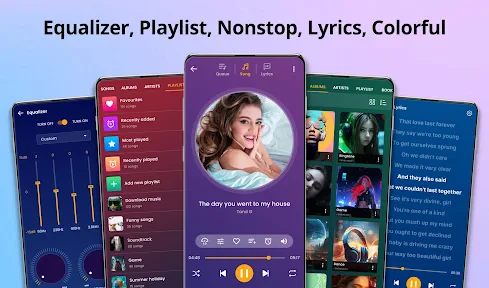
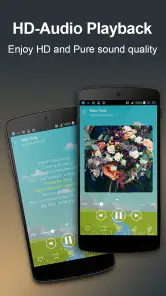
The interface is sleek, intuitive, and doesn’t make you feel like you need a degree in rocket science to navigate. Opening up the app, you're greeted with a home screen that makes finding your favorite tracks as easy as pie. The Music Player supports a multitude of formats, so you’re not stuck converting your files just to enjoy them.
Shaping playback to suit the moment
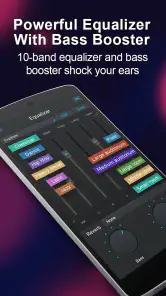
One of the standout features has to be the customization options. Whether you're a bass head or a fan of crisp treble, the equalizer is your best friend. There are presets for those who want to set it and forget it, but for the audiophiles out there, you can tweak until your heart’s content. I found myself getting lost in all the possible combinations, trying to find that perfect sound.
You May Like

Clash of Clans Is Won Between the Battles

Android Auto Makes the Case for Quieter Car Software

MobiOffice: Transforming Mobile Productivity with Seamless Integration

EA SPORTS FC™ Mobile Soccer: Redefining Mobile Sports Gaming

How Microsoft OneDrive Became a Mobile Productivity Giant

How Google Translate Breaks Language Barriers Effortlessly
My practical tip is to adjust the sound with one familiar track rather than changing several settings while jumping between songs. A mix that flatters one recording can make another feel harsh or muddy, so I treat equalizer changes as listening preferences, not as a universal fix. If I am unsure whether a setting helped, I return to the same short passage and compare; that keeps the decision grounded in what I can actually hear.
There is a trade-off here: a built-in equalizer is convenient because it is close to playback, but it is not the same as editing the audio file itself. I would use it to make listening more comfortable, then leave the source track alone. That separation is useful if I share the file later or listen on another device where the same playback adjustments may not apply.
Making a useful edit without turning it into a project
The audio-editing tools are especially handy for quick, practical jobs. If I want a shorter clip for a personal project, I can trim the source instead of opening a desktop editor just to remove a long silence or unwanted ending. I would keep the original file untouched until I have listened through the edited result: that small habit helps avoid losing a section I meant to keep. The same goes for tag edits—correcting a title or artist label before sorting a collection can save time later, particularly when a library has files with inconsistent names.
For a simple workflow, I would first find the track, make one edit at a time, then play the result from beginning to end before sharing or using it elsewhere. This is a sensible tool for clean-up and everyday clipping, but I would choose a dedicated audio editor for layered work, detailed mixing, or a project where precise control over a finished production matters. The convenience here is having basic listening and editing in the same place, not replacing specialist software.
A useful extra safeguard is to name an edited copy clearly before it joins the rest of a collection. Otherwise, two files with nearly identical titles can become hard to tell apart later, especially if one is a full track and the other is a short excerpt. I would also listen at the beginning and end of a trim, where an abrupt cut or a missed beat is easiest to notice. That quick check is more valuable than assuming a selection looks right on screen.
Offline listening needs a little planning
Another major perk is the offline playback feature. We’ve all been there—stuck on a train with no signal and only your downloaded tracks to keep you company. The Music Player makes sure you’re never without your tunes. Just download your playlists and you’re good to go.
For a realistic everyday use, I would check that the music I want is available on the device before leaving home, then use the player on a commute where reception is unreliable. That is different from expecting a streaming app to cache whatever I happen to want at the last minute. If a track is missing from local storage, offline listening cannot solve that; planning the collection in advance is the useful trade-off.
That makes the app a good choice for a commute, a flight, or a workout where I want a familiar queue and do not want to depend on a steady connection. I would make a short travel playlist rather than relying on a huge library that I have not checked recently. It is an uncomplicated habit, but it prevents the frustrating moment of discovering that the one album I expected to hear is not actually on the device.
Oh, and did I mention the sleep timer? For those nights when you just want to drift off to your favorite lullabies, this feature is a godsend. Set the timer, close your eyes, and let the music take you away.
Small creative tasks and sharing
Sharing music has never been easier. With a few taps, you can let your friends know what you’re jamming to. Whether through social media or direct messaging, spreading the love (and by love, I mean music) takes just seconds.
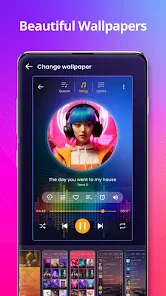
But it's not all about listening—you can also sing along! The lyrics display feature means you can have your own karaoke session right in the comfort of your own home. Just make sure your neighbors are okay with it!
Those extras make the player more flexible for casual use, but I would not build a serious publishing process around them. For example, if I am preparing a short audio excerpt for a presentation or a personal post, I can use the trimming step to get a convenient clip and then check the result before handing it off. If the final delivery needs multiple tracks, careful fades, or exact production control, a specialist editor remains the safer tool for that last stage.
Lyrics can also turn an ordinary listening session into a quick sing-along, which is a nice change of pace at home. I would treat that as a listening aid rather than the reason to choose the app: the core decision is still whether a player for local music suits the way I keep and use audio. The sharing option is handy for passing along what I am listening to, but it does not make the app a platform for publishing or managing a professional release.
Keeping a growing library under control
With a personal collection, small organizational habits make a noticeable difference. I would fix misspelled tags before building a playlist around an artist, and use a trimmed copy rather than overwriting a recording I may want in full later. These are modest steps, but they reduce the familiar annoyance of searching for one track among several files with nearly identical names.
The app has a 4.7 average from around two million ratings, and has been installed over 100 million times. It first arrived on July 26, 2018; version 227.01 is listed for devices running Android 5.0 or newer. That reach suggests it has found a broad audience, but the right test for me is still whether its local playback and quick editing suit the way I manage music. I would skip it if my main need were a large streaming catalog, advanced recording and mastering, or a professional handoff workflow.
Compared with a phone’s basic built-in player, the appeal here is having playback alongside tasks such as tag correction and trimming, so I do not have to switch tools for every small cleanup. Compared with a full desktop audio editor, the compromise is just as clear: a phone-based player is convenient for quick decisions, but it is not where I would want to do detailed production. And compared with streaming, it puts more responsibility on me to keep the files I want available and sensibly labeled.
If I were helping a friend choose, I would ask one simple question: do they already have music files they want to play? If yes, this is worth trying as a practical everyday option. If their answer is that they mostly search for new music, expect recommendations, or want an all-in-one recording and release workflow, I would point them toward a tool built around that specific job instead.
Where I would use it—and where I would not
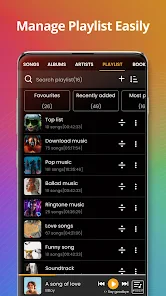
In a world filled with music apps, Music Player stands out by offering a user-friendly experience packed with features that cater to both casual listeners and dedicated audiophiles. Whether you’re curating the perfect playlist or just want to let shuffle play surprise you, this app has got you covered.
For me, the strongest case is a person who keeps a personal collection and wants listening, light organization, and quick audio edits within reach. A student could tidy the title tags on lecture or music files; someone making a simple clip could trim it and listen back before sharing; a listener could queue saved tracks for a connection-poor journey. These are modest tasks, but they are exactly the sort of jobs for which opening a more elaborate program can feel like too much.
I would skip it if I wanted a cloud-first music experience, a deep discovery system, or a production environment where every stage of editing and delivery needs close control. I would also avoid treating a quick trim as a substitute for a careful final master. A short listen-through, a clear filename, and an untouched original are sensible safeguards whenever an edit matters beyond casual use.
So, if you’re on the hunt for a music player that combines functionality with a touch of style, give Music Player a spin. Your ears—and possibly your soul—will thank you.
Music player Frequently Asked Questions
Will Music Player work on my Android device?
Music Player is designed for Android devices running Android 5.0 or later. Before downloading, check the operating system version on your device to make sure it meets that requirement. The app is a music and audio player, so it may suit someone looking for a straightforward way to play music stored on an eligible Android phone or tablet.
Who develops Music Player, and is it widely used?
Music Player is developed by recorder & smart apps. It has an average rating of 4.7 from around 2 million ratings, and it has been installed over 100 million times. Those figures suggest that many Android users have tried it, although individual experiences can differ. Its focus is playing music, with audio editing tools also described as part of the app.
When was Music Player released, and what version is currently listed?
Music Player was released on July 26, 2018, and its currently listed version is 227.01. Knowing the release date and version can help you identify the app and understand which release you are considering. Before installing, check that your Android device meets the minimum operating system requirement, and use the app’s official store page to view its current availability.
Is Music Player free to download, and are there any in-app purchases?
Music Player is a free music and audio app, so you can get started without paying to download it. It also offers in-app purchases priced at $5.99 per item. If you prefer a straightforward player for listening to music files, the free download is a convenient way to try it; consider the optional purchases only if their features suit how you plan to use the app.
What does Music Player let me do besides play songs?
Music Player is described as an MP3 player that can play music and edit tags or cut audio. That combination may be useful if you want basic playback alongside simple ways to adjust audio files or organize their identifying information. Its main purpose remains music playback, while the editing tools provide additional functions for users who want to make changes to audio on their device.
Pros
- User-friendly interface
- easy navigation.
- Supports various audio file formats.
- Customizable equalizer settings.
- Offline play for downloaded tracks.
- Low battery consumption mode.
Cons
- Ads in free version can be intrusive.
- Limited features without subscription.
- Occasional app crashes reported.
- Requires frequent updates.
- Advanced features need in-app purchases.

- Category
- Music & Audio
- Version
- 227.01