

Music Downloader-Song Download
- 2.85K
- 4.8
- Installs
- 1.00M
- Price
- Free

Screenshots
Analysis by Reviewed
I judge a music app less by the first search that works than by whether I still reach for it after the novelty wears off. Music Downloader-Song Download is a free Android music and audio app from good music Inc, and its appeal is straightforward: find tracks, download them, and keep them available for offline listening. It has a 4.8 average from around 65,000 ratings, with over 1 million installs, but the useful question is whether that simple routine fits the way you actually listen.
Why the first week feels easy
In the first few sessions, a search-led workflow can be handy. If I have a particular song or artist in mind, typing the name is more direct than browsing through a streaming service’s editorial playlists. The app’s stated focus on MP3 downloads makes it most appealing to someone who wants to build a small, personally chosen collection rather than spend time tuning a recommendation feed.
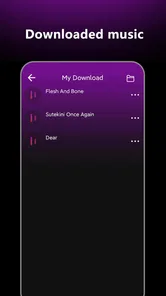
A realistic use is preparing a few familiar tracks before a commute or a trip through an area with unreliable internet. I would search and download while connected, then check that the songs are available for offline listening before leaving. That small check matters: it avoids discovering at the station or on the road that a track has not finished downloading.
A practical commute test
For a weekday routine, I would keep the collection deliberately small at first: a few songs for the journey in, perhaps a different set for the way home, and one playlist for exercise or chores. This tests whether the app fits real listening rather than just making the first successful download feel exciting. If I rarely replay a track after saving it, I would remove it instead of letting the library grow by default.
There is also a useful distinction between preparing music and discovering it. Before a trip, the app’s search-first approach can make it easy to look for specific favorites. When I do not know what I want to hear, a radio-style service or a streaming app’s mixes may take less effort. Choosing the tool based on the moment is more realistic than expecting one music app to handle every listening mood.
Discovering a World of Music
As soon as you fire up Music Downloader-Song Download, you're greeted with a sleek interface that promises simplicity. The app lets you explore a vast library of music, spanning genres from pop to classical, and everything in between. Whether you're a fan of the latest chart-toppers or digging for some old-school jazz, this app seems to have you covered.
Easy Navigation and User Experience
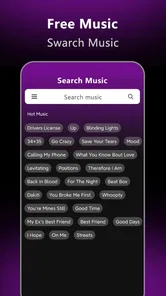
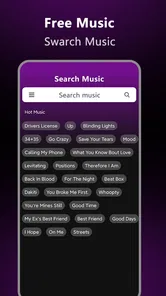
Navigating through the app is a breeze. The developers have done a commendable job ensuring that even a non-techie can find their way around. There's a search bar at the top where you can type in the name of the song or artist, and voila, the results pop up faster than you can say "download". The app doesn't bombard you with ads every two seconds, which is a huge plus in my book.
More From Our News Desk

 Gmail
GmailGmail in a Busy Inbox: Who Benefits Most?
From first account to crowded workday, Gmail earns its place through dependable search and flexible sorting—but its best fit depends on how much inbox maintenance you can tolerate.

 Prime Video
Switching to Prime Video: What Changes in Your Viewing Routine
Prime Video can make a compelling second home for streaming, but switching means learning a different catalog, rental layer, and route from browsing to playback.

 Universal TV Remote Control
Universal TV Remote Control Works Best as a Reliable Backup
A phone remote earns its place through quick setup and reliable habits. Here is how to get more from Universal TV Remote Control—and where its limits show.

 Weather - By Xiaomi
Weather by Xiaomi Review: Clear at a Glance, Less Clear Up Close
Xiaomi’s weather app makes everyday forecasts quick to scan, but its calm surface can leave useful details and recovery paths harder to find than they should be.

 X
XX Under Pressure: Can It Recover When Posting Goes Wrong?
A resilience-focused review of X, examining setup, mistaken posts, interruptions, weak connections, and the gaps that matter when recovery needs to be dependable.

 Clash of Clans
Clash of Clans Is Won Between the Battles
Its raids are quick; its community is a long-term project of coordination, teaching, rivalry, and shared responsibility—with all the friction that entails.
Latest News



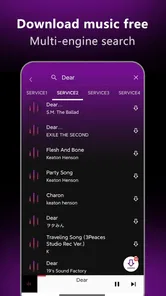
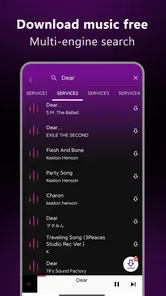
That direct search style is also a useful trade-off to understand. It helps when you know what you want, but it is less valuable if your main pleasure is finding new music through carefully curated stations or suggestions. Search works best when you try a distinctive artist name or song title; if several tracks share a name, taking a moment to check the result before downloading can save both time and storage.
Search habits that prevent mistakes
When a title is common, I would search with both the song and artist rather than relying on a short title alone. Before saving a result, I would check that its identifying details match the track I meant to find. This is a small habit, but it matters more here than in a streaming app where choosing the wrong result usually means only a brief playback detour. A mistaken download also uses storage and can clutter a playlist.
I would treat search as a quick lookup tool, not as a promise that every version of a song will be equally useful. If a result is unfamiliar or its details do not look right, I would pause and search again instead of downloading several near-matches. That cautious approach makes a compact offline collection easier to trust and reduces the cleanup needed later.
Quality and Download Features
Now, onto the main event – the downloads. The app offers multiple quality options for downloading music, so whether you're conserving data or looking for high-quality audio, there's something for everyone. I was pleasantly surprised to find that the download speeds were impressive, and the downloaded tracks didn't seem to compromise on quality. It's like having a mini music library right in your pocket.
Quality choices are most useful when you make them deliberately rather than defaulting to the largest file. For a short walk or background listening, a smaller download may be a sensible way to save space; for a track you play often, choosing a higher quality can feel worth the extra room. If your phone is already crowded, I’d start with a few dependable favorites instead of trying to download every song that catches your attention.
Balancing sound, space, and data
A practical way to choose quality is to think about where you will listen. If the phone is mainly playing music in the background while I cook or walk, a smaller file may be enough. If I expect to listen closely with headphones, I might prefer a higher-quality option for the tracks I replay most. The point is not to select the maximum setting automatically; it is to spend storage where I will notice the difference.
I would also avoid treating a download session as something to do on the move. Searching, comparing results, and choosing quality are easier when I have a moment to pay attention and a reliable connection. Preparing a few tracks at home or before leaving gives me a better chance to check the files and playlists while it is convenient, rather than troubleshooting when I want music immediately.
Additional Perks
One of the standout features of the app is its ability to create playlists. You can easily compile your favorite tracks into a playlist for easy access, and the app even offers recommendations based on your listening habits. It's these little touches that make the experience feel personalized and enjoyable.
Playlists can give a modest download collection a clearer purpose: I’d group tracks by a situation, such as a workout, a quiet evening, or a commute, rather than making one long catch-all list. That makes the app easier to return to month after month. Recommendations may help surface something to try, but I would treat them as a supplement, not a replacement for a streaming service built around discovery.
Making playlists useful over time
There is no need to organize every song into a complicated system. I would use a few practical names that make sense at a glance, then add only tracks I genuinely expect to play in that setting. A “commute” playlist can stay short enough that I do not have to hunt through it, while a broader collection can hold occasional favorites. This structure keeps the app useful without turning listening into a filing project.
Recommendations are most helpful when I am willing to try one or two new tracks, not when I expect them to understand every mood. If they lead me to something I like, I can add it to a focused playlist; if not, I can move on without letting suggestions dictate the collection. That balance is why I see the app as a personal utility first and a discovery destination second.
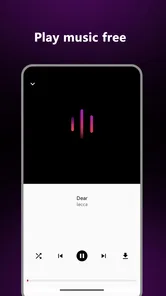
Music Downloader-Song Download also supports offline listening, which is a lifesaver, especially when you're in an area with spotty internet. Just download your tracks while connected, and enjoy uninterrupted music on the go.
Keeping the routine manageable
The ongoing effort is less about navigating the app and more about looking after a collection. Downloads occupy phone storage, and an expanding folder can become harder to browse if you save songs on impulse. I’d add tracks in small batches, give playlists a clear purpose, and occasionally remove songs I no longer play. That habit keeps offline listening useful without turning music management into another chore.
It is also worth separating “available to listen to” from “a dependable archive.” A phone can be lost, replaced, or run short on space, so I would not make one app the only home for music I consider irreplaceable. For everyday favorites, offline access is convenient; for a collection you want to preserve over time, keep a separate backup where appropriate.
What maintenance really involves
The recurring check I would build into my routine is simple: after adding a batch, confirm the tracks appear where I expect, then remove anything I no longer use when storage gets tight. That is more dependable than waiting until the phone is nearly full to decide what matters. A small collection is also easier to review if I change phones or listening habits, because I am not sorting through a long list of forgotten saves.
Offline access is valuable, but it does not remove the need to think about the device itself. If I am planning a long trip, I would check the relevant playlists before departure and avoid assuming that a song I searched for is already ready to play. For music I would be genuinely upset to lose, I would keep a separate copy in a suitable backup location rather than relying on a single phone-based library.
Where the appeal can wear thin
The main limitation is that a downloader is not automatically the best fit for every listening habit. If you want a large, licensed catalog, seamless syncing across devices, or hands-off discovery, a mainstream streaming subscription may be a better match. If you prefer owning and organizing audio files yourself, a conventional music player may offer a more familiar library workflow. This app makes more sense when quick searches and saved tracks are the point.
Downloads also depend on finding the track you mean and choosing a suitable quality. I would check titles carefully, especially for common song names, and avoid saving a large batch before confirming that the results match what I want. The app is free and rated Teen, so it may suit people looking for a no-cost music utility, but younger users should still follow their household’s guidance for app use and downloads.
Who will be happiest with it
I think it is a stronger match for someone who already knows a handful of songs they want to keep close, listens in places where connectivity is unreliable, and does not mind making basic decisions about downloads and playlists. It can also suit a listener who wants a straightforward way to prepare music for a particular routine instead of opening a broad streaming catalog each time.
I would steer away from it if I wanted one account to synchronize listening across several devices, an extensive on-demand catalog, or a discovery feed that does most of the work. A conventional streaming service is likely more comfortable for those needs. Someone who already maintains audio files and wants detailed library organization may prefer a dedicated music player. The best choice depends less on the size of the app’s audience than on how much control and upkeep I want.
Long-term listening and who should choose it
For a listener who repeatedly plays a small set of songs—on a commute, during exercise, or while doing chores—this can earn a lasting place by making those tracks available offline. The app is currently version 1.8.5 and works on Android 5.0 or later. It was released on March 25, 2021, and has accumulated around 2,900 written reviews, giving prospective users a substantial body of public feedback to consider alongside their own needs.
My practical approach would be to test the routine before building a big library: search for a few songs, compare the quality options, make one focused playlist, and listen offline. That answers the questions that matter in daily use—whether the tracks you want are easy to find, whether the chosen files suit your storage, and whether you like managing music this way. If those steps feel like extra work, a streaming app may be the easier habit to maintain.
Questions that matter in everyday use
Can I use it when I am offline? The useful preparation is to download the tracks while connected and verify that they are ready before relying on them away from a network. Will it suit a phone with limited free space? It can, provided I choose download quality thoughtfully, keep the collection selective, and clear out tracks I no longer play. Those are manageable habits, but they are still part of the experience.
Is it a replacement for a streaming service? I would not treat it that way if I depend on broad discovery, synchronized listening, or a large catalog that is ready without personal organization. Is it a good fit for a focused offline playlist? That is where its basic search-and-save routine makes more sense. Those answers help set expectations before I invest time in building a collection.
Final Thoughts
All in all, Music Downloader-Song Download is a solid choice for anyone looking to expand their music library without jumping through hoops. It's user-friendly, efficient, and most importantly, reliable. Whether you're a casual listener or a music aficionado, this app brings a world of music right to your fingertips. So, why not give it a shot and see if it hits the right note with you?
For me, the deciding test is whether a short list of saved songs becomes part of an ordinary week. If I use the same commute playlist repeatedly and appreciate having it available offline, the app has earned space; if I stop opening it once the initial searches are done, I would rather return to the music service or player that already fits my habits. Its lasting value comes from a clear, modest routine—not from collecting tracks simply because I can.
Music Downloader-Song Download Frequently Asked Questions
How much storage and mobile data should I plan for when using Music Downloader-Song Download?
The space you need depends on how many tracks you choose to save and the audio quality available for those downloads. It is sensible to leave room on your device for both the app and your music library. If you are downloading over a mobile connection, keep an eye on your data allowance; using Wi-Fi can help avoid unexpected data use.
Can I listen to downloaded music when I am offline?
The app is presented as a music downloader, so saving tracks for later listening is central to its purpose. Offline access can be useful when you are traveling or do not have a reliable connection. Before relying on it, try playing a saved track with your device disconnected, since access can depend on the source and how a particular file is stored.
What devices and operating systems can I use with Music Downloader-Song Download?
Music Downloader-Song Download is intended for mobile use and is available for Android devices running Android 5.0 or later. Before installing, check your device’s operating system version and make sure you have enough available storage for the app and any music you choose to save. The app is listed as a Music & Audio app and is free to download.
Who developed Music Downloader-Song Download, and is it suitable for teens?
The app is developed by good music Inc and carries a Teen content rating. That makes it useful for parents and younger users to consider before installation, especially if the device is shared or managed by a family. The rating describes the app’s intended audience; adults should still review how it is used and discuss responsible music access with younger listeners.
What is Music Downloader-Song Download and how does it work?
Music Downloader-Song Download is an app designed to allow users to easily download music tracks directly to their devices. Users can search for their favorite songs or artists through the app's search bar, and download them in various formats. The app supports high-quality downloads and provides an intuitive interface for managing your music library. It’s perfect for users who want quick access to offline music without needing a subscription.
Pros
- High-quality audio downloads
- User-friendly interface
- Wide variety of genres
- Fast download speeds
- Offline listening available
Cons
- Limited free downloads
- Ads can be intrusive
- Requires internet for search
- No playlist creation feature
- Not all songs available











