

Music Choice
- 3.39K
- 3.4
- Installs
- 1.00M
- Price
- Free

Screenshots



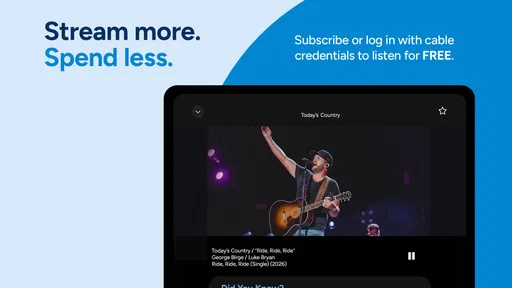
Analysis by Reviewed
I often turn to music apps when I need the right atmosphere before starting a task, but I do not always want to build a playlist from scratch. Music Choice takes a different route: it presents curated listening rather than asking me to manage every song myself. That makes it useful as a creative starting point, especially when I want background music for writing, editing, studying, cooking, or simply changing the mood of a room.
My overall impression is mixed but fairly clear. The app is easy to understand, free to install, and built around the appeal of human selection. At the same time, it is not the best fit for someone who expects a huge on-demand music library, detailed playlist tools, or complete control over every track. I see it more as a guided music service than as a full production or library-management tool.
Starting a creative session without building the soundtrack first
The strongest part of Music Choice is the way it lowers the effort needed to begin listening. Instead of opening an empty playlist and wondering what belongs in it, I can use the app as a ready-made source of direction. That matters when music is supporting another activity rather than becoming the activity itself.
For example, if I am preparing a short video, organizing photos, or drafting an article, I may want a consistent musical backdrop while I work. Choosing a curated channel or listening path is faster than searching through individual artists and albums. I can then concentrate on the task instead of repeatedly interrupting it to make music decisions.
The developer, Music Choice, positions the service around selections made by real people rather than AI. I find that distinction meaningful, although it is not automatically a guarantee that every choice will match my taste. Human curation can provide personality and context, but it can also feel less predictable than an algorithm trained around my listening history.
The app belongs to the Music & Audio category and is free to use as an installation. Its Teen content rating makes it a reasonable option for many older listeners, although I would still treat any music service as something worth checking personally before handing it to a younger family member.
One useful habit is to choose the listening direction before beginning a creative session. If I am editing something energetic, a lively channel can help me maintain momentum. If I am writing or doing detailed visual work, I prefer music that does not compete for attention. This simple choice is more effective than leaving the app running randomly and hoping the mood works out.
More From Our News Desk

 Gmail
GmailGmail in a Busy Inbox: Who Benefits Most?
From first account to crowded workday, Gmail earns its place through dependable search and flexible sorting—but its best fit depends on how much inbox maintenance you can tolerate.

 Prime Video
Switching to Prime Video: What Changes in Your Viewing Routine
Prime Video can make a compelling second home for streaming, but switching means learning a different catalog, rental layer, and route from browsing to playback.

 Universal TV Remote Control
Universal TV Remote Control Works Best as a Reliable Backup
A phone remote earns its place through quick setup and reliable habits. Here is how to get more from Universal TV Remote Control—and where its limits show.

 Weather - By Xiaomi
Weather by Xiaomi Review: Clear at a Glance, Less Clear Up Close
Xiaomi’s weather app makes everyday forecasts quick to scan, but its calm surface can leave useful details and recovery paths harder to find than they should be.

 X
XX Under Pressure: Can It Recover When Posting Goes Wrong?
A resilience-focused review of X, examining setup, mistaken posts, interruptions, weak connections, and the gaps that matter when recovery needs to be dependable.

 Clash of Clans
Clash of Clans Is Won Between the Battles
Its raids are quick; its community is a long-term project of coordination, teaching, rivalry, and shared responsibility—with all the friction that entails.
Latest News



Where it fits better than a blank playlist
Music Choice is particularly convenient for people who enjoy radio-style discovery. It can help when I know the kind of mood or general musical area I want, but I do not have a specific album in mind. That makes it a useful companion for routine work, casual gatherings, and moments when I want music to keep moving without constant input.
It is also a practical choice for listeners who do not want to spend time maintaining a personal library. A manually assembled playlist needs occasional pruning, ordering, and refreshing. A curated service shifts that responsibility away from me. The trade-off is that I give up some precision: I am accepting a programmed flow rather than designing every transition.
I would not choose it as my main tool for a music-heavy creative project where the exact song matters. If I am cutting a video to a particular beat, preparing a presentation with a planned musical cue, or rehearsing a performance, I need direct access to named tracks and dependable control. In those situations, an on-demand streaming service or a local music library is usually the better companion.
A realistic everyday workflow
Imagine that I have an afternoon to prepare a small social video. I start by opening Music Choice while I sort clips and outline the edit. The curated flow gives me a general sense of pace without forcing me to stop and search. When I move into the detailed editing stage, I lower the volume and use the music only as a concentration aid. Once the creative decisions become more specific, I switch to my editing software and treat the app as background listening rather than as part of the final project.
That distinction is important. Music Choice can support the process of making something, but it is not itself a video editor, audio workstation, publishing platform, or delivery system. It helps establish atmosphere and maintain focus; it does not replace the tools used to create, export, license, or hand off finished work.
For a longer session, I would also keep an alternative ready. If the current selection becomes repetitive or moves in an unsuitable direction, I do not want the interruption to derail my work. A second music source, downloaded album, or familiar playlist can act as a backup. This is one of the practical limitations of relying on curated playback for productivity.
How the listening process feels in practice
Once I have chosen a suitable direction, the app works best when I stop treating it like a database and start treating it like a programmed listening experience. The value is in the flow. I am not constantly assembling a queue; I am allowing the service to provide a sequence that supports the moment.
That approach is comfortable for casual listening, but it requires a different expectation from services centered on search. Someone coming from a large streaming catalog may initially feel that Music Choice is restrictive. I can understand that reaction. Search-first platforms make it easy to request a particular song, while this app is more appealing when I want guidance and discovery.
The human-curated angle is also a reason to listen with patience. An algorithmic recommendation system can react quickly to skips and repeated plays, while a programmed channel may have a broader editorial identity. I may hear choices that are not immediate favorites, but those unexpected selections can be useful when I am trying to avoid the same familiar rotation.
For creative work, I recommend separating active listening from background listening. When I am brainstorming, I may pay attention to the character of the music and let it influence the direction of a project. When I am proofreading, color-correcting, or performing another precision task, I keep the sound unobtrusive. The app is flexible enough to serve both purposes, but the result depends on how intentionally I use it.
What I would do when the mood changes
A common mistake is to expect one channel or listening choice to work for an entire day. My concentration changes, and the music that helps with planning may become distracting during execution. I get better results by treating each phase of work separately: exploratory music for idea generation, calmer listening for refinement, and familiar material for final checking.
This is also where curated listening can be more useful than an endless personal playlist. A personal playlist often reflects what I already know I like. A programmed selection can introduce a different pace or texture and stop a session from feeling stale. The downside is that I may need to tolerate a few unsuitable moments instead of immediately replacing them with a handpicked favorite.
Another practical tip is to avoid using the app as the only source during a deadline. It is excellent for setting a tone, but creative delivery often requires concentration and predictable timing. If a particular track or uninterrupted sequence is essential, I would move that part of the workflow to a service or player with more direct control.
How it compares with familiar alternatives
Compared with a conventional radio app, Music Choice feels more intentionally organized around curated listening rather than simply receiving a broadcast. Compared with an on-demand streaming platform, it offers less emphasis on choosing exact songs and more emphasis on letting a selection unfold. Compared with a personal playlist, it reduces preparation but also reduces control.
That puts it in a useful middle ground. I would pick it over a blank playlist when I want to start quickly, and over a random shuffle when I want a clearer editorial mood. I would choose another service when I need a specific artist, a precise sequence, offline planning, or a soundtrack that must line up with a finished creative asset.
The average rating is around 3.4 from roughly 11 thousand ratings, while the app has passed a million installs. I read those figures as a sign of broad interest alongside noticeable differences in user expectations. People who want curated music may appreciate the simplicity, while people expecting a fully flexible streaming catalog may judge it more harshly.
Iteration: making the app work for your habits
The best way to evaluate Music Choice is not through one short listening session. I would try it during several different routines: focused work, casual listening, household tasks, and a creative session with a clear beginning and end. That reveals whether the curation consistently supports my mood or whether I keep reaching for another app.
I also pay attention to the moment when I feel the need to take control. If I repeatedly want to skip, search, save, or reorder, the service is probably not matching the way I listen. If I can leave it running while my attention stays on the project, then its hands-off design is doing exactly what I need.
There is a subtle creative benefit in not over-optimizing every song. When I control every track, I can spend too much time polishing the playlist instead of completing the work. Music Choice can remove that temptation. For a short session, that reduction in decision-making is a genuine advantage.
However, I would not confuse reduced decisions with a complete workflow. The app does not turn an idea into a finished recording, edit, publication, or deliverable. It belongs at the inspiration and concentration end of the process. Once the work needs exact assets or a controlled audio bed, I move to dedicated creative software and use Music Choice separately.
Costs, version, and device expectations
The app is free, though in-app purchases range from about four dollars to thirty dollars per item. I would check the purchase screens carefully before committing, especially if I only want a simple background-listening experience. The free entry point makes experimentation easy, but the presence of optional purchases means the complete experience may depend on how I use the service.
The current version is 10.0.6875 and it requires at least iOS or Android 11. That requirement is worth checking before planning to use it on an older phone or tablet. On a supported device, I would still keep the operating system and app current, because music playback is one of those tasks where small compatibility problems can become surprisingly disruptive.
For a creator, device choice also affects the handoff between listening and making. I might use Music Choice on a phone while sketching ideas, then move to a tablet or computer for actual editing. Since the app is a listening aid rather than a publishing tool, I would not expect it to carry project files, edits, or finished media from one stage to another.
Where the handoff ends
This is the point at which I think users need the clearest expectation. Music Choice can help me begin a project with a mood, sustain attention while I work, and expose me to selections I might not have chosen. It does not replace the software that records audio, edits video, mixes tracks, exports a file, or delivers work to a client.
If I am preparing content for publication, I would treat any music heard through the app as inspiration unless I have separately established that I can use a particular recording in the final project. I would not assume that background listening automatically gives me permission to reuse a track in a video, podcast, advertisement, or commercial presentation. For final delivery, I would use music with the appropriate rights and a workflow designed for publishing.
That limitation does not make the app unhelpful. It simply defines its proper place. The service supports the emotional and atmospheric side of creation, while the formal handoff belongs to the editing and publishing tools that manage the actual files and usage requirements.
My verdict for different kinds of listeners
I recommend Music Choice to people who want a curated music experience with minimal setup. It is especially suitable if I am comfortable letting someone else shape the flow and I mainly need sound for concentration, relaxation, discovery, or everyday activities. The human-led approach gives it a character that can feel more deliberate than a completely automatic shuffle.
I would be more cautious recommending it to listeners who judge a music app by its exact-song control. If I need a particular recording immediately, want to build detailed playlists, or expect music to integrate directly with a creative production, I would look at an on-demand service or a dedicated player instead.
My final view is that Music Choice works best as a creative atmosphere tool, not as a complete music-production workflow. It helps me get moving, keeps routine work from feeling silent, and can introduce a useful editorial surprise. Its limitations become obvious when I need precision, file control, or a direct path from listening to publication.
Music Choice was released in July 2013 and comes from Music Choice, with a Teen rating and more than a million installs. Those details place it among established, widely tried music apps, but they do not remove the central question: do I want to choose every song, or do I want a curated flow to make that choice for me? If the second answer sounds more appealing, this free app is worth trying. If the first answer is essential, I would keep it as a secondary listening option rather than my main music tool.
Music Choice Frequently Asked Questions
Who develops Music Choice, and what kind of app is it?
Music Choice is a Music & Audio app developed by Music Choice. Its store summary describes the service as curated by real people, not AI, which may appeal to listeners who want human-selected programming. The app is free to download, and it is rated Teen. As with other streaming apps, your experience may depend on your device, account, and how you access the service.
What is Music Choice, and what can I use it for?
Music Choice is a music and entertainment service that provides access to curated music channels, genre-based programming, music videos, playlists, and related content. It is designed for listeners who prefer professionally selected programming instead of creating every playlist themselves. Depending on your provider, location, and subscription, the available content and features may vary between the mobile app, television service, and web experience.
Is the Music Choice app free to download and use?
The Music Choice app is free to download, but access to all of its content is not necessarily free for every user. Some features can depend on an eligible television, internet, or mobile subscription from a participating provider. The app also offers in-app purchases, so review the current listing and sign-in requirements before downloading; availability, supported plans, advertising, and premium access can differ by country and service package.
Can I listen to Music Choice without an internet connection?
Music Choice is primarily designed for streaming, so an internet connection is generally required to play music and video content through the app. Whether offline listening or downloads are available depends on the version of the service and your account plan. If you regularly use mobile data, review the app’s settings and consider Wi-Fi to avoid consuming a large amount of data.
What devices and accounts are compatible with Music Choice?
Music Choice availability can differ across Android phones, iPhones, tablets, smart televisions, streaming devices, and participating cable or internet platforms. You may need to create an account or sign in through an eligible provider before accessing the full service. The current Android version requires Android 11 or later; make sure your device software meets that requirement for the best chance of compatibility.
Pros
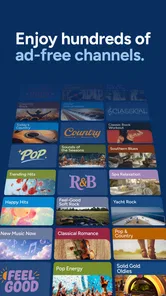
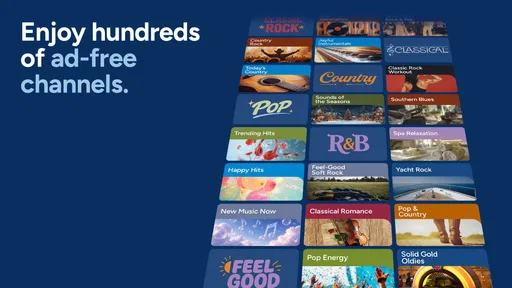
- Offers a wide range of music channels across different genres.
- Includes curated playlists for easy
- mood-based listening.
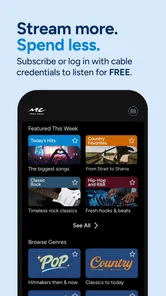
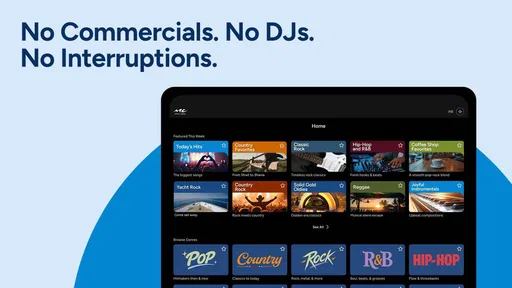
- Simple interface makes browsing channels quick and convenient.
- Provides music videos and visual content alongside audio programming.
- Useful for discovering artists outside your usual listening habits.
Cons
- Availability and channel selection may vary by location and TV provider.
- Some features require an active participating cable or streaming subscription.
- Limited control compared with fully on-demand music streaming services.
- Ad interruptions can reduce the appeal during longer listening sessions.
- The app may use significant mobile data when streaming video content.











