

Mureka: AI Radio & Music Maker
- 2.11K
- 4.7
- Installs
- 5.00M
- Price
- Free

Screenshots




Analysis by Reviewed
I find Mureka - AI Song&Music Maker most useful when I have a musical idea but no clear route from that first spark to something I can listen to. It is an AI music app from Skywork AI Pte.Ltd., aimed at turning creative prompts and experiments into songs without requiring a full desktop studio. That makes it inviting for curious beginners, though it is worth approaching as a starting point for ideas rather than a replacement for learning production or shaping every detail yourself.
Where first attempts can get stuck
The tricky part of making music with an AI tool is often not opening the app; it is deciding what you want it to make. A vague direction can leave you judging an output against an idea you never quite defined. I get more value by choosing a mood, a purpose, and one or two musical details before I begin. Even a simple note such as “a calm tune for a short video, with a steady pulse” gives me a more useful target than asking for something broadly catchy.
I also try not to treat the first result as a finished song. AI-generated music can be a fast way to explore an arrangement or hear a direction, but a result may not match the melody, structure, or emotional tone I had in mind. If the first attempt feels off, I narrow down what is wrong—perhaps the energy, style, or overall feel—and make a more focused next attempt instead of changing everything at once. That makes it easier to tell whether the new direction is actually better.
Checks that make a session smoother
Before settling in, I make sure my phone is running a compatible version of Android: Mureka’s listed minimum is Android 7.0, and the current version is 1.16.0. I also think about what I want to do with the result. If I am only exploring ideas, I can be relaxed; if I need music for a particular project, I should decide on its intended length, mood, and role first. Having that brief in mind helps me judge an output on practical grounds rather than just whether it sounds impressive at first.
The app is free to install, with in-app purchases ranging from $0.99 to $299.99 per item, so I would check any purchase details shown in the app before paying. Its Everyone age rating makes it broadly accessible, but that does not mean every generated track will suit every listener or setting. Mureka has a 4.7 average from around 33,000 ratings and more than a million installs, which suggests plenty of people have tried it, but popularity alone cannot tell me whether its creative approach fits my needs.
Unleashing Your Inner Maestro
If you’ve ever wished you could just hum a tune and have it transformed into a full-fledged song, Mureka - AI Song&Music Maker is here to make that dream come true. This app leverages the power of AI to turn your simple melodies into complex musical compositions. It’s like having your own personal band in your pocket.
Getting Started
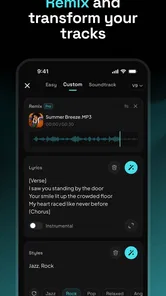
The first thing you’ll notice about Mureka is its user-friendly interface. Even if you’re a complete newbie to music production, the app guides you through every step. You start by choosing a genre – whether it’s pop, rock, jazz, or something more eclectic. Then, you can input your melody. You can hum into your phone, play a tune on a virtual keyboard, or even use MIDI instruments. The app is incredibly flexible and supports a wide range of inputs.
More From Our News Desk

 Gmail
GmailGmail in a Busy Inbox: Who Benefits Most?
From first account to crowded workday, Gmail earns its place through dependable search and flexible sorting—but its best fit depends on how much inbox maintenance you can tolerate.

 Prime Video
Switching to Prime Video: What Changes in Your Viewing Routine
Prime Video can make a compelling second home for streaming, but switching means learning a different catalog, rental layer, and route from browsing to playback.

 Universal TV Remote Control
Universal TV Remote Control Works Best as a Reliable Backup
A phone remote earns its place through quick setup and reliable habits. Here is how to get more from Universal TV Remote Control—and where its limits show.

 Weather - By Xiaomi
Weather by Xiaomi Review: Clear at a Glance, Less Clear Up Close
Xiaomi’s weather app makes everyday forecasts quick to scan, but its calm surface can leave useful details and recovery paths harder to find than they should be.

 X
XX Under Pressure: Can It Recover When Posting Goes Wrong?
A resilience-focused review of X, examining setup, mistaken posts, interruptions, weak connections, and the gaps that matter when recovery needs to be dependable.

 Clash of Clans
Clash of Clans Is Won Between the Battles
Its raids are quick; its community is a long-term project of coordination, teaching, rivalry, and shared responsibility—with all the friction that entails.
Latest News



Features That Stand Out
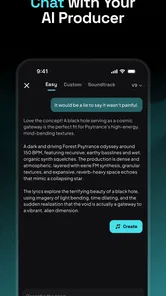
What sets Mureka apart from other music-making apps is its AI capability. The AI not only arranges your melody but also suggests chord progressions, adds harmonies, and even recommends instruments that best suit your style. It’s like having a seasoned producer at your disposal 24/7. Plus, with its vast library of sounds and samples, you can experiment endlessly to find the perfect mix for your track.
Another highlight is the collaborative feature. You can share your projects with other users or invite friends to join you in creating a masterpiece. This social aspect adds a whole new level of fun and creativity, allowing you to work with musicians from around the globe without leaving your home.
Why You’ll Love It
The beauty of Mureka is in its simplicity and power. Whether you’re just noodling around with ideas or crafting the next big hit, the app provides all the tools you need to bring your musical visions to life. It’s perfect for songwriters, producers, and anyone who loves music. The way it integrates AI into music production is nothing short of revolutionary, making it easier than ever to create professional-quality tracks.
Moreover, the app is continually updated with new features and sounds, ensuring that your creativity is never stifled. The developers are keen on feedback and constantly work on improving the user experience, which is a huge plus in today’s app-driven world.
Turning a quick idea into a useful draft
A practical everyday use is sketching a mood for a personal video, a writing session, or a small creative project. I would start with a short, specific brief, listen for the element that works, and keep notes on what I would change. That gives me a reference point for a later session and prevents the common trap of generating several unrelated versions without learning from them. If I am working with a friend, sharing a draft can make feedback more concrete: we can react to an actual musical direction rather than trying to describe one from scratch.
Compared with a conventional music production app, an AI-first tool can reduce the blank-page problem and help a beginner hear a fuller arrangement sooner. The trade-off is control. A traditional digital audio workstation is a better fit when I want precise editing, detailed mixing, or a carefully repeatable workflow. A music streaming app is better when I simply want to listen, not create. I see Mureka as most appealing in the middle: a place to explore song ideas, not necessarily the final stop for a release-ready production.
Recovering when a session goes nowhere
If an attempt disappoints, I would first revisit the creative brief rather than assume the app is broken. Make one change at a time, keep the parts of the idea that still matter, and compare the next result with the original goal. If a session seems interrupted, I would check that the phone is still connected and that the app is responsive, then reopen it and see whether the project or result is available before starting over. This is general troubleshooting, not a guarantee that every interrupted task can be recovered, so I would avoid relying on an unfinished session as the only copy of an important idea.
For a more deliberate workflow, I would treat each generation as a draft and write down what I want to preserve: a memorable melodic contour, a particular energy, or the broad arrangement. That small habit makes it easier to move from exploration toward a usable composition. It also helps me notice when I am asking the AI to solve a problem that is really about my own brief being too open-ended.
When a different tool makes more sense
Mureka is not automatically the right choice for every musician. If I already know how to build a track and need detailed control over each instrument, a conventional production tool will likely feel less restrictive. If I need a specific performance or exact musical phrasing, I would rather work directly with a musician or record it myself than expect an AI-generated draft to land precisely. And if I am choosing music for a public or commercial project, I would review the app’s current terms and the intended use carefully instead of assuming that a generated track is cleared for every situation.
It may also be a poor fit if I dislike iterative prompting or want every musical choice to come from me. The convenience of AI comes with a creative trade-off: it can suggest directions quickly, but I still need to decide what feels right and what should be changed. For a casual experiment or an early sketch, that balance is appealing; for exact authorship and hands-on production, it may not be.
A simple way to judge whether it suits your routine
I would choose this app if my main obstacle is getting from an idea in my head to an audible sketch. A songwriter who has lyrics but no arrangement in mind, for example, may find it helpful to explore a few possible musical moods before committing to one. A beginner can use the same process to notice how a change in style or energy affects the impression of a piece. The value is not only the generated audio; it is the chance to make a vague preference more specific by listening and reacting.
For a realistic everyday session, imagine having a spare few minutes before editing a personal video. I would decide whether the music should feel reflective or upbeat, write a compact brief, and listen for whether the result supports the images instead of competing with them. If it feels too busy, I would adjust that aspect alone rather than rewrite the whole request. I would then keep a note about what worked so the next session starts with a clearer direction. That is a more useful habit than collecting drafts without knowing why I liked or rejected them.
Someone who wants a finished track with exact timing, a specific vocal performance, or meticulous mix decisions should skip the AI-first route as their main tool. Mureka may help at the brainstorming stage, but it is not a substitute for a production workflow built around precise editing. Likewise, if the goal is simply to find background music to play, a streaming service is more direct. The best fit is the person who enjoys testing musical possibilities and is comfortable making the final creative calls.
Keeping expectations and purchases in perspective
One useful question before paying is whether a purchase solves a real limitation in your own process. I would first spend time understanding what the free experience lets me do, then decide whether a paid option is worth considering based on the specific task I want to complete. The range between a low-cost item and a much larger in-app purchase is wide, so I would read the item description and price carefully rather than assume that every purchase is a small add-on or that paying will automatically produce a result I prefer.
I would also separate “sounds polished” from “fits my project.” An attractive result can still be the wrong length, mood, or level of prominence for a video or presentation. Listening with the intended use in mind is a practical check: does the music leave room for speech, support the scene, and avoid pulling attention away from the main content? That sort of judgment remains mine, even when the app helps generate the material.
When the app may not be the cause
If a session behaves unexpectedly, I would distinguish a creative mismatch from a technical interruption. A result that misses the brief calls for a more focused prompt; an app that appears unresponsive calls for basic checks such as confirming the phone has a connection and reopening the app. If a draft matters, I would avoid clearing app data or reinstalling before checking whether the work is still accessible, because broad reset steps can risk removing local information in many apps. These cautious steps are sensible general practice, not a promise about how every Mureka session is stored.
It is also worth checking the device and the task before blaming the generation itself. A weak connection can interrupt online activity, while a phone that is short on available space may make ordinary app use less comfortable. If the same issue continues, I would note what I was doing and when it happened before contacting support through the app’s available route. A short, specific description is more useful than repeatedly restarting and losing track of which step changed anything.
Final Thoughts
In a world where technology and creativity are increasingly intertwined, Mureka stands out as a beacon for aspiring musicians. It’s a powerful tool that democratizes music production, making it accessible to everyone, regardless of their background or experience level. So, if you’re ready to embark on your musical journey, Mureka is the perfect companion to help you hit all the right notes.
My practical verdict is more measured: I would recommend it to someone who wants a low-friction way to explore song ideas, learn what kind of sound they like, or share an early draft with a friend. I would not choose it as my only production tool if precision and detailed editing are the priority. Go in with a clear brief, treat results as material to evaluate rather than finished work, and check purchase details before spending. With those expectations, the app can make musical experimentation feel approachable without pretending that creative judgment is no longer needed.
Mureka: AI Radio & Music Maker Frequently Asked Questions
What kind of music can I create with Mureka - AI Song&Music Maker?
Mureka is an AI music-making app for creating songs and music, making it a potential starting point for experiments, personal projects, or exploring musical ideas. Its tools are intended to help shape a composition through AI-generated suggestions. The result will depend on the creative direction you bring to the process, so it is worth approaching the app as a way to explore and develop ideas rather than expecting every output to match a specific vision immediately.
Who is Mureka - AI Song&Music Maker intended for?
Mureka is aimed at people interested in making music with AI, whether they are starting from scratch or already have musical ideas they want to explore. Its focus on assisted creation may appeal to curious beginners as well as musicians looking for another way to experiment. The app is in the Music & Audio category and is rated for Everyone, so it is presented for a broad audience.
Is Mureka - AI Song&Music Maker free to download, and are there in-app purchases?
Mureka is free to download, so you can try its AI music-making approach without paying an upfront price. It also includes optional in-app purchases, with items ranging from $0.99 to $299.99 each. If you plan to use the app regularly, check the purchase details shown in your app store before buying so you understand what each option includes.
What is Mureka - AI Song&Music Maker and how does it work?
Mureka - AI Song&Music Maker is an innovative app in the Music & Audio category that leverages artificial intelligence to help users create music and songs seamlessly. It provides a user-friendly interface where both beginners and experienced musicians can generate melodies, harmonies, and beats. The AI technology assists in composing by suggesting chords, lyrics, and musical arrangements, making the process intuitive and creative.
Can I use Mureka - AI Song&Music Maker without any prior musical experience?
Absolutely! Mureka is designed to cater to users with varying levels of musical expertise. Whether you're a novice or a seasoned musician, the app's AI-powered features guide you through the music-making process. It offers tutorials and suggestions that make it accessible to those who have never composed music before, ensuring a smooth creative journey.
Pros
- User-friendly interface for easy navigation.
- Wide range of musical genres available.
- High-quality sound production.
- AI-generated music is impressively creative.
- Customizable music templates.
Cons
- Requires stable internet connection.
- Limited offline features.
- Subscription needed for full access.
- Occasional app crashes reported.
- Some features have a learning curve.











