Mp3 Music Downloader
- 13.83K
- 4.8
- Installs
- 10.00M
- Price
- Free
Screenshots
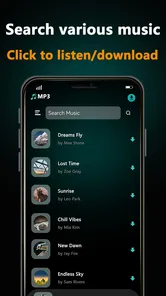
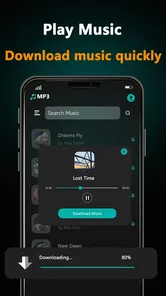
Analysis by Reviewed
My first question with a music downloader is not how many songs it can find, but when I need a reliable connection to use it. In Mp3 Music Downloader, I’d plan to search and start downloads while the signal is steady, then check that the tracks I want are ready before heading out. That simple routine makes more sense than counting on a weak connection to handle every step smoothly.
Good moments to be online
A download-focused app suits people who like to prepare a personal selection instead of opening a streaming service every time they want music. If a song comes to mind while I’m connected, I can look for it then and organize it for later listening. By contrast, listeners who depend on changing recommendations or spontaneous discovery may be happier with a service built around streaming and curated suggestions.
I’d also separate finding music from deciding how to use it. Searching when I have a stable connection, then arranging chosen tracks into a playlist, gives me a clearer routine than browsing at the exact moment I need to leave. It is a small distinction, but it helps avoid turning a commute or workout into a search session.
Choosing a mobile routine
On a busy morning, I might search for a few tracks at home, confirm that the files I wanted are available, and choose a playlist before leaving. If I’m headed somewhere with unreliable service, that check matters more than simply seeing a download action complete. It also gives me a chance to remove tracks I picked impulsively and keep the selection focused on the day ahead.
For a train ride, a prepared playlist is more useful than a long queue of possibilities. At the gym or on a walk, shuffle can add variety to a selection without making me browse while moving. These are practical uses for the app’s playlist and playback options, rather than a reason to assume that every task will behave identically under every network condition.
When a download does not go smoothly
If a search or download seems to stall, I’d pause before tapping repeatedly. First, I’d check whether the connection has become unreliable and give the current action a moment to finish. Repeating the same request right away can leave me unsure whether the first attempt is still active. If the connection remains poor, waiting until I’m somewhere with a steadier signal is a more sensible recovery plan than fighting the phone on the move.
This approach is especially useful when I’m getting ready to travel: I can check my intended playlist before I leave, rather than discover at the station that a track is not ready. The app’s download-oriented design encourages that bit of advance planning. It is less suitable for someone who expects an always-current streaming catalog to respond instantly wherever they happen to be.
More From Our News Desk

 Gmail
Gmail in a Busy Inbox: Who Benefits Most?
From first account to crowded workday, Gmail earns its place through dependable search and flexible sorting—but its best fit depends on how much inbox maintenance you can tolerate.

 Prime Video
Switching to Prime Video: What Changes in Your Viewing Routine
Prime Video can make a compelling second home for streaming, but switching means learning a different catalog, rental layer, and route from browsing to playback.

 Universal TV Remote Control
 Works Best as a Reliable Backup
A phone remote earns its place through quick setup and reliable habits. Here is how to get more from Universal TV Remote Control—and where its limits show.

 Weather - By Xiaomi
Weather by Xiaomi Review: Clear at a Glance, Less Clear Up Close
Xiaomi’s weather app makes everyday forecasts quick to scan, but its calm surface can leave useful details and recovery paths harder to find than they should be.

 X
X Under Pressure: Can It Recover When Posting Goes Wrong?
A resilience-focused review of X, examining setup, mistaken posts, interruptions, weak connections, and the gaps that matter when recovery needs to be dependable.

 Clash of Clans
 Is Won Between the Battles
Its raids are quick; its community is a long-term project of coordination, teaching, rivalry, and shared responsibility—with all the friction that entails.
Latest News



Managing data without guesswork
For a larger batch of music, I’d use Wi-Fi as a practical habit and keep mobile data for searching or downloading only what I need at the time. That is a personal way to control usage, not a claim that the app includes a particular data-saving setting. A focused collection also has another advantage: it is easier to recognize what I actually listen to than it is to manage a pile of tracks gathered just because they appeared in search.
I would build playlists around situations rather than make one enormous list. A short commute selection, a workout group, and a quieter evening mix are easier to find quickly. If a track turns out not to fit, I can adjust one small group instead of reworking an all-purpose collection. That workflow makes the app’s hands-on approach more useful, though listeners who prefer a service to manage recommendations and listening history for them may find it too manual.
Connectivity verdict
My advice is to treat a good connection as part of the preparation, not something to take for granted at the moment you want to listen. Search, download, and organize when conditions are dependable, then use playlists to reduce the need to browse on the go. If that plan sounds comfortable, the app’s direct approach can fit a practical routine. If you want effortless discovery or expect to stream anything immediately, a streaming-first alternative is likely a better match.
Discovering the App’s Interface
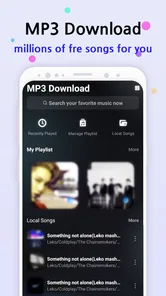
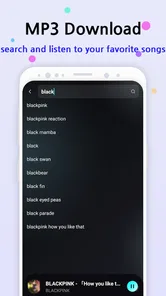
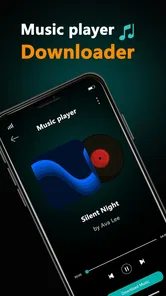
First impressions matter. Upon launching the Mp3 Music Downloader, you're greeted with a clean and intuitive interface. It feels like a breath of fresh air compared to other clunky music apps. Everything is neatly organized, and you won’t find yourself lost in a maze of menus. The search bar is prominently displayed at the top, inviting you to dive right in and find your next jam.
Ease of Use
Navigation is a breeze. With just a few taps, you can explore a vast library of music. The app categorizes music into genres, making it simple to find exactly what you’re in the mood for. Whether you’re into pop, rock, or classical, there’s something here for everyone. And the best part? Downloading a song is as easy as pie. Just hit that download button, and voila! Your favorite track is ready to be enjoyed offline.
For a practical routine, I’d use genre browsing when I know the mood but not the exact track, and search when I already have a song in mind. On a busy morning, that distinction saves aimless tapping: find a few choices before leaving, then use the playlist feature to keep the commute simple. If a search stalls on mobile data, I’d wait for a steadier connection rather than repeatedly restarting it.
Quality of Downloads
Quality over quantity, right? The app doesn’t compromise on sound quality. With high-quality audio downloads, your music sounds as crisp and clear as if you were listening live. It's perfect for those who have an ear for detail and don't want to settle for anything less than stellar audio.
One useful trade-off to keep in mind is that a larger collection takes more attention to organize than a streaming queue. I’d download a focused set for a particular week or activity, rather than collect every interesting result immediately. That makes it easier to spot what I actually listen to and keeps a playlist purposeful instead of turning it into a catch-all.
Additional Features Worth Noting
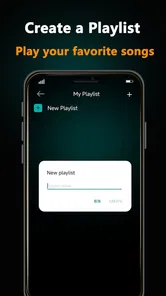
The app isn’t just about downloading music; it’s about enhancing your overall music experience. You can create playlists, shuffle your tracks, and even set songs as ringtones directly from the app. For someone like me who loves customizing my phone, this feature is a game-changer.
Playlists are especially handy when the phone’s connection is unreliable: I can group tracks by context, such as a workout or a quieter evening, instead of searching again at the moment I want to listen. Setting a ringtone is a different kind of use, and I’d treat it as a personal customization choice rather than the main reason to install the app. If I only wanted a discovery engine or a broad streaming catalog, I’d choose a service built around those needs instead.
Using it on the move
A realistic use case is preparing music at home before a train ride, then choosing a playlist once I’m on the platform. The key is to finish the search and download beforehand, while the connection is dependable, and not leave the whole task until the last minute. In a gym or on a walk, shuffled tracks can make a prepared selection feel less repetitive without needing to keep browsing.
If a download takes longer than expected, I’d first check whether the connection has become unstable and give it a moment before trying again. Repeating taps immediately can make it harder to tell whether the original action is still underway. For a data-conscious routine, I’d use Wi-Fi for building a larger collection and reserve mobile data for finding only what I need. That is a sensible habit, not a claim that the app offers a specific data-saving control.
Who will get the most from it
Music Downloader KD. makes this free music-and-audio app, which is rated for Everyone and works on Android 5.0 or later. Its version is 4.8.0. I can see it suiting listeners who want a direct route from finding music to arranging personal playlists, especially if they enjoy setting a track as a ringtone. It is less compelling for someone who expects curated recommendations, a constantly refreshed streaming library, or a single service that handles every part of music discovery.
The app has an average rating of 4.8 from around 112,000 ratings, and it has been installed over 10 million times. Those figures suggest it has found a broad audience, but they don’t replace checking whether its download-focused style matches your habits. If you prefer to stream on demand and avoid managing a collection, the usual streaming alternative may be more convenient; if you value choosing tracks and making playlists, this app’s approach is easier to understand.
The choice between this and a streaming app comes down to what I want to do after finding a song. Streaming keeps the emphasis on browsing and playing from a service, while this app’s appeal is the move from a search to a personally arranged selection. Someone who listens to the same group of tracks during a daily routine may appreciate that directness. Someone who wants fresh recommendations at every turn may find the more deliberate process limiting.
It is also worth thinking about how much time I want to spend maintaining a collection. A few playlists with clear purposes are easy to revisit; a growing, unfiltered set can become harder to navigate than a streaming queue. I’d start with one or two specific listening situations, then add tracks only when they improve those lists. That small bit of curation helps the app stay useful instead of becoming another place where music gets saved and forgotten.
For a first try, I’d pick a familiar track and a short playlist rather than plan a large collection immediately. That lets me judge whether the search and organization flow suits me before I build a routine around it. If my main need is a ringtone, I’d test that use directly; if it is commute listening, I’d focus on preparing and finding a playlist quickly. Different users may value those parts differently, so the best fit depends on the job I want the app to do.
Final Thoughts
In a world where music is an essential part of our lives, having an app like Mp3 Music Downloader is a blessing. It’s user-friendly, efficient, and packed with features that cater to every music lover's needs. Whether you're commuting, working out, or just chilling at home, having your favorite tunes just a tap away is priceless. So, if you’re on the hunt for a reliable music downloading app, give this one a shot. Who knows, it might just become your go-to app!
My recommendation comes with one practical condition: treat connectivity as part of the preparation. Search and organize when your signal is good, then use playlists to make your listening routine less dependent on browsing in the moment. Released on September 13, 2018, and still listed as free, it is worth considering if that simple, hands-on style sounds right for you.
Overall, I’d recommend it most to someone who likes having a clear, self-managed set of tracks and does not mind planning a little before leaving home. The familiar basics—searching, grouping songs, shuffling, and personalizing a ringtone—give it several everyday roles without making it feel like a full streaming platform. Its 4.8 average from around 112,000 ratings and more than 10 million installs indicate wide uptake, though popularity alone cannot tell me whether its workflow will suit my own listening habits.
The app is free, carries an Everyone age rating, and was released on September 13, 2018. Music Downloader KD. is the developer, and version 4.8.0 supports Android 5.0 and later. For a listener who values deliberate downloads over endless discovery, that straightforward setup is a reasonable place to start; for someone who wants recommendations and immediate streaming to lead the experience, I’d choose a different kind of music app.
Mp3 Music Downloader Frequently Asked Questions
Can I listen to music while traveling or when I have no internet connection?
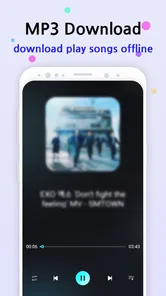
Yes. Mp3 Music Downloader supports offline listening after you download tracks, which can be useful on trips or in places with limited connectivity. Download the music you want while you have internet access, then listen to those saved tracks offline. Keep in mind that offline playback applies to downloaded music; you will need an internet connection when searching for or downloading tracks.
Who develops Mp3 Music Downloader, and what kind of app is it?
Mp3 Music Downloader is a Music & Audio app developed by Music Downloader KD. Its store summary says, “Mp3 music download never was easier,” and its short description is “Mp3 Music.” It is intended for people looking to download music and listen offline. Before installing, consider whether this download-focused approach suits how you prefer to find and enjoy music.
What should I check before downloading Mp3 Music Downloader?
Check that your device runs Android 5.0 or later, and consider whether you are comfortable using an app focused on downloading music files. It is also sensible to review the permissions and terms shown during installation. Use the app responsibly, and make sure any music you download comes from a legal, copyright-compliant source.
How much does Mp3 Music Downloader cost, and what is its age rating?
Mp3 Music Downloader is free to download and is rated Everyone, making it suitable for a general audience. As with any app, it is sensible to review the permissions and terms shown during installation and to use the app responsibly. Its developer is Music Downloader KD, and it is listed in the Music & Audio category.
Will Mp3 Music Downloader work on my device, and is it regularly updated?
Mp3 Music Downloader requires Android 5.0 or later, so check your device’s operating system before installing it. Its current version is 4.8.0. The app was released on September 13, 2018, and its version information can help you confirm that the download you are considering matches the release you expect. Compatibility and updates can affect how smoothly an app runs, so keep your device’s software current where possible.
Pros
- Fast download speeds for music enthusiasts.
- Supports multiple audio formats.
- Clean and intuitive user interface.
- Allows offline listening after download.
- Regularly updated with new features.
Cons
- Limited song library compared to competitors.
- Contains ads that can be intrusive.
- Requires internet for search functionality.
- Some tracks may have lower audio quality.
- Occasional crashes on older devices.