

Movie Box
- 134.00
- 3.2
- Installs
- 10.00M
- Price
- Free

Screenshots

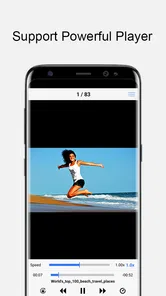
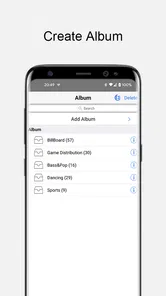
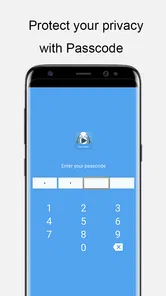
Analysis by Reviewed
I judge a video app by whether it makes one task genuinely easier, and Movie Box has a clear focus: saving videos for later rather than relying on a live connection. That can be useful when I know I will have a patchy signal, but it also makes the way I plan a viewing session more important than simply opening an app and pressing play.
Why downloading changes the routine
Movie Box is a free video player and editor app from MovieBox Group, though individual in-app purchases range from $2.99 to $4.99. Its central promise is fast video downloads. In practical terms, the benefit is preparation: I can get a video ready before leaving home, then avoid depending on mobile reception during a commute or trip. A download is most useful when it solves a real connectivity problem, not just as a second way to watch something I could stream comfortably.
There is a useful trade-off here. Downloading moves the decision earlier: I need to choose what I want to watch and allow time for it to be ready. I would do that while connected to a dependable network, then check that the video is available before heading out. That small habit reduces the frustration of discovering, just as a journey starts, that I have not prepared anything for offline viewing.
A realistic day with Movie Box
Imagine I have a long train ride ahead and expect the connection to drop in and out. I would choose a video before leaving, download it while I still have reliable access, and save my streaming data for other needs. On the way, I could open the prepared video rather than repeatedly waiting for a connection to recover. This is a more convincing use for the app than browsing in a hurry at the station, when there may not be enough time to download a large file.
For a shared household, I would also think about the device before downloading. A phone is convenient for a solo commute, while a larger screen may be more comfortable at home. I would avoid filling limited storage with videos I might not watch soon; choosing one or two for an upcoming trip is a more practical routine than saving a long backlog. These are simple steps, but they make a download-focused app easier to live with.
Making downloads work for a real schedule
I find the most useful mindset is to treat Movie Box as part of trip preparation, not as a last-minute solution. If I know I will have a quiet half-hour on a bus, I can pick something suited to that window and prepare it earlier. That is more reliable than beginning a download when I am already on the move, because an unstable connection can turn a quick plan into an irritating wait. The app’s focus makes advance choice its practical strength, but also its main commitment.
A small selection is usually more helpful than a large queue. I would keep one video for the journey and perhaps a backup for a delay, then remove anything I have finished if space becomes tight. This avoids treating the phone as an unlimited shelf. It also makes it easier to find the item I intended to watch, instead of scrolling through a pile of old downloads when I have only a short break.
More From Our News Desk

 Gmail
GmailGmail in a Busy Inbox: Who Benefits Most?
From first account to crowded workday, Gmail earns its place through dependable search and flexible sorting—but its best fit depends on how much inbox maintenance you can tolerate.

 Prime Video
Switching to Prime Video: What Changes in Your Viewing Routine
Prime Video can make a compelling second home for streaming, but switching means learning a different catalog, rental layer, and route from browsing to playback.

 Universal TV Remote Control
Universal TV Remote Control Works Best as a Reliable Backup
A phone remote earns its place through quick setup and reliable habits. Here is how to get more from Universal TV Remote Control—and where its limits show.

 Weather - By Xiaomi
Weather by Xiaomi Review: Clear at a Glance, Less Clear Up Close
Xiaomi’s weather app makes everyday forecasts quick to scan, but its calm surface can leave useful details and recovery paths harder to find than they should be.

 X
XX Under Pressure: Can It Recover When Posting Goes Wrong?
A resilience-focused review of X, examining setup, mistaken posts, interruptions, weak connections, and the gaps that matter when recovery needs to be dependable.

 Clash of Clans
Clash of Clans Is Won Between the Battles
Its raids are quick; its community is a long-term project of coordination, teaching, rivalry, and shared responsibility—with all the friction that entails.
Latest News



Where it fits among video apps
Compared with a conventional streaming-first player, Movie Box’s appeal is the emphasis on getting a video onto the device ahead of time. A streaming app is often easier when I want to browse casually and start watching immediately, while a download-oriented choice makes more sense when I know access may be unreliable. If my main priority is a broad, familiar streaming setup or predictable access to a particular catalog, I would compare the available options carefully rather than assume this app is a replacement for every service.
The category itself can cover very different jobs, from editing clips to playing saved files. Movie Box is presented as a video-downloading app, so I would approach it for that specific purpose instead of expecting a full editing studio or a universal media library. That distinction matters: a person who mainly wants to trim personal footage, organize a local collection, or cast videos around the home may be better served by an app built around those tasks.
Your Entertainment Hub
Picture this: a single app where you can find all your favorite movies and TV shows in one place. That's exactly what Movie Box offers. The app's user-friendly interface makes it a breeze to navigate. Whether you're searching for the latest blockbuster or a classic film, Movie Box has got you covered. The search functionality is top-notch, allowing you to find exactly what you're looking for in seconds. There's even a handy filter option to customize your search results based on genre, release year, and more.
Features That Stand Out
One of the standout features of Movie Box is its offline viewing capability. Yes, you heard me right! You can download your favorite movies and shows to watch offline, perfect for those long flights or road trips where Wi-Fi is just a distant dream. The app also supports multiple languages, making it accessible to a broader audience. Plus, with regular updates, you can always count on fresh content hitting your screen.
Another feature worth mentioning is the personalized recommendation system. Based on your viewing history, Movie Box suggests new movies and TV shows that align with your interests. It’s like having your own personal entertainment advisor!
Choosing what to download
For me, search and filtering are most valuable when I have a particular kind of viewing in mind, rather than when I am casually browsing without a plan. If I know I want a comedy for a short ride or something familiar for a longer journey, narrowing the choice before downloading can make the preparation feel purposeful. A recommendation can help when I am undecided, but I would still check that the selected video suits the time I have and the connection available before relying on it offline.
There is also a useful distinction between finding something and having it ready. A title appearing in a search or recommendation is not the same as confirming that its download has completed. I would make the final check while still at home or somewhere with dependable access, then open the prepared video briefly before leaving if the trip matters. That extra check is less exciting than browsing, but it is the sensible way to avoid depending on an assumption.
Streamlined User Experience
From the moment I opened the app, I was impressed by its sleek design and easy navigation. The developers have clearly prioritized user experience, ensuring that even the least tech-savvy individuals can find their way around. The streaming quality is superb, offering HD resolution for most of its content, which is a big win for those of us who appreciate crisp, clear visuals.
On top of that, the app is compatible with both Android and iOS, ensuring that no one is left out. Whether you're using a smartphone or a tablet, Movie Box adapts seamlessly to your device, providing a smooth and enjoyable viewing experience.
Questions I would settle before a trip
Would I install it just before boarding? I would not make that my plan. The point of a download-focused app is to prepare while a connection is available, and leaving the process until the last few minutes creates avoidable pressure. Would I use it for a quick, spontaneous watch at home? Probably not as my first choice; a streaming-first player is more convenient when I want to press play without thinking ahead.
Would it suit someone watching on a limited-storage phone? It can, provided downloads stay selective and are cleared when no longer needed. Would I choose it as my only video tool? Only if downloading is the job I care about most. Someone who edits clips, manages a personal file collection, or expects a familiar streaming catalog should compare apps aimed directly at those needs instead of stretching this one beyond its central use.
What to weigh before choosing it
The app has an average rating of 3.2 from around 19,000 ratings, alongside 134 written reviews, so I would treat the experience as a mixed one rather than assume it will suit everyone. It has passed 10 million installs, which shows broad reach, but popularity alone does not answer whether its download workflow fits your habits. I would try it with a small, specific viewing plan before making it part of my regular routine.
It is free to install and rated for Everyone, with version 2.11.6 and a minimum operating system requirement of 7.0. The optional purchases are worth keeping in mind if you prefer apps with no paid extras at all. I would also check the app’s current behavior and available content on my own device before planning a trip around it, since the practical value depends on being able to prepare the video I actually want.
When another kind of app is the better fit
Movie Box is less convincing if my viewing is mostly spontaneous. With a steady home connection, streaming-first services generally remove the extra step of planning and waiting for a download. If I want to edit a clip I recorded, a dedicated editor is the clearer choice; if I want to play files already stored on my device, a local media player is more directly suited to that workflow. Those alternatives are not automatically better in every situation, but they make more sense when downloading videos is not the problem I am trying to solve.
I would also be cautious about choosing any download-oriented app purely because of a promise of speed. The useful measure in daily life is whether the video I want is ready when I need it, not whether a download sounds quick in theory. A practical first test is to prepare a short viewing plan on a reliable connection, check the result, and see whether the process feels comfortable on my device. If that routine feels like unnecessary work, the app’s main advantage may not matter to me.
Who gets the most from it
I would recommend Movie Box to someone who often travels, faces unreliable internet, or likes to decide on entertainment before leaving home. Its strongest use is a prepared offline session, especially when buffering would ruin a short break or when mobile data is something to conserve. It is less compelling for someone who only watches at home on a stable connection, wants a dedicated editor, or prefers to browse and play immediately without planning downloads.
My overall view is that the download-first idea is useful when matched to the right situation, but it does not make the app an automatic choice for every video task. I would use it for a planned commute or journey, keep downloads selective, and compare it with a streaming-first alternative if spontaneous discovery matters more. If that practical balance sounds right for you, Movie Box is worth trying; if you want a dependable all-purpose media setup, I would look for an option designed around that broader need.
Movie Box Frequently Asked Questions
Does Movie Box work on both Android and iOS devices?
Movie Box is intended for mobile use, but installation and compatibility can differ between Android and iOS. Before downloading, check that the version and installation method are suitable for your device and operating system. On Android, the listed minimum operating system is version 7.0. Whichever device you use, review the installation instructions and requested permissions carefully.
Can I watch videos offline with Movie Box, or do I need an internet connection?
Movie Box is described as an application for downloading videos, and its earlier description also presents downloading as an option for offline viewing. Downloading content generally requires a connection while the download is in progress; afterward, offline playback may be useful when you are away from a network. Check how the app handles downloaded videos and storage on your device before relying on it for a trip.
What does Movie Box offer beyond video playback?
Movie Box belongs to the video players and editors category, and its short description identifies it simply as Movie Box. Its summary emphasizes downloading videos at ultra-high speed. The experience may therefore be relevant if you want a mobile app centered on video, but it is sensible to explore the available functions and controls after installation rather than assume that every editing or playback feature you expect is included.
What is Movie Box’s age rating, and is it suitable for everyone?
Movie Box has an Everyone content rating, which indicates that it is categorized for a broad audience. That rating does not necessarily describe every video a user might encounter through the app, so families should still consider the content itself and supervise younger users where appropriate. If the app presents its own content controls or viewing choices, review them before handing the device to a child.
How popular is Movie Box, and what do users say about it?
Movie Box has an average rating of 3.2 from around 19,000 ratings, alongside 134 written reviews. Those figures give a general sense of user feedback, but they cannot predict whether the app will suit your device or expectations. Reading recent reviews can help you spot recurring comments about installation, playback, or downloads, and it is wise to weigh both positive and critical experiences.
Pros
- Extensive movie library
- User-friendly interface
- Offline viewing available
- Regular content updates
- Compatible with multiple devices
Cons
- Contains ads
- Limited free content
- Requires stable internet
- Potential copyright issues
- Subscription needed for HD quality











