Morgan & Morgan Mobile
- 429.00
- 4.9
- Installs
- 100.00K
- Price
- Free

Screenshots
Analysis by Reviewed
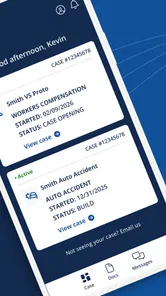
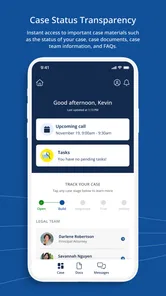
When a legal case is already part of your household routine, waiting for an update can become surprisingly disruptive. I found Morgan & Morgan Mobile most useful in that exact situation: it gives clients a place to check the progress of a Morgan & Morgan case without having to search through old messages or contact the office every time a small question comes up. It is a free business app from Morgan & Morgan PLLC, built around one focused job rather than a broad collection of legal tools.
That narrow purpose is both its appeal and its main limitation. This is not an app for researching laws, comparing attorneys, preparing a claim from scratch, or managing every legal matter a family may have. It is for people who already have a Morgan & Morgan case and want convenient access to its status while away from a computer. In my experience, that makes it easier to recommend to an existing client than to someone who is still deciding what kind of legal help they need.
How it fits into a shared household routine
A realistic example is a household dealing with an injury claim after one family member has become the main contact with the law firm. The other people at home may still need to know whether anything has changed, especially when an appointment, document request, or next step affects transportation, work schedules, or childcare. Instead of passing around a chain of emails, the case holder can open the app and check the current information directly.
That does not turn the app into a family coordination platform, and I would not treat it as one. Its value is more practical: it can reduce the number of times one person has to act as a messenger. If a spouse asks, “Has there been any movement on the case?” the account holder can check the app rather than relying on memory. That is a small improvement, but legal matters often involve enough uncertainty that small improvements in organization matter.
Shared-device use needs a little care. A tablet or phone used by several people may make access convenient, but it also means the person who opens the app should understand that case information is personal. I would avoid leaving the app open on a communal device, particularly in a home where visitors, children, roommates, or extended family members may pick up the phone. The app can support coordination, but the account holder should decide who is actually allowed to see the case details.
I also think it works best when one person remains responsible for checking the case and relaying only what the household needs to know. Giving several people informal access can create confusion about who is reading updates, who is expected to respond, and whether an important message has already been handled. The app helps with visibility; it does not replace a clear agreement inside the household about responsibility.
What the app is really for
The store summary describes the central use clearly: checking a Morgan & Morgan case status while on the go. After using it with that expectation, I found the focused design easier to understand than a general legal app would have been. There is no need to browse unrelated services when the immediate question is simply whether the case has moved forward.
More From Our News Desk

Weather by Xiaomi Review: Clear at a Glance, Less Clear Up Close

X Under Pressure: Can It Recover When Posting Goes Wrong?

Clash of Clans Is Won Between the Battles

Android Auto Makes the Case for Quieter Car Software

MobiOffice: Transforming Mobile Productivity with Seamless Integration

EA SPORTS FC™ Mobile Soccer: Redefining Mobile Sports Gaming
That focus also sets the right expectations. A status view is not the same as a conversation with an attorney, a legal opinion, or a guarantee that every development will appear at the exact moment it happens. If the household needs an explanation of a legal decision, advice about signing something, or help with an urgent issue, the app should be treated as a convenient reference point rather than the complete answer.
One useful habit is to check the app before contacting the office about a routine status question. If the information already answers the basic question, everyone saves time. If it does not answer the question, the account holder can contact the appropriate legal team with a more specific request. That two-step workflow is more efficient than calling without knowing whether the case record has already changed.
Setting it up without blurring account boundaries
The most important setup decision is not technical; it is deciding whose account the app represents. A household may share devices, phone numbers, email accounts, or calendars, but a legal case still belongs to particular clients and authorized representatives. I would install the app for the person connected to the Morgan & Morgan matter, then keep the account boundary clear instead of treating the application like a shared household account.
This matters when several members of a family have separate cases. Using one person’s access to answer questions about another person’s matter can lead to mix-ups, especially when names, incidents, or deadlines are similar. Each client should use the access associated with their own case rather than assuming that one login is a convenient doorway into every related claim.
On a shared phone, I would also make a short routine part of setup: open the app when needed, review the status, then close it before handing the device to someone else. That is particularly sensible if the phone is used for banking, health information, work communication, or other private tasks. A legal case belongs in the same category of information that deserves deliberate handling.
Another practical tip is to avoid using a family member’s device casually if that person may later need the phone for their own account. The convenience of installing the app on the most available device can become a problem when multiple people sign in and out or when someone forgets which account is active. For a household with one case holder, keeping access on that person’s primary device is usually the cleaner arrangement.
The application is free, which removes a financial barrier for clients who want this particular convenience. That does not mean every household should install it on every device. Free access is useful, but privacy, clarity, and controlled access are more important than having the app everywhere. One carefully managed device can be enough for a family that coordinates well.
When the usual alternatives may be better
The obvious alternative is contacting the firm directly. That remains the better choice when the status shown in the app is unclear, when a deadline is involved, or when the household needs an answer tailored to its circumstances. A phone call or direct message can provide context that a status screen cannot. The trade-off is that direct contact may be less convenient for a quick check during a commute, lunch break, or evening at home.
Email can be more useful when a family needs a written explanation or wants to keep a detailed record of a question and its answer. A calendar can be better for household scheduling, while a notes app can help collect questions for the next conversation with the legal team. None of these alternatives replaces the case-status convenience here, but they may complement it better than expecting one app to manage the entire legal process.
I would skip this app if you are looking for a general-purpose legal research tool or if your case is not with Morgan & Morgan. The developer is Morgan & Morgan PLLC, and the app’s purpose is closely tied to that relationship. Someone comparing firms, learning about a possible claim, or looking for broad legal education will likely get more value from other resources.
I would also skip it as a household-wide installation when no one has agreed who should manage the case information. More copies do not automatically mean better coordination. In a busy family, several people checking independently can produce conflicting interpretations and repeated questions. The better setup is one account holder, a simple sharing arrangement, and direct contact with the firm when the displayed information needs clarification.
Coordination that works in everyday use
The strongest household workflow I found is to use the app as a checkpoint rather than as the family’s entire case-management system. The account holder checks the status, notes anything that affects the household, and then tells the relevant people what they need to know. If a detail is uncertain, the family writes down the question for the legal team instead of guessing from a brief status label.
That approach avoids a common mistake: treating a visible update as a full explanation. A case status can tell you that something has changed, but the practical meaning may depend on documents, conversations, or legal context. I would not make travel plans, stop preserving records, or assume a matter is finished based only on a quick glance. The app is useful for awareness, not for replacing judgment.
A second helpful habit is checking at a consistent time rather than repeatedly refreshing throughout the day. Legal cases rarely become easier to manage because someone checks every few minutes. A planned check can keep the household informed without allowing the case to dominate everyone’s attention. If the family is waiting on a development that affects work or care arrangements, the account holder can share the relevant update once it appears.
For households with an older relative or someone who is less comfortable with mobile apps, the account holder can help with navigation while keeping the person involved in decisions about their own case. That distinction is important. Assistance with opening an app or reading a status is not the same as taking control of the legal matter. The person who owns the case should remain part of the conversation about what information is shared and what action follows.
There is also a useful boundary between coordination and delegation. A partner may remind the account holder to check for an update, but that does not mean the partner should automatically use the account. A family member may help organize questions, but that does not make them the legal contact. Keeping those roles separate reduces the risk of an informal household arrangement becoming confused with authorization.
Privacy, trust, and the Teen content rating
The app carries a Teen content rating, which is relevant when a phone or tablet is used by younger people. I would not interpret that rating as permission for children to browse an adult’s case information. The rating describes the app’s audience context; it does not remove the need for a parent or client to control access to private legal details.
This is especially important in households where children borrow a parent’s unlocked phone. A child may open an app out of curiosity without understanding the sensitivity of what is displayed. The safest routine is simple: the case holder checks the app privately and closes it afterward. That protects trust without requiring the app to become part of a child’s device routine.
Trust also matters between adults. A spouse or relative may be closely involved in the practical consequences of a case, yet the client may still prefer to keep certain details private. I would discuss that expectation openly before sharing access. The app can make information easier to reach, but easier access is not the same as automatic entitlement.
For a shared family device, I would treat the account like any other private service. Do not assume that because the household shares the hardware, everyone should share the login. If someone needs information, the account holder can provide the relevant update verbally or decide together whether that person should be present during a check. That approach is less convenient than unrestricted access, but it is more respectful of the client’s control.
The Teen rating also reinforces why this is not a general family app in the same sense as a calendar or shopping list. Its subject matter concerns legal cases, and the appropriate audience is people connected to those matters. I appreciate that distinction because it prevents a household from confusing technical availability with suitability for every person who uses the device.
Version, compatibility, and the practical ownership experience
The current version is 4.31.1, and the app works on Android devices running version 7.0 or later. That gives it a reasonably broad place in a household’s mobile setup, especially if the family keeps an older phone for occasional use. Still, I would check the device’s operating system before planning around it. A phone that cannot run the app should not become the only place where the family expects to follow the case.
For someone choosing between an older spare phone and a newer primary device, I would favor the device that the case holder actually keeps available and can update reliably. A shared tablet may be comfortable for reading, but it can be less convenient when the person needs to check the status away from home. A primary phone is usually better for mobility, while a private household tablet may be better for sitting down together to review information.
The app’s popularity suggests that it has found a clear audience: it has more than one hundred thousand installs, with an average rating of 4.9 from around 4.7 thousand ratings. Those figures make it look reassuring for an existing client deciding whether the app is worth trying, but I would still judge it by fit rather than popularity. A high rating cannot make it useful for someone whose case is elsewhere, and it cannot replace a conversation when the case details are complicated.
There are also around 425 written reviews, which can help a prospective user see that people are engaging with the application as a real client tool rather than as a general business directory. I would read such feedback cautiously, however. Experiences with a case-status app can depend on the user’s case, account access, device, and expectations. A person wanting legal advice may judge it harshly for not doing something it was never designed to do, while an existing client may value its focused convenience.
The release date was May 5, 2022, so this is not a brand-new experiment. That gives the app a little more context as an established mobile option for the firm’s clients. Even so, I would keep the app updated through the normal device process and avoid relying on an outdated installation if the phone has been unused for a long time. The goal is dependable access when the household actually needs it.
Who should use it, and who should keep looking
I would recommend it to a Morgan & Morgan client who wants a quick way to check case progress, especially someone who travels, works irregular hours, or shares practical responsibilities with other people at home. It is also a sensible choice for a client who dislikes digging through email and wants one dedicated place to begin a status check.
It is less suitable for someone who expects a complete timeline, detailed legal explanations, document preparation, or direct advice from every screen. Those needs call for communication with the legal team and possibly separate organizational tools. The app can be the first stop, but it should not be mistaken for the whole relationship with a law firm.
I would be cautious about recommending it to a household that has no clear account owner, frequently passes one unlocked device among many people, or expects children to manage adult legal information. In those situations, the privacy and coordination problems may outweigh the convenience. A controlled, adult-led routine is a much better fit.
My household verdict
After looking at it as both a client tool and a shared-device app, I see Morgan & Morgan Mobile as a focused convenience rather than a complete legal companion. Its best quality is that it puts case-status checking into a dedicated mobile experience, which can make an otherwise awkward part of household life easier to organize.
The right way to use it is deliberately simple: the client keeps control of the account, checks the case when useful, shares only what the household needs, and contacts the firm when a status requires interpretation. That workflow respects privacy while still reducing the burden of being the only person who knows whether anything has changed.
For an existing Morgan & Morgan client, the free download and broad Android compatibility make it worth trying. The strong average rating and more than one hundred thousand installs add confidence that it serves a real user base, but the app’s value remains highly specific. If your legal matter is with another firm, or if you need advice rather than a status check, another option will serve you better.
My final recommendation is positive with clear boundaries: use it as a private case-status checkpoint, not as a shared family dashboard or substitute for legal communication. In a household that agrees on access and responsibility, that distinction makes the app genuinely helpful. In a household without those boundaries, the usual alternatives—direct contact, written correspondence, and a simple shared schedule—may be safer and more effective.
Morgan & Morgan Mobile Frequently Asked Questions
Who develops Morgan & Morgan Mobile, and what should I check before installing it?
Morgan & Morgan Mobile is the business app from Morgan & Morgan PLLC. Before downloading, check the developer name in your device’s official app store so you select the intended app. It is free to download, and its age rating is Teen. As with any app, review its permissions and make sure you are comfortable with the access it requests before using it.
What is Morgan & Morgan Mobile used for?
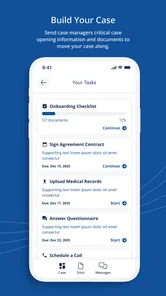
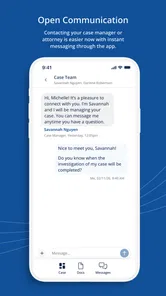
Morgan & Morgan Mobile is designed to help clients and potential clients connect with the Morgan & Morgan law firm from a smartphone. Depending on your location and case type, the app may provide access to legal information, case-related updates, communication tools, document requests, and contact options. It is primarily a convenience and communication platform, not a substitute for personalized legal advice from an attorney.
Can I use the app to start a personal injury claim?
The app may allow you to submit information about an accident or potential legal matter so the firm can review your situation. However, submitting a form does not necessarily mean that Morgan & Morgan has agreed to represent you, and it may not create an attorney-client relationship. Provide accurate details, avoid assuming deadlines are extended, and contact the firm directly if your matter is urgent or time-sensitive.
Is my personal and legal information secure in Morgan & Morgan Mobile?
The app may handle sensitive information, including contact details, accident descriptions, medical information, and uploaded documents. Before using it, review its privacy policy, permissions, and terms to understand how information is collected, stored, shared, and retained. Use a secure device, keep the app updated, avoid public Wi-Fi when submitting confidential material, and never share your login credentials with others.
Does Morgan & Morgan Mobile provide legal advice or guarantee representation?
Morgan & Morgan Mobile can make it easier to contact the firm and access certain case services, but app content and automated features should not be treated as legal advice. Information may be general, incomplete, or dependent on your jurisdiction. The firm must evaluate your circumstances before accepting a case, and using the app alone does not guarantee that an attorney will represent you.
Pros
- Free access to legal information and case-related resources
- Easy way to contact the firm from a mobile device
- Helpful tools for checking potential case eligibility
- Clear explanations of common legal issues
- Useful for tracking updates after opening a case
Cons
- Availability and features may depend on your location
- Not a substitute for personalized advice from an attorney
- Some users may receive marketing or case-related notifications
- Case information may take time to appear or update
- Requires sharing sensitive personal details for legal assistance











