MoonLit - Werewolf Novels
- 834.00
- 4.6
- Installs
- 100.00K
- Price
- Free

Screenshots




Analysis by Reviewed
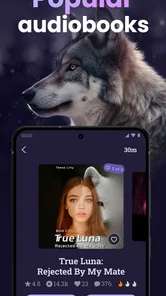
I approached MoonLit as a reader looking for something more focused than a general ebook shelf. It is a free Books & Reference app from FMPROJECT LIMITED, built around werewolf fiction, romance stories, and audiobook listening. That combination gives it a clear personality: it is not trying to be a universal library, and it makes the most sense when you already know that supernatural romance is the kind of reading you want.
My first impression was that the app is aimed at quick discovery rather than careful cataloguing. You open it expecting to browse dramatic stories, find a title that catches your attention, and settle into a continuing reading or listening habit. That can be appealing after a long day, especially when I do not want to search through unrelated genres before finding something with werewolves, romance, and heightened emotional stakes.
The important question is whether that narrow focus works for your routine. If you want literary fiction, nonfiction reference material, or a single place for books you already own, this is unlikely to replace a mainstream reading app. If you enjoy serialized supernatural romance and like sampling stories directly from a themed catalogue, the focus becomes its main advantage.
Where the reading experience can slow you down
I find that browsing can take longer when I am trying to match a story to a particular mood, rather than simply looking for werewolves or romance. In this section, I’ll focus on small ways to narrow the choice without getting pulled into a title I may not want to continue. That makes the next section’s preparation checks more useful, especially before settling into a longer session.
Finding the right story takes more than choosing a genre
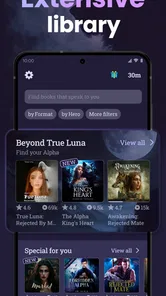
A themed catalogue sounds simple, but readers often get stuck at the browsing stage. Werewolf romance can cover very different moods: gentle relationship drama, darker fantasy, fast-moving conflict, or stories that lean heavily into pack politics and suspense. A title that looks suitable from its cover may not match the tone I want at that moment, so I treat the first few minutes as a filtering process rather than an immediate commitment.
My practical approach is to sample several options instead of investing in the first attractive title. I look at the wording around the story, check whether the opening establishes the kind of relationship and setting I enjoy, and then decide whether it deserves a place in my current reading queue. This matters particularly with serialized fiction, where the opening chapters are doing the job of both introduction and invitation to continue.
The app’s narrow subject is helpful here because it removes much of the noise found in broad ebook services. I am not moving through cookbooks, business titles, biographies, and unrelated fiction. At the same time, the narrower selection can feel limiting if I finish a story and want to switch immediately to mystery, science fiction, or contemporary romance outside the supernatural theme.
More From Our News Desk

Weather by Xiaomi Review: Clear at a Glance, Less Clear Up Close

X Under Pressure: Can It Recover When Posting Goes Wrong?

Clash of Clans Is Won Between the Battles

Android Auto Makes the Case for Quieter Car Software

MobiOffice: Transforming Mobile Productivity with Seamless Integration

EA SPORTS FC™ Mobile Soccer: Redefining Mobile Sports Gaming
Reading and listening are different kinds of commitment
MoonLit combines novels with audiobook-oriented content, which makes it more flexible than a text-only reading shelf. I would use written chapters when I want to control my pace, reread a scene, or quietly read in bed. I would choose audio when doing routine work, walking, or commuting. Those are useful differences, but they also change how I judge a story: a passage that works well on screen may feel slower when heard, while an expressive narration can make familiar romantic tension easier to follow.
Switching between those habits requires a little discipline. I keep track of where I stopped instead of assuming that every session will happen in the same format. If I begin a story in audio during a walk and continue by reading later, I check the chapter position before settling in. That small pause prevents the most annoying kind of interruption: discovering that I have repeated a scene or skipped ahead without meaning to.
For readers who mainly want audiobooks from a wide range of publishers, a dedicated audio service will usually offer a broader and more established catalogue. MoonLit is more attractive when the genre itself is the priority and audio is one way of enjoying that focused selection.
Why a free app still needs purchase awareness
The app can be installed without an upfront charge, but that should not be confused with unlimited access to everything inside it. In-app purchases range from $6.99 to $519.99 per item, so I would pay close attention to any purchase screen before confirming anything. The wide span makes it especially important to understand whether I am unlocking a particular item, continuing a story, or choosing a larger package.
My advice is simple: begin with the free material or the parts you can inspect without paying, then decide whether the writing and listening experience justify spending more. I would not make a purchase just because a cliffhanger creates pressure to continue. A themed reading app is most enjoyable when it supports a deliberate reading budget rather than turning every evening session into an impulse decision.
This is also where MoonLit differs from a library app. A public library service may be better for readers who want borrowing rules, established titles, and predictable access without repeated story-by-story spending. MoonLit is better suited to someone who accepts a more entertainment-focused model and wants a steady stream of genre fiction.
Setup checks that prevent avoidable frustration
Before I rely on a reading app during a commute or quiet evening, I like to check the device and test a story while I have time to sort out any snags. Here, I’ll cover a few practical checks that help distinguish setup trouble from a problem with one title. With those basics in place, it becomes easier to recover smoothly if a session is interrupted later.
Start with the device requirements
Before troubleshooting anything complicated, I check the basics. MoonLit supports Android 8.0 and later, so an older phone or tablet may be the first reason an installation or update does not go smoothly. On a supported device, I make sure the operating system is current enough for normal store activity and that there is sufficient free storage for the app and any reading or listening material I intend to keep available.
I also check that I am installing the current version, 1.15.4, rather than relying on an outdated copy that may behave differently from the present release. This is a useful first step when a screen loads incorrectly, a chapter does not appear as expected, or audio behaves inconsistently. Updating is not a guarantee of a fix, but it removes one common source of confusion.
Give the first session a calm test
I prefer to test a new reading app on a stable connection instead of during a rushed commute. I open a story, move through the first available sections, and try the audio option if that is part of my plan. This tells me whether the problem is limited to one title or affects the whole app. It also gives me a chance to learn the navigation before I am relying on it in a place with weak reception.
If a page appears slow, I avoid repeatedly tapping the same control. Repeated taps can make it difficult to tell whether the app is processing a request or whether the connection has stalled. I wait briefly, return to the previous screen once, and try again. That sounds minor, but it is a much cleaner way to identify whether the issue is temporary loading friction or a genuine navigation problem.
For audiobook use, I test playback with the phone volume raised and the device’s silent or focus settings checked. If I am using headphones, I confirm that they are connected to the phone rather than another nearby device. These checks are not MoonLit-specific features; they are sensible ways to separate an app issue from a device audio setting.
Keep account and purchase decisions separate
I recommend browsing first and making account or payment decisions only after I know how the catalogue fits my taste. If a reader shares a device with family members, it is worth being especially careful around any purchase confirmation screen. The Teen content rating also makes the app more appropriate for older teenagers and adults than for young children, so I would not treat it as a general-purpose children’s reading shelf.
A useful habit is to note the story title and chapter before leaving the app, particularly during the first few sessions. If I later need to reopen the app, I know exactly what I was reading and can quickly tell whether the app restored my place correctly. This is more reliable than assuming that every interruption will be handled perfectly.
Make the reading environment do some of the work
MoonLit is easier to enjoy when the surrounding conditions match the format. For text, I use a comfortable brightness and avoid reading in a moving vehicle if the screen makes me tired. For audio, I choose a place where I can hear voices clearly and where I do not need to keep checking the display. The app cannot compensate for glare, poor headphone fit, or a noisy room.
This is one of the less obvious trade-offs of combining novels and audiobooks in one focused service. The same story can feel convenient in one setting and awkward in another. I get better results when I decide beforehand whether the session is for active reading or background listening instead of switching formats repeatedly.
Recovering a disrupted reading workflow
When a session breaks off, the useful question is not only how to restart playback or reopen a chapter, but how to resume without losing track of the story. I’ll look at a simple way to preserve your place and compare what happens across titles or formats. That approach also helps identify when the phone or connection, rather than the app, is creating the interruption.
When a story will not open normally
If a title refuses to load, I first close and reopen the app, then try a different story. That comparison is useful: if another title opens, the problem may be limited to the original item or a temporary loading state; if nothing opens, I look at the connection and device conditions before blaming the catalogue. I also avoid uninstalling immediately, because removing an app can make it harder to understand what actually caused the interruption.
A stable connection is particularly important when moving between text and audio. I test once on the connection I normally use and, if practical, once on another reliable connection. I do not keep switching back and forth endlessly, but one comparison can reveal whether the difficulty follows the app or the network.
When playback stops or feels out of sync
For audio interruptions, I check the phone’s volume, headphone connection, and any system setting that may pause media. Then I stop playback, wait a moment, and start it again rather than repeatedly pressing play. If the story resumes at an unexpected point, I manually return to the last chapter or passage I remember. This is faster than trying to reconstruct the entire session from memory.
I also avoid beginning an important listening session with a nearly empty battery or a crowded background of active apps. That is not because MoonLit requires unusual hardware; it is simply a practical way to reduce interruptions on an older or heavily used phone. If text reading works normally while audio remains unreliable, I use the written version temporarily and test audio again later.
When progress seems to disappear
Progress problems are frustrating because they affect the reason I opened a reading app in the first place. My recovery method is to record the story name and chapter before closing the app, then reopen that same title and compare the displayed position with my note. If the position is wrong, I move forward manually and leave the app from a clear point rather than closing it during a transition.
I would also avoid clearing app storage as a first response. That can remove local information and make recovery more difficult. A restart, an update check, and a careful test with another story are safer early steps. If the same problem continues, I would use the app’s available support route rather than repeatedly reinstalling and risking more lost context.
Use a small personal queue
One workflow that helps me is keeping a short note with three items: the story I am currently reading, the next story I want to sample, and the last chapter I completed. This is especially useful if I alternate between audio and text or use more than one device. It turns a vague “where was I?” problem into a quick recovery routine.
The trade-off is that this adds a little manual work. A broad reading platform with a mature library-management system may handle organization more comfortably. MoonLit’s strength is the themed discovery experience, but readers with a large, carefully sorted personal library may prefer an app designed around shelves, annotations, and long-term collection management.
When the app is not the cause
A stalled page or silent audiobook can have several causes, so I avoid treating every hiccup as an app defect. This section considers the everyday checks I use to separate connection, device, and listening-environment issues from a genuine mismatch with the service. The distinction matters because the best fix may be a phone setting—or choosing a broader reading app instead.
Connection, storage, and system settings can look identical
Not every loading delay points to MoonLit. Weak Wi-Fi, unstable mobile data, low storage, aggressive battery management, and a phone that has been running for too long can all produce similar symptoms. I check these in a sensible order: connection, available space, device restart, app update, and then a second title inside the app.
This order matters because it prevents unnecessary changes. If the app works after a restart, I have learned something useful without deleting anything. If only one story behaves strangely while several others open normally, I do not assume that the entire service is broken. I simply continue with another title and revisit the original later.
Audio problems often begin outside the app
When narration is silent, I check media volume rather than ringtone volume, confirm the output device, and disconnect accessories that may have taken control of playback. I also check whether another application is already using audio. These are ordinary phone checks, but they resolve many “the audiobook is broken” moments before deeper troubleshooting is needed.
If the sound is present but difficult to understand, I change the listening environment before judging the narration. A busy street, weak earbuds, or a phone speaker at low volume can make any spoken story seem poor. I prefer to test in a quiet room with a familiar pair of headphones, then decide whether the issue is genuinely connected to the app or simply the conditions.
Content expectations can be the real mismatch
MoonLit is not the right choice for every reader who likes books. Its identity is strongly tied to werewolf fiction, romance, and audiobook-style enjoyment. Someone searching for academic reference works, classic literature, practical manuals, or a broad selection of unrelated novels should choose a general ebook platform instead.
It may also be a poor fit if you dislike ongoing romantic tension, dramatic supernatural settings, or stories designed to encourage continued reading. The app’s focused catalogue is valuable only when that focus matches your taste. I would rather recommend a broader service to a friend who wants variety than push this one simply because it is free to install.
Think carefully about age and spending
The Teen rating is an important part of deciding who should use it. I would consider the intended reader’s maturity and comfort with supernatural romance before handing over a shared device. I would also explain that free installation does not mean every story element is free, especially given the range of available in-app purchase amounts.
For a teenager, a parent or guardian may want to agree on a spending limit before use. For adults, the same advice is useful in a different way: decide what a story is worth before reaching a cliffhanger. That keeps the reading experience enjoyable and makes the app’s purchase model easier to manage.
My practical verdict after using it as a focused fiction shelf
MoonLit works best as a specialized escape rather than a replacement for every reading app on a phone. Its appeal comes from putting werewolf novels, romance-driven stories, and audiobook listening in one place. I like that clear identity because it makes discovery faster for the right reader, and the free entry point makes it easy to test the atmosphere before committing to a longer habit.
Its audience is already substantial, with a 4.6 average from around 5,400 ratings and over 100,000 installs. That gives me some confidence that the concept is connecting with readers, while the 833 written reviews suggest there is enough user feedback for newcomers to compare experiences before deciding how deeply to use it.
My strongest recommendation is to treat the first session as an evaluation, not a race. Check that the device meets the Android 8.0 minimum, test both text and audio if you plan to use both, note your chapter position, and inspect purchase prompts carefully. These habits remove much of the avoidable friction and help you judge the actual stories rather than confusing a network or device problem with an app problem.
I would recommend it to a reader who wants supernatural romance on demand, enjoys discovering serialized fiction, and is comfortable managing optional purchases. I would skip it in favor of a general ebook library if I needed serious reference material, a broad cross-genre catalogue, or a large personal collection with advanced organization. For the right mood, though, MoonLit is an easy app to understand: open it when you want werewolves, emotional drama, and the choice between reading a chapter and listening to one.
MoonLit - Werewolf Novels Frequently Asked Questions
Who develops MoonLit, and what devices can run it?
MoonLit - Werewolf Novels is developed by FMPROJECT LIMITED and is available as a mobile app for Android and iOS. On Android, it requires version 8.0 or later, so checking your device’s operating system before downloading can help avoid installation issues. If you read on more than one device, check how the app handles account access and reading progress before relying on it to keep your place synced.
What is MoonLit - Werewolf Novels?
MoonLit - Werewolf Novels is a mobile reading app focused on serialized romance and fantasy stories, especially werewolf, paranormal, and supernatural fiction. Its main appeal is the selection of dramatic stories featuring pack rivalries, fated mates, alpha characters, secrets, and unexpected twists. Readers can browse titles, open chapters, and follow ongoing novels directly from their Android or iOS device.
Is MoonLit - Werewolf Novels free to download and use?
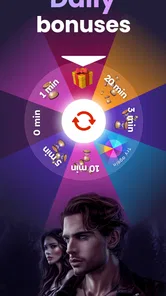
The app is free to download, allowing users to explore its library and read available content. However, access to every chapter may depend on the platform’s reading system, such as daily rewards, virtual coins, advertisements, or in-app purchases. In-app purchases range from $6.99 to $519.99 per item, so check the purchase details in the app before spending. Readers should also review any applicable refund rules.
What types of stories can I read on MoonLit?
MoonLit primarily caters to readers who enjoy werewolf romance and paranormal fiction, but its catalog may also include related themes such as vampires, fantasy kingdoms, rejected mates, enemies-to-lovers relationships, powerful heroines, and dramatic family conflicts. The stories are usually released chapter by chapter, so some novels may be ongoing rather than fully completed. Content ratings and descriptions should be reviewed before reading.
Does MoonLit require an internet connection?
An internet connection is normally needed to download the application, browse the catalog, synchronize your account, unlock chapters, and load newly published content. Depending on the version and available features, some chapters may be temporarily accessible offline after being loaded, but this should not be assumed for every title. Users with limited mobile data should download or read over Wi-Fi whenever possible.
Pros
- Large catalog of werewolf and paranormal romance stories
- Personalized recommendations help discover similar novels
- Offline reading is useful when traveling or without internet
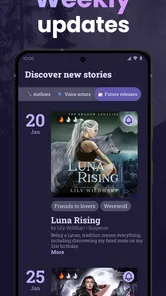
- Regular updates can provide fresh chapters and new titles
- Reading progress syncs conveniently across supported devices
Cons
- Many stories require coins or purchases to unlock chapters
- Some novels may contain repetitive romance and supernatural tropes
- Ads can interrupt browsing or reading for free users
- Quality and editing vary between different stories
- Offline access may be limited for selected books or chapters












