

MoneyPilot : Class Action
- 211.00
- 4.6
- Installs
- 50.00K
- Price
- Free

Screenshots



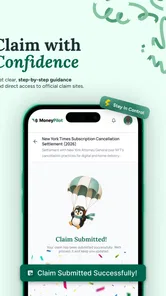
Analysis by Reviewed
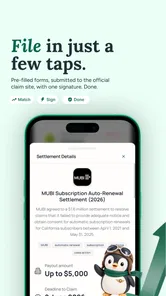
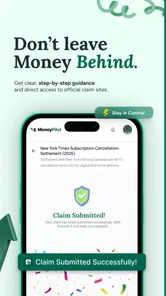
I approached MoneyPilot: Class Action as a finance app for people who suspect they may be owed money but do not know where to begin. Its purpose is straightforward: help users find possible claims, keep track of them, and submit payout claims when they appear relevant. In practice, that makes it less like a budgeting tool and more like a claims-finding assistant.
That distinction matters. This is not an app I would open every day to monitor spending, move money, or plan a household budget. I see its value in occasional, focused sessions: checking whether a settlement may apply to me, reviewing the status of a claim, or keeping several possible payouts from disappearing into an email inbox or a forgotten browser tab. The app is free to install, carries an Everyone age rating, and comes from Bloom Processing.
My overall impression is cautiously positive. The idea is useful, especially for people who regularly hear about class actions but never know how to check eligibility. At the same time, anything involving claims, personal details, and potential payments deserves a slower approach than a typical app download. I would use it as an organized starting point, not as a reason to submit information without reading each claim carefully.
What MoneyPilot is actually useful for
The strongest part of the concept is the way it brings a scattered task into one place. Class-action opportunities can be easy to miss because they may arrive through news stories, notices, social posts, or legal websites. A dedicated claims finder gives me a more practical workflow: browse possible opportunities, open the ones that seem relevant, decide whether the details match my situation, and return later to track what I submitted.
That workflow is especially helpful when the claim depends on a narrow combination of circumstances. A person may remember using a particular service or buying a certain type of product but forget the exact date, account, or transaction involved. Instead of relying on memory alone, I can use the app to identify a claim first and then gather the documents or account history needed to make a sensible decision.
I also like the separation between finding a claim and submitting a payout claim. Those are not the same activity. Finding an opportunity is exploratory; submitting one is a commitment to provide information and attest that the claim applies. Treating them as separate steps encourages better judgment. I would rather review several possibilities and discard the unsuitable ones than rush through a form simply because it promises a possible payment.
A realistic example would be someone who receives a notice about a settlement after changing email addresses. They may not remember whether they already submitted a form, when the deadline falls, or whether the claim was accepted. An app built around tracking can reduce that uncertainty, provided the user records the details accurately and still keeps any official confirmation messages.
More From Our News Desk

 Gmail
GmailGmail in a Busy Inbox: Who Benefits Most?
From first account to crowded workday, Gmail earns its place through dependable search and flexible sorting—but its best fit depends on how much inbox maintenance you can tolerate.

 Prime Video
Switching to Prime Video: What Changes in Your Viewing Routine
Prime Video can make a compelling second home for streaming, but switching means learning a different catalog, rental layer, and route from browsing to playback.

 Universal TV Remote Control
Universal TV Remote Control Works Best as a Reliable Backup
A phone remote earns its place through quick setup and reliable habits. Here is how to get more from Universal TV Remote Control—and where its limits show.

 Weather - By Xiaomi
Weather by Xiaomi Review: Clear at a Glance, Less Clear Up Close
Xiaomi’s weather app makes everyday forecasts quick to scan, but its calm surface can leave useful details and recovery paths harder to find than they should be.

 X
XX Under Pressure: Can It Recover When Posting Goes Wrong?
A resilience-focused review of X, examining setup, mistaken posts, interruptions, weak connections, and the gaps that matter when recovery needs to be dependable.

 Clash of Clans
Clash of Clans Is Won Between the Battles
Its raids are quick; its community is a long-term project of coordination, teaching, rivalry, and shared responsibility—with all the friction that entails.
Latest News



The first session: useful organization, but not automatic certainty
When I use an app in this category, my first question is not “How much money can I get?” It is “Why might this claim apply to me?” That is the right mindset here. The app can help surface opportunities, but eligibility still depends on the terms of each settlement. A matching topic or familiar company name is only a prompt to investigate, not proof that a payout is available.
I would begin by reading the claim description slowly and noting the covered dates, products, locations, and required evidence. If those details do not fit my experience, I would move on rather than submit a speculative claim. This is one of the most useful habits for MoneyPilot users because the convenience of a centralized list can otherwise create a false sense that every displayed opportunity is personalized.
Another practical tip is to keep a small record outside the app of the claim name, the date submitted, and any confirmation number. That may sound redundant, but financial and legal processes are easier to manage when one app is not the only place holding the history. The app can be the working dashboard while official notices remain the authoritative reference.
Trust begins with visible choices
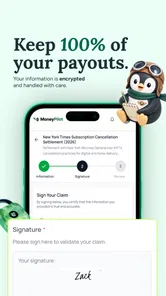
Because this is a finance-focused app, I pay close attention to the moments when it asks me to identify myself, describe a purchase, or provide payment-related information. The useful question is not simply whether an app looks polished. It is whether I can understand what I am being asked to share and make an informed choice before continuing.
I would review every screen for clear explanations of why a field is needed. A claim may reasonably require information that connects me to the affected product, account, or period. That does not mean I should provide unrelated details automatically. If a field feels excessive or unclear, I would pause and look for an explanation or consult the official settlement materials before proceeding.
This is also where the developer matters. Bloom Processing presents MoneyPilot as a dedicated claims-finding product rather than a general-purpose wallet or bank replacement. I would still judge the app by its visible controls: whether account settings are easy to find, whether submitted claims can be reviewed, and whether the app makes it clear when I am leaving its interface for an external claim process. Those are more meaningful trust signals than attractive graphics or a high download count.
The app has a 4.6 average from around 1.9 thousand ratings, with roughly 202 written reviews, and it has passed 50 thousand installs. Those figures suggest that many people find the concept worthwhile, but they do not remove the need for personal verification. A rating can tell me that the experience is generally well received; it cannot determine whether a particular settlement is legitimate for my circumstances or whether I should share a specific piece of information.
Where personal information becomes sensitive
The most sensitive moments are likely to occur during claim submission rather than casual browsing. Browsing possible settlements is relatively low commitment. Entering identifying details, purchase history, contact information, or payout instructions is different because those details may be difficult to retract once submitted to a claim administrator.
I would therefore separate research from action. During the first pass, I would read the claim terms and note what evidence appears necessary. During the second pass, I would collect only the relevant material and check that the official deadline and submission route match what the app shows. This two-step approach reduces impulsive submissions and makes it easier to notice inconsistencies.
There is another subtle risk: users may confuse a potential settlement amount with guaranteed income. Payouts can depend on the number of valid claims, the settlement structure, and the information supplied. MoneyPilot is useful for discovering and organizing opportunities, but I would never treat a displayed possibility as money already earned. That expectation-setting is important for anyone using the app to manage household finances.
I would also avoid uploading documents merely because they are convenient. If a claim can be supported with a less sensitive record, that may be preferable. On the other hand, if the official process genuinely requires proof, refusing to provide it may simply make the claim incomplete. The right balance is relevance: provide what the claim requires, not a broader collection of personal records.
Account control and keeping your own records
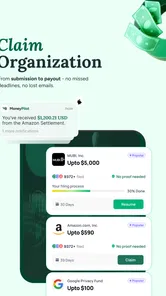
For an app that tracks claims, control means more than being able to open a list. I want to know which claims I have reviewed, which ones I submitted, and what action is expected next. I also want to be able to correct an accidental entry or remove an opportunity that no longer interests me. These small controls determine whether the app remains helpful or turns into another cluttered inbox.
My advice is to treat each saved claim as a task with a clear status. If I have only read the details, I would keep it in a research state. If I have submitted a form, I would record that separately and preserve the confirmation. If the claim is no longer relevant, I would remove or archive it rather than letting an old opportunity look active. This is a simple workflow improvement, but it prevents duplicate submissions and missed follow-ups.
I would also check the account area before relying on the app for long-term tracking. The important questions are practical: Can I recognize my submitted claims at a glance? Can I update contact details if my circumstances change? Can I manage notifications or other account preferences without searching through unrelated screens? These are the controls I would value most because they affect day-to-day ownership of the information.
For people who share devices or use a family tablet, I would be especially careful about leaving the account open. Claims can involve personal history and payment details, so ordinary device security still matters. A finance app does not replace a screen lock, careful password habits, or attention to who can access the phone.
How it compares with familiar alternatives
The usual alternative is to search the web manually whenever a settlement appears in the news. That approach can be more transparent because I can visit the official administrator directly, read the full legal notice, and avoid adding another account to my routine. Its weakness is consistency. I may forget to search, lose a tab, or fail to remember which claims I already checked.
MoneyPilot’s advantage is organization. It gives the discovery process a dedicated home and makes tracking more intentional than a collection of browser bookmarks. I would choose it when I want a repeatable way to review opportunities rather than investigate one isolated settlement.
Official settlement websites remain important, though. They are the place I would use to verify the full terms, deadlines, eligibility language, and submission instructions before finalizing a claim. In that sense, MoneyPilot works best alongside official sources, not as a replacement for them. If I am handling a high-value claim or one involving complicated documentation, I would spend more time with the official materials and rely less on a simplified app view.
It also differs from a budgeting app. Budgeting tools help explain where money goes; this app helps identify money that might be recoverable through claims. Someone looking for bank syncing, spending categories, bill reminders, or investment tracking would be better served by a conventional finance manager. Installing MoneyPilot will not solve those needs.
Who will benefit most from it
I think the app is a good fit for people who frequently miss settlement deadlines, forget where they submitted forms, or want a central place to review possible claims. It may also suit users who are comfortable doing their own verification but appreciate having discovery and tracking in a single workflow.
It is less suitable for someone who expects automatic eligibility decisions or guaranteed payouts. The app cannot replace reading the settlement terms. I would also hesitate to recommend it as the only record for a claim, especially when the submission involves important documents or a meaningful amount of money.
Privacy-conscious users should take a deliberate approach rather than assuming that a finance label makes every request necessary. Browse first, understand the purpose of each field, and submit only what is relevant. That habit is useful with any claims service, but it is particularly important here because the app’s central task naturally brings users close to sensitive personal information.
Version, cost, and practical expectations
MoneyPilot is free to install, with optional in-app purchases ranging from $3.99 to $99.99 per item. That pricing detail is worth considering before using any paid feature. I would not pay simply because a claim appears promising; I would first understand what the purchase provides, whether it is optional for submitting a claim, and whether the same official process can be completed without it.
The current version is 1.0.55, and the app runs on Android 7.0 or later. That broad compatibility makes it accessible on many older Android devices. Still, users on older phones should keep the operating system and device security in mind, especially when handling financial or identity-related information. Compatibility is convenient, but it is not the same as having a recently secured device.
The Everyone rating makes the app approachable for a broad audience, although younger users should still involve a parent or trusted adult when a claim requests personal or payment information. An age label describes accessibility; it does not remove the need for judgment around legal forms and sensitive data.
My cautious verdict
I find MoneyPilot valuable because it addresses a specific problem that ordinary finance apps ignore: keeping possible class-action payouts from becoming invisible or forgotten. Its best use is as a research and tracking layer, helping me move from “I heard there was a settlement” to “I have checked the terms, decided whether it applies, and recorded what I did.”
My recommendation comes with a clear boundary. I would use MoneyPilot: Class Action to discover and organize claims, but I would verify important details through the official settlement materials before submitting anything. I would keep confirmation records, review every information request, and treat any potential payout as uncertain until the process is complete.
For that careful user, the app can save time and reduce forgotten claims. For someone seeking a fully automatic money-finding service, a guaranteed return, or a complete personal-finance dashboard, it is not the right choice. The strongest reason to try it is not the promise of effortless cash; it is the practical structure it gives to a task most people otherwise handle in a scattered, unreliable way.
MoneyPilot : Class Action Frequently Asked Questions
What devices and operating systems can run MoneyPilot: Class Action?
MoneyPilot: Class Action is an app in the Finance category, and its listed minimum Android requirement is version 7.0. Check your device’s operating system and available storage before downloading, and use the appropriate app store for your device. Keeping your operating system and app updated can also help you access current features and security improvements.
Who develops MoneyPilot: Class Action, and what do user ratings indicate?
MoneyPilot: Class Action is developed by Bloom Processing. It has an average rating of 4.6 from around 1,900 ratings, alongside 202 written reviews and over 50,000 installs. Ratings can offer a broad sense of other users’ experiences, but they do not guarantee that the app will suit your needs or that a claim will qualify for a settlement.
What is MoneyPilot: Class Action?
MoneyPilot: Class Action is designed to help users discover and potentially participate in eligible class action settlements. The app may provide information about available cases, estimated eligibility requirements, deadlines, and claim instructions. It should be viewed as an informational tool rather than a law firm or a substitute for professional legal advice. Always review the official settlement website and documents before submitting a claim.
How does MoneyPilot: Class Action determine whether I am eligible?
Eligibility generally depends on details such as where you live, whether you used a particular product or service, the relevant dates, and whether you experienced the issue described in the settlement. MoneyPilot may guide you through questions or display case requirements, but it cannot guarantee acceptance. Final eligibility is determined by the settlement administrator, so read the official terms carefully and provide only accurate information.
Is MoneyPilot: Class Action free to download and use?
The app is free to download, but it includes in-app purchases priced from $3.99 to $99.99 per item. Review the purchase details in the app store before buying anything, and distinguish optional app purchases from any rules set by a settlement. Legitimate class action claims typically do not require a payment to submit, so check the official settlement page and claim conditions before proceeding.
Pros
- Simple interface makes case-related information easy to browse.
- Helps users discover potential class action settlements in one place.
- Useful alerts can help track important claim deadlines.
- Provides basic eligibility details before starting a claim.
- Free to download and convenient for checking cases on the go.
Cons
- Availability of cases and features may vary by location.
- Settlement eligibility is not guaranteed after submitting information.
- Claim payouts and processing times can be unpredictable.
- Some users may be uncomfortable sharing personal details.
- The app cannot replace legal advice for complex claims.











