Money Manager (Remove Ads)
- 286.00
- 4.7
- Installs
- 100.00K
- Price
- $5.99

Screenshots

Analysis by Reviewed
I find a money-tracking app most useful when it helps me make small, steady decisions rather than promising to fix my finances overnight. Money Manager (Remove Ads) is a personal finance app from Realbyte Inc., and its practical appeal is that it gives everyday income and spending a clear place to land. It suits someone willing to enter transactions regularly and review them, rather than someone hoping an app will manage everything automatically.
A routine that makes the numbers useful
My best advice is to record a purchase when it happens, or at a predictable point later that day. A quick entry after lunch or while checking a receipt is easier to maintain than trying to reconstruct a whole week from memory. That habit also makes budget comparisons more meaningful: a category only tells you something useful if the transactions in it are reasonably complete.
For example, if I am trying to curb café spending, I would log each coffee under the same category and check the month’s progress before deciding whether another treat fits. The point is not to treat every small purchase as a failure. It is to notice the pattern early enough to make a choice. Consistent entries matter more than perfect bookkeeping, especially when getting started.
Streamlined Financial Tracking
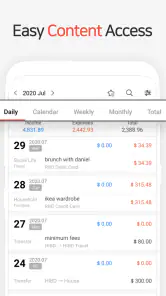
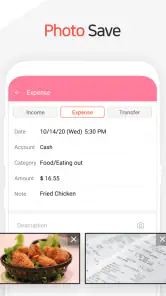
One of the first things I noticed about Money Manager (Remove Ads) is its clean and intuitive interface. Right from the get-go, the app makes it super easy to input your income and expenses. No more fumbling around trying to make sense of complicated features. The layout is straightforward, making it a breeze for anyone to use, whether you're a financial whiz or just starting out.
Features that Make a Difference
What truly sets this app apart are its robust features. Firstly, the budgeting tool is a life-saver. It allows you to set monthly budgets and track your spending against them. The app sends you notifications if you’re nearing your limit, which is a real eye-opener for someone like me who tends to overspend on lattes!
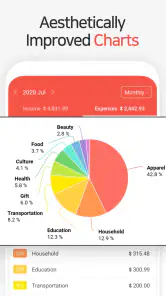
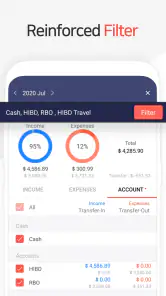
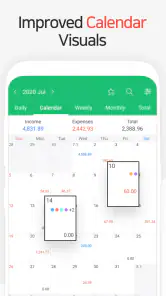
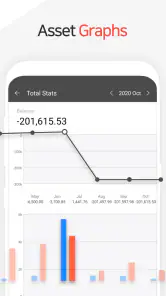
Another standout feature is the ability to view your financial data in various formats. You can choose from graphs, charts, or even simple lists. This visual representation helps in understanding spending habits at a glance. Plus, the app supports multiple currencies, which is perfect if you’re a frequent traveler or have international transactions.
Settings and habits worth checking
Before relying on a budget, I would choose categories that match the way I actually spend. Too many narrow categories slow down entry; too few can hide the difference between essentials and flexible spending. A useful middle ground is to separate recurring commitments from day-to-day choices, then keep the labels consistent so monthly comparisons stay clear.
More From Our News Desk

Clash of Clans Is Won Between the Battles

Android Auto Makes the Case for Quieter Car Software

MobiOffice: Transforming Mobile Productivity with Seamless Integration

EA SPORTS FC™ Mobile Soccer: Redefining Mobile Sports Gaming

How Microsoft OneDrive Became a Mobile Productivity Giant

How Google Translate Breaks Language Barriers Effortlessly
Notifications work best as prompts, not as a substitute for a review. If I get a warning that a budget is close to its limit, I would check whether a one-off purchase explains it or whether the normal pace of spending has changed. That distinction helps avoid reacting to a temporary spike as though it were a lasting problem.
For people handling more than one currency, I would keep the original transaction context in mind when reviewing totals. Currency support is handy for travel and overseas purchases, but a mixed-currency record still benefits from careful entry and a quick check that the amount and currency are right. A little attention at entry time is easier than trying to interpret an odd-looking chart later.
Making repeat entries less of a chore
The most useful shortcut is often a habit rather than a button: decide in advance when entries happen and keep the same routine on busy days. I might check receipts while settling in at home, then record several purchases together while they are still fresh. This batch approach saves interruptions, but I would not leave it until the end of the week, when small cash purchases and unclear descriptions are easy to forget.
For recurring expenses, I would use a consistent category and description each time, rather than inventing a new label because the merchant name looks different. That makes later comparisons easier to interpret. It also helps distinguish a genuine change in spending from a change in how I recorded it. The trade-off is that standardization takes a little thought at the beginning; once the routine is settled, it reduces friction.
A practical review does not need to involve every chart. I would pick one question, such as whether food spending rose compared with the previous month, and use the relevant category view to investigate. If I scan every figure without a question in mind, I am more likely to overreact to a single unusual purchase. Keeping a short note of the decision I want to make—such as packing lunch more often—turns a visual summary into something actionable.
Security and Accessibility
Security is a top priority when it comes to financial apps, and Money Manager doesn’t disappoint. With password protection and the option for biometric login, your financial data remains secure. Plus, the app is available on both Android and iOS, which means you can access your financial information anytime, anywhere.
I also appreciated the seamless cloud sync feature. Whether you're accessing the app from your phone or tablet, your data stays updated across all devices. This is particularly useful for me as I switch between devices often.
Choosing the right level of detail
One decision worth making early is whether a transaction should be split into smaller parts. If a single shopping trip includes groceries and household supplies, recording everything under one broad label is quicker; separating the amounts gives a more useful picture if those costs need different limits. I would split only when the distinction could change a decision. Recording tiny details that I never review adds work without improving the picture.
Likewise, I would avoid changing category names every time my priorities shift. A new budget goal may call for a different view, but consistent records are what make month-to-month comparisons fair. If I do reorganize categories, I would make a note of the change so I do not mistake a reporting difference for a real spending trend. The app is most informative when my own bookkeeping choices remain steady.
Where its approach has limits
Compared with a bank’s built-in spending view, a manual tracker asks for more effort but can give me more control over how I classify purchases. Compared with a spreadsheet, it is more approachable for quick phone entries and visual checks, while a spreadsheet may suit someone who wants custom formulas or a highly tailored setup. Neither alternative removes the need to keep records accurate.
I would not choose this app if I want a completely hands-off picture of my accounts or dislike entering transactions. Manual tracking can become a chore, and a missed week makes budget feedback less dependable. I would also avoid treating a budget notification as financial advice: it is a useful nudge to look at my own choices, not a verdict on whether a purchase is affordable.
There is a second limitation to consider: a well-organized record is still only as complete as the entries behind it. If I forget cash purchases, use inconsistent categories, or enter a transaction in the wrong currency, a neat chart can create false confidence. I would occasionally compare the app’s records with receipts or account activity, especially after a busy stretch. That small check is more valuable than adding more categories to an already messy record.
The app is rated for Everyone and has a 4.7 average from around 18 thousand ratings, with more than 100 thousand installs. It costs $5.99, with in-app purchases ranging from $2.49 to $19.99 per item. It was released on April 5, 2012, and version 4.10.3 GP requires Android 6.0 or later. I would check the exact purchase options in the relevant store before paying, and think about whether an ad-free experience is worth the price for how often I expect to use it.
What to expect before committing
The obvious question for a new user is whether the app can make budgeting easier without taking over the work. My answer is yes, as long as “easier” means making entries and reviewing them more orderly, not automatically collecting every financial detail. I would try it with a few dependable categories first, then add complexity only when a real question cannot be answered with the simpler setup.
Another reasonable question is whether it suits occasional use. It can still help someone check a specific spending pattern, but irregular logging weakens the value of month-to-month totals. If I only open it when I am worried about money, I will probably have gaps exactly when I need a reliable picture. A short, repeatable check-in is a better fit than an occasional deep dive.
The Remove Ads edition is most appealing to someone who expects to use the tracker often and values a less interrupted experience. I would compare that one-time cost and the available in-app purchase choices in the store before deciding, rather than assuming the paid version is necessary for everyone. Someone still testing whether manual tracking suits them may prefer to establish the habit first and then decide whether paying makes sense.
Why You Should Consider It
In a digital age where ads can be overwhelming, having an ad-free experience is refreshing, and that's exactly what Money Manager offers. It allows you to focus solely on managing your finances without any distractions.
Overall, I’ve found Money Manager (Remove Ads) to be an indispensable tool in my financial arsenal. It’s like having a personal accountant in your pocket, keeping you on track without the hefty price tag. So, if you're serious about getting your finances in order, I’d say give this app a go. You might find, like I did, that it’s exactly what you need to achieve your financial goals.
Who will get the most from it
I would recommend it to someone who wants to build a clearer picture of spending, is comfortable logging purchases, and prefers seeing their own categories and budgets rather than relying only on a bank’s automatic labels. It can also work well for a household or traveler who wants to keep a closer record across currencies, provided everyone entering transactions follows the same habits.
If you share finances, agree on category names and decide who records a purchase before you begin. That small bit of coordination prevents duplicate or inconsistent entries and makes a shared review more useful. If your priority is automatic account aggregation, advanced spreadsheet-style analysis, or minimal interaction, a banking tool or spreadsheet may be a better fit.
For an experienced user, the payoff comes from pairing a simple routine with deliberate review: enter transactions consistently, keep categories stable, and use the charts to ask one concrete question at a time. That is a more realistic path to better awareness than endlessly adjusting budgets. I would treat this app as a tidy tracking workspace, not a replacement for judgment, and that is exactly where its straightforward approach makes sense.
My recommendation after weighing the trade-offs
For a realistic weekday, I might record lunch and a transit fare together after getting home, then check the relevant category before making a weekend plan. If the totals look higher than expected, I can inspect the entries and decide whether the difference comes from a one-off event or a repeated choice. That is a modest workflow, but it is precisely the kind of decision a personal tracker can support without turning money management into a second job.
I would choose this app over a bank’s built-in view when I care about assigning transactions to categories that make sense to me, and over a spreadsheet when I want quick phone-based recording without building my own formulas. I would choose neither if my main requirement were automatic account aggregation or extensive custom analysis. The right alternative depends less on which tool has the longest feature list and more on whether I will actually maintain the records.
My final advice is to start with a small set of categories, a manageable review rhythm, and one practical goal. Give the routine enough time to show whether it fits your day, but do not confuse a tidy ledger with a complete financial plan. Money Manager (Remove Ads) is a good choice for hands-on tracking, especially for someone who finds clarity in their own records; it is a poor match for anyone who wants the app to do the recording and interpretation for them.
Money Manager (Remove Ads) Frequently Asked Questions
Can Money Manager (Remove Ads) help me keep personal finances organized in one place?
Money Manager (Remove Ads) is intended for personal asset management, with tools for recording income and expenses, organizing transactions into categories, and reviewing budgets and reports. Keeping those details together can make it easier to see how everyday spending fits your plans. It works best when you enter transactions consistently and choose categories that make sense for your own routine.
Will Money Manager (Remove Ads) work on my phone or tablet?
The Android version requires Android 6.0 or later, so check your device’s operating system before installing. The app is also available for iOS. Whether you use a phone or tablet, consider how comfortably you can enter transactions and review your finances on that screen; a tracking app is most useful when its everyday workflow feels practical to you.
Who develops Money Manager (Remove Ads), and is it suitable for first-time budgeting?
Money Manager (Remove Ads) is a finance app developed by Realbyte Inc. Its purpose is personal asset management, and its transaction, category, and budget tools can suit people who are starting to organize their finances as well as those who already track spending regularly. The app is rated for Everyone, so it is intended for a broad audience.
What is Money Manager (Remove Ads) and how does it work?
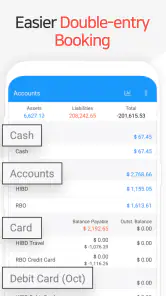
Money Manager (Remove Ads) is a comprehensive financial management app designed to help users track their income, expenses, and overall financial health. The app provides tools for budgeting, expense tracking, and generating financial reports, all without the distraction of ads. Users can easily input transactions, categorize them, and monitor their spending patterns to make informed financial decisions.
Is Money Manager (Remove Ads) available for both Android and iOS?
Yes, Money Manager (Remove Ads) is available for download on both Android and iOS platforms. This ensures that users can enjoy seamless financial management across different devices, whether they are using a smartphone or tablet. The app can be found on the Google Play Store for Android users and the Apple App Store for iOS users.
Pros
- Intuitive user interface
- Comprehensive financial reports
- Multiple currency support
- No ads for distraction-free use
- Data backup and restore
Cons
- Limited free features
- Steep learning curve for new users
- No integration with banks
- Manual data entry required
- Limited customer support options
- Category
- Finance
- Version
- 4.10.3 GP