

Momenzo: Real Estate Videos
- 25.00
- 3.9
- Installs
- 50.00K
- Price
- Free

Screenshots
Analysis by Reviewed
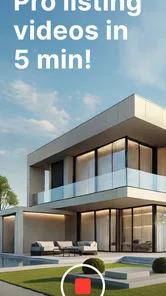
If you need a polished property video but do not want to learn a full editing program, Momenzo: Real Estate Videos is built around a very specific promise: helping you turn listing material into a presentable video with less manual work. I see it as a focused tool for agents, landlords, property managers, and homeowners who want something more engaging than a folder of photos but do not need a cinematic production workflow.
The app sits in the video players and editors category, although its real identity is much narrower than a general-purpose editor. Momenzo Ltd. develops it for real estate presentation, and the store summary points toward creating listing videos quickly. That focus is useful because it removes many decisions that can slow down a beginner. At the same time, it means people looking for unrestricted creative editing may find the experience more limited than they expect.
My overall impression is that the app makes the most sense when speed and consistency matter more than complete control. You provide the material for a property, follow the guided process, and work toward a shareable result. The strongest benefit is not unlimited editing power; it is reducing the distance between raw listing content and a usable presentation.
What to expect before making your first video
The first thing I would tell a new user is to approach Momenzo as a real estate production assistant rather than as a replacement for a professional desktop editor. Its purpose is to help you assemble a listing video efficiently, not to give you every possible adjustment for timing, visual effects, sound design, or detailed color work.
That distinction matters. A traditional mobile editor usually starts with a blank timeline and asks you to make nearly every creative decision yourself. You choose the order of clips, trim each section, arrange text, decide how transitions feel, and work out whether the finished piece looks coherent. Momenzo’s focused approach is more reassuring for someone who simply wants a property to look organized and attractive without spending an evening learning editing terminology.
In practical use, I would prepare the media first instead of opening the app with no plan. Gather the exterior view, the main living areas, bedrooms, kitchen, bathrooms, useful details, and any closing shot you want viewers to remember. A short, deliberate selection is usually easier to manage than importing every image and clip you have. This is one of the less obvious ways to improve the result: the app can simplify assembly, but it cannot rescue a confusing collection of source material.
The application is free to install, with optional in-app purchases listed from around twenty-four dollars to about one hundred seventy dollars per item. That makes it sensible to explore the basic workflow before deciding whether it fits your regular work. I would not treat the presence of a free download as a guarantee that every useful production option will be available without cost. Instead, use the initial experience to judge whether the time saved is valuable for your situation.
More From Our News Desk

 Gmail
GmailGmail in a Busy Inbox: Who Benefits Most?
From first account to crowded workday, Gmail earns its place through dependable search and flexible sorting—but its best fit depends on how much inbox maintenance you can tolerate.

 Prime Video
Switching to Prime Video: What Changes in Your Viewing Routine
Prime Video can make a compelling second home for streaming, but switching means learning a different catalog, rental layer, and route from browsing to playback.

 Universal TV Remote Control
Universal TV Remote Control Works Best as a Reliable Backup
A phone remote earns its place through quick setup and reliable habits. Here is how to get more from Universal TV Remote Control—and where its limits show.

 Weather - By Xiaomi
Weather by Xiaomi Review: Clear at a Glance, Less Clear Up Close
Xiaomi’s weather app makes everyday forecasts quick to scan, but its calm surface can leave useful details and recovery paths harder to find than they should be.

 X
XX Under Pressure: Can It Recover When Posting Goes Wrong?
A resilience-focused review of X, examining setup, mistaken posts, interruptions, weak connections, and the gaps that matter when recovery needs to be dependable.

 Clash of Clans
Clash of Clans Is Won Between the Battles
Its raids are quick; its community is a long-term project of coordination, teaching, rivalry, and shared responsibility—with all the friction that entails.
Latest News



It is suitable for everyone from an age-rating perspective, and it supports Android devices running version eight or newer. The current release is 4.8.1. Those details are helpful when you are setting up a shared work phone or checking whether an older device can run it, but the more important question is whether your phone has enough comfortable screen space and storage for the property media you intend to handle.
Who will get the most from the focused design
I think the best match is a first-time listing creator who needs a repeatable process. An independent agent preparing several properties can benefit from having a dedicated place for this task instead of rebuilding a presentation from scratch in a general editor. A landlord can use the same kind of workflow when advertising a vacant apartment. A homeowner preparing a sale may also appreciate a guided approach, especially if the alternative is learning a complex editing application for one project.
The app is less convincing for a filmmaker, social media editor, or marketing specialist who needs precise creative control. If your work depends on custom animation, carefully timed voice-over, advanced audio mixing, or a highly individual visual identity, a full editor will probably remain the better choice. Momenzo’s value comes from narrowing the problem, and that same narrowing is its main trade-off.
Its audience also affects how you should judge the finished video. A property listing video does not need to behave like a movie trailer. Clear movement through the home, sensible ordering, and readable presentation are often more useful than dramatic effects. I would prioritize a calm tour that helps someone understand the space over a flashy edit that makes the property difficult to evaluate.
Setting up the first project without getting stuck
After installing the app, I would begin with one property rather than trying to build a reusable system immediately. The first project is where you learn how Momenzo wants information arranged and which parts of the process it handles for you. Keeping the test small makes it easier to identify whether a problem comes from the app or from the source material.
Before selecting anything, create a simple shot plan. Start with a recognizable exterior or entrance, move through the strongest shared spaces, then show bedrooms and practical rooms, and finish with a detail that gives the viewer a reason to remember the listing. This order is not just aesthetic. It prevents a common beginner mistake: presenting attractive close-ups before the viewer understands where they are in the property.
I would also rename or organize the media on the phone before importing it. Even when an app makes assembly easier, vague files and repeated images create hesitation. If you have several similar kitchen shots, choose the one with the clearest composition rather than adding all of them “just in case.” A shorter selection gives the final presentation a stronger rhythm and makes the property feel more intentional.
Lighting deserves attention at this stage. Do not expect an editing app to correct every weak photograph. If one room is dark, cluttered, or photographed from an awkward angle, replace that source if possible. A useful workflow is to review the images in the phone gallery first, remove obvious duplicates, and only then bring the strongest material into the project. This saves time and makes later decisions less frustrating.
For a real-world example, imagine that I am preparing a rental listing between appointments. I would capture the building exterior, the entryway, the living room, kitchen, bedroom, bathroom, storage area, and a final wide view. I would avoid mixing unrelated older images with the new set. Once the material is gathered, Momenzo becomes useful because I am asking it to organize a clear story, not to decide what the property actually offers.
The first successful action
The first meaningful success is not merely opening a project. It is producing a complete draft that lets another person understand the property without me explaining every image. To reach that point, I would choose one listing, add only its most representative media, and follow the app’s creation flow from beginning to end before spending time on small refinements.
That “complete draft first” habit is important for beginners. It is easy to become stuck adjusting one scene before knowing whether the whole sequence works. A finished rough version reveals bigger issues earlier: perhaps the opening does not establish the location, the middle section repeats the same room, or the ending feels abrupt. Fixing the structure first is more productive than polishing a weak arrangement.
When reviewing the draft, I would watch it as if I were a prospective buyer or tenant. Ask whether the property is easy to recognize, whether the sequence feels logical, and whether the important rooms receive enough attention. I would also check whether the presentation creates an honest impression. A video can look polished while still being unhelpful if it hides awkward spaces or relies too heavily on close-ups.
A practical tip is to make a version for the listing itself and a separate version for quick personal review, if the workflow allows you to manage those materials clearly. The listing version should be clean and easy to follow. Your private review copy can help you spot missing rooms, inconsistent images, or a sequence that makes the home feel smaller than it is. The key is to avoid confusing multiple properties on the same phone.
Another useful habit is to keep the first project deliberately modest. Do not judge the app by attempting a large luxury listing with dozens of rooms as your first test. Use a small apartment or a compact home, learn the process, and then decide how well the workflow scales to your normal assignments. This gives you a fairer impression than an overloaded first attempt.
Where beginners commonly feel confused
The most likely confusion comes from expecting a specialized tool to behave like a blank-canvas editor. If you are accustomed to dragging every clip wherever you want, Momenzo may feel more structured. I would not interpret that immediately as a flaw. The structure is part of what makes the app approachable, but it can feel restrictive when your project does not fit a typical property-tour pattern.
Another point of friction is the difference between a visually attractive image and a useful listing image. A close-up of a stylish fixture may look good in isolation, yet it tells the viewer little about the room. I would use detail shots sparingly and place them beside wider views that explain context. This is especially important in small spaces, where too many close-ups can make the property seem misleadingly spacious.
Users may also wonder why a draft does not instantly feel professional. The answer is usually not that the app has failed. Real estate video quality depends heavily on the order, lighting, stability, and consistency of the original material. If one clip is vertical, another is poorly framed, and a third is much darker, the finished result will reflect those differences. A dedicated workflow can reduce editing effort, but it cannot make mismatched footage naturally consistent.
I would review the first export on the same kind of screen your audience is likely to use. A sequence that looks fine while editing may feel too fast or too busy when watched casually on a phone. If the app offers a straightforward way to revise the project, make changes based on that viewing experience rather than trying to perfect everything inside the editor window.
There is also a financial question. Since optional purchases can reach a substantial amount per item, I would inspect what is included in the free experience before building the app into a business routine. For an occasional homeowner, paying for a specialized workflow may not be worthwhile. For a professional who repeatedly prepares listings, the calculation is different: the relevant comparison is not only the purchase cost, but also the time saved compared with manual editing.
How it compares with ordinary mobile editors
General mobile video editors are better when you want freedom. They usually suit projects with unusual pacing, multiple audio layers, custom titles, or a mixture of personal and promotional footage. They can also be a better long-term investment for someone who plans to edit travel videos, social clips, tutorials, and property tours in the same application.
Momenzo makes a stronger case when the subject is consistently real estate. Its specialization can reduce the number of creative choices that a beginner has to make, which is valuable when the goal is to publish a listing rather than study editing. I would choose it over a general editor for a user who feels overwhelmed by timelines and wants a more direct route to a property-focused result.
The trade-off is flexibility. If I wanted to build a highly branded campaign with exact typography, carefully timed narration, or unusual transitions, I would start in a broader editor. If I needed to create a clear property tour quickly and repeat the process across several listings, I would give Momenzo the advantage. Neither choice is universally better; the right option depends on whether speed or control is the main constraint.
Taking the next step after the first draft
Once the first video works, I would develop a personal checklist rather than simply repeating the same upload process. Check the entrance, the main living area, the kitchen, sleeping spaces, bathroom, storage, outdoor areas, and any feature that affects a buyer’s decision. This turns the app from a one-off experiment into part of a reliable listing routine.
I would also create a consistent capture style. Use similar camera height, avoid unnecessary movement, and pause briefly before and after important views. Even if the app assembles the material efficiently, steady source clips make the result feel more deliberate. Consistency is often more persuasive than adding extra visual decoration.
For agents, the next useful step is separating projects carefully by property. Finish or archive one listing before beginning another, and check the opening and closing material every time. A polished video with the wrong room sequence or mixed property images is worse than a simple video that is clearly correct. This organizational discipline is easy to overlook because it happens outside the creative part of the app.
For landlords and homeowners, I would decide whether a video is actually helping the listing. A compact, well-presented tour can answer basic questions and give viewers a better sense of flow. However, it should support accurate written details and photographs rather than replace them. People still need practical information that a moving sequence may not communicate clearly.
The app has built a modest audience, with over fifty thousand installs and an average rating of 3.9 from around five hundred ratings. I read that as a sign of useful appeal alongside some understandable limits, not as a reason to expect perfection. The rating is consistent with my view: the focused workflow can be genuinely helpful, but the experience will depend on whether your needs match its property-video purpose.
My recommendation is straightforward. Try it if you are new to real estate video, value a guided process, and want to turn a carefully selected set of property images or clips into a coherent presentation. Start with one small project, test the free workflow, and judge the result on clarity rather than flashy effects. If you want a fast, property-specific starting point, Momenzo is worth exploring; if you want an unrestricted editing studio, choose a broader tool instead.
After using it this way, I see its role clearly: it is a practical bridge between raw listing media and a finished property presentation. It will not replace thoughtful photography, good organization, or honest coverage of the home. What it can do is make the first successful video feel achievable, especially for someone who would otherwise avoid editing altogether.
Momenzo: Real Estate Videos Frequently Asked Questions
Will Momenzo work on my Android or iPhone?
Momenzo is available for mobile devices, and its minimum operating-system requirement is version 8.0. Before downloading, check that your device meets that requirement and that you are installing the app from the store for your platform. Keeping your phone’s software up to date can also help with compatibility and everyday performance when working with photos and video.
What is Momenzo: Real Estate Videos used for?
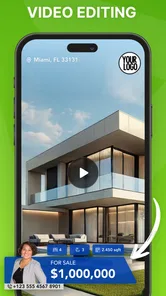
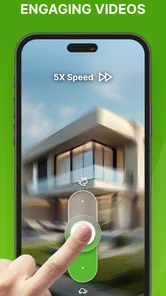
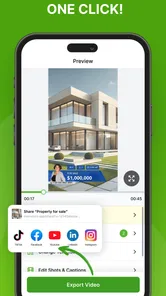
Momenzo is a mobile app designed to help real estate agents, property managers, and homeowners create professional-looking property videos. It combines photos, video clips, text, music, branding, and listing information into ready-to-share presentations. The app is especially useful for promoting homes on social media, websites, messaging apps, and real estate portals without requiring advanced video-editing experience.
Do I need professional video-editing skills to use Momenzo?
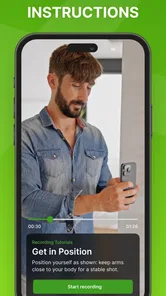
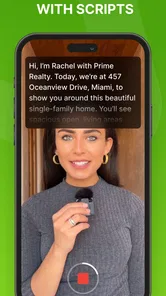
No. Momenzo is built around guided templates and a relatively simple mobile workflow. You can usually select a property presentation style, add images or footage, enter details such as the address and price, and customize branding elements. While the app makes production easier, creating an attractive result still depends on using clear photos, steady footage, accurate listing information, and thoughtful captions.
Can I add my own branding, contact details, and property information?
Momenzo is intended for real estate marketing, so branding and listing details are important parts of the experience. Depending on the selected template and subscription plan, you may be able to add an agency logo, agent information, contact details, property descriptions, prices, and other presentation elements. Review the available customization options before subscribing if specific branding controls are essential to your workflow.
Is Momenzo free to download, and are there in-app purchases?
Momenzo is free to download, but in-app purchases range from $23.99 to $169.99 per item. Access to templates, exports, advanced features, or removal of limitations can depend on a paid plan or in-app purchase. Before confirming a subscription or purchase, check the store listing carefully for renewal terms, billing frequency, and cancellation instructions.
Pros
- Automates property video creation with ready-made layouts.
- Supports vertical videos suited to social media platforms.
- Lets you add branding
- contact details
- and property information.
- Can help agents produce listings without advanced editing skills.
- Useful for creating consistent marketing content across multiple properties.
Cons
- Some templates and features may require a paid subscription.
- Export options can vary depending on the selected plan.
- High-resolution video rendering may take time on older devices.
- Results depend heavily on the quality of your photos and clips.
- Limited creative control compared with professional video editors.











