MobileSheets
- 474.00
- 4.5
- Installs
- 100.00K
- Price
- $15.99

Screenshots
Analysis by Reviewed
I trust music tools most when I can tell what they let me do, where my files go, and which choices remain in my hands. That is the lens I bring to MobileSheets, a paid sheet-music app from Zubersoft. It has a 4.5 average from around 4,200 ratings, and more than 100,000 installs, which suggests it has found an audience among musicians who want more than a basic PDF viewer. Still, popularity alone does not tell me how any app handles personal information, so I focus on practical controls and on the moments when I would be importing, editing, or sharing music.
Where trust enters the music workflow
For me, trust is less about a reassuring label and more about whether I can make sensible choices at each step. A score may be only a working chart, but it can also contain personal annotations, arrangements, or material I am not ready to share. I would start with a few non-sensitive files, learn the import and backup flow, and only then decide how much of my working library I want to manage in the app.
MobileSheets sits in the Music & Audio category, but it is aimed at a narrower job than a streaming service or general audio player: keeping playable sheet music usable during practice and performance. That focus is valuable, though it also means I would judge it by the details of the score workflow, not by assumptions about how music apps usually handle accounts or libraries. Its $15.99 price makes a small trial with representative scores especially worthwhile before committing to a larger move.
What I would check before building a library
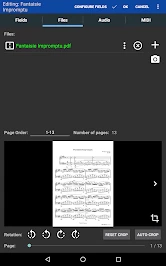
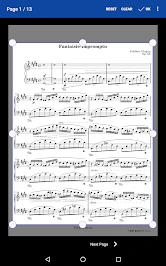
My first step would be to test the workflow with a small group of scores rather than move an entire collection at once. The app supports importing PDFs and images, and its description of cloud-service imports makes that route convenient when a chart is already stored elsewhere. I would confirm that the files I need are available on the device before rehearsal, then check that annotations remain legible on the pages I actually use. That small trial also helps me decide whether my preferred organization—by composer, gig, or set—is easy to maintain.
For trust, there is a useful distinction between a visible tool and a privacy guarantee. An import option tells me how I can bring music into the app; by itself, it does not establish how every file or account detail is handled. I would review the permission prompts and choices shown on my device, grant access only when it is needed for a task, and avoid assuming that a cloud workflow behaves like local storage. The app is rated for Everyone, and its current release is version 3.9.32 (Build 575), but neither detail is a substitute for checking the controls that appear during setup and use.
Your Music, Your Way
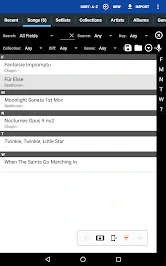
One of the first things I noticed about MobileSheets is how incredibly easy it is to organize your music collections. Whether you're a classical musician, a jazz enthusiast, or a rock star, the app lets you categorize your pieces in a way that makes sense to you. You can create setlists, categorize by genre, or even tag pieces based on mood or performance type. It's like having a personal music librarian in your pocket!
Features That Hit the Right Note
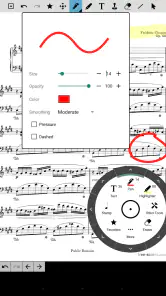
Let’s talk about the features because, honestly, that's where this app shines. First off, the import options are super flexible. You can bring in your sheet music via PDFs, images, and more, directly from cloud services. This means you can quickly upload files from Google Drive, Dropbox, or OneDrive with ease. Plus, the annotation tools are top-notch. You can scribble, highlight, and even add text notes, which is perfect for marking tricky passages or jotting down fingerings on the fly.
More From Our News Desk

Clash of Clans Is Won Between the Battles

Android Auto Makes the Case for Quieter Car Software

MobiOffice: Transforming Mobile Productivity with Seamless Integration

EA SPORTS FC™ Mobile Soccer: Redefining Mobile Sports Gaming

How Microsoft OneDrive Became a Mobile Productivity Giant

How Google Translate Breaks Language Barriers Effortlessly
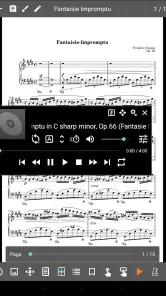
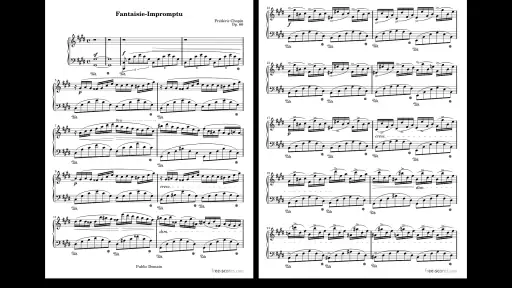
Another feature I absolutely love is the metronome and music player integration. Practicing becomes so much more efficient when you can keep time with a built-in metronome or play along with backing tracks. Oh, and did I mention the half-page turn? It’s such a thoughtful addition that makes following along with your music a breeze during performances.
Small tests that prevent rehearsal surprises
A helpful first-session routine is to open one score with several page layouts rather than judge the app from a single tidy PDF. Scans can have uneven margins, and a page that looks clear on a laptop may be harder to read at the distance or angle you use while playing. I would check the smallest notation I need, try the page-turn method I expect to use, and make sure any marks I add do not obscure rests, dynamics, or other cues.
For practice, I would use the metronome or a backing track to work through a difficult section, then leave a concise note at the point where I tend to lose time. This is more useful than covering every page with reminders: the screen should help me find the next action quickly, not become a second score full of clutter. If I am preparing a part for a student or bandmate, I would also keep a clean copy and a working copy so my private rehearsal marks do not become the version I intend to share.
Making a setlist work in real life
One useful approach is to prepare a separate setlist for each rehearsal or performance instead of searching through a large library while everyone waits. I would check the order and page flow at home, then keep the setlist focused on the charts needed that day. For a gig with quick transitions, half-page turns can be worth testing with the device positioned where you will actually read it; a feature that feels natural at a desk may take practice when your attention is on an ensemble.
That flexibility is also where the app asks for some care. Annotations are helpful, but I would make a copy of an important score before experimenting with extensive markings, so the clean version remains easy to find. Likewise, a Bluetooth pedal can reduce screen taps, but it adds another piece of equipment to charge, pair, and test. If I only read a few pages occasionally, paper or a simple document reader may be less setup than I need. MobileSheets makes more sense when repeated performances, edits, and organized repertoire justify that preparation.
Performance Ready
If you're a performer, you know the struggle of fumbling with sheet music mid-performance. With MobileSheets, page turns are as easy as a tap or a Bluetooth pedal press. It’s a seamless experience that helps you stay focused on your performance rather than worrying about what page you're on. And for those who prefer to perform with a band, the app's ability to share setlists and sync across devices is a real boon.
That convenience depends on the whole setup, not just the app. Before a performance, I would test the screen position, page-turn response, and any pedal connection during a full run-through, rather than discovering an awkward reach in front of an audience. A tablet stand, readable display, and reliable access to the relevant scores all matter to the experience. If those practical pieces are not ready, a paper binder can still be the calmer choice for a one-off performance.
Choices around sharing and backups
Sharing a setlist or syncing devices can save time when musicians need to prepare from the same order, but I would treat sharing as an intentional step: check what is being sent and who needs it before proceeding. A setlist is not necessarily the same thing as the underlying scores, so I would verify the recipients can access the material they need rather than assume every file travels with it. For backups, I would make a test copy and check that it can be restored before relying on it for a major performance or a device change.
If I were preparing for a new device, I would treat the transfer as a rehearsal task rather than a last-minute admin job. I would make the backup, restore a small sample, open a score with annotations, and confirm that the setlist order still makes sense. That process answers a practical question many musicians have: whether a backup is useful in real life, not merely whether an option exists. I would keep the old device or a separate copy untouched until I had checked the restored material.
These are practical checks, not signs that something is wrong. They help me keep a clean master library, avoid last-minute surprises, and make informed choices about the documents I bring into a music app. If account or privacy controls matter to you, take a moment to inspect the settings and prompts available on your own device; I would not treat a general backup or sharing feature as a complete explanation of data handling.
How it compares with simpler options
The closest alternative for many people is not another specialist music tool; it is a PDF reader, a folder of image files, or a binder of printed pages. Those options can be quicker to understand and perfectly adequate for a small, stable repertoire. They may be preferable if you rarely change page order, do not need annotations, or want to avoid organizing scores inside a dedicated system. MobileSheets earns its place when the same music is revisited, marked, arranged into different sets, or used in performance.
Compared with a plain document reader, the advantage here is the combination of music-focused organization, annotation, practice tools, and performance-oriented page turning. The trade-off is that a more capable library takes more care: importing, naming, tagging, and checking files are small jobs that accumulate. I would not pay for specialist features simply because they exist; I would ask whether they save enough repeated effort in my own routine to justify learning and maintaining them.
A realistic week with the app
Imagine I have a rehearsal after work and a weekend performance using some of the same charts in a different order. Earlier in the week, I could import the needed PDFs, mark a few entrances, and create one setlist for rehearsal and another for the performance. At rehearsal, I would use the notes to focus on problem passages; afterward, I could adjust the working annotations without having to rebuild the whole library. Before the weekend, I would check the performance order and test page turns with the device in its actual position.
This kind of routine is where a dedicated sheet-music app can feel more useful than a folder of files. It turns several repeated tasks—finding the right chart, remembering a cue, and preparing an order—into one prepared workflow. It is not magic, though: if the files are poorly scanned, the setlist is stale, or the device is not positioned comfortably, the app cannot fix those problems for me. A few minutes of setup are part of the bargain.
Final Thoughts
In conclusion, MobileSheets is more than just a digital sheet music reader. It’s a comprehensive tool that caters to both practicing musicians and live performers. Whether you’re in a studio or on stage, this app offers the flexibility and functionality needed to enhance your musical journey. Trust me, once you start using it, you’ll wonder how you ever managed without it. So, go ahead, give it a try, and let your music soar without the paper clutter!
Who will get the most from it
I would recommend it most to musicians who revisit the same repertoire, need to annotate charts, or perform from changing setlists. A teacher preparing marked-up parts or a player covering several gigs may value having scores and notes together more than someone who only opens a chart now and then. If you prefer printed pages, have a very small collection, or want a basic reader with minimal setup, a standard PDF app or paper binder may suit you better.
My cautious recommendation
At $15.99, this is a considered purchase rather than an impulse download, and I would decide based on how often its specialist workflow would earn its keep. It has been available since April 13, 2015, and the current version is 3.9.32 (Build 575), with a minimum operating-system requirement of 7.0. Those details help me judge compatibility and maturity, but the best test is still whether it handles my actual scores and habits comfortably. Zubersoft’s app has a 4.5 average across around 4,200 ratings and 474 reviews, yet I would use those figures as context, not as a substitute for trying my own files and checking the choices presented on my device.
My overall advice is to begin with a small, representative library and ask three practical questions: Can I find the right chart quickly, can I make useful marks without muddling the page, and can I recover my work if I change devices? If the answers are yes, its organization and performance tools can make regular music work feel more orderly. If I mainly need to open an occasional score, a free or simpler PDF workflow may be the more sensible fit. For musicians who value control over their working repertoire, the app is worth considering—with a deliberate approach to imports, sharing, and backups.
MobileSheets Frequently Asked Questions
What devices and operating systems can run MobileSheets?
MobileSheets is a sheet music viewer for musicians, and its listed minimum operating system is 7.0. Before downloading, check that your device meets this requirement and that you are choosing the edition intended for your platform. The app is available for Android and iOS, so musicians can use it on compatible devices within either ecosystem.
What is MobileSheets and what are its primary features?
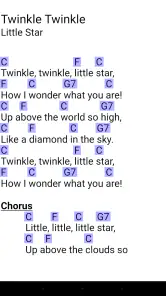
MobileSheets is a versatile sheet music reader app designed for musicians who want to manage their music collections digitally. Its primary features include the ability to import PDF and image files, annotate scores, create setlists for performances, and use a metronome. Additionally, it supports MIDI connections and offers a robust library management system, making it a comprehensive tool for musicians of all levels.
How does MobileSheets handle music annotation and organization?
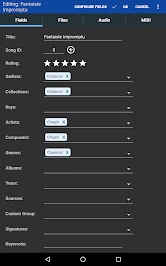
MobileSheets provides a comprehensive annotation toolset that allows users to mark up their sheet music with notes, highlights, and symbols. This feature helps musicians customize their scores for practice or performance. The app also excels in organization, allowing users to categorize music by composer, genre, or custom tags. This makes it easy to locate and manage pieces efficiently.
Can MobileSheets be used across different devices and platforms?
Yes, MobileSheets is available for both Android and iOS devices, ensuring cross-platform accessibility. This means that users can sync their music library across multiple devices, allowing seamless transitions between different operating systems. The app provides cloud backup options to ensure that all data remains safe and accessible regardless of the device used.
Is there a free version of MobileSheets, and what are the differences between the free and paid versions?
MobileSheets offers a free version with basic functionalities, but it may have limitations on features such as the number of pieces you can store or the extent of annotation options. The paid version unlocks the full feature set, including unlimited music storage, advanced annotation tools, and better integration with MIDI devices. Users should consider their needs before deciding which version to use.
Pros
- Highly customizable sheet music app.
- Supports various file formats
- including PDF.
- Easy library organization and search.
- Annotations and notes are simple to add.
- Metronome feature aids practice.
Cons
- Limited free version features.
- Syncing between devices can be tricky.
- In-app purchases might be costly.
- Initial setup can be confusing.
- Occasional performance lags.
- Category
- Music & Audio
- Version
- 3.9.32 (Build 575)











