

Minga
- 426.00
- 3.2
- Installs
- 100.00K
- Price
- Free

Screenshots
Analysis by Reviewed
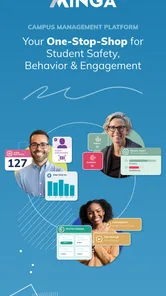
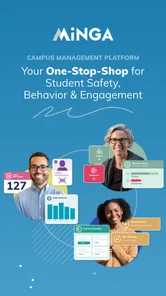
I approached Minga as a practical education app rather than another general communication tool. Its purpose is to bring campus activity into one connected space, with the larger goal of helping schools create a safer, more engaged environment. That sounds broad, so the real question is whether putting those responsibilities together makes daily school life easier for students, families, teachers, and administrators.
My answer is that Minga is most interesting when a school wants one shared system instead of a collection of disconnected tools. It is free, aimed at everyone, and developed by Minga Solutions Inc. The app belongs in the education category, and its current version is 7.21.1 for devices running Android 8.0 or later. Those details make it relatively approachable, but they do not automatically make it the right choice for every campus.
What I would consider before choosing Minga
The first decision is not whether the app looks useful on a phone. It is whether the school can actually organize its routines around a common digital home. An individual student can install Minga, but the value depends heavily on whether the surrounding school community uses it consistently. If only a small group checks it, the experience can feel incomplete no matter how polished the app is.
I would also ask what problem the school is trying to solve. If the main need is simply sending occasional announcements, a familiar messaging channel may be enough. If the school needs a broader campus experience that connects communication, engagement, and safety-related routines, Minga is easier to justify. The important distinction is between adding another app and replacing scattered habits with one recognizable place.
For students, the decision comes down to clarity. A useful campus app should reduce the need to remember which service handles which task. For families, it should make school participation feel less fragmented. For staff, it should support a repeatable workflow rather than becoming another inbox that must be checked without clear purpose. I would judge Minga by those practical questions before judging it by its download page.
The everyday experience depends on adoption
In a realistic school-day scenario, a student could open Minga while preparing for the day, check what is relevant to campus life, and return to it when an activity or school message needs attention. The benefit is not one spectacular function; it is the possibility of making school information easier to find and campus participation easier to follow.
That same scenario exposes the main weakness. A shared platform only works when the people responsible for publishing information keep it current and when users know where to look. If a school continues to distribute important updates through several unrelated channels, Minga may become one more place to check rather than the central place it is intended to be. I would want the school to explain its communication policy before expecting families to rely on it.
More From Our News Desk

 Gmail
GmailGmail in a Busy Inbox: Who Benefits Most?
From first account to crowded workday, Gmail earns its place through dependable search and flexible sorting—but its best fit depends on how much inbox maintenance you can tolerate.

 Prime Video
Switching to Prime Video: What Changes in Your Viewing Routine
Prime Video can make a compelling second home for streaming, but switching means learning a different catalog, rental layer, and route from browsing to playback.

 Universal TV Remote Control
Universal TV Remote Control Works Best as a Reliable Backup
A phone remote earns its place through quick setup and reliable habits. Here is how to get more from Universal TV Remote Control—and where its limits show.

 Weather - By Xiaomi
Weather by Xiaomi Review: Clear at a Glance, Less Clear Up Close
Xiaomi’s weather app makes everyday forecasts quick to scan, but its calm surface can leave useful details and recovery paths harder to find than they should be.

 X
XX Under Pressure: Can It Recover When Posting Goes Wrong?
A resilience-focused review of X, examining setup, mistaken posts, interruptions, weak connections, and the gaps that matter when recovery needs to be dependable.

 Clash of Clans
Clash of Clans Is Won Between the Battles
Its raids are quick; its community is a long-term project of coordination, teaching, rivalry, and shared responsibility—with all the friction that entails.
Latest News



The app’s age rating of Everyone is sensible for a school-oriented product. Still, an age rating does not tell me how a particular school will configure or use it. Parents and students should think of the rating as a basic accessibility signal, not as a substitute for understanding the school’s own routines and expectations.
Where the unified approach is valuable
Minga’s strongest idea is consolidation. Instead of treating campus connection as a single announcement stream, it presents the school experience as something broader: communication, participation, and a sense of belonging can sit within the same app. That makes it more distinctive than a basic classroom messaging tool.
I find this especially useful for schools where information is spread across email, paper notices, social channels, and separate activity systems. Even when each individual method works, the overall experience can be tiring. A student may miss something not because the message was unclear, but because it appeared in a place they were not expecting. A central app can reduce that uncertainty if the school uses it with discipline.
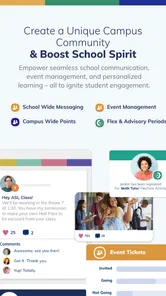
There is also a subtle benefit for engagement. When campus life is presented as more than academic administration, students may be more likely to notice activities and feel connected to what is happening around them. I would not promise that an app alone creates community, but a consistent digital meeting point can support the habits that make participation easier.
Another useful insight is that Minga may be more valuable as a routine than as an emergency download. Installing it only when a student needs a particular notice misses the larger advantage. The better workflow is to make it part of a regular check-in, while the school keeps its information organized enough that users can quickly distinguish urgent matters from general campus activity.
How I would use it without creating more noise
I would begin by deciding what deserves immediate attention and what can wait. If every update is treated as equally important, the app can become noisy and users may stop checking it carefully. Schools should establish simple habits around timing, wording, and audience. Students and families, in turn, should learn which areas are relevant to them instead of trying to follow everything.
A second practical tip is to use the app as a starting point for campus awareness, not as the only source of personal planning. I would still keep a separate calendar or reminder system for deadlines and appointments if that is already part of my routine. Minga can help me stay connected to the school environment, but I would not assume that one education app should replace every personal organization tool.
For staff, the less obvious trade-off is consistency versus flexibility. A central system becomes easier to understand when departments follow shared conventions. However, a school may also need different groups to communicate in different ways. The challenge is to preserve the convenience of one home without turning it into a crowded collection of unrelated notices.
What the numbers suggest about its place in the market
Minga has passed 100K installs, which indicates that it has reached a meaningful number of Android users, though it is not something I would describe as universal. Its average rating is 3.2 from around 1.1K ratings, alongside 425 written reviews. I read that combination as a reason to approach it thoughtfully: there is enough user activity to show real interest, but the score does not support blind enthusiasm.
Ratings for school platforms can reflect more than the software itself. The quality of a rollout, the clarity of school instructions, and the usefulness of the information being published can all affect how people feel about the app. That does not excuse a frustrating experience, but it does mean I would separate the product’s central concept from the way a particular institution manages it.
The fact that it is free removes one obvious barrier for families and students. It does not remove the practical cost of learning a new routine. Time spent installing, signing in, understanding where information belongs, and changing established habits is still a form of cost. A school should plan for that transition rather than assuming that free means effortless.
When another type of tool may be better
I would choose a simpler messaging platform when a school only needs direct announcements and does not want to build a wider campus experience. A classroom-focused service may be better when the priority is assignments, teacher feedback, and academic work. A calendar-first solution may suit a community whose main pain point is scheduling rather than engagement.
That comparison is not a criticism of Minga. It is a reminder that “all in one” can be either convenient or excessive. If I only need one narrow task, a focused tool may feel faster and easier. Minga makes more sense when the school wants the broader connection implied by its design, not when administrators are trying to solve a single small problem.
I would also hesitate if the school cannot commit to keeping the platform coherent. A central app with outdated or duplicated information can create more confusion than a small number of clearly managed channels. Before switching, I would ask who owns the publishing process, how students are introduced to the app, and what happens to older communication methods. These questions matter more than the installation itself.
The real cost of switching
Moving to Minga is not just a technical change. It changes where people look for campus information and how staff think about publishing it. Students may need a short orientation. Families may need clear guidance about which notices matter to them. Teachers and administrators may need agreed rules so that the app does not become a dumping ground for every message.
The transition will be smoother if the school starts with a small number of dependable routines. For example, it could identify the kinds of information that belong in the app, tell users what remains elsewhere, and explain how often they should check. That approach is more realistic than presenting Minga as a complete replacement for every existing system from the first day.
There is also a social cost when different groups adopt the app at different speeds. If students use it but families do not, or if staff publish inconsistently, the shared-campus idea weakens. I would therefore judge success by common behavior, not by the number of installations. A smaller, active user community may be more useful than a large group that rarely knows what to do inside the app.
Who should try it
I recommend Minga for schools that want to connect campus communication with a wider sense of participation and safety. It is a good candidate for a community that is willing to define clear usage rules, train people briefly, and make the app part of everyday school routines. Students and families who dislike searching through several channels may appreciate that direction.
I would be more cautious for someone looking for a personal study planner, a dedicated homework manager, or a private family chat. Minga is not the first tool I would choose for those narrow purposes. Its value comes from the relationship between the individual user and the wider campus, so a person whose school does not actively use it may gain very little from installing it alone.
The same applies to schools already satisfied with a focused academic platform. If teachers, students, and families can find assignments and announcements easily, adding Minga may create overlap. The strongest case for switching is not “we need another app,” but “our current tools do not give the campus one clear, connected experience.”
My recommendation after weighing the trade-offs
I see Minga as a worthwhile option for institutions that are ready to make campus connection a shared habit. Its free access, Everyone rating, and support for Android 8.0 or later make the entry point straightforward, while its education focus gives it a clearer purpose than a general chat application. The concept is appealing because it tries to bring several parts of school life closer together.
At the same time, I would not recommend installing it without knowing how the school intends to use it. The middling average rating suggests that the experience will not be equally satisfying for everyone, and the app cannot solve inconsistent communication on its own. The most important feature, in practice, is a reliable agreement between the institution and its users about what belongs there.
My final advice is simple: try Minga when your school is genuinely prepared to make it a central campus touchpoint, and skip it when you only need a narrow academic or messaging function. The app is strongest as a shared school routine, not as a standalone download. If that distinction matches your situation, it is worth exploring; if it does not, a more focused alternative may save you time and confusion.
Minga Frequently Asked Questions
Is Minga intended for students, families, or school staff?
Minga is an education app built around creating a safe, connected, and engaged campus in one place. That makes it relevant to people involved in a school community, although the experience may depend on how a particular organization uses the platform. If you are considering it for a campus, check with the school or organization about who can join and how members are expected to use it.
What is Minga and what can I use it for?
Minga is a digital platform designed to help users organize and manage everyday activities in one place. Depending on the version available in your region, it may include tools for communication, planning, coordination, updates, or community participation. Before downloading, check the app-store description and the developer’s information to confirm which features are currently supported on your Android or iOS device, as availability can vary by location and account type.
Is Minga free to download and use?
Minga is free to download. Some features, services, or content could depend on the organization providing access or on optional in-app purchases. After installing the app, review the registration screen, subscription details, and privacy or payment terms carefully. The exact cost structure can change over time, so users should verify the current information on Google Play or the Apple App Store before proceeding.
Do I need an account or invitation to use Minga?
In many cases, Minga is intended for users connected to a particular group, organization, school, workplace, or community. This means you may need to create an account, enter an access code, or accept an invitation before all functions become available. If registration does not work immediately, confirm that your email or phone number is supported and ask the relevant administrator whether your account has been activated.
What permissions and personal information does Minga require?
During setup, Minga may request information such as your name, email address, phone number, profile details, or organization membership. Depending on its features, it could also ask for notifications, camera, photo, calendar, storage, or location permissions. You can usually review and change these permissions in your device settings. Read the app’s privacy policy before accepting, particularly if the service is used by children or within an institution.
Pros
- Simple interface makes daily transit information easy to find.
- Supports cashless ticketing for faster boarding on supported routes.
- Useful service updates help users plan around delays or disruptions.
- Route information can reduce the need for separate transit apps.
- Convenient for checking tickets and travel details in one place.
Cons
- Coverage and features depend heavily on the local transport network.
- Some tickets or passes may not be available through the app.
- Account or payment setup can take time before first use.
- Service information may occasionally lag behind real-time conditions.
- A stable internet connection may be needed for key functions.











