Milwaukee Journal Sentinel
- 386.00
- 2.3
- Installs
- 50.00K
- Price
- Free

Screenshots

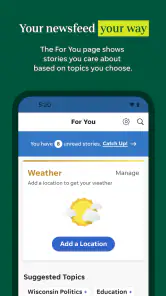
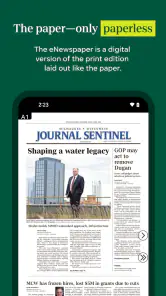




Analysis by Reviewed
I approached Milwaukee Journal Sentinel as a reader who wants local reporting without constantly opening a browser. It is a free news and magazines app from USA TODAY Co., focused on Milwaukee coverage alongside broader breaking news, entertainment, local sports, and access to the eNewspaper. That combination makes it more than a headline feed: it is meant to serve both quick updates and readers who prefer a newspaper-style edition.
My overall impression is mixed. The app has a clear purpose and can be useful if Milwaukee reporting is central to your daily routine, but its modest average rating of 2.3 from around 687 ratings suggests that the experience has not worked equally well for everyone. I would not dismiss it on that basis alone, because a local newspaper app can be valuable even when it is not the smoothest news reader. I would, however, install it with realistic expectations about speed, account access, and the difference between casual browsing and regular newspaper use.
What the app is really built for
The strongest reason to choose this app is its local focus. National news applications can give you a broad picture of the day, but they rarely replace a publication that follows Milwaukee-area stories, local teams, and community developments closely. Here, the regional identity is the point. If you live in the area, have family there, or want a dependable local perspective, the app is more relevant than a general-purpose news aggregator.
The content mix also gives it two distinct jobs. For a quick check, I would use it to scan breaking news, entertainment items, or sports updates. For a longer reading session, the eNewspaper is the more newspaper-like part of the experience. That split matters because the best way to judge the app depends on what you expect from it. Someone looking only for fast headlines may find the publication-oriented approach more involved than a lightweight news feed, while a subscriber-minded reader may appreciate having both current updates and an edition format in one place.
The app is free to install, but it includes in-app purchases ranging from $19.99 to $69.99 per item. That means “free” should be understood as an entry point rather than a guarantee that every part of the reading experience is unrestricted. Before relying on it as your only source of local news, I would check which articles and newspaper content are available to you and which may require a purchase or subscription arrangement. This is especially important if you are downloading it for a household member who expects complete edition access immediately.
Speed expectations during ordinary reading
For ordinary use, I would treat the app as a publication reader rather than an instant, minimalist headline tool. The time it takes to reach a story is not only about loading a page; it also depends on moving through sections, selecting the right local topic, and deciding whether you want a live article or the eNewspaper. That extra choice is useful, but it can make the experience feel less direct than opening a general news feed.
A practical routine is to use it in two passes. In the morning, scan the local news and sports areas for the subjects that matter that day. Later, when you have more time, open the eNewspaper for a fuller reading session. Separating those habits keeps the app from feeling slow simply because you are asking a newspaper edition to behave like a social timeline. It also helps you notice whether the app fits your reading style before you commit to any paid access.
More From Our News Desk

Weather by Xiaomi Review: Clear at a Glance, Less Clear Up Close

X Under Pressure: Can It Recover When Posting Goes Wrong?

Clash of Clans Is Won Between the Battles

Android Auto Makes the Case for Quieter Car Software

MobiOffice: Transforming Mobile Productivity with Seamless Integration

EA SPORTS FC™ Mobile Soccer: Redefining Mobile Sports Gaming
The latest listed version is 8.10.3, and the app has been available since Jan 14, 2013. That long presence suggests an established product rather than a temporary experiment, but it does not automatically mean every screen will feel modern or equally responsive. In my view, the more realistic expectation is steady utility: open it for a specific local purpose, read what you need, and avoid judging it solely by the speed of the fastest headline apps.
What happens when reading becomes heavier
The heavier moments are likely to come when you move beyond a handful of articles. A long eNewspaper session, repeated switching between local reporting and sports, or frequent opening and closing of stories places more demands on the app than a quick headline check. That is where the distinction between a useful newspaper companion and a polished all-purpose news reader becomes clearer.
I would use a simple workflow on busy days: first identify the few stories worth reading, then finish them before jumping between unrelated sections. This reduces unnecessary navigation and makes the app feel more purposeful. For the eNewspaper, I would start with the sections I actually follow instead of trying to consume the entire edition in one sitting. That approach is not just about convenience; it also makes it easier to tell whether the edition format is genuinely valuable to you.
There is a trade-off here. A publication with local reporting, entertainment, sports, breaking news, and a newspaper edition naturally has more content pathways than a single-topic app. More choice can mean more taps and more opportunities to lose your place. If you want one fast stream that constantly refreshes, a broad news aggregator may feel lighter. If you want Milwaukee coverage organized around a recognizable local publication, the additional structure is more defensible.
One useful everyday scenario is following a developing local story while commuting or working. I would check the latest article before leaving, then return later to read the fuller report or consult the eNewspaper when I had time. The app’s value in that situation is not that it replaces every other news source; it gives the story a local home and lets me shift between quick updates and deeper reading. I would still avoid assuming that the first headline I see is the complete picture, especially during a rapidly changing event.
Stability and recovering from interruptions
Reliability matters more in a news app than many people expect. A reader may open it during a short break, receive a phone call halfway through an article, or switch away while checking a message. The important question is whether returning to the app feels predictable enough to continue reading rather than restart the whole process. I would pay particular attention to whether the app returns to the same article, whether the eNewspaper remains easy to reach, and whether a section change loses your place.
I cannot treat the rating alone as proof of a particular technical failure, but the 386 written reviews show that users have had enough varied experiences to comment beyond a simple star score. My advice is to test the app during your normal routine instead of making a decision after one brief launch. Open a local article, leave it, return to it, and then try the eNewspaper. That small test tells you more about recovery and navigation than a single uninterrupted session.
For dependable access, I would also keep an alternative way to reach urgent information. This is not a criticism unique to this publication; news apps can be affected by network changes, account states, content updates, or interruptions outside the reader’s control. If you follow severe weather, emergency announcements, or time-sensitive local events, use the app as one source rather than your only alert system. Its role is strongest as a publication reader, not as a substitute for every official channel.
The eNewspaper deserves separate consideration because edition reading is a different kind of reliability test. A traditional page layout can be satisfying when you want the feel of a paper, but it may require more patience than a standard article. If you are interrupted, you may need to remember both the page or section and the article you were reading. I would reserve it for a deliberate reading block and use the regular news sections for quick checks.
Older phones, newer phones, and practical limits
The minimum operating-system requirement is Android 8.0 or later. That is helpful for people using an older compatible phone, although operating-system support alone does not tell you how comfortable the app will feel on every device. A phone with limited free space, an aging processor, or a crowded background workload may handle a newspaper app differently from a newer model.
On a compact screen, the eNewspaper may be less comfortable than ordinary article pages because newspaper layouts are designed around scanning a larger page. I would choose the standard article view when reading on a smaller phone and save edition browsing for a larger display if one is available. That is a meaningful trade-off: the newspaper format can be more familiar, but the regular article flow is usually the better choice for one-handed reading.
Resource demands are also worth considering without pretending that a fixed measurement applies to every phone. A news app that includes live stories, images, sports coverage, entertainment, and an edition reader has more to manage than a text-only local bulletin. If your phone is older or storage is tight, watch for whether the app feels comfortable after several reading sessions rather than judging it immediately after installation. Closing unused apps before a long reading session may help on a weaker device, but I would not expect that step to solve every compatibility issue.
People who carefully limit mobile data should be selective about when they browse. I would avoid opening the eNewspaper casually while relying on a weak connection, and I would wait for a stable connection when I plan to read extensively. The reason is practical: a newspaper edition and image-rich reporting can be a less suitable choice for a quick, low-data check than a simple text feed. The app is better suited to intentional reading than constant background consumption.
Who will get the most from it
This is a good fit for Milwaukee-area readers who want local reporting in an app made around a specific newspaper rather than an algorithmic collection of links. It also makes sense for someone who values having an eNewspaper alongside current articles. If local sports and community news are part of your daily routine, the focused coverage can be more useful than a national app that treats those subjects as occasional categories.
I would also recommend trying it for relatives or friends who already think in terms of a newspaper edition. The transition from print-style reading to a phone is easier when the app offers more than an endless stream of headlines. The free installation lets you explore the experience before deciding whether the paid elements are worthwhile for your needs.
On the other hand, I would skip it if you want a completely frictionless, rapidly updating news feed with no publication-style navigation. It is also not my first choice for someone who only wants national headlines, because the local identity is central to its usefulness. Readers who dislike in-app purchase prompts or who expect all content to be open after installation should examine the access model carefully before making it part of their daily routine.
How it compares with common alternatives
Compared with a general news aggregator, Milwaukee Journal Sentinel offers a clearer local point of view and a more direct connection to Milwaukee reporting. The aggregator wins on breadth and speed of scanning: it can place many publishers and topics in one stream. The trade-off is that the local coverage may feel less coherent, and you may spend more time filtering sources.
Compared with a browser bookmark, the app is more convenient for repeated reading because the publication’s news areas and eNewspaper are gathered in one dedicated place. A browser remains the better fallback if you want to avoid installing another app, compare several sources side by side, or move easily between unrelated websites. The app’s advantage is focus, not universal flexibility.
Compared with a national newspaper application, this one should win when Milwaukee is your priority and lose when you want extensive international or national depth. That is not a flaw; it is the natural consequence of choosing a regional publication. I would keep a broader source alongside it if your reading needs extend well beyond local news, rather than expecting one local app to cover every subject equally.
My performance verdict after weighing the trade-offs
My verdict is that this is a specialized local news tool with a sensible range of reading options, but not an automatic recommendation for everyone. Its strongest qualities are the Milwaukee focus, the combination of breaking coverage and local sports, and the option to read an eNewspaper instead of relying only on individual articles. Those strengths matter most when you already have a reason to follow this publication.
The main friction comes from the broader reading experience: an edition reader is naturally more involved than a headline feed, paid access may become relevant, and the relatively low average rating should encourage a careful trial rather than blind confidence. I would judge speed and stability on your own phone, especially if you use an older device or depend on the app during short, interrupted reading sessions.
For me, the best approach is to install it free, test both a quick local-news check and a longer eNewspaper session, then decide whether the local value justifies the in-app purchases. The app is not the right replacement for every news source, but it can be a worthwhile daily companion for readers who specifically want Milwaukee coverage. If local relevance matters more to you than having the fastest possible news interface, it is worth trying; if effortless national headline scanning is your priority, choose a broader alternative instead.
It is rated for Everyone 10+, and its listed developer is USA TODAY Co. With over 50K installs, it has a meaningful audience without being one of the enormous general news platforms. That scale reinforces my final view: this is a focused publication app to evaluate for its local usefulness, not a universal news solution. I would keep it when it becomes part of a clear reading habit, and remove it when the edition format, access model, or device experience does not justify the space it occupies.
Milwaukee Journal Sentinel Frequently Asked Questions
What devices and operating systems can run the Milwaukee Journal Sentinel app?
The Milwaukee Journal Sentinel app is available for mobile devices and is listed with a minimum operating-system requirement of version 8.0. Before downloading, check that your phone or tablet meets that requirement and has enough available storage for the app and its content. The app’s current version is 8.10.3, and its suitability may depend on the operating system installed on your device.
Who publishes the Milwaukee Journal Sentinel app, and what age rating does it have?
The app is published by USA TODAY Co. and is categorized as a News & Magazines app. Its content rating is Everyone 10+, which can help families decide whether it is appropriate for younger users. The app brings news and other newspaper content to mobile devices, so readers should consider their own preferences for news coverage and screen time before installing it.
What is the Milwaukee Journal Sentinel app?
The Milwaukee Journal Sentinel app is the mobile edition of the Wisconsin newspaper, offering access to local reporting, breaking news, politics, sports, business, entertainment, investigations, and community coverage. After installing it, readers can browse the latest headlines, open full articles, and often receive notifications for important developments. Its main value is providing Milwaukee-area journalism in a convenient format for phones and tablets.
Is the Milwaukee Journal Sentinel app free to download and use?
The app can generally be downloaded at no cost, but downloading it does not necessarily provide unlimited access to every article. Some stories and features may be available to all users, while full digital access can require a subscription or account. In-app purchases range from $19.99 to $69.99 per item, so check the current offer, renewal price, trial conditions, and whether access includes the website, e-edition, or other Gannett newspaper benefits before subscribing.
Do I need a subscription to read articles in the app?
A subscription may be required after you reach the app’s free article limit or when you try to open premium journalism. Subscribers typically sign in through the app to unlock broader access, while non-subscribers may still be able to read selected articles, headlines, and breaking-news updates. Availability can change, so review the current subscription information shown in the app or official app-store listing.
Pros
- Reliable local coverage of Milwaukee and Wisconsin news
- Strong reporting on politics
- crime
- business
- and community issues
- Includes in-depth investigations and local sports coverage
- Clean mobile reading experience with customizable news sections
- Subscribers can access articles across devices
Cons
- Many premium articles require a paid subscription
- Some content may focus heavily on the Milwaukee area
- Advertising can interrupt browsing for non-subscribers
- Breaking-news alerts may feel frequent for some readers
- Certain features may require creating an account
- Category
- News & Magazines
- Version
- 8.10.3













