

Mileage Tracker by MileageWise
- 880.00
- 4.7
- Installs
- 50.00K
- Price
- Free

Screenshots
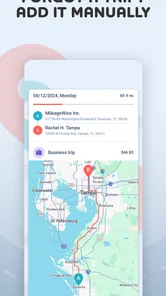
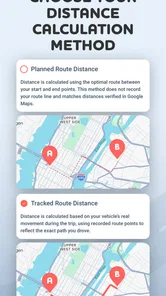
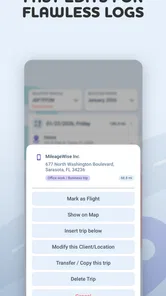
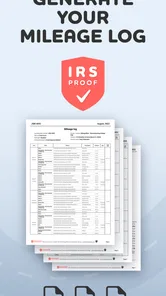
Analysis by Reviewed
I tend to forget mileage the moment I park, which is exactly why a dedicated tracker makes sense for people who drive for work. Mileage Tracker by MileageWise Inc. is a finance app built around that problem: keeping a usable record of business travel so you are not reconstructing an entire month from memory, calendar entries, and fuel receipts. After spending time with it, I see it as a practical tool for freelancers, salespeople, contractors, and anyone who needs cleaner records at tax time rather than as a general-purpose budgeting app.
The app is free to download, carries an Everyone age rating, and has reached over 50 thousand installs. Its average rating is 4.7 from around 1.3 thousand ratings, with roughly 880 written reviews, so it has attracted a fairly focused audience rather than trying to be everything in finance. MileageWise Inc. released it on September 7, 2020, and the current version is 52. That history matters to me because mileage tracking is only useful when it remains dependable over repeated trips, not merely impressive during the first setup.
How Mileage Tracker feels during everyday driving
I find that the most useful way to judge a mileage tracker is to look beyond a single drive and ask whether its record-keeping fits the rhythm of a whole workday. In the next section, I’ll focus on what makes that routine easier or harder, including the small checks that help keep a busy day’s travel clear.
Speed expectations before and after a trip
The main performance question is not whether a mileage app can open quickly. It is whether it can fit into a routine without making me stop, remember extra steps, or wait around when I am already leaving a client, job site, or appointment. Mileage Tracker is most valuable when I treat it as part of the drive-recording habit rather than as a monthly emergency tool. I would set up the way I work first, then use the app consistently instead of expecting it to recreate every detail from a vague memory.
That distinction separates this app from a notebook or a basic odometer note. A manual method can be faster for one isolated trip, but it becomes awkward when several destinations are involved or when personal and business driving happen on the same day. Mileage Tracker gives the record a dedicated home, which reduces the mental work of deciding where each journey belongs later. The time saving is less about a dramatic animation or a flashy interface and more about avoiding the end-of-month sorting exercise.
I also would not judge it solely by how fast the first screen appears. The useful question is whether the record remains understandable after a busy week. A tracker that opens instantly but leaves me with ambiguous entries is not truly efficient. In my experience, the strongest workflow is to review entries while the route is still fresh, correct anything unusual, and keep the app from becoming a backlog.
What happens during heavy-use moments
The demanding scenario is a day with many stops, not a single commute. A contractor might leave home, visit a supplier, drive to two properties, return for equipment, and finish at another customer. A salesperson may cross several towns and mix short appointments with longer highway journeys. In those cases, the value of Mileage Tracker depends on how clearly I can separate trips and how little attention the process demands while I am moving between them.
More From Our News Desk

 Gmail
GmailGmail in a Busy Inbox: Who Benefits Most?
From first account to crowded workday, Gmail earns its place through dependable search and flexible sorting—but its best fit depends on how much inbox maintenance you can tolerate.

 Prime Video
Switching to Prime Video: What Changes in Your Viewing Routine
Prime Video can make a compelling second home for streaming, but switching means learning a different catalog, rental layer, and route from browsing to playback.

 Universal TV Remote Control
Universal TV Remote Control Works Best as a Reliable Backup
A phone remote earns its place through quick setup and reliable habits. Here is how to get more from Universal TV Remote Control—and where its limits show.

 Weather - By Xiaomi
Weather by Xiaomi Review: Clear at a Glance, Less Clear Up Close
Xiaomi’s weather app makes everyday forecasts quick to scan, but its calm surface can leave useful details and recovery paths harder to find than they should be.

 X
XX Under Pressure: Can It Recover When Posting Goes Wrong?
A resilience-focused review of X, examining setup, mistaken posts, interruptions, weak connections, and the gaps that matter when recovery needs to be dependable.

 Clash of Clans
Clash of Clans Is Won Between the Battles
Its raids are quick; its community is a long-term project of coordination, teaching, rivalry, and shared responsibility—with all the friction that entails.
Latest News



My practical advice is to avoid treating the app as a passive witness that needs no checking. At the end of a busy route, I would reserve a short review period to look for an incomplete journey, a trip that should be marked as personal, or an entry that needs a business explanation. That habit is one of the less obvious advantages of using a dedicated tracker: it turns record keeping into a small daily task instead of a stressful tax-season reconstruction.
There is also a trade-off here. More automation can reduce tapping, but it can make a record feel less transparent if I do not understand how a trip was captured or categorized. More manual control improves confidence but asks for discipline. Mileage Tracker is best for someone willing to establish a repeatable routine. If you want to press one button once a month and receive a perfect history, no mileage app can remove the need for review and personal judgment.
Reliability and recovering from imperfect records
Reliability in this category means more than avoiding crashes. It means being able to trust the record after ordinary human mistakes: forgetting to check an entry, changing plans, making a personal detour, or using the phone under less-than-ideal conditions. I appreciate that Mileage Tracker is aimed at compliance-focused tracking, because that encourages a more careful attitude toward documentation than a simple trip counter would.
Still, I would keep the app as part of a broader record-keeping habit. I would not rely on one application as the only evidence for an important financial claim. I would periodically review the mileage history alongside my calendar, invoices, or appointment notes. This is not because the app is unsuitable; it is because a mileage record is strongest when the dates, destinations, and business purpose make sense together. That cross-check is especially useful when a route changes unexpectedly.
Recovery is another area where user behavior matters. If I notice a missing or questionable trip, I would correct it promptly while I can still remember the route. Waiting several weeks makes any tracker harder to use accurately. The app can organize the information, but it cannot know the business reason behind every stop or determine whether a personal detour should be excluded. In that sense, the best recovery feature is a regular review habit.
The app’s long presence on the market and its current version suggest an actively maintained product rather than a forgotten experiment. I would nevertheless install it before an important reporting period and spend time learning the workflow. That gives me a chance to see how it behaves on my particular phone and driving routine, instead of discovering friction when the records are urgently needed.
Device constraints and practical setup
Mileage Tracker requires Android 8.0 or later, which makes it accessible on many devices but not on every older phone. If you keep an aging handset in the car, the operating-system requirement is worth checking before building your entire record-keeping process around it. The app is also available in a finance context, so I would give it a dedicated place on the phone and make sure the device itself is kept charged during long driving days.
Battery and connectivity deserve realistic expectations even when an app is designed for mileage. Any tool used around driving has to operate within the limits of the phone, its settings, and the environment. A phone with aggressive background restrictions, low storage, or a nearly empty battery is a poor foundation for dependable records. I would test the app on a normal workday, not just while sitting at home, and confirm that my chosen routine still works when I move between appointments.
This is also why I would not install it on a spare phone without first checking how that phone fits into my actual travel pattern. A tracker is easier to trust when it stays with the vehicle or with the person doing the driving. Switching between devices can create gaps, duplicated habits, or uncertainty about where the latest entry belongs. Keeping one consistent device is a simple but important way to reduce avoidable confusion.
Who gets the most value from it
I think the app is a strong match for self-employed people who drive regularly and need a cleaner separation between business and personal mileage. It also makes sense for employees who must maintain travel records for reimbursement, provided their workplace accepts the resulting documentation. Someone who visits customers, properties, suppliers, or job sites can benefit more than someone whose work involves only an occasional trip.
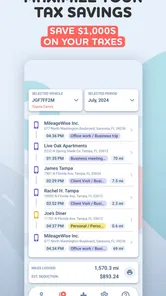
A realistic example would be a freelance installer who starts the morning at home, drives to a hardware supplier, visits two customers, and then returns with unused materials. Instead of trying to remember the route at the end of the week, the driver can make mileage recording part of the day’s closeout. The important improvement is not merely having a number; it is having a chronological record that can be checked against the work schedule and explained later.
I would also recommend it to a small-business owner who wants employees to develop a consistent mileage habit without handing them a complicated accounting system. The app is narrower than full bookkeeping software, which can be an advantage when the only problem is travel documentation. A focused tool is easier to introduce than a large finance platform filled with functions a driver may never use.
When another approach may suit you better
Mileage Tracker is not the right choice for everyone. If you rarely drive for work, a simple note tied to your calendar may be enough. If you already use a company fleet platform with mandatory reporting, adding a second tracker could create duplicate records rather than solve a problem. Likewise, people who dislike reviewing automated or semi-automated travel logs may prefer a deliberately manual system, even if it takes longer.
It is also not a substitute for accounting software. A mileage record can support tax preparation or reimbursement, but it does not replace the wider work of categorizing income, expenses, receipts, and business purpose. For a business that needs invoicing, payroll, or financial reports in one place, a full accounting service is a better central system. Mileage Tracker makes more sense as the focused travel component of that setup.
Compared with a spreadsheet, the app offers a more natural mobile workflow for someone who is frequently away from a desk. A spreadsheet gives excellent control and can be customized around unusual company rules, but it depends heavily on timely manual entry. Compared with a generic GPS history, a dedicated mileage tool is more relevant to the record-keeping problem, because raw location history is not automatically the same thing as a defensible business-mileage log.
Costs, updates, and the decision to continue
The app itself is free, which lowers the barrier to testing it with a real week of driving. Optional in-app purchases range from $8.99 to $549.99 per item, so I would look carefully at what a paid option provides before committing. The wide spread means the free starting point is useful, but the long-term cost could matter greatly depending on the plan or item selected. I would compare that expense with the value of the time saved and with the cost of making inaccurate records manually.
That pricing structure also makes a short trial especially important. I would not pay simply because a mileage app sounds useful. First, I would confirm that the workflow suits my phone, that the records are easy for me to review, and that the level of detail matches the requirements I face. If the app becomes part of a business process, I would factor in continuity: changing tools later can be inconvenient when older mileage records are already organized in one system.
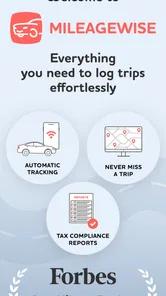
The developer, MileageWise Inc., presents the product as a focused finance utility rather than a broad lifestyle application. Its Forbes feature for compliance-focused tracking adds context to its intended audience, but I would still make my decision based on daily usability. Recognition can attract attention; consistent entries, understandable records, and a routine I can maintain are what determine whether the app earns a permanent place on my phone.
My performance verdict
My view is that Mileage Tracker performs best when I use it as a disciplined daily companion. Its perceived speed comes from reducing the amount of reconstruction I have to do later, while its practical reliability comes from reviewing records before details fade. It is not a magic replacement for attention, and it should not be treated as an unquestionable authority for financial reporting. Those limitations are normal for mileage software, but they are important to acknowledge before relying on it.
The most useful advanced habit is to close each workday with a quick reconciliation: compare the recorded travel with the calendar, identify personal portions, and note anything unusual while the reason is still clear. A second helpful habit is to test the workflow on a high-stop day, because a system that works for one trip may feel very different when the schedule becomes crowded. A third is to keep the same phone and routine whenever possible, reducing gaps caused by switching devices or changing habits.
For a freelancer or mobile worker who wants a purpose-built way to organize business driving, I would recommend giving it a careful trial. The free entry point, Everyone rating, broad Android compatibility from version 8.0 onward, and strong user reception make that evaluation easy to justify. For occasional drivers, people already covered by fleet software, or users seeking a complete accounting platform, I would choose a simpler or broader alternative instead.
Overall, Mileage Tracker earns its place by addressing an unglamorous but expensive source of administrative stress. I like it most when the goal is steady, reviewable mileage documentation rather than flashy finance features. If you are prepared to check your entries and understand the purchase options before upgrading, it can turn a fragile memory-based task into a much more manageable part of the workday.
Mileage Tracker by MileageWise Frequently Asked Questions
Is Mileage Tracker by MileageWise suitable for someone who drives only occasionally for work?
It can be useful even if work trips are occasional, since keeping a log as you go can be easier than reconstructing journeys later. The app is designed to organize trip details and driving categories, so you can review business travel alongside personal journeys. Before relying on it, check that its recording and review process fits how often you drive and the records you need to maintain.
What phone permissions should I expect to use Mileage Tracker by MileageWise?
Mileage tracking relies on location and may use motion or background activity features so trips can be detected while you are driving. The permissions you allow, along with your device’s battery and background settings, can affect whether journeys are recorded consistently. If you restrict access, the app may be less convenient or may miss trips, so review your phone settings and check recorded journeys before using them as official records.
What is Mileage Tracker by MileageWise used for?
Mileage Tracker by MileageWise is designed to record and organize driving activity for business, tax, reimbursement, or fleet-related purposes. It can help you keep track of trip distances, routes, dates, and driving categories instead of relying on handwritten notes. After reviewing the app, its main value is the time saved when creating a consistent mileage log, especially for people who make several work-related trips each week.
Does Mileage Tracker by MileageWise track trips automatically?
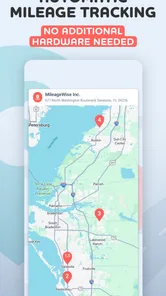
The app is built to simplify automatic mileage tracking, but the exact behavior depends on the permissions and settings enabled on your Android or iOS device. Location access, motion detection, battery restrictions, and background activity can affect recording accuracy. Before using it for official records, check that trips are being detected correctly and review each entry, because no GPS-based tracker is perfectly reliable in every situation.
Can I separate business and personal mileage in the app?
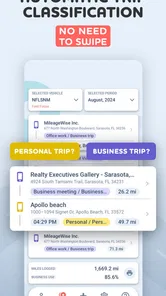
Yes, Mileage Tracker by MileageWise is intended to help users classify trips, which is useful when business and personal driving are mixed. You can review recorded journeys and assign appropriate categories or purposes rather than treating every mile as deductible or reimbursable. It is still important to verify the classifications yourself and retain supporting information, since the app does not replace professional tax or accounting advice.
Pros
- Automatic trip detection reduces the need to enter journeys manually.
- Supports IRS-compliant mileage logs for business and tax documentation.
- Trips can be categorized as business
- personal
- or commuting.
- Cloud synchronization keeps mileage records available across devices.
- Export options make it easier to share reports with accountants or employers.
Cons
- Background location tracking may noticeably affect battery life.
- Some advanced features require a paid subscription.
- Accidental trip detection can create logs that need manual correction.
- The interface may feel complex for users tracking only occasional trips.
- Accurate mileage records depend on granting continuous location permissions.











