Mezquite Diatonic Accordion
- 564.00
- 4.5
- Installs
- 10.00M
- Price
- Free
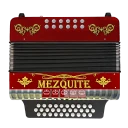
Screenshots




Analysis by Reviewed
When I want to see whether an accordion phrase works before committing to a longer practice session, I like having a playable version of the instrument close at hand. A phone can’t give me the weight, bellows resistance, or tactile spacing of an accordion, but it can make it easy to try a melody, hear a sound, and decide what I want to work on next. That practical role is where Mezquite Diatonic Accordion makes the most sense to me: as a portable starting point for exploring diatonic accordion music, rather than a replacement for an instrument or a teacher.
Choosing a first step
I’d reach for a virtual accordion when I wanted to explore a melody before sitting down with a physical instrument, or when there simply wasn’t room to carry one. That’s a different job from learning every bellows technique on a real accordion: a phone can help you get familiar with the notes and try out a musical idea, but it can’t reproduce the feel of moving air and coordinating both hands on the instrument.
For a beginner, that distinction matters. I’d treat the app as a low-pressure place to begin exploring diatonic accordion playing, not as a complete substitute for lessons or an acoustic instrument. If your goal is to decide whether the sound and style appeal to you, a phone is a convenient first step; if your goal is to build performance technique, you’ll eventually want practice on the real thing too.
From First Tap to a Tune
From the moment you open the Mezquite Diatonic Accordion, you're greeted with a user-friendly interface that makes navigation a breeze. The app is specifically designed for both seasoned musicians and beginners who just want to dabble in the world of diatonic accordions. I was pleasantly surprised by how quickly I was able to dive into playing, thanks to the intuitive layout.
Exploring sounds before settling on one
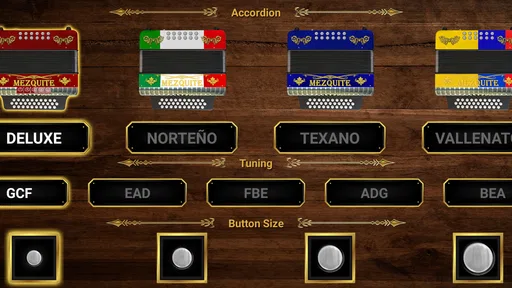
One of the first things I noticed was the variety of accordion types available. Whether you’re into Norteño, Tejano, or just plain old folk music, there’s an accordion style for you. Each type comes with its own unique sound, and switching between them is as simple as tapping a button.
But that’s not all! The app also includes a handy tutorial mode which guides you through the basics of playing the accordion. I found this particularly helpful as someone who’s more accustomed to string instruments. The step-by-step lessons are detailed and easy to follow, making the learning curve less daunting.
Turning a spare moment into practice
A useful way to approach a short practice session is to pick one small goal before opening the app: try a phrase from a song you already know, or spend the session getting comfortable with a tutorial step. That keeps the screen from becoming a place to tap randomly without noticing what you’ve learned. I’d also replay the same phrase after changing the accordion sound, listening for how the timbre changes while keeping the notes the same.
More From Our News Desk

 Gmail
Gmail in a Busy Inbox: Who Benefits Most?
From first account to crowded workday, Gmail earns its place through dependable search and flexible sorting—but its best fit depends on how much inbox maintenance you can tolerate.

 Prime Video
Switching to Prime Video: What Changes in Your Viewing Routine
Prime Video can make a compelling second home for streaming, but switching means learning a different catalog, rental layer, and route from browsing to playback.

 Universal TV Remote Control
 Works Best as a Reliable Backup
A phone remote earns its place through quick setup and reliable habits. Here is how to get more from Universal TV Remote Control—and where its limits show.

 Weather - By Xiaomi
Weather by Xiaomi Review: Clear at a Glance, Less Clear Up Close
Xiaomi’s weather app makes everyday forecasts quick to scan, but its calm surface can leave useful details and recovery paths harder to find than they should be.

 X
X Under Pressure: Can It Recover When Posting Goes Wrong?
A resilience-focused review of X, examining setup, mistaken posts, interruptions, weak connections, and the gaps that matter when recovery needs to be dependable.

 Clash of Clans
 Is Won Between the Battles
Its raids are quick; its community is a long-term project of coordination, teaching, rivalry, and shared responsibility—with all the friction that entails.
Latest News



There’s a practical trade-off when practicing on a phone: touch controls are handy for trying ideas, but the size of the screen can make precise, fast playing harder than on physical buttons. I’d start slowly and use the app to understand note patterns, then move to an instrument if finger accuracy and coordination become the main challenge. For a quick musical break at home or while waiting for a friend, though, the portability is part of the appeal.
Making the handoff to a real instrument
If you already own an accordion, I’d use the app as a planning and recall tool rather than a place to rehearse a full performance. For example, I could use a quiet moment to work out the rough shape of a melody, then take that idea to the instrument later and concentrate on bellows direction, fingering, and keeping both hands together. That separation is useful: the phone helps me focus on the tune, while the physical instrument is where I check whether the fingering and movement actually feel comfortable.
It also helps to keep a small mental note of what the app has and hasn’t taught you. Recognizing a note pattern on a screen is a useful early win, but it doesn’t automatically transfer to fast button changes or expressive phrasing. I’d make the handoff gradual: first learn a short phrase, then try it slowly on the real accordion, and only then decide whether the app’s practice has prepared you for the next section.
Learning alongside other players
One of the standout features of Mezquite Diatonic Accordion is its community aspect. The app allows users to share their musical creations and even collaborate with other users. It’s like having a band at your fingertips! I enjoyed listening to other users’ compositions and picked up a few tips and tricks along the way.
The app also hosts regular challenges and events, which are perfect for those looking to test their skills or simply have some fun. I participated in one of these challenges, and although I didn’t win, it was a fantastic way to connect with fellow accordion enthusiasts.
A realistic routine for a busy day
Imagine you have ten quiet minutes before leaving home and a tune stuck in your head. I’d open the app, choose a phrase short enough to repeat, and use the tutorial if I needed help getting started. Once I could recognize the basic pattern, I’d switch the sound and play it again to hear whether another accordion character suited the tune better. I’d finish by deciding what needs attention next: remembering the notes, improving the timing, or trying the phrase on a physical instrument.
That routine is deliberately modest. It makes the app useful even when I don’t have time to set up a full practice session, and it gives me a clear stopping point instead of turning a spare minute into aimless tapping. If I’m somewhere noisy or around people who don’t want to hear repeated notes, I’d wait until I had a more suitable moment or use headphones. The app is most convenient when the phone’s small size is an advantage, not when I’m expecting it to behave like a full-size instrument.
Who will get the most from it
I’d recommend this to curious beginners, casual players, and musicians who want a handy way to explore diatonic accordion sounds without bringing another instrument along. It may also be useful if you already play another instrument and want a fresh way to sketch a tune. If you’re looking for a full digital audio workstation, detailed music notation, or realistic physical practice, a general music-making app or an actual accordion may suit you better.
Compared with a basic metronome or a music player, this app gives you an instrument-specific way to interact with accordion sounds and a tutorial path to follow. A broad music production app may offer more ways to record and arrange, but it can feel like too much setup when all you want is to explore a simple accordion phrase. The right choice depends on whether you want focused accordion play or a larger production toolkit.
What to expect from the learning curve
The tutorial is a sensible place to begin if you’re unfamiliar with diatonic accordion playing, but I’d approach it as guided orientation rather than a promise of instant fluency. Short lessons are easier to absorb when I pause to repeat an idea instead of rushing through several steps. If a pattern feels confusing, I’d return to the same part and work out what I can play comfortably before trying to increase speed. The app is better suited to exploration and steady familiarity than to measuring progress against a strict practice schedule.
One useful habit is to compare what you can do on the screen with what you can reproduce later without looking. That check helps separate recognition from actual recall. If I can follow a phrase only while watching the display, I’d repeat it more slowly; if I can remember it, I’d take the next step on a real instrument or use the app to explore a different phrase. This makes the tutorial more active and gives each short session a clear purpose.
Practical details and limits
Mezquite Diatonic Accordion is a free music and audio app from Mecatronium Apps, with optional in-app purchases ranging from $3.49 to $6.99 per item. It has a 4.5 average from around 16,000 ratings, and more than 10 million installs. It is rated Teen, runs on Android 6.0 or later, and its current version is 9.5.8. Those details make it accessible to many Android users, though anyone considering a purchase should check the available options in the app and decide whether they need them.
One limitation I’d keep in mind is that a community feature is most valuable when other people are actively sharing and responding; it should be a bonus, not the sole reason to install. For a focused solo learner, the tutorial and sound exploration are the more dependable reasons to try it. And if you’re using the app around other people, headphones can make casual practice more considerate and help you listen closely to the sound you’re exploring.
When another tool is the better fit
I wouldn’t choose this as my main tool if I needed to write a complete arrangement, record and mix several parts, or read notation from a detailed score. A music-production app is a more natural choice for arranging and editing, while a metronome is simpler when the only aim is keeping a steady beat. Likewise, someone preparing for a performance will get more useful feedback from an actual accordion, a teacher, or both. The app fills a narrower but worthwhile space: interactive, accordion-focused exploration without the effort of carrying the instrument.
There is also a difference between hearing an accordion sound and judging how an acoustic accordion will respond. A phone lets me try a melody and compare tones, but it cannot show whether my bellows control is smooth or whether a real button transition is comfortable. I’d keep that in mind before treating a successful screen practice as proof that a passage is performance-ready. Used with realistic expectations, this limitation is manageable; ignored, it can make the app feel less useful than it is.
My take after trying the workflow
In conclusion, the Mezquite Diatonic Accordion app is a must-have for anyone interested in exploring the world of accordion music. Its user-friendly interface, variety of features, and engaging community make it a standout choice for musicians of all levels. Whether you’re looking to master the accordion or just have a bit of musical fun, this app has something to offer.
So, if you’re ready to embrace your inner musician and explore the vibrant sounds of the accordion, give Mezquite Diatonic Accordion a try. You won’t be disappointed!
Mezquite Diatonic Accordion Frequently Asked Questions
Can I try the app before deciding whether it suits me?
Yes. Mezquite Diatonic Accordion is free to download, so you can open it and explore its virtual accordion without paying upfront. Its stated purpose is to make learning and playing the diatonic button accordion educational and fun. If you are considering paid options, take a moment to review the purchase details in your app store before confirming a transaction.
What kind of music app is Mezquite Diatonic Accordion?
Mezquite Diatonic Accordion is a music and audio app centered on the diatonic button accordion. It gives users a way to explore the instrument on a mobile device, whether they are curious about its sound or looking for a learning-oriented activity. The app’s focus is specifically on playing and learning this type of accordion, rather than serving as a general music player.
Can I use the app as a way to explore the diatonic button accordion?
Yes. The app is intended to make learning and playing the diatonic button accordion approachable, and its virtual instrument gives you a mobile way to engage with that instrument. It may be a useful starting point if you want to explore accordion playing without first committing to a physical instrument. The experience is educational as well as fun, so it can suit casual exploration too.
Is Mezquite Diatonic Accordion free to download?
Mezquite Diatonic Accordion is free to download, so you can try its virtual accordion without paying upfront. The app also offers in-app purchases, which may be relevant if you want access to paid options. Its core purpose is to make learning and playing the diatonic button accordion approachable, but check the purchase details shown in your app store before confirming any transaction.
Who makes Mezquite Diatonic Accordion, and is it popular?
The app is developed by Mecatronium Apps and sits in the Music & Audio category. It has an average rating of 4.5 from around 16,000 ratings, with over 10 million installs. Those figures suggest that it has reached a sizeable audience, although individual experiences can vary depending on what you want from a virtual accordion and how you plan to use it.
Pros
- Intuitive interface for beginners.
- Wide range of diatonic scales.
- Realistic accordion sound.
- Customizable button layout.
- Regular updates and improvements.
Cons
- Limited free content.
- Ads in free version.
- No offline mode.
- Advanced features require payment.
- Occasional app crashes.