

Messages - SMS Messenger +
- 290.00
- 4.0
- Installs
- 100.00K
- Price
- Free

Screenshots
Analysis by Reviewed
I approached Messages - SMS Messenger + as a practical communication app rather than a flashy replacement for every messaging service on my phone. That distinction matters. Its job is simple: handle text messages in a cleaner, more thoughtful way, while keeping the experience approachable for ordinary Android users. After spending time with it, my main impression is that it works best for people who want a focused SMS tool without turning their inbox into a complicated project.
The app comes from Dovi AI and sits in the Communication category. It is free to install, available to Everyone, and has reached over one hundred thousand installs. Its average rating is 4.0 from around two thousand ratings, which suggests a generally positive reception but also leaves room for a realistic conclusion: this is useful software, not a universally perfect messaging replacement.
What using Messages - SMS Messenger + feels like
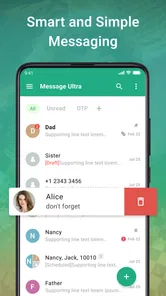
The first thing I noticed is how naturally the app fits the everyday rhythm of texting. SMS is still important for delivery updates, appointment reminders, two-factor codes, family messages, and contacts who do not use the same internet messenger as you. A good SMS app should therefore stay out of the way. I found the most convincing part of this one to be its straightforward purpose: open it, find a conversation, write a message, and move on.
That simplicity is more valuable than it sounds. Many communication apps try to combine text messaging with social feeds, calls, media sharing, stickers, accounts, or elaborate personalization. Messages - SMS Messenger + is easier to understand because its central role is narrower. If you are switching from a basic phone manufacturer messaging app, the transition should feel familiar rather than disruptive.
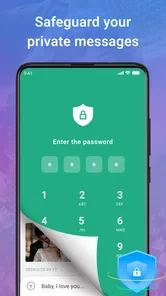
The store summary describes the app as smarter, simpler, reliable, and private. I would treat those words as an intention rather than a guarantee that every user will experience it identically. The useful part of that promise is the emphasis on a less cluttered messaging routine. The privacy angle is also relevant for anyone who prefers an SMS-focused tool, although I would still review the app’s current permissions and privacy information before making it the default for sensitive conversations.
One practical detail is its compatibility. The current version is 2.3.19 and it supports Android 7.0 or later, so it is not limited to recent phones. That makes the app worth considering for people keeping an older Android device in service. I would not assume that every feature behaves identically across old and new hardware, but the operating-system range gives it a broader audience than many newer communication tools.
The strongest reason to try it
For me, the strongest argument is focus. Messages - SMS Messenger + is easier to recommend when someone says, “I just want my texts to be manageable.” It does not need to replace WhatsApp, Signal, Telegram, or a carrier’s RCS experience to be useful. Instead, it can occupy the practical space those services cannot fully cover: communicating with people through ordinary mobile numbers.
More From Our News Desk

 Gmail
GmailGmail in a Busy Inbox: Who Benefits Most?
From first account to crowded workday, Gmail earns its place through dependable search and flexible sorting—but its best fit depends on how much inbox maintenance you can tolerate.

 Prime Video
Switching to Prime Video: What Changes in Your Viewing Routine
Prime Video can make a compelling second home for streaming, but switching means learning a different catalog, rental layer, and route from browsing to playback.

 Universal TV Remote Control
Universal TV Remote Control Works Best as a Reliable Backup
A phone remote earns its place through quick setup and reliable habits. Here is how to get more from Universal TV Remote Control—and where its limits show.

 Weather - By Xiaomi
Weather by Xiaomi Review: Clear at a Glance, Less Clear Up Close
Xiaomi’s weather app makes everyday forecasts quick to scan, but its calm surface can leave useful details and recovery paths harder to find than they should be.

 X
XX Under Pressure: Can It Recover When Posting Goes Wrong?
A resilience-focused review of X, examining setup, mistaken posts, interruptions, weak connections, and the gaps that matter when recovery needs to be dependable.

 Clash of Clans
Clash of Clans Is Won Between the Battles
Its raids are quick; its community is a long-term project of coordination, teaching, rivalry, and shared responsibility—with all the friction that entails.
Latest News



That makes it especially handy in mixed-contact households. Imagine a weekday morning when a school sends an SMS reminder, a delivery driver texts from an unfamiliar number, and a family member uses a different chat platform. Keeping those conversations in a dedicated SMS environment reduces the temptation to check several apps for routine information. I like that workflow because it separates essential phone-number messages from the social noise of internet-based platforms.
Another less obvious advantage is that a dedicated messaging app can become a deliberate inbox rather than an accidental archive. I recommend treating it like email: keep active conversations easy to find, remove obsolete verification messages, and avoid letting every automated alert remain indefinitely. This is not a special button or hidden mode; it is a better way to use the app. The simpler interface makes that habit easier because the app’s purpose stays visible.
I also found the app more suitable for people who do not want to persuade every contact to install something. SMS works across phones and operating systems, and that universality remains its greatest practical strength. A friend can use an iPhone, an older Android handset, or a basic mobile plan, and the conversation can still begin without negotiating which platform to join.
Where it fits beside other messaging options
The comparison with familiar alternatives depends on what kind of message you send. For internet messaging, Signal or similar privacy-oriented services may be a better choice when both people are willing to use the same platform. They can offer a richer conversation environment than SMS, but that benefit disappears when the recipient is not on the service or has limited data access.
Carrier messaging apps can be the better option for users who specifically want tight integration with a phone provider’s RCS features, account tools, or manufacturer interface. If your current app already handles group conversations, spam controls, backups, and notifications exactly as you like, changing may not produce enough benefit to justify the adjustment.
Messages - SMS Messenger + makes more sense when the default app feels dated, crowded, or awkward, and when you want a fresh SMS-centered experience without moving your contacts to a new network. It is not a replacement for an encrypted internet messenger, and I would not choose it solely because the word “private” sounds reassuring. Its value is practical: it gives ordinary text messages a dedicated home.
Small workflow choices that improve the experience
My first tip is to decide before installing whether you want this to be your main SMS app or simply a second tool for testing. Messaging apps work best when one application clearly owns incoming and outgoing texts. Leaving two apps competing for attention can create confusion around notifications and conversation history. I would install it, test a few normal exchanges, and then make a clear decision rather than switching back and forth every day.
My second tip is to use conversation names and contact details as a safety check before replying. SMS often mixes personal chats with automated messages, short codes, and unfamiliar numbers. A clean interface cannot solve the human problem of sending a private reply to the wrong recipient. I make a habit of checking the recipient line whenever a message involves an address, appointment, payment, or one-time code.
A third useful habit is to separate convenience from security. Text messages are excellent for reach, but they are not automatically the right place for confidential information. I would use this app for routine coordination, family updates, and service messages, then move genuinely sensitive conversations to a service designed for that purpose. That trade-off is easy to overlook when a messaging app feels polished.
Finally, I would be cautious with automated messages. Delivery notices and login codes can be useful for a short time but quickly become clutter. Reviewing old threads occasionally makes it easier to spot a real personal message and reduces the chance that an important alert disappears among expired notifications. This advice applies particularly well to SMS because so many businesses still use it as a one-way channel.
The meaningful limitations
The biggest limitation is not necessarily a flaw in the app itself; it is the nature of SMS. Messages can be less flexible than internet chat, especially for large media, group communication, international use, or conversations where strong encryption is essential. If your friends and family already live inside another messaging ecosystem, this app will not magically bring those chats into one place.
I also would not install it expecting a full productivity system. The app’s short store description is simply “Messages,” and that narrow identity is a useful clue. People looking for task assignments, shared documents, voice communities, or a broad social inbox should choose a different category of application. The strength of a focused SMS tool becomes a weakness when you ask it to manage communication that belongs elsewhere.
There is also a financial detail worth considering. The app is free, but optional in-app purchases range from around five dollars to around fifteen dollars per item. That does not make the basic download unattractive, but I would check what a paid item unlocks before buying. For an app whose main purpose is everyday texting, paid extras need to solve a real annoyance rather than merely add decoration.
Another point is trust. A communication app handles information that feels personal even when the messages themselves are ordinary. I would therefore inspect notification behavior, permission requests, and privacy settings during setup instead of tapping through every prompt. That is good practice with any SMS application, and it matters more here because the app may become the place where appointment details, verification codes, and family conversations collect.
Users with very specific expectations should also test their important routines early. Send a normal message, receive a reply, check how notifications appear, and confirm that the conversations you care about are easy to locate. This short trial is more useful than judging the app from screenshots because SMS habits vary widely. Someone who mostly receives automated alerts will evaluate it differently from someone who sends long group conversations every day.
Who should use it, and who should skip it
I think Messages - SMS Messenger + is a good fit for Android users who want a dedicated, uncomplicated SMS application; people using older compatible phones; families communicating across different devices; and anyone dissatisfied with a manufacturer’s default messaging screen. It is also a sensible choice for users who want to keep phone-number conversations separate from their internet chat accounts.
I would be more selective if you depend heavily on encrypted messaging, rich group features, large media sharing, or seamless desktop communication. In those cases, an established internet messenger may serve you better, provided your contacts use it too. I would also skip this app if your current SMS tool already feels fast, clear, and dependable. Changing apps has a cost in adjustment, and not every minor interface improvement is worth it.
For someone helping a parent or relative with an older Android phone, the app could be worth testing because its purpose is easy to explain: it is the place to read and send text messages. I would still configure it together, demonstrate how to identify contacts, and explain that a text message is not the same as a protected private chat. The best setup is not just an installation; it is a small lesson in safe communication.
My verdict after using it
Messages - SMS Messenger + succeeds when I judge it by the job it appears designed to do. It offers a focused route into SMS communication, works on a wide range of Android versions, and is free to try. With over one hundred thousand installs and a 4.0 average from around two thousand ratings, it has enough real-world adoption to be worth a look without demanding blind confidence.
My recommendation is straightforward: try it if your current SMS experience is cluttered or frustrating, but do not expect it to replace a secure internet messenger or a feature-heavy communication hub. The app is at its best when it stays in its lane. It can make everyday texts easier to manage, especially in a mixed-device household, while its limitations become clear when conversations require advanced media, encryption, or cross-platform collaboration.
The name Messages - SMS Messenger + tells you more about the product than a long list of promises would. This is a communication app built around ordinary text messaging, developed by Dovi AI, and aimed at keeping that familiar channel usable. I would give it a fair trial as the default SMS option, review the purchase prompts carefully, and keep a separate encrypted service for genuinely sensitive discussions. For the right user, that combination makes the app a sensible, low-friction addition rather than an unnecessary replacement for everything else.
Messages - SMS Messenger + Frequently Asked Questions
What Android version do I need to use Messages - SMS Messenger +?
Messages - SMS Messenger + requires Android 7.0 or later. Before downloading, check your phone’s Android version in its settings so you know it meets that requirement. Compatibility is only one part of the experience: your device, carrier, and messaging settings can also affect how SMS and MMS features work.
Who develops Messages - SMS Messenger +, and what kind of app is it?
Messages - SMS Messenger + is a communication app developed by Dovi AI. It is focused on text messaging rather than social networking or internet-based chat, so it may suit someone looking for a dedicated SMS and MMS client. Its store summary describes it as “Smarter. Simpler. Reliable. Private.”, while the short description is simply “Messages.”
What is Messages - SMS Messenger + and what can I use it for?
Messages - SMS Messenger + is an Android messaging application designed for sending and receiving traditional SMS and MMS messages. After installation, it can provide an alternative interface for managing conversations, contacts, notifications, and multimedia messages. It is mainly useful for users who want a cleaner or more customizable replacement for their phone’s default messaging app, rather than an internet-based chat service like WhatsApp or Messenger.
Does Messages - SMS Messenger + require an internet connection?
The app generally does not need Wi-Fi or mobile data to send standard SMS messages, because those messages use your mobile carrier’s network. However, carrier charges may apply depending on your plan. MMS messages, such as picture or group messages, commonly require mobile data and correct carrier settings. Features such as advertising, updates, or optional online services may also use an internet connection.
Can Messages - SMS Messenger + replace my default SMS application?
Yes, the application is intended to work as an alternative SMS and MMS client, but you normally need to set it as the default messaging app in Android settings to access all of its functions properly. This allows it to handle incoming messages, notifications, and replies. Before switching, check whether your current app supports backups or special features that may not transfer automatically.
Pros
- Clean interface makes conversations easy to browse and manage.
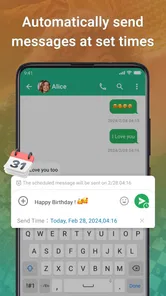
- Supports scheduled messages for sending texts at a chosen time.
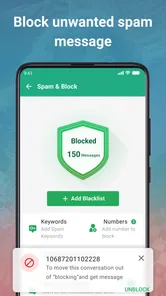
- Offers useful tools for blocking unwanted senders and spam.
- Conversation search helps find older messages quickly.
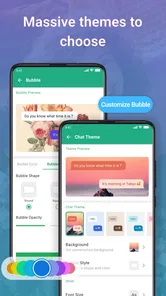
- Customizable themes and notification settings improve daily use.
Cons
- Some advanced features may require a premium subscription.
- Ad-supported areas can make the interface feel less polished.
- Compatibility with certain devices or Android versions may vary.
- Backup and restore options may be less comprehensive than system tools.
- Extra customization settings can take time to discover.












