

Message Plus - SMS Messager
- 224.00
- 4.1
- Installs
- 100.00K
- Price
- Free

Screenshots



Analysis by Reviewed
Ever find yourself in a messaging rut, scrolling through the same old text apps that just don't cut it anymore? Well, let me introduce you to Message Plus - SMS Messager. This nifty little app has got me all excited about texting again, and trust me, that's no small feat!
Getting a useful texting routine in place
I find a messaging app works best when it fits into habits I already have, rather than asking me to rebuild them. With Message Plus, I’d start by opening a conversation I use often, checking that the people and threads I care about are easy to reach, and then deciding which tools actually help my day. For example, if I’m coordinating a pickup, I can keep the exchange easy to find and use a quick reply when a short confirmation is all that’s needed. That is more useful than turning every conversation into a project.
It suits people who want an SMS-focused place to manage everyday conversations. It is less compelling if all your important chats happen in a service built around group features, media sharing, or a particular community; switching apps only helps when the people you message can still reach you in the way they normally do. I would treat it as a practical alternative for texting, not assume it replaces every communication tool on my phone.
A practical fit for everyday texting
One useful way to judge an SMS app is to ask what happens when your day is already busy. Imagine I’m leaving work, arranging a pickup, and trying to confirm a time with a family member while another routine message comes in. A pinned conversation can keep the ongoing plan visible, while a short quick reply handles the immediate confirmation. Later, search can help me find the earlier address without scrolling through unrelated exchanges. The benefit comes from using each tool for a distinct task, not from keeping every feature switched into active use.
This is a better fit for people who mostly communicate by ordinary text and want more control over how their inbox is organized. I would be less likely to recommend it to someone whose daily conversations depend on a particular internet messaging service, large group chats, or shared media features. In that situation, the app people already use together is usually the more practical choice; a polished SMS inbox cannot make all contacts move with you.
Why Message Plus - SMS Messager Stands Out
First things first, let's talk about the interface. It's sleek, modern, and incredibly intuitive. You don't need a degree in tech to figure this one out. From the moment you open the app, you'll notice how everything just flows. It's like the developers really listened to what users want — simplicity without sacrificing functionality.
Customization Galore
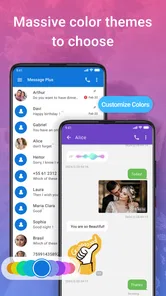
If you're anything like me and love to personalize your apps, then you're in for a treat. Message Plus offers a plethora of themes and customization options. Whether you're into bright, bold colors or something more muted and minimalistic, there's something here for everyone. Changing the look and feel of your messaging interface is as easy as pie, and it makes texting feel fresh and fun.
More From Our News Desk

 Gmail
GmailGmail in a Busy Inbox: Who Benefits Most?
From first account to crowded workday, Gmail earns its place through dependable search and flexible sorting—but its best fit depends on how much inbox maintenance you can tolerate.

 Prime Video
Switching to Prime Video: What Changes in Your Viewing Routine
Prime Video can make a compelling second home for streaming, but switching means learning a different catalog, rental layer, and route from browsing to playback.

 Universal TV Remote Control
Universal TV Remote Control Works Best as a Reliable Backup
A phone remote earns its place through quick setup and reliable habits. Here is how to get more from Universal TV Remote Control—and where its limits show.

 Weather - By Xiaomi
Weather by Xiaomi Review: Clear at a Glance, Less Clear Up Close
Xiaomi’s weather app makes everyday forecasts quick to scan, but its calm surface can leave useful details and recovery paths harder to find than they should be.

 X
XX Under Pressure: Can It Recover When Posting Goes Wrong?
A resilience-focused review of X, examining setup, mistaken posts, interruptions, weak connections, and the gaps that matter when recovery needs to be dependable.

 Clash of Clans
Clash of Clans Is Won Between the Battles
Its raids are quick; its community is a long-term project of coordination, teaching, rivalry, and shared responsibility—with all the friction that entails.
Latest News



I’d make one change at a time rather than redesigning everything at once. That way, if a new look makes names or message bubbles harder for me to scan, I can undo the choice without losing track of what changed. The useful payoff is not decoration by itself; it is being able to read a busy inbox comfortably and spot the conversation I need. If you prefer a plain, familiar layout, there is no need to customize just because the option is there.
Features That Pack a Punch
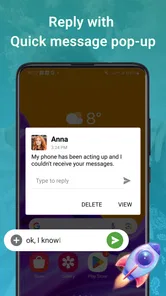
What really sets Message Plus apart from the ordinary messaging apps are its features. We're talking quick replies, scheduled messages, and even the ability to pin important conversations to the top. This is seriously handy for those of us who tend to forget things unless they're right in our faces!
These tools are most effective when I give each a clear job. I might pin a thread I need to revisit during a busy week, use a quick reply for a routine acknowledgement, and schedule a message when I know I will be occupied later. Before scheduling, I would double-check the recipient and wording; automation is convenient, but it also makes a mistaken send easier to overlook. Pins are best for conversations I genuinely return to, not every thread I might need someday.
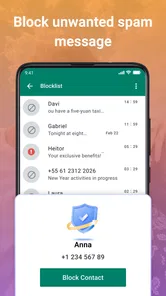
And let's not forget the spam filter. It works like a charm, keeping those annoying spam texts at bay so you can focus on the messages that matter. Plus, there's an integrated search function that helps you find any conversation in the blink of an eye.
Search becomes especially handy when I remember a detail but not when it was sent: I can look for a phrase or a name instead of scrolling through an old thread. I’d still take care with messages that look suspicious, even when a filter is available, and avoid treating an unexpected text as trustworthy just because it reached the inbox. Compared with a basic SMS app, these organizational touches can make daily use feel tidier; they do not change the fact that ordinary texting depends on the other person’s messaging setup.
Settings, compatibility, and practical limits
Before settling in, I would check the app’s available settings and make sure the way it handles notifications and conversation appearance suits me. I’d also confirm that it works comfortably on my device: the listed minimum operating system is 7.0, and the current version is 2.2.76. Message Plus is a free communication app from Dovi AI, with in-app purchases priced from $1.99 to $14.99 per item. I’d try the free experience first and only consider a purchase if it addresses something I actually want to change.
It is rated for Everyone. The app was released on March 4, 2024, and has a 4.1 average from around 976 ratings, with 100K+ installs. Those figures give a sense of its reach, but they cannot tell me whether its workflow will suit a particular person; the sensible test is whether I can comfortably manage my own everyday messages in it.
One trade-off is that a feature-rich SMS inbox can add choices where a simpler default app may already be enough. If you mostly send occasional texts and do not need pinned threads, scheduled messages, or visual changes, switching may not improve much. If your priority is a messaging service centered on internet-based group conversations, I would compare it with the service your friends already use instead of assuming an SMS app is a direct substitute.
Small habits that make the tools more useful
I’d keep a simple rule for pins: reserve them for threads with an active reason to stay near the top, such as coordinating a family visit or following up on an appointment. Once that task is over, removing the pin keeps the inbox useful instead of turning the top of the screen into a permanent archive. This is a modest habit, but it makes the feature more dependable when something genuinely needs attention.
For scheduled messages, I’d use the feature for timing rather than as a substitute for remembering the conversation. A message intended for a particular moment deserves a quick final check before it is set: confirm the person, context, and wording, especially if a plan could change. If timing is flexible or the message is sensitive, sending it manually may be the calmer option. That trade-off matters more than scheduling every routine text.
Quick replies work best when they still sound like me. I would use them for simple acknowledgements, then write a fresh response when someone needs a thoughtful answer or a detail that could be misunderstood. That distinction keeps speed from making a personal exchange feel abrupt. Search has a different role: it is most valuable after I have let a thread grow, when a phrase or name is easier to remember than a date.
Security and Privacy
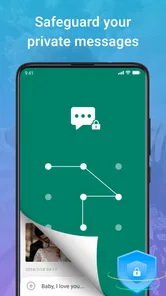
In this day and age, security is a top concern, and Message Plus doesn't disappoint. With end-to-end encryption, you can rest easy knowing your conversations are safe from prying eyes. It's like having a little vault for all your private chats.
For sensitive conversations, I would still think about who I am messaging and what information I choose to send. Privacy claims should not make me careless with personal details, and the safest app for a conversation may depend on what the other person uses too. I would also take a moment to read the app’s privacy and security information before relying on it for especially sensitive communication; a reassuring feature is useful, but it is not a reason to skip sensible judgement.
Who will get the most from it?
I’d recommend giving it a try if you text regularly, like having key threads close at hand, or want to make your inbox easier to scan. A realistic routine might be to pin a family thread for ongoing plans, search an older exchange when you need an address someone sent, and schedule a reminder message for a time when you expect to be free. Those separate actions solve different small problems, so the app is most helpful when you use only the ones that fit your routine.
If you value speed above customization, keep the interface simple and learn the few actions you use repeatedly. If you enjoy adjusting the look, make changes gradually and keep the layout readable. That small discipline helps prevent an inbox from becoming visually busy and makes practical features easier to find when you need them.
When another messaging option makes more sense
I would compare this app with the messaging setup I already rely on, rather than with an abstract idea of a perfect inbox. A phone’s basic texting app may be enough if I only send occasional messages and have no trouble finding old conversations. A service built around online groups may be the better home for a club, workplace, or friend circle that shares updates and media there. Message Plus is most persuasive when the job is everyday SMS organization, not when I need every communication feature in one place.
Before changing my routine, I’d also check how the people I contact actually reach me and whether I’m comfortable using this app for those conversations. For someone who depends on quick access to a small number of threads, pins and search can offer a clear reason to try it. For someone who values a familiar default above extra controls, the cost of changing habits may outweigh the organizational benefit. That is a personal trade-off, not a flaw that applies equally to everyone.
In conclusion, Message Plus - SMS Messager is more than just another messaging app. It's a breath of fresh air in a crowded market, offering features that genuinely enhance the texting experience. Whether you're a casual texter or someone who lives for messaging, this app has something for everyone. So why not give it a whirl? You might just find yourself falling in love with texting all over again.
My recommendation is to judge it by a few ordinary days of use, not by how many options the interface offers. If the pinned conversations, quick replies, search, and scheduling make your real texting routine smoother, they earn their place; if you keep reaching for a different service, stick with the one your contacts already use. That is the difference between a genuinely helpful SMS app and another download that only looks appealing at first.
For me, the strongest reason to keep it would be a repeatable routine: a readable inbox, a small number of useful pins, and deliberate use of search or scheduling when they solve an actual problem. I would start with the free experience, leave optional purchases alone until I knew what I wanted, and keep sensitive conversations subject to the same care I use elsewhere. If those habits make ordinary texting easier, it has earned a place on my phone; if not, a simpler default remains a perfectly reasonable choice.
Message Plus - SMS Messager Frequently Asked Questions
What is Message Plus - SMS Messenger, and who makes it?
Message Plus is a communication app developed by Dovi AI. Its short description is simply “Message Plus,” while its store summary presents it as “Smarter. Simpler. Reliable. Private.” It is intended for people looking for a messaging app, and it is free to download. The app is rated for Everyone, so it is suitable for a broad audience.
Will Message Plus - SMS Messenger work on my device?
Message Plus - SMS Messenger requires Android 7.0 or later, so check your device’s operating system before downloading. The current version is 2.2.76. If your phone meets the minimum requirement, you can try the app and decide whether it suits the way you prefer to manage messages. The app is available as a free download, with in-app purchases offered.
What features does Message Plus - SMS Messenger offer?
Message Plus - SMS Messenger is packed with features to enhance your texting experience. It allows users to send and receive text messages seamlessly, includes multimedia messaging support, and offers a variety of customizable themes. Additionally, it supports group messaging, scheduled messages, and offers end-to-end encryption for added security.
Is Message Plus - SMS Messenger secure to use?
Yes, Message Plus - SMS Messenger prioritizes user security with its end-to-end encryption, ensuring that your messages remain private and secure. The app also includes features like passcode protection and the ability to lock specific conversations, which adds an extra layer of security to your communications.
Does Message Plus - SMS Messenger support multimedia messaging?
Absolutely, Message Plus - SMS Messenger supports multimedia messaging, allowing users to send images, videos, and audio clips effortlessly. This feature ensures that you can share more than just text with your friends and family, making conversations more interactive and engaging.
Pros
- User-friendly interface with intuitive navigation.
- Supports multimedia messaging
- including images and videos.
- Fast and reliable message delivery.
- Customizable themes and chat backgrounds.
- Supports group messaging for efficient communication.
Cons
- Limited support for third-party integrations.
- Occasional ads may interrupt the experience.
- No end-to-end encryption for messages.
- Limited customization options for notifications.
- Requires internet for multimedia messaging.












