

Melozi: AI Song, Music Maker
- 21.00
- 4.7
- Installs
- 100.00K
- Price
- Free

Screenshots
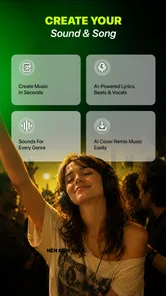
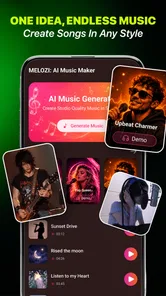
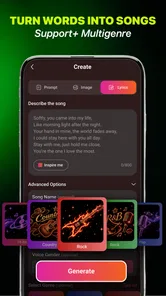

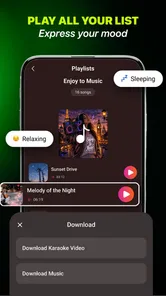

Analysis by Reviewed
I’d treat Melozi: AI Song, Music Maker as a quick way to explore musical ideas, not as a substitute for a full recording studio. Its appeal is the chance to turn a written prompt or an image into a starting point for a song. That makes it useful when I want a mood, rhythm, or creative spark without first learning production software. The trade-off is that an AI-generated result is best approached as a draft: the concept can be exciting, but anyone seeking precise control over composition should keep a more traditional music tool nearby.
Where Melozi earns its place
I find Melozi most useful when a project needs a musical direction before it needs a finished track. In this section, I’d focus on the practical value of turning a mood or visual cue into something I can assess by listening, while keeping the next creative decision in my hands. That distinction helps explain where the app can save time—and where a more hands-on tool becomes the better fit.
A prompt can be a useful first instrument
Many music apps begin with a blank timeline, a library of loops, or a set of controls. Melozi’s text-and-image premise offers a different entry point: describe what you have in mind, or use a picture as the seed for a musical idea. That lowers the barrier for people who can imagine a sound but do not know how to build it from notes and tracks.
I can see the text route working especially well when the brief is about feeling rather than technical detail. A phrase such as “a calm tune for a rainy afternoon” gives the generator a clear emotional direction without demanding that I know tempo, chord names, or arrangement terms. The image route is interesting for the same reason: a photo can serve as a visual prompt when words feel too vague. I would use either input to explore a direction, then judge the result by listening rather than assuming the prompt guarantees a particular sound.
One practical tip is to make prompts specific in mood and use, but not overloaded with instructions. If I ask for too many qualities at once, I may not know which part of the idea shaped the output. A short brief gives me a cleaner way to compare attempts: change one idea, listen again, and decide whether the new direction is closer. That small habit makes a generative app more useful as a creative tool rather than a slot machine for random surprises.
Making the result useful beyond the first listen
I would also treat each generated idea as a reference, not just a file to keep or discard. After listening, I can write down what worked—perhaps the gentle feel, the energy, or the contrast with a picture—and use that observation to form a more focused next prompt. This creates a simple feedback loop: the first result helps me clarify what I actually want, even when it is not the track I will use.
For a small creator, that can be more useful than repeatedly asking for an entirely different song. If I am choosing music for a clip, I can compare a few distinct moods before committing to an editing direction. The trade-off is that experimentation takes attention; a prompt generator does not remove the need to listen critically. I would stop once I have a useful direction rather than keep generating in search of a perfect surprise.
More From Our News Desk

 Gmail
GmailGmail in a Busy Inbox: Who Benefits Most?
From first account to crowded workday, Gmail earns its place through dependable search and flexible sorting—but its best fit depends on how much inbox maintenance you can tolerate.

 Prime Video
Switching to Prime Video: What Changes in Your Viewing Routine
Prime Video can make a compelling second home for streaming, but switching means learning a different catalog, rental layer, and route from browsing to playback.

 Universal TV Remote Control
Universal TV Remote Control Works Best as a Reliable Backup
A phone remote earns its place through quick setup and reliable habits. Here is how to get more from Universal TV Remote Control—and where its limits show.

 Weather - By Xiaomi
Weather by Xiaomi Review: Clear at a Glance, Less Clear Up Close
Xiaomi’s weather app makes everyday forecasts quick to scan, but its calm surface can leave useful details and recovery paths harder to find than they should be.

 X
XX Under Pressure: Can It Recover When Posting Goes Wrong?
A resilience-focused review of X, examining setup, mistaken posts, interruptions, weak connections, and the gaps that matter when recovery needs to be dependable.

 Clash of Clans
Clash of Clans Is Won Between the Battles
Its raids are quick; its community is a long-term project of coordination, teaching, rivalry, and shared responsibility—with all the friction that entails.
Latest News



Good for sketches, not necessarily finished tracks
The strongest case for Melozi is rapid ideation. A creator making a short social clip, a hobbyist looking for a theme, or someone who simply wants to hear an imagined atmosphere may get more value from a quick generated sketch than from hours spent arranging sounds manually. The app’s concept is also approachable for people who have never opened a digital audio workstation and do not want their first step to be a lesson in mixing.
Still, I would separate “a song idea exists” from “the song is ready to publish.” Music intended for a polished video, a commercial project, or a carefully produced release usually needs decisions about structure, edits, balance, and fit that a prompt alone cannot settle. Melozi can help me find a direction or make a rough placeholder, while a dedicated editor is the better next stop when timing and detailed arrangement matter.
That distinction is not a knock against the app; it is a useful way to avoid disappointment. I would start with Melozi when I want options quickly, then move to another tool if I need to reshape a particular section or make a track sit exactly under spoken audio. Its value is highest at the beginning of a project, when a fresh idea matters more than fine-grained control.
A realistic everyday use
Imagine I am putting together a short birthday video for a friend and do not want to use a familiar stock track. I could describe the tone I want—warm, playful, and personal—or pick an image from the celebration as a creative cue. The generated music could give the video a more tailored starting point. I would then listen alongside the footage and check whether the mood supports the images rather than distracting from them.
For this kind of job, I would keep expectations modest and leave time for a backup plan. If the first result feels too dramatic or too busy, I would revise the prompt rather than trying to force the track into place. If the timing needs to match a specific cut, a conventional audio editor may be easier for that final adjustment. The useful insight is that Melozi can help answer “what kind of music might fit?” faster than it can answer every production question that follows.
What the AI approach asks from you
Prompt-based music generation shifts some creative work from playing notes to describing intent. That is liberating when I have a clear scene or feeling in mind, but it can be frustrating if I expect the app to infer a detailed musical arrangement from a few broad words. I would treat the first prompt as a conversation starter with the generator, not a complete commission.
A good workflow is to decide what matters most before creating anything: the emotional tone, the likely use, or a visual reference. Then I can listen for that one priority. If the result captures the mood but not the exact rhythm I imagined, I can decide whether the mood is enough or whether I need a more controllable tool. This is more effective than judging a generated track against an unspoken checklist.
There is also a genuine limitation in the premise: generative results can be less predictable than choosing a known loop or composing a melody myself. That unpredictability is part of the fun when I am experimenting, but it is a drawback when a client or project requires a precise brief. I would not make Melozi the only step in a time-sensitive workflow where the music must meet exact structural requirements.
Think about the handoff before you start
Before using an AI-generated idea in a larger project, I would decide what the next step needs to be. If I only need inspiration, listening and taking notes may be enough. If I need a finished clip, I should make room for a separate editing stage and check that the result works with the visuals, voice, or pacing. That small planning choice keeps the app in its strongest role instead of asking it to solve the whole production process.
It is also sensible to keep a fallback in mind for work with a fixed deadline. A familiar music library or an editor with direct controls can be the more dependable choice when the brief is exact and there is little time to experiment. I see Melozi as most rewarding when curiosity is part of the task, rather than when every musical detail has already been decided.
Who should try it, and what to know first
I’d recommend trying Melozi when curiosity and quick experimentation matter more than exact control, but I’d decide what I need from it before starting. A useful first step is to choose whether I’m seeking a mood, a rhythm, or inspiration from an image, then judge the result against that one goal. With that in mind, the next section considers who is likely to enjoy the app and what trade-offs to weigh.
Best suited to curious creators
Melozi is most compelling for people who want to explore musical ideas without starting from technical controls. Casual creators, video makers testing a mood, and beginners curious about AI-generated music are natural fits. It may also help someone who feels stuck: a prompt or image can provide an unexpected direction that is easier to react to than a blank page.
It is less suitable for musicians who want hands-on authorship over every note, or for producers who already have a precise arrangement in mind. If I need detailed editing, a familiar instrument library, or repeatable control over each musical decision, a conventional composition or recording app is likely a better primary choice. Melozi can still be useful as an idea generator, but I would not confuse an accessible starting point with a complete production environment.
The app is free to install, with in-app purchases ranging from $2.99 to $20.99 per item. I would explore the basic experience before paying for anything and decide whether the generated ideas actually fit my routine. The price range matters because a free download does not mean every use or option is necessarily free; anyone who wants to keep spending predictable should check the purchase prompt carefully before confirming.
Availability and practical details
Developed by Mee Game Inc, Melozi sits in the music and audio category. It has a 4.6 average from around 1.7 thousand ratings, with over 100 thousand installs. Those figures suggest that people are finding the concept worth trying, though they do not tell me whether the app will suit my particular workflow. I would use them as context, not as a guarantee that every generated result will match my taste.
The app is rated for Everyone and supports devices running Android 7.0 or later. Its current version is 1.0.2, and it was released on August 27, 2026. I would check that my device meets the minimum requirement before installing, especially if I keep an older phone for music or media tasks. The modest version number also makes it sensible to approach the experience with an open mind as the app develops.
One question a new user may have is whether this is mainly for professional production or casual experimentation. My answer is casual experimentation first. The prompt-led premise is most valuable when a quick idea can help me decide what to make, while a specialist production app remains preferable for exact edits and a finished, controlled arrangement.
How it compares with familiar music apps
Against a loop-based music maker, Melozi puts more emphasis on describing an idea than selecting and arranging individual sounds. That can save setup time, particularly for a beginner, but it also means less direct control at the point where the music is created. Against a full audio workstation, the difference is even clearer: a workstation rewards manual shaping, while Melozi’s central attraction is turning a prompt or image into a musical starting point.
I would choose between them based on the job, not on which approach sounds more advanced. For a quick mood sketch, a playful experiment, or inspiration when I cannot find the first note, Melozi’s approach makes sense. For a track that must follow a precise duration, support dialogue cleanly, or reflect a carefully planned arrangement, I would reach for an editor where I can make deliberate changes. A useful compromise is to generate an idea here and finish the project elsewhere, provided the result suits the intended use.
Questions worth settling before relying on it
Can I use it when I have no music theory background? I think that is one of the more sensible reasons to try it: the starting point is an idea expressed in words or an image rather than a technical arrangement. I would still expect to guide the process with clear priorities and listen carefully, because a simple prompt does not guarantee a specific musical outcome.
Is it a good choice for a finished track? Only when the project can accept some uncertainty and the result already fits what I need. For precise cuts, a strict structure, or music that must sit cleanly under speech, I would plan on using a more controllable editor afterward. And should I pay immediately? I would first see whether the free experience produces ideas I genuinely want to use, then read each purchase prompt before making a decision.
My verdict
The best reason to try Melozi is that it turns musical imagination into something you can listen to without requiring production knowledge. The text and image inputs give the app a distinctive role as an idea-sparking tool, and that role is easy to understand in everyday creative work. I would recommend it to curious beginners and creators who need a quick musical direction more than a fully controlled studio session.
I would skip it as my main tool if I needed dependable, detailed control over a finished track. The same unpredictability that makes AI generation enjoyable can leave a precise project needing extra work, and the in-app purchase range is worth bearing in mind before spending. Used with those limits in mind, Melozi is a worthwhile experiment: a convenient way to test a musical mood, find a starting point, and decide what to create next.
Melozi: AI Song, Music Maker Frequently Asked Questions
What is Melozi: AI Song, Music Maker?
Melozi: AI Song, Music Maker is an app for creating music with the help of artificial intelligence. Depending on the features available in your version, you can provide a text prompt, choose musical preferences, or work with other supplied options to generate a song. It is designed to make experimenting with music more approachable, though the results may vary and may not match a specific style or idea exactly.
How do you create a song in Melozi?
Song creation generally starts by entering a prompt or selecting available settings, such as a genre, mood, or other musical direction, then asking the app to generate a track. The exact workflow and controls can differ by app version. Clear, specific descriptions may help guide the result, but AI generation is not fully predictable, so you may need to adjust your prompt or try again to get something closer to what you want.
Is Melozi free to use, and are there in-app purchases?
Check the app’s store listing before downloading to confirm its current pricing, since free access, trial offers, generation limits, and subscription options can change over time or vary by region. Some music-making apps let users try basic tools at no cost while reserving additional generations or features for paid plans. Review the subscription terms carefully, including renewal details, before starting a trial or making a purchase.
Can you download and share songs made with Melozi?
The app may provide options to save, export, or share generated music, but the available formats and limits depend on its current features and plan. Before relying on a track for a project, check the export controls and any restrictions shown in the app. Also review Melozi’s terms for rules about commercial use, attribution, ownership, and distribution; having the ability to export a song does not automatically grant every usage right.
Does Melozi require an internet connection, and what data does it use?
AI music generation may require an internet connection because prompts are often processed by online services, so some features might not work offline. The app’s privacy policy and permission prompts are the best sources for understanding how it handles prompts, account details, and other data. Before entering personal or confidential information, review those disclosures and the app’s store listing, and use only permissions that make sense for the features you intend to use.
Pros
- Turns text prompts and ideas into original songs with minimal effort.
- AI-generated vocals can add a polished feel without recording equipment.
- Useful for quickly creating music for videos
- social posts
- or personal projects.
- A simple workflow makes experimenting with song ideas approachable for beginners.
- Offers a convenient way to explore different musical directions from one concept.
Cons
- Generated lyrics or melodies may not match the prompt exactly.
- Results can sound generic compared with music made by experienced artists.
- Fine control over arrangement and individual musical elements may be limited.
- Creating and refining a track can require several generations.
- Check the app’s current pricing and usage rights before relying on tracks commercially.











