

MelodyCraft - AI Music Maker
- 999.00
- 4.5
- Installs
- 100.00K
- Price
- Free

Screenshots

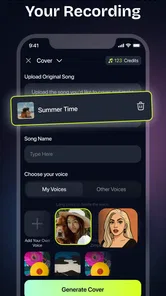
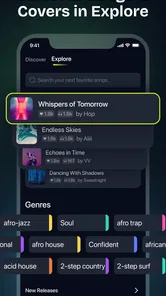
Analysis by Reviewed
I tried MelodyCraft - AI Music Maker with a simple question in mind: would it be useful on a shared household device, or would it feel like another novelty app that gets opened once and forgotten? My answer is more positive than I expected. It is a free music and audio app from Meta Innovation that uses artificial intelligence as the starting point for creating music. That makes it approachable for people who have ideas but do not know how to arrange instruments, write notation, or work inside a traditional digital audio workstation.
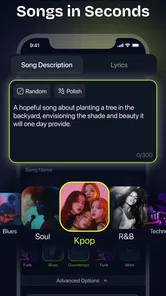
The important distinction is that this is not a replacement for a full recording studio. I see it as a quick idea generator and a low-pressure creative tool. You describe the kind of musical direction you want, listen to the result, adjust your thinking, and decide whether the output is worth developing further. That workflow is especially comfortable when several people use the same phone or tablet: one person can make a playful track, another can try something calmer, and nobody needs to understand complicated production software before hearing a result.
How MelodyCraft fits into a shared household
I find a shared-device session works best when everyone agrees on one small creative goal rather than taking turns generating unrelated tracks. For example, the household can compare a few moods for the same slideshow or video and decide together which one supports it. That keeps the activity focused while making room for different tastes; next, it helps to set clear boundaries around who can change or use the result.
A practical evening use case
One realistic way to use it is during a family evening when someone needs a short piece of music for a personal project. A teenager might want an energetic background idea for a video, while a parent may be looking for something gentle for a slideshow or a small presentation. Instead of opening a professional workstation and spending time choosing tracks, everyone can take turns exploring musical prompts and comparing the results.
I like this kind of use because the app lowers the social pressure around making music. A beginner does not have to perform an instrument or show unfinished work in a complicated editor. The first attempt can simply be treated as a conversation starter: “What happens if we make this darker?” or “Can we try the same idea with a calmer mood?” That makes the app suitable for casual creative sessions rather than only for people who already identify as musicians.
There is also a useful division of roles. One person can describe the mood, another can judge whether the result suits the intended video, and someone else can keep notes about which direction felt closest. This turns the app into a small collaborative sketchpad. It is not the same as making music together in real time, but it does give a household a shared activity with a clear result to discuss.
Why a shared device changes the experience
On a personal phone, the experience is naturally private and continuous. On a household tablet, the main challenge is continuity. Different users may have different tastes, and the next person may not know what the previous person was trying to create. I recommend treating each session as a separate experiment rather than assuming that the app will organize a family music library for you.
More From Our News Desk

 Gmail
GmailGmail in a Busy Inbox: Who Benefits Most?
From first account to crowded workday, Gmail earns its place through dependable search and flexible sorting—but its best fit depends on how much inbox maintenance you can tolerate.

 Prime Video
Switching to Prime Video: What Changes in Your Viewing Routine
Prime Video can make a compelling second home for streaming, but switching means learning a different catalog, rental layer, and route from browsing to playback.

 Universal TV Remote Control
Universal TV Remote Control Works Best as a Reliable Backup
A phone remote earns its place through quick setup and reliable habits. Here is how to get more from Universal TV Remote Control—and where its limits show.

 Weather - By Xiaomi
Weather by Xiaomi Review: Clear at a Glance, Less Clear Up Close
Xiaomi’s weather app makes everyday forecasts quick to scan, but its calm surface can leave useful details and recovery paths harder to find than they should be.

 X
XX Under Pressure: Can It Recover When Posting Goes Wrong?
A resilience-focused review of X, examining setup, mistaken posts, interruptions, weak connections, and the gaps that matter when recovery needs to be dependable.

 Clash of Clans
Clash of Clans Is Won Between the Battles
Its raids are quick; its community is a long-term project of coordination, teaching, rivalry, and shared responsibility—with all the friction that entails.
Latest News



A simple routine helps. Before handing over the device, say what the current idea is meant to do: a cheerful intro, a quiet background, a dramatic transition, or just an amusing experiment. The next user can then respond to the same goal instead of starting from confusion. This small habit matters more than it sounds, because AI music tools can produce many plausible directions and it is easy to lose sight of the original purpose.
For shared use, I would also keep personal creative work separate in whatever way the device itself allows. I would not assume that one household member’s projects should automatically be visible to everyone else, or that another person will understand which drafts are important. MelodyCraft is easiest to manage when users agree in advance about whether a session is private, collaborative, or simply temporary.
What the app is good at for beginners
The strongest part of the experience is the short distance between an idea and an audible result. Traditional music software gives you deep control, but it also asks you to understand tracks, effects, timing, instruments, and arrangement. MelodyCraft approaches the problem from the opposite direction. You begin with a musical intention, then evaluate what the app gives back.
That makes it a friendly introduction to concepts that are often difficult to explain. A child or beginner may not know the technical difference between atmosphere, rhythm, and arrangement, but they can usually recognize whether a result feels exciting, relaxed, mysterious, or unsuitable. I found that this encourages listening skills: instead of focusing only on buttons, the user starts noticing tempo, texture, repetition, and emotional tone.
The trade-off is control. If your goal is to place every note, edit every performance, or shape a detailed mix, a conventional music workstation remains the better choice. MelodyCraft is more valuable when the first challenge is finding a direction. Once the idea becomes serious, you may want another tool for editing, recording, or final production.
Setup boundaries, coordination, and trust
When several people use one device, I would agree in advance who is guiding the session, who makes the final choice, and whether the output is only for listening or may be used in a project. This avoids treating an experiment as finished material and makes purchase decisions easier to handle, especially with younger users. A few simple ground rules can preserve the fun while giving everyone a clearer sense of responsibility.
What to decide before handing over the device
Because the app is designed around AI-assisted creation, expectations should be set early. It can help turn a description into a musical starting point, but it should not be treated as a substitute for a person’s taste. The result still needs listening and judgment. In a shared setting, I would explain that the first output is a draft, not a guaranteed finished song.
This is particularly useful with younger users. They may assume that a computer-generated result is automatically correct or ready to publish. I would encourage them to ask three questions: does it match the intended mood, is it appropriate for the audience, and does it actually serve the project? Those questions teach responsible use without taking away the fun.
Another boundary concerns spending. The app is free to install and use, while in-app purchases range from $1.99 to $99.99 per item. That is a wide enough range for household members to discuss purchase expectations before the app is shared. I would not leave a child to interpret purchase screens alone. A parent or device owner should decide whether purchases are allowed and use the operating system’s normal purchase protections where appropriate.
Keeping creative sessions organized
One of my more useful habits was to give each experiment a clear purpose before starting. “Make something for a travel montage” is more helpful than “make a cool song,” because it gives you a way to judge the result. The same approach works for a shared household: each person can suggest a use case, and the group can compare which musical direction communicates it best.
It also helps to avoid endless prompting. AI music apps can encourage constant variation, but more options do not always mean better decisions. I prefer making a small number of deliberate changes: first adjust the mood, then the energy, then the intended setting. This makes the differences easier to hear and prevents a family session from becoming a random sequence of unrelated generations.
For anyone using the app alongside schoolwork or a personal video, I would keep a written note of the prompt and the reason a particular result was chosen. That record is useful when returning to the project later, especially on a shared device where another person may have created several unrelated ideas afterward. It also helps the user learn which descriptions lead to useful outcomes.
Age context and everyday trust
MelodyCraft has an Everyone content rating, which makes it approachable for a broad household audience. That rating does not remove the need for supervision or conversation. Music creation can still involve choices about themes, language, intended audiences, and where a finished piece might be used. I would treat the age rating as a sign that the app is broadly accessible, not as a promise that every generated idea will suit every family situation.
The trust question is also practical. When several people use one device, they should know who is responsible for saving, sharing, or purchasing. A child might think a generated track is only a game-like experiment, while an adult may be preparing something for public use. Agreeing on those boundaries avoids misunderstandings and makes the creative process more comfortable.
I would be especially careful when a young user wants to use a generated track in a public video or presentation. The app can help with the creative starting point, but the adult responsible for the project should make the final decision about suitability and use. That is not a criticism of MelodyCraft; it is simply sensible whenever AI-generated material leaves the private household setting.
How it compares with familiar alternatives
Compared with streaming music services, MelodyCraft is interactive rather than passive. A streaming app is better when you already know what you want to hear or need a reliable playlist. This app is better when you want to explore an idea that does not yet exist in your library.
Compared with loop-based beat makers, it offers a less hands-on starting point. Beat makers are rewarding when you enjoy arranging patterns manually and want immediate control over rhythm. MelodyCraft is more convenient for users who begin with a scene, feeling, or broad musical brief. The price of that convenience is that the creative process can feel less precise.
Compared with professional digital audio workstations, the difference is even clearer. A workstation is the right choice for recording instruments, editing detailed performances, mixing multiple elements, and building a repeatable production workflow. MelodyCraft is the quicker option for sketching. I would use it before a workstation, not necessarily instead of one.
Device support and practical expectations
The app requires Android 7.0 or later, so it is available to many older Android devices as well as newer ones. Its current version is 1.18.0, which suggests that the app is being maintained as an active product rather than presented as an abandoned experiment. Even so, the quality of an AI music session can depend on the device, connection, and the complexity of what you are asking it to create, so I would leave room for occasional waiting or retrying.
For a household tablet, headphones can make a noticeable difference. They let one person evaluate details without turning a shared room into an accidental listening session. If several people are collaborating, speakers are more social, but headphones are better when comparing subtle changes or working late. This is a small setup choice, yet it affects whether the app feels focused or distracting.
Who should use it and who should skip it
I would recommend MelodyCraft to curious beginners, casual creators, families looking for a shared creative activity, and anyone who often has a musical idea but no practical way to develop it. It is also useful for people who want to test a mood before investing time in a more complex production workflow.
I would skip it if you want a fully manual instrument, a detailed multitrack editor, or a dependable replacement for professionally licensed production tools. It may also frustrate users who dislike variation and want the same result every time. AI-assisted creation is most enjoyable when you are willing to evaluate possibilities rather than demand a single perfect outcome immediately.
The app has earned an average rating of 4.5 from around 27 thousand ratings, with over 100 thousand installs. Those figures suggest that it has found an audience, but they do not tell me whether it will suit a specific household. The real question is whether your goal is exploration or precision. For exploration, I found the concept genuinely useful. For precision, I would move to a more traditional tool sooner rather than later.
My household verdict
After using it as a casual music-making companion, I see MelodyCraft - AI Music Maker as a good fit for shared creative moments, provided everyone understands the boundaries around saving, sharing, age-appropriate use, and purchases. Its free entry point makes experimentation easy, and the Everyone rating keeps it approachable for mixed-age households. The developer is Meta Innovation, and the app sits comfortably in the music and audio category without pretending to be a complete studio.
My favorite use is not trying to produce a polished masterpiece in one sitting. It is using the app to turn a vague idea into something audible, then deciding what deserves more work. That makes it helpful for a family project, a personal video, a school presentation, or a relaxed evening of comparing musical moods. The best results come when users give each session a purpose and listen critically instead of accepting the first output automatically.
There are real limits: shared-device organization requires cooperation, purchase boundaries need adult attention, and serious producers will eventually want deeper editing control. Still, those limitations are reasonable for an app built around fast AI-assisted sketches. If you want an approachable way to explore music with other people in the home, I think it is worth trying. If you already know exactly how you want to record, arrange, and mix every element, a professional music app will serve you better.
My final advice is simple: start with a specific household project, make a small number of intentional experiments, and agree beforehand who can save, share, or buy anything. Used that way, MelodyCraft feels less like a disposable novelty and more like a practical creative starting point. Its real strength is helping people move from “I have an idea” to “I can hear the direction” without demanding musical expertise first.
MelodyCraft - AI Music Maker Frequently Asked Questions
Can I install MelodyCraft on an iPhone or iPad?
MelodyCraft is presented as an Android app, so it is intended for compatible Android phones and tablets rather than iOS devices. If you use Android, check that your device meets the app’s minimum operating-system requirement before downloading. The app is also rated for Everyone, making its listed age category suitable for a broad audience.
Will MelodyCraft suit someone who only wants to make music casually?
MelodyCraft is designed to help users explore musical ideas with AI, which may appeal to people who want to experiment without treating music production as a full-time hobby. You can use it for song concepts, background music, or creative sketches. As with any creative app, the experience will depend on the tools available and whether they match what you want to make.
Is MelodyCraft - AI Music Maker available for my phone or tablet?
MelodyCraft is a music and audio app for Android, and its minimum operating-system requirement is version 7.0. Before downloading, check that your device meets this requirement and has enough available storage for the app and any projects you create. The app is rated for Everyone, so its listed age category is suitable for a broad audience.
Who develops MelodyCraft, and is it a popular app?
MelodyCraft - AI Music Maker is developed by Meta Innovation. It has an average rating of 4.5 from around 27,000 ratings, with about 999 written reviews and over 100,000 installs. Those figures can give you a sense of its audience and reception, but individual experiences may differ depending on what you expect from an AI music-making app and how you use it.
What is MelodyCraft - AI Music Maker, and what can I create with it?
MelodyCraft - AI Music Maker is designed to help users generate original musical ideas with the assistance of artificial intelligence. You can typically use it to experiment with melodies, rhythms, harmonies, and complete song concepts without advanced music theory knowledge. It is suitable for quick sketches, background tracks, social media content, songwriting inspiration, and casual experimentation, although the exact creation tools may depend on the version installed and your subscription plan.
Pros
- Creates original tracks from simple text prompts
- Offers multiple genres and moods for creative experimentation
- Useful for quick background music and content ideas
- Beginner-friendly interface with minimal music knowledge required
- Helps overcome writer’s block with instant musical concepts
Cons
- AI results can sound repetitive or lack emotional depth
- Advanced editing options may feel limited for experienced musicians
- High-quality exports or features may require a subscription
- Generated tracks may need manual refinement before publishing
- Stable internet access may be needed for music generation












