Meeting Guide
- 1.62K
- 4.6
- Installs
- 1.00M
- Price
- Free

Screenshots
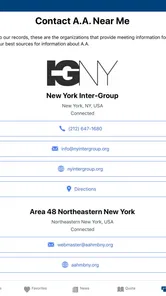

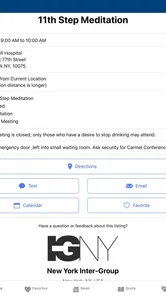
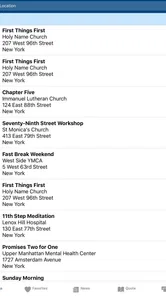
Analysis by Reviewed
When I need to find an Alcoholics Anonymous meeting in an unfamiliar part of town, the hard part is often not deciding to go; it is turning that decision into a practical plan. I want a time and place I can check quickly, without relying on an old message or a half-remembered address. That is the problem Meeting Guide is meant to help with, and it makes most sense as a companion for getting from “I should go” to walking through the right door.
Starting with a place and a plan
I would reach for Meeting Guide when my usual routine changes: I am traveling, staying late at work, or looking for a meeting near an errand rather than near home. Instead of searching broadly and sorting through general web results, I can start with nearby meeting information. That focused purpose is the app’s clearest strength. It is a free lifestyle app from A.A. World Services, Inc., and its average rating is 4.7 from around 4,600 ratings, with more than a million installs.
It is best suited to people who already know they are looking for an AA meeting and want a direct way to explore the options around them. A newcomer may also find it useful, especially when choosing a meeting type feels less daunting than showing up without knowing what to expect. I would not treat it as a substitute for personal guidance or a conversation with someone in recovery, though. Its job is to help with meeting logistics, not to decide what support is right for you.
From search to showing up
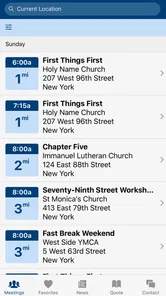
Right off the bat, the Meeting Guide app impressed me with its clean and intuitive interface. No need to fumble around; everything is laid out in a straightforward manner. Just open the app, and you’re greeted with a list of meetings based on your location. It’s like having a personal assistant that knows the ins and outs of the local AA scene.
Choosing a meeting that fits
One of the app’s standout features is its comprehensive meeting database. Whether you’re in a bustling city or a quiet town, Meeting Guide seems to have it all covered. I was particularly impressed by the filtering options. You can sort meetings by day, time, and even specific needs like LGBTQ+ or women’s meetings. This level of customization makes it incredibly user-friendly.
A useful way to search is to narrow the choices in stages: first by the day you can attend, then by time, and then by a meeting type that feels comfortable. That prevents a long list from becoming its own obstacle. If I am planning around work, for example, I would check the available time before comparing locations; if I am new to a group, I might prioritize a specific meeting focus over saving a few minutes of travel. Filters help make that trade-off visible, but the final choice is still personal.
Compared with a general maps search, a meeting-focused app is more useful for finding AA-specific details and categories rather than merely nearby buildings. A calendar can help me remember a meeting I already chose, but it will not help much when plans change and I need another option. I see Meeting Guide as the discovery step in that workflow: find a candidate here, then use the map or navigation tool I already trust to plan the trip.
More From Our News Desk

Weather by Xiaomi Review: Clear at a Glance, Less Clear Up Close

X Under Pressure: Can It Recover When Posting Goes Wrong?

Clash of Clans Is Won Between the Battles

Android Auto Makes the Case for Quieter Car Software

MobiOffice: Transforming Mobile Productivity with Seamless Integration

EA SPORTS FC™ Mobile Soccer: Redefining Mobile Sports Gaming
Checking the route and the details
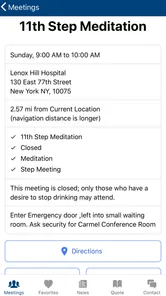
Another nifty feature is its map integration. I’m someone who gets lost easily, and having a map that directs me straight to the meeting venue is a godsend. It’s those little conveniences that make the app a game-changer for regular attendees and newcomers alike.
Before leaving, I would check the meeting details again rather than relying on a screenshot saved days earlier. The location and schedule are only useful if they still match the current plan, and the notes section can add context that affects whether a visit goes smoothly. I would also leave enough time to confirm the route and identify the entrance once I arrive; a map pin gets me close, but it cannot tell me how a particular venue will feel or where to go inside.
When plans change, and who helps next
Using the app was a breeze. I was able to find a meeting just a few blocks away from a café I frequent. The details provided were spot on, and I appreciated the notes section where hosts sometimes leave additional information. One time, I found out about a venue change through the app, saving me from showing up at the wrong place.
That kind of handoff is where the app earns its place in my routine: it helps me find the meeting and check practical information, while the people running or attending the meeting provide the human welcome and any on-the-ground clarification. If a listing raises a question, I would not assume the app can answer it; I would use the contact details available in the listing, if present, or seek confirmation through an appropriate local AA channel. The useful habit is to treat the listing as a planning aid and verify anything that could make the trip fail.
What really struck me about Meeting Guide is the sense of community it fosters. It’s not just about finding meetings; it’s about staying connected with the AA community at large. The app provides links to AA resources and literature, which I found incredibly helpful, especially for someone new to the program.
Where the route can break down
A nearby result is not automatically the best result. In a less populated area, or when I am looking for a particular meeting focus at a particular time, there may be fewer suitable choices, so I would widen the search area or adjust the day rather than assume the app has failed. Location-based results are also less helpful if I do not want to share or use my current location; in that case, searching by a place I can identify is a more deliberate approach when available. The app can shorten the search, but it cannot remove the real-world constraints of distance, schedule, or a venue change.
The app is free, rated for Everyone, and its current version is 5.0.5, with a minimum operating-system requirement of 8.0. It was released on June 17, 2018. Those details make it straightforward to assess whether it fits an older device, but I would still check that my phone can install it before depending on it for a time-sensitive trip. The app is not the right choice for someone seeking broad wellness advice, a general social network, or a complete recovery plan; its value is much narrower and more practical.
What the trip feels like in practice
Picture finishing a shift later than expected in a neighborhood you do not know well. You open the app, look for a meeting that fits the remaining evening, compare the time and location, and check any notes before setting off. If the first option is too far away, you can reconsider the time or search for another meeting instead of making a rushed guess. Once you have chosen, the map helps with the handoff from browsing to travel, while the people at the venue take over the part no app can provide: the actual meeting and human connection.
For a regular attendee, another practical use is keeping a backup in mind rather than searching only after a plan falls through. I would note a second plausible option mentally, especially when traveling, and recheck it before leaving. That small bit of preparation is more reliable than assuming a familiar meeting will always fit a changed schedule. It also keeps the app in its proper role: a source for finding options, not a promise that every option will suit every circumstance.
Using it with different levels of familiarity
For someone who has attended meetings for years, the main benefit is practical flexibility: finding a nearby option when work, travel, or family plans disrupt the usual routine. A newcomer has a different decision to make. The filters can help identify a meeting that sounds more approachable, but I would read the listing as a starting point, not a guarantee about the room’s format or atmosphere. If I were unsure what a meeting label meant, I would ask a trusted person in recovery or a local AA contact rather than choosing solely from a short description.
I would also avoid treating the app as a complete directory of every kind of help. It is specifically useful for AA meeting information and related resources. Someone looking for medical advice, crisis support, or a broader range of recovery services needs a more suitable source. That distinction matters because a convenient meeting search can support a plan, but it cannot replace the kind of help that a different situation calls for.
Small habits that make the search more useful
When I am away from home, I would search before I am rushed, then check the chosen listing again close to departure. That gives me time to reconsider if a meeting is at an inconvenient hour or the route is longer than expected. If location-based results are not useful, trying a recognizable nearby place can make the search more intentional when the app allows it. I would keep the meeting time and address handy for the trip, but avoid trusting an old saved image over the live listing.
There is also a useful trade-off between choosing the closest result and choosing the best-fitting one. A short trip may be attractive after a tiring day, while a meeting’s focus or timing may matter more for a first visit. I would use the filters to reduce the field, then make that judgment myself. The app can organize the choice; it cannot know which compromise will feel right for me that day.
My Personal Experience
Using the app was a breeze. I was able to find a meeting just a few blocks away from a café I frequent. The details provided were spot on, and I appreciated the notes section where hosts sometimes leave additional information. One time, I found out about a venue change through the app, saving me from showing up at the wrong place.
What really struck me about Meeting Guide is the sense of community it fosters. It’s not just about finding meetings; it’s about staying connected with the AA community at large. The app provides links to AA resources and literature, which I found incredibly helpful, especially for someone new to the program.
Final Thoughts
All in all, Meeting Guide is a must-have tool for anyone involved in AA. It’s reliable, user-friendly, and it genuinely enhances the meeting-going experience. I can’t stress enough how much easier it made my life, and I’m sure it will do the same for many others. If you’re looking for a way to streamline your AA meeting schedule, this app is definitely worth a download. Trust me, once you’ve tried it, you’ll wonder how you ever managed without it!
So, if you haven’t already, give Meeting Guide a try. You might just find it’s the app you never knew you needed, but now can't live without it.
Meeting Guide Frequently Asked Questions
Is Meeting Guide suitable for someone who has never attended an AA meeting before?
Yes. Meeting Guide can help newcomers explore Alcoholics Anonymous meeting options by showing details such as when and where meetings take place and what type they are. You do not need to be familiar with the app or the AA community to look up meetings. Seeing those details beforehand can make it easier to choose an option that feels appropriate and plan your visit.
What is Meeting Guide and who can benefit from it?
Meeting Guide is an app designed to assist individuals looking for Alcoholics Anonymous (AA) meetings. It's particularly beneficial for those in recovery from alcohol addiction, individuals seeking support groups, or anyone interested in finding information about AA meetings. The app provides up-to-date meeting times, locations, and formats, making it a valuable resource for anyone involved or interested in the AA community.
How do I find AA meetings using the Meeting Guide app?
To find AA meetings using the Meeting Guide app, simply download and install the app on your smartphone. Once installed, you can search for nearby meetings by entering your location or allowing the app to access your GPS. The app will then display a list of upcoming AA meetings, including details such as time, location, and meeting type, making it easy to find the right meeting for you.
Does Meeting Guide need access to my location?
Location access can make it easier to search for nearby AA meetings, but the app also lets you enter a location yourself. This gives you a way to look up meetings in an area without relying on GPS, such as when planning ahead or searching somewhere other than your current location. Choose whichever search method is more comfortable for you.
Is the Meeting Guide app free to use?
Yes, the Meeting Guide app is free to use. It is designed to provide accessible support to anyone seeking AA meetings without a cost barrier. Users can download the app from the Google Play Store or Apple App Store at no charge, ensuring that financial constraints do not hinder access to this valuable resource.
Pros
- User-friendly interface for quick navigation.
- Comprehensive list of meetings worldwide.
- Real-time updates for meeting changes.
- Offline access to saved meeting details.
- Customizable notification alerts.
Cons
- Limited to Alcoholics Anonymous meetings.
- Requires location access for full functionality.
- No built-in social features for users.
- Occasional inaccuracies in meeting data.
- Limited support for non-English languages.












