Everything AA
- 3.16K
- 4.9
- Installs
- 500.00K
- Price
- Free

Screenshots





Analysis by Reviewed
When I need a recovery resource in reach, I want to find the right page or meeting without turning a brief check-in into a frustrating search. Everything AA brings several Alcoholics Anonymous resources together on a phone, which can make it a useful companion between meetings. I’d treat it as a convenient aid, not a replacement for the support of people, a sponsor, or a group.
Where setup and first use can feel unclear
The app’s range of material is a strength, but it can also leave a new user wondering where to begin. I’d start with one immediate need: open a daily reflection for a short reading, look for a meeting, or use the Big Book if that is what I came for. Choosing one task at a time makes the collection feel more manageable than trying to explore everything in one sitting.
Meeting search is especially useful when a familiar routine changes, but search results still need a human check. Before setting out, confirm that the meeting’s time, location, and format suit your needs; an app can help you find an option, while the group or its current information is the better place to resolve a last-minute change. If nothing suitable appears, try a broader search rather than assuming there are no meetings available.
A practical way to make the resources easier to use
In my experience, the best approach is to connect the app to a routine you already have. For example, I might read a reflection with breakfast, then open the Big Book later when I have a specific passage in mind. Audio can suit a walk or commute when reading is inconvenient, while text is easier when I want to pause, reread, or keep my attention on a particular section.
A small but useful habit is to decide what I need before opening the app: a reading, a meeting, or a moment of encouragement. That prevents browsing from becoming a substitute for reaching out to someone. If a page or search does not behave as expected, I’d close and reopen the app, check that the device has a working connection where needed, and try again. Those are sensible first checks, not a reason to assume the resource itself is unavailable.
A Handy Companion for Your Journey
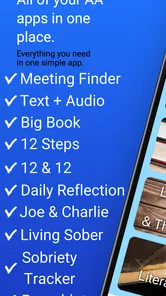
The first thing that struck me about the Everything AA app is how comprehensive it is. It’s not just an app; it feels like a community. Right from the start, you can access a wealth of resources. Whether you’re looking for daily reflections to start your day on a positive note or need to find a meeting in your area, this app has got you covered.
Features That Stand Out
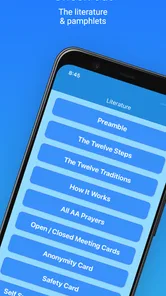
One of the standout features is the Big Book section. For those who might not be familiar, the Big Book is a cornerstone in AA literature. Having it readily available on your phone is incredibly convenient; no more lugging around a physical copy. Plus, the app offers audio versions, which is perfect for those moments when you’re on the go.
More From Our News Desk

Weather by Xiaomi Review: Clear at a Glance, Less Clear Up Close

X Under Pressure: Can It Recover When Posting Goes Wrong?

Clash of Clans Is Won Between the Battles

Android Auto Makes the Case for Quieter Car Software

MobiOffice: Transforming Mobile Productivity with Seamless Integration

EA SPORTS FC™ Mobile Soccer: Redefining Mobile Sports Gaming
Another feature I found particularly helpful is the sobriety counter. It’s a simple yet powerful tool that lets you track your progress. There’s something incredibly fulfilling about seeing those numbers go up each day. It’s a daily reminder of how far you’ve come.
Connecting with Others
If you’re someone who thrives on community support, the meeting locator is going to be your best friend. The app makes it super easy to find meetings near you. You can even filter them by type, which is great if you’re looking for a specific format or group.
Moreover, the app includes a chat feature where you can connect with other members. It’s like having a support network in your pocket, and sometimes, just knowing someone else is out there who understands can make all the difference.
Who it suits—and where I’d look elsewhere
I can see this being especially helpful for someone who already knows they want AA materials and would like readings, meeting-finding, and a progress reminder in one place. A realistic use is checking a reflection before work, then using the meeting locator after a schedule change to find an option for the evening. Someone who prefers paper books, already has a trusted local meeting routine, or wants a general wellness journal may find a dedicated alternative simpler. The app is focused on AA rather than broad mental-health support, so I wouldn’t rely on it for urgent help or as a substitute for professional care.
Choosing it over separate alternatives
Compared with keeping a printed Big Book, a separate meeting-search tool, and a paper journal, the appeal here is having several AA-oriented resources together. That is most useful when I’m away from home or unsure which resource I’ll need that day. The trade-off is that a single app can’t make every part of the experience as tailored as a specialist tool: someone who mainly needs a dependable local meeting routine may prefer to keep the group’s own contact details handy, while a reader who wants an uncluttered book experience may prefer paper or a dedicated reading app.
I’d use the collection as a starting point, not as a reason to abandon whatever already works. One practical approach is to keep a known meeting contact outside the app as well, then use the locator when plans change. That gives me a backup if search is inconvenient and keeps the app’s role clear: it helps me reach resources, while real people and established group communication remain important for confirming plans.
Small habits that prevent avoidable friction
For meeting searches, I’d avoid narrowing the search too quickly. If a precise query returns nothing useful, widening it and checking nearby options can be more productive than repeatedly entering the same terms. Once I find a plausible meeting, I’d verify its details before travelling, especially after a schedule change. Search is a convenience, not a guarantee that every listing reflects a last-minute change.
For reading, I’d choose audio or text based on the situation rather than expecting one format to fit every moment. Audio can help when my hands are busy, but it is less suitable when I need to compare a passage or read quietly in a shared space. Text makes pausing and revisiting a line straightforward. Keeping a specific reading in mind before opening the Big Book also makes a short session easier to manage than aimless browsing.
The progress counter can be meaningful, but I’d treat it as a personal prompt rather than a measure of anyone’s worth or recovery. A number can encourage reflection; it cannot capture the support someone gives, the effort involved in asking for help, or the many ways a person works through a difficult day. If tracking feels unhelpful, there is no need to make it the centre of using the app.
What to check when something seems wrong
If a meeting result looks out of date, or a search seems empty, I’d first reconsider the search terms and confirm details with the meeting itself before travelling. A phone’s connection can also affect searches, while a device restart or reopening the app is a reasonable basic troubleshooting step if it stops responding. If the issue persists, checking for an available app update is worthwhile; the current release is version 3.84, and the app requires Android 7.0 or later. These checks help separate a temporary device or information issue from a problem with the resource I’m trying to use.
It also helps to distinguish an app problem from a change in circumstances. A meeting may have changed its time or location, and a search that once worked may need broader terms when I’m somewhere unfamiliar. If reading or listening is interrupted, I’d try the resource again after checking the connection and reopening the app before assuming the content has disappeared. For urgent support, I would contact someone directly rather than spending time troubleshooting a phone.
Cost, expectations, and day-to-day fit
Everything AA is a free lifestyle app from Everything AA, with optional in-app purchases ranging from $1.99 to $19.99 per item. It is rated for Everyone 10+, and its average rating is 4.8 from around 16,000 ratings, with about 2,200 written reviews and over 500,000 installs. I’d regard that reach as a sign that many people find it useful, not proof that every feature or meeting listing will fit every person. Since optional purchases are present, I’d check the item details before buying and use the free resources first to see whether the app suits my routine.
For someone new to the app, I’d begin with its free basics and decide after a few ordinary days whether the collection genuinely saves time. The developer is Everything AA, and the app’s focus is clear from its meeting, reading, and reflection resources. It is not a general lifestyle organizer, so I would skip it if I wanted broad habit planning, unrelated wellness content, or a substitute for professional support. The best fit is someone seeking AA resources in a convenient mobile format.
Wrapping It Up
In a world where we’re constantly on our phones, having an app like Everything AA can make a significant impact. It’s user-friendly, packed with features, and most importantly, it provides a sense of community and support that’s crucial during recovery.
If you’re on this journey, or know someone who is, I’d highly recommend giving it a try. It’s not just about staying sober; it’s about building a new life, one day at a time. And with this app, you’re never alone on that journey. Cheers to new beginnings!
Everything AA Frequently Asked Questions
What is Everything AA’s main purpose?
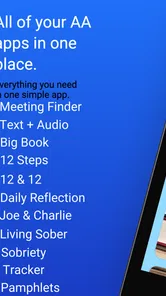
Everything AA is a lifestyle app for people seeking Alcoholics Anonymous resources in one place. Its store summary highlights a meeting finder, the Big Book, and daily reflections, making it a focused companion for exploring AA-related material. If you are looking for a general task manager or a broad productivity assistant, this app is not presented as serving that purpose.
Can Everything AA help me find an AA meeting?
A meeting finder is one of the app’s highlighted features, so finding meetings is part of its AA-focused offering. That may make Everything AA useful if you want meeting information alongside other AA resources in the same app. Its summary also mentions the Big Book and daily reflections, giving you a sense of the different kinds of material it brings together.
Is Everything AA focused on Alcoholics Anonymous resources?
Yes. Everything AA is a lifestyle app centered on Alcoholics Anonymous, bringing together resources such as a meeting finder, the Big Book, and daily reflections. It is intended for people looking for AA-related material in one app, rather than a general-purpose productivity assistant. Its store description presents it as “Everything Alcoholics Anonymous,” which makes its focus clear before you download.
What devices and operating systems can run Everything AA?
Everything AA is an Android app that requires Android 7.0 or later. Before downloading, check that your device meets this minimum requirement and has enough available space for the installation. The app is listed for users of all ages with a 10+ content rating, so it may be suitable for a broad audience while still carrying that age guidance.
What is Everything AA and what does it offer?
Everything AA is an all-in-one personal assistant app designed to streamline your daily activities. It offers features such as task management, calendar integration, and note-taking, all in one convenient platform. The app aims to improve productivity by providing a seamless interface where users can organize their schedules, set reminders, and manage tasks effectively. Whether you're a student, professional, or just someone looking to stay organized, Everything AA acts as a personal assistant to keep your life on track.
Pros
- User-friendly interface for easy navigation.
- Wide range of customizable features.
- Reliable performance with quick load times.
- Regular updates with new features.
- Great customer support available 24/7.
Cons
- Limited offline functionality.
- Some features require in-app purchases.
- Occasional bugs with new updates.
- Requires a stable internet connection.
- User data collection might concern some.












