MediaMonkey Pro
- 1.30K
- 4.4
- Installs
- 100.00K
- Price
- $5.49

Screenshots
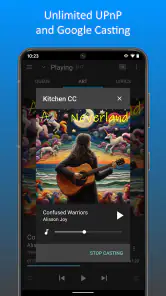
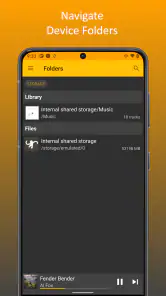
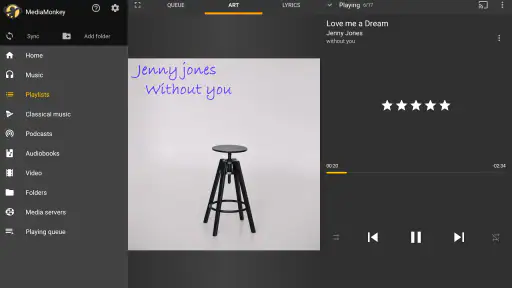

Analysis by Reviewed
I’d choose a music app by starting with the shape of my collection. If most of what I listen to lives in a streaming service, a dedicated library manager may feel like extra work. If I keep a personal collection of audio files and want to browse it carefully, MediaMonkey Pro is a more natural fit. It’s an Android music and audio app from Ventis Media, Inc., with a 4.4 average from around 6,800 ratings and more than 100,000 installs. The one-time price is $5.49, and it’s rated for Everyone.
A paid unlock for a particular kind of listener
The key point is that Pro unlocks the full set of MediaMonkey features; it isn’t a separate music catalog or streaming subscription. I’d consider the purchase if I already rely on MediaMonkey and regularly use the tools that the free experience keeps behind the Pro unlock. If I only need basic playback, paying for a broader library-management setup may be unnecessary.
That distinction also helps set expectations. This app makes the most sense when you have music files to manage, not when you simply want an effortless way to discover and play whatever is popular. Its Everyone age rating makes it broadly suitable, but the collection-focused approach is still aimed at people who care about how their own audio is organized.
Seamless Music Management
Right off the bat, MediaMonkey Pro impresses with its capability to handle an enormous music library without breaking a sweat. Whether you've got a modest collection or thousands of tracks, this app sorts everything with ease. One of the standout features is its ability to automatically organize and rename files based on your preferences. Say goodbye to the days of manually fixing those pesky track titles!
Sync Across Devices
In today's digital age, having your music available across all your devices is crucial. MediaMonkey Pro truly excels here by offering seamless synchronization. You can effortlessly sync your tracks between your PC and mobile devices, ensuring your favorite jams are always at your fingertips. This feature alone is worth its weight in gold for those who like to switch between devices regularly.
For a practical routine, I’d use a computer as the place to tidy a collection, then sync a deliberate selection for listening on the go. That avoids treating a phone as the only place to sort years of files, and it encourages a useful habit: check that the albums and playlists you actually want are on the mobile device before leaving home. If you’re deciding whether this workflow suits you, ask how often you move music between a computer and phone; the more often you do, the more valuable the manager’s role becomes.
Customize Your Listening Experience
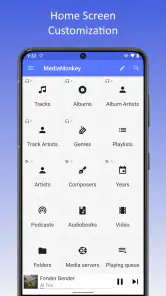
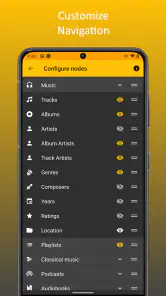
Another area where this app shines is customization. From tweaking the equalizer settings to adjusting playback features, MediaMonkey Pro allows you to tailor your listening experience to your liking. It's like having a personal DJ in your pocket, ready to adjust the vibe to match your mood.
More From Our News Desk

Clash of Clans Is Won Between the Battles

Android Auto Makes the Case for Quieter Car Software

MobiOffice: Transforming Mobile Productivity with Seamless Integration

EA SPORTS FC™ Mobile Soccer: Redefining Mobile Sports Gaming

How Microsoft OneDrive Became a Mobile Productivity Giant

How Google Translate Breaks Language Barriers Effortlessly
One small but worthwhile trade-off with audio controls is consistency: a setting that helps one album can make another sound less natural. I’d start with modest equalizer changes, compare a familiar track, and avoid assuming every adjustment should stay enabled for every kind of music. That makes customization a tool for preference rather than a constant project.
Advanced Features for Power Users
For those who consider themselves power users, you'll be thrilled with the advanced features MediaMonkey Pro offers. The app supports a wide array of audio formats and provides tools for audio conversion. Plus, with its ability to analyze volume levels and apply leveling across your tracks, you'll never have to deal with unexpected volume jumps again. It's the little things that make a big difference, right?
Volume analysis is particularly useful when a playlist jumps between older and newer recordings, or between albums mastered at noticeably different levels. I’d treat leveling as a listening convenience, not a reason to discard the original files or expect every track to sound identical. Similarly, conversion tools can help when preparing music for a particular playback setup, but they’re most useful when you know why you need a converted copy and keep your originals organized.
And let's not forget the party mode and sleep timer, which come in handy more often than you'd think. Whether you're throwing a bash or winding down for the night, MediaMonkey Pro has got you covered.
When another music app makes more sense
The usual alternatives fall into two broad camps: streaming-first players and simpler local audio players. I’d lean toward a streaming app if finding new music and having a ready-made catalog matter more than maintaining files. A lightweight player is a better choice if I just want to tap an album and listen without spending time on organization. MediaMonkey’s advantage is the middle ground for people who want playback plus control over a personal library; that same depth can feel like friction if sorting, syncing, and adjusting settings sound like chores.
A realistic evening use might be checking a newly added album on the computer, correcting its organization, and syncing it before a commute the next morning. The benefit is less hunting through inconsistently named files later. The catch is that this workflow depends on keeping the collection and the phone’s selected music in step, so it’s not the best match for someone who expects every device to update itself without any attention.
What to weigh before switching
If you already use another player, I wouldn’t move your whole listening routine at once. Start with a small group of albums and test the parts that matter to you: whether your files appear as expected, whether the organization fits your habits, and whether moving music between devices feels worthwhile. This is a low-risk way to see whether MediaMonkey’s extra control saves time or simply adds another library to maintain.
The most important question before buying is whether you’ll use the unlocked tools, rather than whether the app has a long feature list. The Pro purchase is a poor value if your listening is almost entirely streaming or your current player already handles your local collection comfortably. For a computer-based library that needs regular care, though, the paid unlock can make a phone feel like part of a broader music setup instead of an isolated player.
Making a library easier to live with
One benefit of a manager like this is that a little preparation can prevent repeated small annoyances. When adding a batch of albums, I’d check that their names and basic organization are sensible before sending them to the phone. That way, browsing later feels intentional instead of like searching a folder full of files with inconsistent labels. Automatic organization can save effort, but I’d still review the result rather than assume every file has been identified exactly as I intended.
It also helps to decide what belongs on the phone before syncing. A commute playlist, a few complete albums, and music for a particular activity may be more useful than copying an entire collection simply because there is room. This is a practical distinction: the computer can remain the long-term home for a broad library, while the phone carries a listening selection. If you change that selection often, the routine is worthwhile; if you rarely alter it, a simpler player may involve less upkeep.
Who benefits most from the extra control
I’d recommend considering MediaMonkey Pro if you already own audio files, care about their organization, and want your mobile listening to connect to a collection managed on a computer. It’s especially appealing to someone who notices mismatched track names, likes building playlists from their own albums, or wants playback tools that go beyond the basics. Its paid nature makes more sense when those tasks are part of a regular routine rather than occasional tinkering.
On the other hand, I’d skip it if you mainly press play on a streaming service, rarely keep music files, or don’t want to think about syncing and library upkeep. A streaming-first app is a more natural fit when discovery and a large ready-to-play catalog are the priority. A basic local player makes more sense when you already have a neat folder of music and want the shortest route from opening an app to hearing a track.
There’s also a middle case: someone with a local collection who mostly listens on one device. That listener may appreciate the organization and playback controls, but the computer-to-phone workflow won’t add much if there is no regular device handoff. I’d compare the purchase with the effort it saves in the specific task that currently bothers you, not with the length of a feature list.
Small tests before committing to a new routine
When moving from another player, I’d avoid reorganizing the entire collection at once. Choose a handful of albums with different naming or folder patterns and see how they appear. Then try making one playlist, adjusting one playback setting, and syncing only what you plan to hear. This gives you a meaningful test of the everyday workflow without making a change that is difficult to undo.
For conversion, I’d keep the original files untouched and make a separate copy when there is a clear playback reason to do so. That simple habit makes it easier to compare versions and avoids turning a convenience feature into a confusing file-management problem. Likewise, after changing equalizer settings, I’d revisit a familiar track at a normal listening level; an adjustment that sounds exciting in one moment may not suit a different album or longer session.
These checks answer the practical question many switchers have: will the app fit the way I already listen, or will it ask me to adopt a new system? The answer depends less on the number of tools than on whether you enjoy maintaining a library. If you do, its extra controls can support a tidy, repeatable routine. If you don’t, the same controls may make music feel like another task.
How it compares with everyday alternatives
Compared with a streaming service, MediaMonkey is about taking care of music you already have rather than making a catalog the center of the experience. That distinction matters if you value a personal collection and want to control how it is arranged. Streaming is usually the simpler choice for someone who wants to search broadly, discover unfamiliar artists, and avoid managing files; this app is better suited to people who want their own library to remain the main event.
Against a minimal local player, the trade-off is depth versus immediacy. A simple player can be pleasant when all you need is a straightforward queue. MediaMonkey’s broader management approach is more useful when you want to organize, adjust, analyze levels, convert audio, or move a chosen collection between a computer and phone. The extra capability is only an advantage if those jobs matter to you; otherwise, a lighter tool can feel more direct.
I’d also separate playback quality from collection control when choosing. If your current player already sounds and behaves the way you like, the reason to switch would need to be better management or a more useful device workflow, not a vague expectation that a different library screen will improve every listening session. That keeps the decision grounded in the problem you want solved.
Final Thoughts
So, is MediaMonkey Pro worth it? In my humble opinion, absolutely! Its robust features and user-friendly interface make it a top contender for anyone looking to elevate their music management game. You might find yourself wondering how you ever managed your library without it. So, if you're still on the fence, give it a try—you won't be disappointed!
With MediaMonkey Pro, managing your music isn't just easy; it's downright enjoyable. And that's music to anyone's ears!
My recommendation is strongest for listeners who can describe a real library problem they want to fix: scattered organization, a need to prepare music for mobile listening, or a desire for more control than a basic player offers. If that sounds like your situation, the $5.49 unlock is easier to justify because it serves an established habit instead of asking you to invent one.
If you mostly stream, don’t move music between devices, or prefer not to manage files, I’d choose a simpler route without feeling that you’re missing the point. For everyone else, the sensible approach is to test a small part of your collection and see whether the extra structure feels helpful in ordinary use. That is the clearest way to decide whether this paid music manager belongs in your routine.
MediaMonkey Pro Frequently Asked Questions
What devices and operating systems can I use MediaMonkey Pro on?
MediaMonkey Pro is an app in the Music & Audio category, and the Pro app is available for Android. The published questions also describe Android and iOS use, but compatibility can depend on which MediaMonkey app and device you choose. Before downloading, check that the version in your device’s app store matches your operating system and that you are selecting the Pro unlock rather than a different MediaMonkey app.
What does the MediaMonkey Pro purchase unlock?
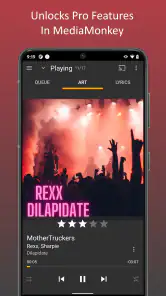
MediaMonkey Pro is described as unlocking all the Pro features of MediaMonkey. It is a paid app listed at $5.49, so it is intended for users who want those additional features rather than only the basic MediaMonkey experience. The age rating is Everyone, making it suitable for a general audience. Consider whether you want the Pro capabilities before purchasing.
What is MediaMonkey Pro and how does it enhance my music experience?
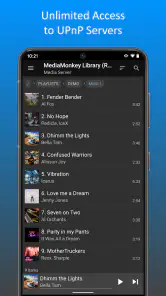
MediaMonkey Pro is an advanced music management application designed to organize, play, and sync music collections across devices. It enhances your music experience by offering features like automatic tagging, advanced searching, and smart playlists, ensuring you have easy access to your music library. The Pro version eliminates ads and provides additional features like wireless synchronization, DLNA support, and advanced audio settings.
Is MediaMonkey Pro compatible with both Android and iOS devices?
Yes, MediaMonkey Pro is compatible with both Android and iOS devices. It offers seamless integration across platforms, allowing users to manage and sync their music libraries no matter which operating system they prefer. This cross-platform capability ensures that your music is always at your fingertips, whether you’re using an Android smartphone or an iOS tablet.
What are the key features that make MediaMonkey Pro worth purchasing?
MediaMonkey Pro offers several key features that justify its purchase. These include advanced music management tools, such as automatic music tagging, customizable playlists, and a powerful search function. Additionally, it supports high-quality audio formats, wireless synchronization, and DLNA streaming. The Pro version also removes ads, providing an uninterrupted, premium music experience.
Pros
- Robust media organization features.
- Supports a wide range of audio formats.
- Syncs with multiple devices seamlessly.
- Advanced audio and video playback options.
- Customizable user interface.
Cons
- Paid app with no free version.
- Complex interface for beginners.
- Limited podcast management features.
- Requires MediaMonkey server for full sync.
- Lacks cloud storage integration.
- Category
- Music & Audio
- Version
- Varies with device











