

MealMaster - Recipe Keeper
- 10.00
- 3.9
- Installs
- 10.00K
- Price
- Free
Screenshots
Analysis by Reviewed
When I first opened MealMaster, I understood its appeal quickly: it is a practical Food & Drink app for turning recipes into something easier to manage, adjust, and reuse. Instead of treating a recipe as a fixed block of text, it focuses on the parts that usually cause trouble in a real kitchen—changing the number of servings, keeping personal recipes together, and working out the ingredient amounts needed for a meal.
That makes it more useful than a simple collection of cooking articles, but it is also more focused than a full meal-planning service. I would recommend it to someone who already has recipes they want to organize or regularly cooks for different numbers of people. I would not choose it as my only cooking companion if I wanted polished food photography, extensive discovery tools, shopping delivery, or a social community.
MealMaster is free to install, developed by Tikamori, and suitable for everyone. It has passed the early experimental stage too: the app has more than ten thousand installs and an average rating of 3.9 from roughly one hundred fifty ratings. Those figures suggest a modest but established utility rather than a huge all-purpose cooking platform. Its current version is 13.7, and it works on Android 9 or later.
What to expect when you open MealMaster
The best way to think about this app is as a personal recipe workspace. Its main job is not to tell me what is fashionable to cook; it helps me take a recipe and make it fit the situation in front of me. That distinction matters. If I have a family recipe written for four people but I am cooking for two, the calculator-style approach is more useful than manually estimating every ingredient.
The same applies when guests arrive unexpectedly. I can use the recipe information as a starting point, change the serving count, and avoid multiplying each quantity in my head. This is especially helpful with ingredients such as flour, rice, stock, or spices, where a small arithmetic mistake can affect the final result.
The app’s recipe-saving purpose also suits people who collect instructions from different places. I often end up with recipes in notes, screenshots, browser bookmarks, and messages. A dedicated recipe keeper gives those instructions a more consistent home. The benefit is not glamorous, but it becomes obvious after a few weeks: I spend less time searching for the version I meant to use.
There is a trade-off. A focused recipe calculator cannot replace the inspiration and editorial guidance offered by large cooking websites. If I want to browse hundreds of tested recipes before deciding what to make, a conventional recipe platform may feel richer. MealMaster makes more sense after I have found a recipe I trust and want to keep working with.
More From Our News Desk

 Gmail
GmailGmail in a Busy Inbox: Who Benefits Most?
From first account to crowded workday, Gmail earns its place through dependable search and flexible sorting—but its best fit depends on how much inbox maintenance you can tolerate.

 Prime Video
Switching to Prime Video: What Changes in Your Viewing Routine
Prime Video can make a compelling second home for streaming, but switching means learning a different catalog, rental layer, and route from browsing to playback.

 Universal TV Remote Control
Universal TV Remote Control Works Best as a Reliable Backup
A phone remote earns its place through quick setup and reliable habits. Here is how to get more from Universal TV Remote Control—and where its limits show.

 Weather - By Xiaomi
Weather by Xiaomi Review: Clear at a Glance, Less Clear Up Close
Xiaomi’s weather app makes everyday forecasts quick to scan, but its calm surface can leave useful details and recovery paths harder to find than they should be.

 X
XX Under Pressure: Can It Recover When Posting Goes Wrong?
A resilience-focused review of X, examining setup, mistaken posts, interruptions, weak connections, and the gaps that matter when recovery needs to be dependable.

 Clash of Clans
Clash of Clans Is Won Between the Battles
Its raids are quick; its community is a long-term project of coordination, teaching, rivalry, and shared responsibility—with all the friction that entails.
Latest News



The app also includes in-app purchases ranging from $2.99 to $28.99 per item. I would begin with the free experience and decide only after using the core workflow for several meals. That is a sensible approach with any utility app: first confirm that its recipe entry and adjustment style fit the way you cook, then consider whether extra paid functionality is worthwhile.
Starting with one recipe instead of importing your whole collection
For a first-time user, I would avoid trying to recreate an entire cookbook immediately. Pick one recipe you know well, preferably something you have cooked before. That gives you a reliable way to check whether the quantities, serving adjustment, and saved result behave as expected.
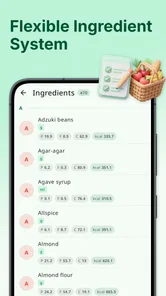
Begin by entering the recipe in the form the app expects, using clear ingredient names and consistent quantities. This is more important than it sounds. If I enter “one onion” in one recipe and “1 onion” in another, the information may still be understandable to me, but consistent wording makes a personal collection easier to scan later.
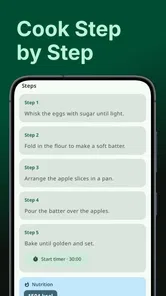
I would also separate preparation notes from ingredients wherever the interface allows it. “Chopped onion” is still an onion quantity, while “chop finely” is an instruction. Keeping those ideas distinct makes a recipe easier to read when I return to it during cooking. It also prevents the ingredient list from becoming a long paragraph that is difficult to follow with wet hands or limited attention.
Before saving, check the original serving count carefully. This is the reference point for later calculations. If a recipe says it serves four but the quantities were actually intended for six, changing the number later will only magnify the original mistake. MealMaster can help with arithmetic, but it cannot know whether the recipe’s starting proportions are sensible.
The first meaningful success: resize a familiar meal
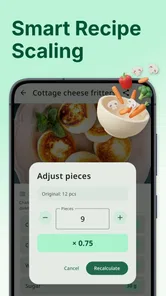
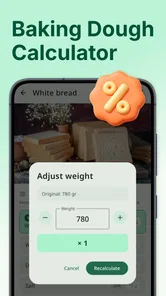
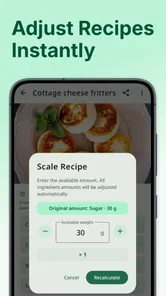
Once the recipe is saved, the most convincing first test is to change its serving size for a real meal. Imagine having a pasta recipe intended for a larger family dinner but cooking a smaller portion after work. Instead of dividing every ingredient separately, use the recipe calculator to adapt the quantities, then compare the result with what you would normally write on paper.
This is where the app earns its place. The useful result is not merely seeing a new number; it is having a repeatable method. I can save the original recipe as my baseline, adjust the servings for the current occasion, and return to the original version next time. That is safer than overwriting the recipe every time household numbers change.
A less obvious advantage is using the calculator for batch cooking. If I am preparing soup or a sauce for several meals, I can scale the recipe before shopping rather than discovering halfway through that I bought too little of a key ingredient. I still need to think about pot size, cooking time, and heat distribution, but the ingredient calculation becomes a cleaner starting point.
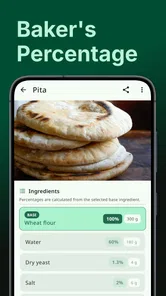
Scaling is not equally reliable for every recipe. Doubling a stew is usually straightforward, while baking can be more sensitive to pan dimensions, oven behavior, and ingredient interactions. I would trust the app for the arithmetic but not treat the adjusted result as a guarantee. For cakes, bread, and other precise recipes, I would check the texture and method requirements separately instead of assuming that every line should simply be multiplied.
How to build a useful personal recipe library
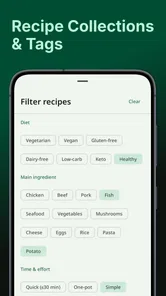
Saving recipes is most valuable when the saved version contains the details I actually need. A recipe title should be specific enough to distinguish similar dishes. “Chicken” is less helpful than a title that identifies the style or main method. I would also add notes after cooking: whether the seasoning was too strong, whether the sauce needed more liquid, or whether the stated preparation order caused a delay.
Those notes turn MealMaster from a storage box into a learning tool. The first saved recipe is only a record; the second or third version can reflect what worked in my kitchen. This is one of the app’s most practical uses for home cooks who repeat meals but rarely make them exactly the same way twice.
Another useful workflow is to save a recipe before shopping, then adjust the serving count to match the people expected at the table. That gives me a more realistic ingredient list than keeping a permanent recipe at an arbitrary size. It also reduces the temptation to buy based on memory, which is where small omissions tend to happen.
I would keep the original quantities visible in my own notes whenever a recipe comes from a trusted source. A scaled version is convenient for today, but the original is the reference that helps me understand the recipe’s intended balance. This matters particularly for ingredients that do not scale perfectly, such as salt, chili, raising agents, or strongly flavored extracts.
Where first-time users may hesitate
The phrase “recipe calculator” sounds simple, but cooking quantities are not always simple. A user may expect every conversion to produce a perfect cooking instruction, while the app’s calculation is only one part of the decision. A larger batch may need a wider pan, a longer cooking period, or cooking in stages. The app can reduce multiplication errors, but it cannot replace judgment at the stove.
Serving sizes can also be subjective. A recipe marked for four might provide four small portions or two generous ones. I would treat the serving number as a practical label rather than a scientific measurement. If I know my household eats larger portions, I would adjust the target accordingly and use the result as a planning guide.
Ingredient units deserve attention too. Converting a quantity on screen does not automatically solve differences in ingredient density. A cup of flour and a cup of chopped vegetables do not behave the same way, and a volume measure may be less precise than a weight measure for baking. My advice is to preserve the units used by the original recipe unless I have a clear reason to change them.
There is also a difference between saving a recipe and making it easy to retrieve. A large collection with vague titles can become just as frustrating as scattered notes. I would establish a naming habit from the beginning and use the notes area for substitutions or personal adjustments rather than placing every thought in the title.
Because the app is a focused utility, users looking for automatic meal plans may need to change their expectations. MealMaster is better suited to managing recipes I choose than to deciding my entire week for me. If I want nutritional analysis, pantry tracking, grocery delivery, or a large recommendation engine, a broader food-planning app may be a better match.
Everyday situations where it earns its keep
Consider a couple cooking a recipe written for four. One person wants leftovers for lunch, while the other wants dinner only. Instead of guessing, they can set a serving target that reflects the actual plan, save the adjusted quantities, and shop with that version in mind. The value is small but immediate: fewer leftovers than intended and less waste from buying for an imaginary household.
It is also useful for shared family recipes. A parent can keep the original recipe while adding notes about a child-friendly variation, such as reducing a strong spice or adding an ingredient later. That creates a repeatable record instead of relying on memory each time the dish is prepared.
For someone learning to cook, the app can provide a safer structure for experimenting. I would change one variable at a time, record the result, and keep the base recipe intact. That makes it easier to understand whether a different serving size, extra liquid, or seasoning adjustment caused the change in the final dish.
People who cook for occasional gatherings may appreciate the same system. A recipe can be kept at its normal size for everyday use, then resized when guests are expected. The important habit is to calculate before shopping and review the adjusted list before starting. That prevents the common mistake of scaling the main ingredients while forgetting garnish, sauce, or finishing components.
How it compares with notes, spreadsheets, and recipe websites
A phone notes app is faster for capturing a recipe, especially when I am copying it in a hurry. However, notes are usually weak at structured serving adjustments. I can do the math manually, but the process is easy to get wrong and difficult to repeat. MealMaster’s dedicated purpose gives it an advantage when the same recipe needs to serve different numbers of people.
A spreadsheet offers more control and can handle custom formulas, but it demands more setup and maintenance. For most home cooks, that flexibility is unnecessary. MealMaster is the more approachable choice when the goal is to save recipes and calculate portions without designing a system from scratch.
Large recipe websites are usually better for discovery, photographs, reviews, and cooking inspiration. Their weakness is that my personal changes can become buried among advertisements, comments, or multiple versions of the same dish. MealMaster is strongest as the place where I keep the version I actually use, even if I discovered the original recipe somewhere else.
Dedicated meal-planning services can go further with calendars, shopping lists, and nutrition features. I would choose one of those if my main problem were organizing an entire week. I would choose MealMaster when my main problem were recipe ownership and portion calculation. The right option depends on whether I need discovery, planning, or control over a personal collection.
What I would do after the first successful recipe
After testing one familiar meal, I would add recipes gradually and create a small working collection rather than importing everything. Start with dishes that are cooked repeatedly and benefit from changing servings. Those recipes reveal the app’s value faster than one-off dishes that will never be opened again.
Next, I would review each saved recipe after cooking and add one concise note about the result. This creates a feedback loop: save, adjust, cook, record, and improve. It is a more useful long-term habit than simply collecting recipes that remain untouched.
If the free version already handles the workflow I need, I would keep using it before considering an in-app purchase. The paid items cost between $2.99 and $28.99 each, so the sensible question is not whether extra functionality sounds attractive, but whether it removes a problem I actually encounter. A purchase should support a proven routine, not compensate for failing to establish one.
I would also keep a backup habit for recipes that matter emotionally or practically. A family recipe, a carefully refined baking formula, or a dish needed for an event should not exist in only one place. MealMaster can be the convenient working copy, while a separate personal record protects the original wording and history.
My final view after using it as a cooking tool
MealMaster succeeds because it addresses a narrow problem that appears often in everyday cooking. Saving recipes and recalculating servings sound basic, but they become genuinely helpful when I cook for changing household sizes, prepare batches, or adapt recipes over time. The app is at its best when I treat it as a personal, organized workbench rather than an endless source of culinary entertainment.
I like that the first useful result can happen quickly: enter one known recipe, save it, resize it, and use the adjusted quantities for a real meal. That path is reassuring for beginners because it does not require building a complex collection before the app becomes useful. It also gives experienced cooks a practical way to preserve their own improvements.
My reservations are mainly about expectations. Calculations do not solve every cooking problem, and scaling is not a substitute for understanding baking, cookware, texture, or seasoning. Users who want an all-in-one planner or a discovery-focused cooking community may find the experience too limited. Those are not reasons to dismiss it; they simply define where it fits.
For Android users on version 9 or newer who want a free starting point for recipe organization and serving adjustments, I think it is worth trying. I would especially suggest it to people who are tired of searching through scattered notes or repeatedly doing kitchen arithmetic. My strongest recommendation is to begin with one familiar recipe and judge the app by how much easier the next real meal becomes.
In my experience, that is the honest measure of this app. It will not decide what you should cook, and it will not replace cooking judgment. But when I already have a recipe and need to keep, adapt, and reuse it, MealMaster offers a straightforward workflow that can make ordinary meal preparation less error-prone and more repeatable.
MealMaster - Recipe Keeper Frequently Asked Questions
Is MealMaster - Recipe Keeper available for my device?
MealMaster - Recipe Keeper is an app in the Food & Drink category, and its current version is 13.7. It requires Android 9 or later, so check your device’s operating system before downloading. The app is free to install and is rated for Everyone. If you use iOS, check the Apple App Store listing for compatibility with your specific device.
Who makes MealMaster - Recipe Keeper, and is it popular?
MealMaster - Recipe Keeper is developed by Tikamori. It has more than 10,000 installs and an average rating of 3.9 from 152 ratings, giving prospective users a useful snapshot of its reception. Those numbers can help set expectations, but they do not guarantee that every feature or workflow will suit your cooking habits. Reading recent user feedback alongside the app description can help you decide.
What is MealMaster - Recipe Keeper used for?
MealMaster - Recipe Keeper is designed to help you organize, save, and manage recipes in one convenient place. After reviewing the app, its main appeal is the ability to keep personal recipes together instead of searching through notes, screenshots, websites, or cookbooks. It can be useful for planning everyday meals, preserving family recipes, and quickly returning to dishes you want to prepare again.
Can I add my own recipes to MealMaster - Recipe Keeper?
Yes, the app is intended for building a personal recipe collection, so users can generally add their own dishes with information such as ingredients, preparation instructions, cooking time, serving details, and notes. This makes it suitable for both beginners and experienced home cooks. Before downloading, remember that the exact editing options and supported fields may vary depending on the app version and your device.
Does MealMaster - Recipe Keeper work without an internet connection?
A recipe-keeping app is most useful when saved recipes remain available while cooking, including in kitchens with limited Wi-Fi or mobile data. MealMaster - Recipe Keeper may allow access to recipes stored locally on your device, but features that depend on online content, synchronization, account services, or external recipe sources could require an internet connection. Check the current store description for offline limitations.
Pros
- Quickly saves recipes from websites
- notes
- and photos in one place.
- Customizable categories make large recipe collections easier to organize.
- Ingredient scaling helps adjust servings without manual calculations.
- Useful search tools make finding saved recipes fast.
- Shopping lists can simplify grocery planning for upcoming meals.
Cons
- Some advanced features may require a paid subscription.
- Recipe imports may not work perfectly with every website.
- A large collection can take time to organize initially.
- Cloud syncing may depend on account setup and internet access.
- The interface may feel crowded when recipes contain many details.











