FaceAge - How old do I look
- 44.00
- 3.7
- Installs
- 500.00K
- Price
- Free
Screenshots
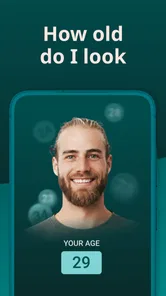
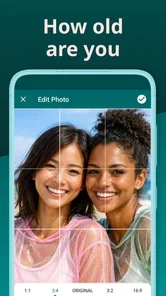
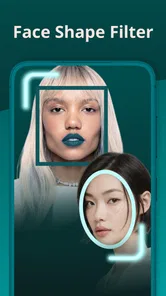

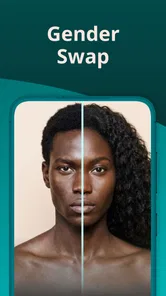
Analysis by Reviewed
I would approach Face scan - How old do I look as a small selfie-based diversion, not a beauty tool that needs to become part of a routine. The appeal is the moment of curiosity: you take a picture, see what age the app assigns to that image, and decide whether the guess seems amusing or surprising. That makes it easiest to enjoy when you already know the number is only a playful estimate.
Who Will Get the Most from a Quick Guess
I can see this fitting someone who likes trying novelty camera apps, or a group of friends looking for an easy icebreaker while getting ready to go out. It also suits a first-time user who wants to test the idea without learning a complicated editing workflow. The best outcome is not a particular number; it is a quick shared laugh that everyone is comfortable having.
I would skip it if you are looking for a dependable way to measure age, judge a change in your appearance, or get personalized skincare guidance. A camera-based estimate is affected by the photo itself, so it cannot answer those questions reliably. If you already feel uneasy about appearance comparisons, there is little reason to invite an arbitrary score into your day.
A Low-Pressure First Session
My preferred first-session approach is to take one ordinary, unfiltered selfie in even light, check the estimate, and stop there unless I am genuinely curious about how the picture affects it. This avoids turning a playful test into a hunt for a more flattering number. If you do compare two shots, change one condition at a time and keep the framing similar; otherwise, you will not know whether the difference came from lighting, expression, or angle.
For a casual get-together, I would let each person decide whether to participate and show results only to the group. That keeps the activity friendly without assuming everyone wants a face photo posted publicly. If you are using it alone, the same principle applies: the result can be a passing curiosity rather than something you need to save, defend, or repeat.
Face scan - How old do I look is a fun and intriguing app that promises to reveal the age you appear based on a quick selfie. It's one of those apps that can either be a great conversation starter or just a fun way to pass the time. So, naturally, I had to give it a spin and see what all the fuss was about. Here's my take after playing around with it for a bit.
First Impressions
Upon downloading and opening Face scan - How old do I look, the first thing I noticed was its sleek and straightforward interface. No clutter, just a simple layout that guides you directly to the main event - snapping that all-important selfie. As someone who appreciates when an app doesn't bombard you with too many options right off the bat, I found this approach quite refreshing.
More From Our News Desk

 Gmail
Gmail in a Busy Inbox: Who Benefits Most?
From first account to crowded workday, Gmail earns its place through dependable search and flexible sorting—but its best fit depends on how much inbox maintenance you can tolerate.

 Prime Video
Switching to Prime Video: What Changes in Your Viewing Routine
Prime Video can make a compelling second home for streaming, but switching means learning a different catalog, rental layer, and route from browsing to playback.

 Universal TV Remote Control
 Works Best as a Reliable Backup
A phone remote earns its place through quick setup and reliable habits. Here is how to get more from Universal TV Remote Control—and where its limits show.

 Weather - By Xiaomi
Weather by Xiaomi Review: Clear at a Glance, Less Clear Up Close
Xiaomi’s weather app makes everyday forecasts quick to scan, but its calm surface can leave useful details and recovery paths harder to find than they should be.

 X
X Under Pressure: Can It Recover When Posting Goes Wrong?
A resilience-focused review of X, examining setup, mistaken posts, interruptions, weak connections, and the gaps that matter when recovery needs to be dependable.

 Clash of Clans
 Is Won Between the Battles
Its raids are quick; its community is a long-term project of coordination, teaching, rivalry, and shared responsibility—with all the friction that entails.
Latest News



What to Expect from the Result
This is a beauty app built around one light-hearted question: what age might a face appear to be in a photo? I’d treat the result as a playful estimate, not a measurement of health, attractiveness, or actual age. A face scan can react to the image in front of it, so the number is best understood as a conversation starter rather than a verdict about you.
That distinction matters if you’re deciding whether to try it. If you enjoy selfie-based novelty apps and can laugh when a result seems surprising, the basic idea is easy to appreciate. If you want dependable facial analysis or advice about skincare, this is not the tool I’d choose; a photo-based age guess cannot replace a professional assessment or a beauty routine tailored to your needs.
How It Works
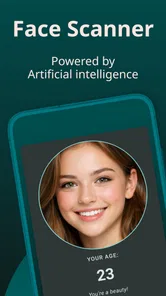
Getting started is as easy as pie. You simply take a selfie, and within seconds, the app provides an age estimate based on your facial features. The app uses complex algorithms and facial recognition technology to determine your "perceived age." While I can't speak to the scientific accuracy of these estimates, it was certainly fun to see how old (or young!) the app thought I looked. I took multiple selfies under different lighting conditions just to see how consistent the results were, and it was amusing to observe the variations.
Getting a Useful First Scan
For a first try, I’d use a straightforward, recent selfie rather than a filtered image or a dramatic angle. Face the camera, keep your expression relaxed, and choose even lighting so shadows do not dominate the picture. These are practical ways to make the photo easier to compare with another one; they do not make the estimate scientifically accurate. If the first result feels odd, repeat the scan once with a clearer photo before drawing conclusions.
A small but useful experiment is to change just one thing between attempts. Try similar framing in brighter and dimmer light, for example, instead of changing lighting, pose, makeup, and camera angle all at once. That makes it easier to see how much the image conditions affect the outcome. I would avoid treating a more flattering result as proof that a particular look makes you younger; the app is responding to a photo, not evaluating your appearance in a consistent real-world setting.
A realistic moment for using it is getting ready with friends before going out: everyone can take a quick selfie, compare the guesses, and move on when the joke has had its turn. That is a better fit than using the result to judge a serious change in appearance. It also gives the app a clear purpose without turning a playful number into something personal or stressful.
Fun Features
Beyond just guessing your age, Face scan - How old do I look offers a few additional features that enhance the overall experience. There's a share button that lets you post your results directly to social media, making it easy to challenge your friends to see how their results compare. The app also provides some interesting insights into how certain features might influence perceived age, though I took these with a pinch of salt.
Sharing is most enjoyable when everyone involved is comfortable having a selfie result shown to others. I’d check the image and result before posting, and I’d ask friends before sharing theirs. If you would rather keep the joke between a small group, you can simply show the result in person instead of turning it into a social post. That keeps the app useful for a quick icebreaker without making sharing feel like part of the experience you have to complete.
Common Confusion and Practical Limits
The biggest point to keep in mind is that a different estimate from one selfie to the next does not necessarily mean the app has changed its view of you. Lighting, framing, expression, and image quality can all change what a photo presents. That is why I would compare only broadly similar pictures and take any variation lightly. The scan is entertainment, not a repeatable beauty test.
Face scan - How old do I look is free to download, with optional in-app purchases priced from $0.99 to $19.99 per item. I’d try the basic experience first and only consider spending if a feature you actually want is clearly presented before purchase. The app is rated for Everyone, and Tikamori is the developer. It has a 3.7 average from around 4,200 ratings, with 41 written reviews, and more than 500,000 installs. Those figures suggest people have tried it, but they do not tell me whether its estimate will suit any individual photo.
It is also worth separating the age-scan idea from the usual alternatives. A standard camera app lets you take and edit selfies, while a dedicated beauty or skincare app is more relevant if your goal is appearance guidance or routine planning. This app’s appeal is narrower: it gives a quick age guess for amusement. Choose it for that small, social activity, not as a replacement for editing tools, skincare information, or a reliable age assessment.
User Experience
The app runs smoothly, with no noticeable lag or crashes during my testing. It's compatible with both Android and iOS devices, which is great news for all users. The ads are present but not overly intrusive, allowing you to enjoy the app without too many interruptions. One thing to note, though, is that while the app is free, some features might require in-app purchases, so keep that in mind if you're looking to unlock everything it has to offer.
The Android version is listed as version 27.0 and requires Android 6.0 or later. If you are using Android, it is sensible to check that your device meets that minimum before installing. The first meaningful action is simply taking a clear selfie and seeing the estimate; there is no need to prepare a gallery of photos or learn a complicated workflow before you can decide whether the app is for you.
I’d skip it if a numerical age guess might affect your confidence, or if you need consistent, evidence-based feedback. I’d also avoid scanning someone else’s face without their agreement, especially if you intend to share the result. For people who want a quick bit of novelty and understand the limits, though, the simple setup is part of the appeal.
Making the Result Useful Without Overreading It
One practical way to keep the experience grounded is to decide what you are testing before taking another photo. If you are curious about lighting, keep your expression and distance from the camera similar. If you are curious about expression, keep the lighting and framing steady instead. This will not make the output a controlled assessment, but it can make the comparison less confusing and help you see why two pictures might receive different guesses.
I would also treat a scan as a moment-in-time result, rather than a record of how you look across weeks or months. Different cameras, rooms, and image conditions make casual comparisons unreliable. If your real goal is to track a change in skin or appearance, a consistent personal photo routine or advice from a qualified professional is a better fit than repeatedly checking a playful estimate.
What to Consider Before Paying or Sharing
Because the app is free to download but offers optional purchases, I would not tap through a payment screen just to see what happens. First decide whether the basic age-guess activity is enjoyable on its own. If a paid option appears, read its description and price carefully, then consider whether it adds something you actually want; there is no need to pay simply to make a surprising result feel more meaningful.
Sharing deserves a similar pause. A face photo can feel more personal than an ordinary app result, so I would review exactly what will be posted and choose a private, in-person comparison if there is any doubt. For a group, the most considerate approach is to let each person control their own photo and result. That small bit of care keeps a silly activity from becoming an awkward one.
Overall, Face scan - How old do I look is a fun app that doesn't take itself too seriously. It's perfect for those moments when you just want a quick laugh or need something to break the ice in a group setting. While it's not an app you'll likely use every day, it's one that you'll be glad to have on your phone for those times when you're in the mood for a bit of light-hearted fun.
My recommendation is to treat the scan as a one-minute curiosity: take a clear photo, enjoy the guess, and don’t let one result define how you see yourself. If that sounds like the kind of small diversion you want, it is easy to give it a try. If you are looking for a serious beauty tool, a camera editor or a more focused skincare app will be a better match.
FaceAge - How old do I look Frequently Asked Questions
Is Face scan - How old do I look free to download, and are there in-app purchases?
Face scan - How old do I look is free to download, so you can try its age-estimation concept without paying upfront. The app also offers optional in-app purchases, with items ranging from $0.99 to $19.99. Check the purchase details shown in your app store before confirming anything, and consider your device’s purchase controls if you want to avoid accidental spending.
What should I know about the app before installing it?
Face scan - How old do I look is a beauty app from Tikamori, intended to estimate how old you appear from a photo. It is rated for Everyone and has been installed over 500,000 times. The app has an average rating of 3.7 from around 4,200 ratings, so user experiences vary. These details can help you decide whether its lighthearted photo-analysis idea suits you.
What is "Face scan - How old do I look" and how does it work?
"Face scan - How old do I look" is an entertaining app designed to estimate your age and gender by analyzing your facial features. Using advanced facial recognition technology, it scans your uploaded photo and provides an estimate of how old you appear. It’s a fun and engaging way to see how others might perceive your age visually.
Is "Face scan - How old do I look" accurate in determining my age?
While "Face scan - How old do I look" uses sophisticated algorithms to evaluate facial features, the results are meant for entertainment purposes and may not always be accurate. Variations in lighting, photo quality, and facial expressions can affect the outcome. Hence, it should not be used as a definitive measure of your actual age.
Do I need an internet connection to use "Face scan - How old do I look"?
Yes, an internet connection is required to use "Face scan - How old do I look." The app sends your photo to a server where the image processing and analysis occur. This means you need either a Wi-Fi connection or mobile data to enjoy the full functionality of the app and receive results.
Pros
- Fun and engaging user interface.
- Quick and easy face scanning.
- Provides age prediction instantly.
- Entertaining for social sharing.
- Regular updates and improvements.
Cons
- Accuracy may vary significantly.
- Requires good lighting for best results.
- Limited free features
- in-app purchases needed.
- May not work well on older devices.
- Privacy concerns about data usage.