

MD Vinyl - Music Player Widget
- 185.00
- 4.5
- Installs
- 1.00M
- Price
- Free

Screenshots
Analysis by Reviewed
I like MD Vinyl - Music Player Widget most when I treat it as a home-screen companion rather than a replacement for a full music app. Its vinyl-inspired look gives playback controls a bit of personality, while the practical appeal is being able to reach the music already playing without opening another screen. That mix suits people who enjoy a carefully arranged home screen and want their everyday listening to feel a little less plain.
A widget that earns its space
The useful question is not just whether a spinning-record design looks good, but whether it helps during ordinary listening. I can see the appeal while getting ready in the morning: glance at the current album art, pause a track, or move on without hunting through a music app. It is a small convenience, not a new way to discover or organize music, and that distinction matters if you are choosing between a decorative widget and a full-featured player.
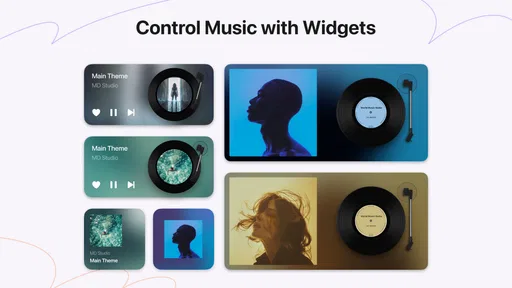
For a tidier setup, I would try the available sizes before settling on one. A larger widget can give the record-and-artwork treatment room to breathe, while a smaller one may suit a crowded screen better. The trade-off is straightforward: give it more space for a stronger visual presence, or keep the screen uncluttered and accept a more compact control surface. The choice depends on how often you use the widget rather than how striking it looks in a preview.
The Vintage Charm
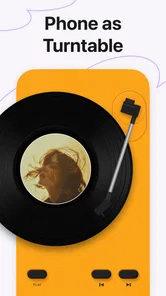
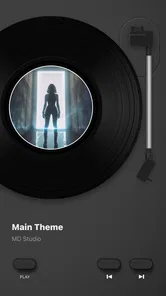
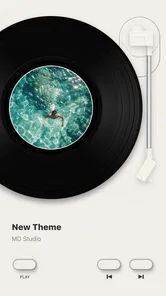
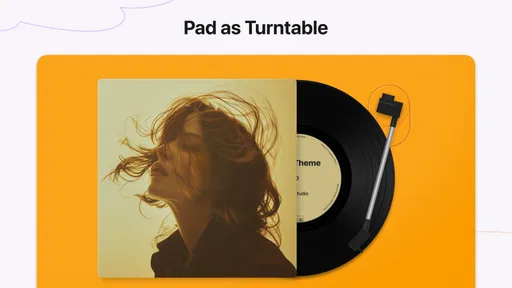
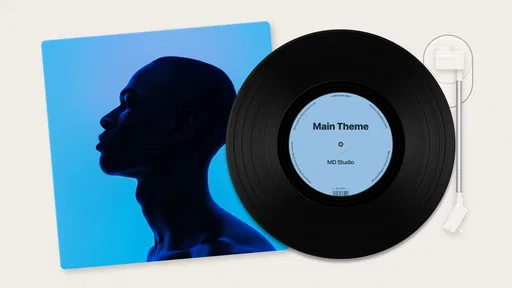
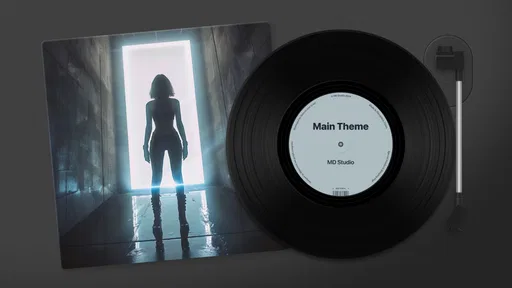
First off, let’s talk aesthetics. MD Vinyl - Music Player Widget brings a touch of nostalgia to your home screen. The app cleverly combines the old-school appeal of vinyl records with modern functionality. You get to choose from a variety of widget designs, all mimicking the look and feel of a spinning vinyl. It’s like having a mini record player right in your pocket! And yes, it does make your screen look pretty snazzy.
Features That Spin
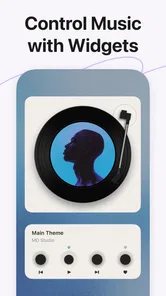
Now, onto the features. This app doesn’t just sit pretty; it packs some serious functionality. You can customize the widget size and style to fit your home screen perfectly. It integrates seamlessly with most music streaming apps, so whether you’re a Spotify, Apple Music, or a SoundCloud fanatic, you’re covered. The playback controls are straightforward and user-friendly, making it easy to pause, skip, or replay your favorite tracks without having to dive into the main app.
Moreover, the widget is interactive. You can tap on it to open up your music library, and even better, it displays the album art of the current track playing. So, not only does it serve as a player, but it’s also a neat way to showcase your music taste.
Where it fits—and where it doesn’t
Compared with leaving a music service’s standard playback panel on screen, this widget puts more emphasis on album art and a vinyl theme. That is the reason I would choose it, not because it replaces the service’s own library, queue, or browsing tools. If I’m picking a playlist or searching for a particular album, I still expect to use the music app itself; the widget makes sense once playback is underway and I want quick, visible controls.
More From Our News Desk

 Gmail
GmailGmail in a Busy Inbox: Who Benefits Most?
From first account to crowded workday, Gmail earns its place through dependable search and flexible sorting—but its best fit depends on how much inbox maintenance you can tolerate.

 Prime Video
Switching to Prime Video: What Changes in Your Viewing Routine
Prime Video can make a compelling second home for streaming, but switching means learning a different catalog, rental layer, and route from browsing to playback.

 Universal TV Remote Control
Universal TV Remote Control Works Best as a Reliable Backup
A phone remote earns its place through quick setup and reliable habits. Here is how to get more from Universal TV Remote Control—and where its limits show.

 Weather - By Xiaomi
Weather by Xiaomi Review: Clear at a Glance, Less Clear Up Close
Xiaomi’s weather app makes everyday forecasts quick to scan, but its calm surface can leave useful details and recovery paths harder to find than they should be.

 X
XX Under Pressure: Can It Recover When Posting Goes Wrong?
A resilience-focused review of X, examining setup, mistaken posts, interruptions, weak connections, and the gaps that matter when recovery needs to be dependable.

 Clash of Clans
Clash of Clans Is Won Between the Battles
Its raids are quick; its community is a long-term project of coordination, teaching, rivalry, and shared responsibility—with all the friction that entails.
Latest News



It is also a better fit for someone who listens across the services the widget supports than for a listener who expects one dedicated player to manage every part of their collection. “Most” does not mean every service, so I would check that my usual app behaves as expected before relying on the widget for daily use. If reliable access to a particular service is the priority, its own controls may be the safer choice.
Small setup choices, real trade-offs
One practical tip is to test the widget with the music service you actually use, not just while browsing its designs. Confirm that the track information and artwork appear during normal playback, then try the controls from the home screen. This quick check tells you whether the setup suits your routine and avoids mistaking a good-looking layout for a useful one. Album art can also vary from track to track, so the visual experience depends partly on what is playing.
As a free app from Miidii Tech, it is easy to try without paying up front, though in-app purchases range from $1.99 to $3.99 per item. I would explore the basic setup first and only consider a purchase if a particular option matters to me. The app is rated for Everyone, and its 4.5 average from around 11,000 ratings suggests it has found an audience; that is useful context, but it does not guarantee that every music service or home-screen arrangement will suit your device.
Easy Peasy Setup
Setting up MD Vinyl is a breeze. After downloading the app, you’ll find straightforward instructions guiding you through the process of adding the widget to your home screen. No rocket science here! It’s designed to be intuitive, even for those who aren’t the most tech-savvy. Plus, the app doesn’t hog your phone’s resources, so you won’t have to worry about it slowing down your device.
For anyone checking compatibility before installing, the current version is 2.6.2 and it requires Android 8.0 or later. It has passed one million installs, is free to download, and was released on January 2, 2023. Those details make it a low-commitment experiment for an eligible Android user, especially if the aim is simply to see whether a vinyl-style control looks and feels right on a home screen.
Making it part of a listening routine
The widget makes most sense when I decide in advance what I want to listen to, start playback in the music service, and then use the home screen for small adjustments. For example, I might put on an album while preparing lunch, then pause it when the doorbell rings and resume once I am back. The value is in avoiding an extra trip into the player for these brief interruptions, rather than in controlling every part of a listening session from the widget.
That workflow also helps set realistic expectations. If I want to compare albums, build a queue, or search for a song, I begin in the streaming app; once I have chosen, the widget is a handy surface for playback. I would keep the service’s own app easy to reach rather than treating the widget as the only doorway to music. This two-part setup is less impressive in a feature checklist than a full player, but it fits how many people actually use background music throughout the day.
How it compares with familiar controls
The standard playback controls built into a phone are the more practical choice when I care about function above appearance. They are already part of the listening flow and do not ask me to reserve home-screen space for a particular design. MD Vinyl’s distinction is visual: album art and the record-inspired presentation make playback feel more personal. If I rarely look at my home screen while music plays, that difference may not justify changing my setup.
It also should not be judged as a rival to a streaming service’s full app. Those apps are where I expect to browse catalogs, manage a queue, and make listening choices. A dedicated music player may be a better fit for someone whose priority is organizing local files or shaping a collection in detail. This widget occupies a narrower middle ground: it decorates and simplifies access to playback already underway. I would choose it for that specific role, not because it offers a more complete music experience than the tools around it.
What to check before settling in
When trying it for the first time, I would test a few ordinary situations rather than judging it from one successful tap. Start a track in the service you use most, lock and unlock the phone, and return to the home screen to see whether the artwork and controls still suit the way you listen. Then try a skip and a pause. This is a useful reality check because a widget can look polished while still being less convenient than the controls you already use.
I would also decide where the widget belongs before choosing its size. On a screen already filled with shortcuts, a large visual element can make the layout feel crowded; on a sparse screen, that same footprint can become a deliberate focal point. If I use more than one music service, I would test each one separately instead of assuming that the same behavior will carry over. Those small checks help answer the practical question—will I use this often enough to keep it?—without turning setup into a project.
Who will get the most from it
I would recommend it to listeners who already have a preferred music app, enjoy seeing album artwork, and like customizing the look of their Android home screen. It is especially appealing if music is often playing while you move between simple tasks and you want pause or skip controls within easy reach. The app’s Music & Audio category describes its place, but its real appeal is more specific: it adds a themed control surface to music listening rather than trying to become the center of it.
I would skip it if home-screen space is precious, if I almost always control music from headphones or a car interface, or if I want an all-in-one library and discovery tool. It may also disappoint anyone expecting every streaming service to work identically. Checking compatibility with your everyday service before arranging the screen is the sensible approach. Since the app is free to try and rated for Everyone, the main commitment is deciding whether its appearance and controls deserve a permanent spot.
Final Spin on the Groove
So, what’s the verdict? If you’re someone who appreciates a blend of retro aesthetics and modern convenience, MD Vinyl - Music Player Widget is definitely worth a try. It’s not just about making your phone look cool; it’s about enjoying your music in a whole new way. The app is a great conversation starter too; I mean, who wouldn’t want to gush about their pocket-sized vinyl player?
In the end, MD Vinyl hits the sweet spot between style and functionality. So, if you’re ready to add a little spin to your music experience, go ahead and give it a whirl. Happy listening!
My recommendation is specific: try it if album artwork and quick controls are things you want to see on your home screen, and if you enjoy the record-player visual enough to give a widget space. I would skip it if you mainly want deeper library management, broad music discovery, or a dependable interface for a service you have not tested with it. In that case, the service’s own app is the more direct tool. For the right listener, though, this is a pleasant visual layer over familiar playback—not a substitute for the music apps doing the actual listening work.
MD Vinyl - Music Player Widget Frequently Asked Questions
Is MD Vinyl - Music Player Widget free to download, and are there in-app purchases?
MD Vinyl - Music Player Widget is free to download, so you can try its vinyl-inspired music player and home-screen widget without an upfront purchase. The app also offers in-app purchases priced from $1.99 to $3.99 per item. If you prefer not to spend money, check the available options in the app and review any purchase prompt before confirming.
What devices can run MD Vinyl - Music Player Widget?
MD Vinyl - Music Player Widget is an app in the Music & Audio category from Miidii Tech, and it requires Android 8.0 or later. That gives you a quick way to check compatibility before downloading: look at your device’s Android version in its settings. The app is rated for Everyone, making its stated age category suitable for a general audience.
What is MD Vinyl - Music Player Widget?
MD Vinyl - Music Player Widget is an innovative music player app designed for music enthusiasts who enjoy personalizing their listening experience. The app offers a unique widget feature that resembles a vinyl record player, allowing users to add a nostalgic and visually appealing touch to their home screens while playing their favorite tracks. Its tagline, “Play Music, Feel Music,” captures the focus on combining playback with a distinctive visual style.
How does the widget functionality of MD Vinyl work?
The widget functionality in MD Vinyl - Music Player Widget allows users to place a vinyl record-inspired widget directly on their home screen. This widget not only displays the current track information but also includes basic playback controls. Users can easily view and control their music without needing to open the full app, enhancing convenience and aesthetic appeal.
Is MD Vinyl compatible with all music file formats?
MD Vinyl - Music Player Widget supports a variety of popular music file formats, including MP3, WAV, and AAC. While it covers most common formats, it's advisable to check the app's specifications for any updates or additional format support to ensure full compatibility with your music library. If you rely on a less common format, testing a track from your collection after installing can help you see whether it plays as expected.
Pros
- Elegant and intuitive user interface.
- Seamless integration with music libraries.
- Customizable widgets for quick access.
- Lightweight and doesn't drain battery.
- Frequent updates with new features.
Cons
- Limited support for rare file types.
- Some features locked behind paywall.
- Occasional minor glitches reported.
- Requires constant internet connection.
- Ads can be intrusive at times.











