MBTA mTicket
- 558.00
- 3.0
- Installs
- 500.00K
- Price
- Free

Screenshots
Analysis by Reviewed
Before trusting a transit app with a purchase, I want to know what job it actually does and where its boundaries are. MBTA mTicket is a free ticketing app from MBTA for Massachusetts commuter rail travel, rather than a general-purpose map for planning every leg of a Boston-area journey. That focus is useful: I can think of it as a place to handle a ticket, while checking broader route choices separately when my trip involves other services.
Where trust begins: a focused ticketing tool
The app has been available since Nov 8, 2012, and its current version is 7.9.0. It has an average rating of 3.0 from around 1.6K ratings, alongside 558 written reviews, and has been installed over 500K times. Those figures tell me it has a substantial commuter audience, but the middling average is a reason to approach it as a practical utility rather than assume every part of the experience will be effortless. The app is rated for Everyone and requires Android 7.0 or later.
For a commuter, the key question is not whether an app promises convenience; it is whether buying and presenting a ticket fits the trip. I would use this one when I already know I’m taking the commuter rail and want to avoid arranging a paper ticket at the station. I would not treat it as a substitute for checking the full journey, especially if I need to combine different kinds of transit or compare routes.
Who benefits most from keeping it installed
The best fit is someone who takes the commuter rail often enough that buying a ticket is a recurring chore, but not necessarily often enough to have every station routine memorized. A regular rider can keep ticket purchasing separate from route research, while an occasional rider can use the app when the rail portion of a trip is already settled. If you mainly need a map, transfer guidance, or a comparison between rail and other ways of getting around, a broader navigation tool is a better starting point.
There is a useful middle ground for visitors, too. If I were visiting the Boston area and had already confirmed that commuter rail was the right service for a particular outing, I could use mTicket for that purchase without expecting it to plan my entire day. If I had not yet worked out where to board, how to reach the station, or what to do after arriving, I would sort those questions out elsewhere first.
Getting Started with MBTA mTicket
First things first, downloading and setting up the app is a breeze. Available for both Android and iOS, you can fetch it via Google Play or the App Store. Once installed, creating an account is as straightforward as pie—just plug in your email, set a password, and you're in. The design is clean and intuitive, which is perfect for tech-savvy commuters and those a bit more tech-challenged alike.
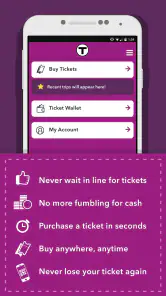
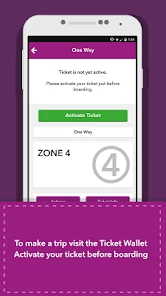
The standout feature? The ability to purchase and store tickets digitally. Say goodbye to the hassle of losing paper tickets or fumbling around at the station. With a few taps, you can buy one-way, round-trip, or even monthly passes. The tickets are saved right in the app, ready to be activated when you board.
More From Our News Desk

Clash of Clans Is Won Between the Battles

Android Auto Makes the Case for Quieter Car Software

MobiOffice: Transforming Mobile Productivity with Seamless Integration

EA SPORTS FC™ Mobile Soccer: Redefining Mobile Sports Gaming

How Microsoft OneDrive Became a Mobile Productivity Giant

How Google Translate Breaks Language Barriers Effortlessly
Buying ahead without losing control
One useful way to make the ticketing flow less stressful is to separate the purchase from the moment of travel. If I know tomorrow’s rail trip is likely, I can handle the purchase before I’m hurrying to the platform, then pay attention to the ticket’s status when it is time to board. That habit reduces last-minute tapping, but it also means I should avoid activating a ticket simply because I have opened the app; I want to make sure I’m using it for the intended ride.
For someone new to mobile tickets, a sensible first outing is a straightforward one-way trip rather than a complicated day with several changes. That gives you a chance to learn where the ticket appears and how the activation step works before you depend on it during a rushed connection. If you travel with a monthly pass, the same basic discipline applies: check that the pass you intend to use is available before leaving, rather than discovering a problem at the station entrance or onboard.
A practical routine for departure day
I would make the final check part of leaving home, not something I try to do while stepping onto the train. Confirm that the ticket for the intended ride is visible, make sure the phone has enough charge for the journey, and leave time to deal with a login or payment issue. This is not a special trick so much as a change in where the friction sits: the app can spare a stop at a ticket machine, but the phone becomes part of the boarding routine.
For a return trip, I would think through the day’s ticket needs before buying rather than assume that a purchase can be adjusted later. The right choice depends on the journey and the ticket shown in the app, so I would read the options on screen carefully. When plans are firm, buying ahead can make departure calmer; when plans are uncertain, waiting until I know which ride I need may be the more sensible trade-off.
Features That Make Commuting Easier
One of my favorite features of the MBTA mTicket app is the real-time updates. If you're like me and always running late, you'll appreciate the push notifications about train schedules and any service disruptions. It’s like having a personal conductor in your pocket keeping you in the loop.
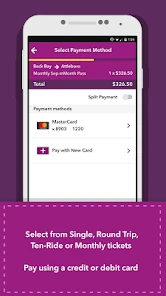
Plus, the app supports multiple payment methods, including credit cards and PayPal, so buying tickets is as flexible as it gets. And for those who commute regularly, the app allows you to save your frequently used routes, making future ticket purchases faster than ever.
Saved routes are especially handy when the trip is repetitive: choosing a familiar route again can reduce the chance of rushing through a purchase and selecting the wrong journey. I would still look at the route and ticket details each time, because saved choices are a shortcut, not a reason to skip checking. For someone whose work schedule or destination changes often, the time saved may be less noticeable, and careful selection matters more than speed.
A useful tool, not the whole trip planner
The practical trade-off is that ticket convenience and journey planning are different needs. A map or general transit-planning app is usually a better first stop if I am unfamiliar with the area, need to compare ways to reach a destination, or expect to combine commuter rail with other transportation. Once I have chosen the rail trip, mTicket can serve the narrower task of buying and keeping the ticket in one place. That division of labor is more dependable than expecting one app to answer every travel question.
I also would not rely on ticketing convenience as proof that a train is running exactly as planned. The original article describes schedule and disruption notifications, but I would still check relevant travel information before setting out when timing matters. A notification can be helpful; it does not remove the need to make a backup plan for an important appointment or a tight connection.
This is where it differs from the usual alternative: a general transit app is useful for exploring a route, understanding transfers, and comparing options, while a station ticket machine or another in-person purchase method avoids making the phone the only place I manage a ticket. mTicket is most compelling after I have made the route decision. If I need one tool to answer every question from departure point to final stop, I would use a route planner alongside it rather than stretch its ticketing role into a full travel guide.
Why It's a Game Changer
Now, let's talk about the convenience factor. Imagine it's a chilly New England morning, and you’re not in the mood to queue up for a ticket. With the MBTA mTicket app, you can buy your ticket while sipping your morning coffee at home. It’s not just convenient; it’s revolutionizing how we think about public transportation. No more wrestling with cash or waiting for change—just a seamless and efficient experience.
In a more ordinary rush-hour scenario, I would buy the ticket before heading out, confirm that the intended ticket is visible, and leave enough time to deal with any phone or payment snag. That last step matters: a digital ticket shifts the task from finding a machine to keeping the phone usable and the ticket easy to reach. If the battery is nearly empty, or I am uncomfortable depending on my phone for proof of travel, a station-based option may feel safer.
What to consider before depending on it
There is a real convenience-versus-dependence trade-off here. A saved digital ticket avoids carrying a paper slip, but it makes the phone part of the travel routine. I would check the ticket before leaving and keep the app accessible, rather than wait until boarding to log in or search through screens. For a visitor who rides the commuter rail once, that may be enough; for someone who makes the same trip often, learning the purchase and activation flow can save repeated station stops.
People who want a broad route guide, who rarely use commuter rail, or who prefer not to manage travel purchases on a phone may be better served by a general navigation app or an in-person ticket option. Conversely, regular rail riders who already know their route are the clearest fit. If a trip’s details are uncertain, I would settle the route and service questions first, then use the ticketing app for the purchase rather than asking it to do both jobs.
One practical question is whether this should replace a paper ticket entirely. I would not make that choice automatically. For a familiar trip with a charged phone and a ticket I have checked in advance, digital purchase is convenient. For a day when my phone is unreliable, I do not want to depend on it for access, or I am still unsure about the ride, another purchase method may provide more peace of mind. The best option is the one that leaves me ready to travel, not simply the one with the fewest taps.
Data-sensitive moments and user choice
Buying a ticket is a moment when I pay attention to what I am doing: I check the route and ticket type before paying, and I review the amount and payment choice on screen before confirming. That simple pause is useful in any transit purchase, especially when I am distracted or buying in a hurry. I would also use an email account I can access, since the original setup flow describes creating an account with an email and password.
I do not assume an app is trustworthy merely because it is operated by a transit agency, nor do I infer privacy practices from its ticketing features. My practical standard is to make deliberate choices in the screens I can see, keep account access under my control, and avoid completing a purchase until the selected trip looks right. If a payment or account step feels unclear, I would stop and resolve it before relying on the ticket for boarding.
For a shared phone or a device someone else may use, I would be especially deliberate about account access and payment confirmation. I would avoid leaving a purchase screen open and would make sure I can sign in with the account I intend to use before travel day. Those habits do not require assumptions about what information the app collects; they are simple ways to keep a ticket purchase intentional and prevent a hurried tap from becoming a costly mistake.
There is also a difference between buying a ticket and managing a whole travel day. If plans might change, I would think through the intended ride before purchasing rather than assume every ticket can be changed or refunded in a particular way. For someone whose schedule is unpredictable, checking the ticket terms shown during the purchase is a better habit than making assumptions based on how other travel apps work.
Final Thoughts
In conclusion, if you’re a regular on the MBTA commuter rail, the MBTA mTicket app is a must-have. It’s not just about ease of use; it’s about transforming your commuting experience into something stress-free and enjoyable. Whether you're a local or just visiting, this app ensures your travels are as smooth as possible. So next time you're planning a trip on the MBTA, do yourself a favor and let the mTicket app handle your ticketing needs. Trust me, once you try it, there's no going back to the old ways.
My more cautious recommendation is to see it as a useful rail-ticket companion, not a guarantee that every part of a journey will be simple. Its strongest case is a familiar commuter-rail trip where buying ahead removes one station task. For a first-time visitor, a rider with a complicated itinerary, or anyone uneasy about relying on a phone, pairing it with a broader route-planning option—or choosing another way to buy—can be the sensible call.
Overall, I would install it when commuter rail is a regular part of my travel and I value preparing the ticket before arriving at the station. I would keep a separate navigation option for unfamiliar journeys, review every purchase before confirming, and avoid relying on a phone that may not be usable when I need to show the ticket. With those boundaries in mind, it is a focused convenience rather than an all-purpose travel solution—and that is a reasonable role for it to fill.
MBTA mTicket Frequently Asked Questions
Is MBTA mTicket free to download, and which devices can run it?
MBTA mTicket is free to download and is available for Android and iOS devices. Before installing, check that your phone’s operating system meets the app’s minimum requirement; the listed minimum is version 7.0. The app is rated for Everyone, so its content rating is suitable for a broad audience. As with any travel app, make sure your device has enough battery for your trip.
Who is MBTA mTicket intended for, and what can I use it to do?
MBTA mTicket is a mobile application designed for commuters using Massachusetts Bay Transportation Authority (MBTA) services. It is intended to let riders buy and display tickets on a smartphone, offering a paperless option for accessing public transportation. The app’s focus is ticketing rather than general trip planning, so it is most relevant to people who want to handle eligible ticket purchases from their phone.
What is the MBTA mTicket app?
The MBTA mTicket app is a mobile application designed for commuters using the Massachusetts Bay Transportation Authority (MBTA) services. It allows users to purchase and display tickets for train and bus rides directly from their smartphones. The app provides a convenient and paperless way to access public transportation, eliminating the need for physical tickets or cash transactions.
How do I purchase a ticket using the MBTA mTicket app?
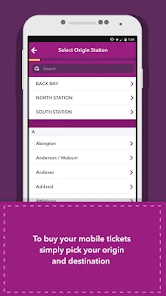
To purchase a ticket using the MBTA mTicket app, first download and install the app on your Android or iOS device. After registering or logging in, navigate to the 'Buy Tickets' section. Select your desired route and ticket type, then proceed to payment. Tickets can be paid using a credit or debit card, and once purchased, they appear in the 'My Tickets' section of the app.
Can I use the MBTA mTicket app offline?
Yes, the MBTA mTicket app allows you to access and display purchased tickets even when offline. However, you need an internet connection to buy new tickets or refresh the app's content. It's recommended to purchase and download your tickets before entering areas with limited connectivity to ensure seamless access to your tickets when needed.
Pros
- Easy to buy tickets anytime
- anywhere
- Supports multiple payment options
- User-friendly interface
- Quick ticket activation
- Saves favorite trips for fast purchase
Cons
- Occasional app crashes
- Limited customer support options
- Requires internet for ticket validation
- No offline access to schedules
- Battery drain issues on prolonged use
- Category
- Maps & Navigation
- Version
- 7.9.0












