

Mary Kay® Skin Analyzer
- 427.00
- 4.6
- Installs
- 100.00K
- Price
- Free

Screenshots
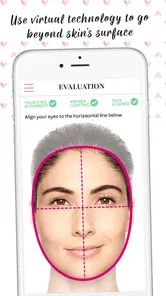
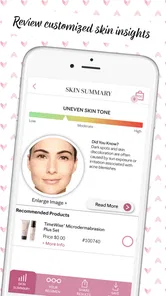
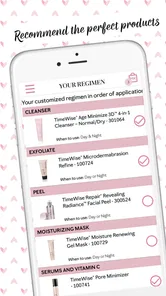
Analysis by Reviewed
I’m usually cautious about apps that promise to make skincare easier, because a selfie can’t tell the whole story of someone’s skin. Still, Mary Kay® Skin Analyzer gives a first-time user a clear place to begin: it turns a quick look at your face into a set of skincare prompts and product suggestions. I’d treat it as a practical starting point, not a diagnosis or a substitute for advice from a dermatologist.
Getting Started with Your Skin Analysis
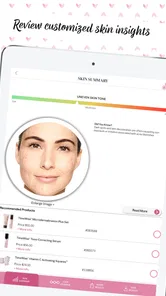
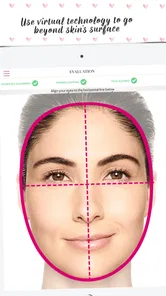
The first thing you'll notice about the Mary Kay® Skin Analyzer is its sleek design and user-friendly interface. Downloading and setting up the app is a breeze. Once you've got it up and running, the app invites you to take a selfie. Yep, just a simple selfie is all it needs to kickstart your skin analysis journey. The app uses advanced technology to assess various aspects of your skin, including texture, firmness, and even the size of your pores.
What to expect from the first scan
The important thing is to approach the result as a snapshot rather than a verdict. A selfie-based reading can give you a structured way to think about texture and other visible concerns, but lighting, camera angle, and expression can all affect how a photo looks. For a more useful comparison, take the image in steady, even light, face the camera directly, and avoid judging a new result against a photo taken in very different conditions.
Mary Kay, Inc makes this free beauty app, and its focus is naturally tied to skincare and the company’s own product range. That makes it handy if you want product ideas in the same place as your skin assessment. It is less neutral than a general-purpose skin diary, though: I would use its suggestions as options to consider, not as an obligation to buy or as a complete survey of every product available elsewhere.
A Deep Dive into Your Skin’s Needs
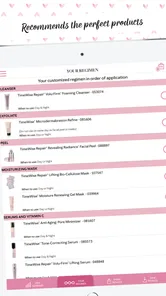
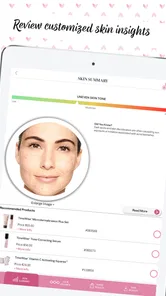
After your selfie is analyzed, the app provides a detailed report that is surprisingly comprehensive. It breaks down your skin's condition into different categories, offering insights that you might not have considered before. What’s really cool is that it doesn’t just stop at identifying issues; it goes a step further by suggesting products tailored to address each specific concern. I found this feature particularly helpful because it takes the guesswork out of choosing the right skincare products. No more standing in the beauty aisle overwhelmed by choices!
For a first meaningful use, I’d pick one concern from the report rather than trying to change everything at once. If the app points you toward a texture-related goal, for example, note what it recommends and compare that with the products you already use. This makes it easier to decide whether a suggestion fills a genuine gap or simply overlaps with your current routine. It also keeps the assessment from turning into a long shopping list.
Personalized Recommendations Just for You
One of the standout features of the app is its personalized product recommendations. These aren’t just generic suggestions. The app takes into account your unique skin profile and preferences, offering options that suit your individual needs. It’s like having your very own skincare consultant. Plus, the app updates your recommendations as your skin changes, ensuring that you’re always using the best products for your current skin condition.
More From Our News Desk

 Gmail
GmailGmail in a Busy Inbox: Who Benefits Most?
From first account to crowded workday, Gmail earns its place through dependable search and flexible sorting—but its best fit depends on how much inbox maintenance you can tolerate.

 Prime Video
Switching to Prime Video: What Changes in Your Viewing Routine
Prime Video can make a compelling second home for streaming, but switching means learning a different catalog, rental layer, and route from browsing to playback.

 Universal TV Remote Control
Universal TV Remote Control Works Best as a Reliable Backup
A phone remote earns its place through quick setup and reliable habits. Here is how to get more from Universal TV Remote Control—and where its limits show.

 Weather - By Xiaomi
Weather by Xiaomi Review: Clear at a Glance, Less Clear Up Close
Xiaomi’s weather app makes everyday forecasts quick to scan, but its calm surface can leave useful details and recovery paths harder to find than they should be.

 X
XX Under Pressure: Can It Recover When Posting Goes Wrong?
A resilience-focused review of X, examining setup, mistaken posts, interruptions, weak connections, and the gaps that matter when recovery needs to be dependable.

 Clash of Clans
Clash of Clans Is Won Between the Battles
Its raids are quick; its community is a long-term project of coordination, teaching, rivalry, and shared responsibility—with all the friction that entails.
Latest News



A realistic way to use those recommendations is during a routine reset. Say you’ve finished a cleanser and are deciding what to replace it with: review the analysis, look at the suggested options, then check whether the product’s purpose fits your habits and budget before making a choice. I wouldn’t swap several products at once based on one scan; changing one thing at a time makes it easier to notice what suits you and avoids confusing cause and effect.
Where it fits—and where it doesn’t
This is a better fit for someone who enjoys guided skincare suggestions or feels lost among product choices than for someone who already has a stable routine and wants a brand-independent tracker. Compared with browsing beauty counters or reading broad skincare articles, the app offers a more personal starting point. Compared with a dermatologist visit, it is much less comprehensive: persistent irritation, painful acne, sudden changes, or a concern that worries you deserves professional attention rather than another selfie analysis.
One useful trade-off is convenience versus consistency. A quick scan is easy to repeat, but repeated checks only help if you keep the conditions similar and use the results thoughtfully. I’d avoid treating small shifts between scans as proof that a product is working. Give your routine time, pay attention to how your skin feels, and use the app to organize questions or choices instead of chasing a perfect score.
Easy Navigation and Handy Features
Navigation within the app is straightforward, which is a blessing for those of us who aren’t exactly tech-savvy. The interface is intuitive, making it easy to find what you need without any hassle. Moreover, integrating the app's recommendations into your daily skincare routine is seamless. The app also features educational content that helps you understand the science behind each product, which, in my opinion, is a great touch.
If you’re new to skincare, a simple next step is to read the educational material connected to a recommendation before acting on it. Focus on what a product is intended to address, then fit it into a routine you can realistically maintain. That small pause helps separate useful guidance from impulse buying. If you prefer to research ingredients across many brands, you may want to pair the app with independent sources rather than relying on one company’s recommendations alone.
Who should try it, and what to keep in mind
The app is free, rated for Everyone, and has an average rating of 4.5 from around 1,100 ratings, with over 100,000 installs. It was released on January 15, 2019, and its current version is 1.5, with Android 6.0 as the minimum operating system. Those details make it accessible to many Android users, though it is still worth checking that your device meets the requirement before installing. The rating suggests many people find it useful, but individual skin needs and expectations will vary.
It may not be the right choice if you want medical guidance, recommendations spanning many unrelated brands, or a detailed long-term log of every change in your skin. Nor would I use a photo result to make a decision about a new rash or a persistent reaction. In those cases, a qualified professional is the better next step. For everyday product browsing and a little structure, however, the analyzer can make the first decision feel less overwhelming.
For a first-time user, I’d keep the first session deliberately simple: take the scan, read through the results once, and choose a single question to investigate. Maybe you are unsure whether your current routine addresses the concern the app highlights, or perhaps you just want to understand why a recommendation appears. This is more useful than treating the first visit as a shopping task. It gives you a concrete outcome—one point to consider—without asking you to overhaul habits that may already work.
A practical routine for using the suggestions
If you decide to explore a suggested product, I’d compare its purpose with what you already own before adding it to your routine. Check the label and instructions, and think about when you would realistically use it. A recommendation can be relevant in theory yet impractical if it adds a step you will skip or duplicates something you already use. Keeping a short note of what you changed and when can also help you make sense of your experience without expecting the app to serve as a complete skin journal.
There is also a useful distinction between getting ideas and making a purchase. The analyzer can narrow your attention toward a concern and give you a product direction, but the final choice still belongs to you. I’d take time to consider your own preferences and spending limit, especially if the app’s brand-specific suggestions are not the only options you are weighing. That approach lets the personalized element help with discovery while avoiding the assumption that every prompt requires buying something.
How it compares with other ways to get advice
Against a paper routine list or a notes app, this tool is more guided because it starts with a face image and connects the assessment to product suggestions. A general beauty search may offer a wider range of brands and viewpoints, but it can leave a beginner sorting through conflicting advice. The analyzer’s advantage is a more focused path from concern to possible next step; its limitation is that the path is shaped around Mary Kay’s skincare range. I’d use it when I want direction, and broader independent reading when I want to compare approaches across brands.
That difference matters most for someone who has a very particular shopping preference. If you already buy from a range of companies and mainly want to record how your skin feels over time, a simple journal may suit you better. If you are curious about Mary Kay products and want a low-friction way to explore them, the app is more relevant. Neither approach is automatically better: the right choice depends on whether you need a prompt for product discovery or a neutral record of your own routine.
Small choices that make a scan more useful
For a more meaningful repeat scan, I’d keep the photo conditions as similar as possible and avoid reading too much into a single change. Use a calm expression, face the camera, and choose even lighting rather than a bright patch of sunlight or a shadowed room. These are simple habits, but they reduce avoidable differences between images. They do not turn a selfie into a clinical test; they just make the app’s visual starting point easier to interpret consistently.
I would also avoid scanning in a rush and making an immediate decision while standing in a shop. A result is easier to consider when you can compare it with your existing routine and think about what you actually want to improve. If something in the assessment surprises you, treat that as a reason to look more closely, not as proof that your skin has a problem. The value here is in organizing attention, not creating urgency.
Who is likely to get the most from it?
I can see this being especially useful for someone beginning to build a skincare routine, someone who enjoys a guided product-discovery experience, or someone who wants a simple prompt before replacing an item. It can also help a person prepare for a conversation with a skincare professional by putting their visible concerns into words. The app is less suitable for someone who expects diagnosis, comprehensive tracking, or recommendations that are independent of a single beauty brand.
If you are sensitive to product changes, move cautiously and avoid introducing several new items together. The app can offer a direction, but it cannot tell you how your skin will respond to a product in daily life. Follow the product’s own instructions, and if a reaction is persistent or worrying, stop treating the issue as a recommendation problem and seek appropriate professional advice. That boundary is important: convenience should not be mistaken for medical certainty.
Before you decide to install
The app is a free option for Android users, with an Everyone content rating, and its current release is version 1.5. It first appeared on January 15, 2019, and requires Android 6.0 or later. It has a 4.5 average from around 1,100 ratings and more than 100,000 installs, so it has attracted a substantial group of users without making it a universal fit. I’d check your device’s operating system before trying it, then decide whether the brand-focused recommendations match what you want from a beauty app.
A common point of confusion is what “personalized” should mean here. The app can shape suggestions around its analysis and the information used for its recommendations, but that does not make every suggestion a guarantee or a medical conclusion. Your own comfort, routine, and response matter. If you are looking for a definitive answer about a skin condition, this is not the tool I would rely on; if you want a structured way to explore everyday skincare choices, it has a clearer role.
Overall, the Mary Kay® Skin Analyzer is more than just an app; it’s a comprehensive skincare companion. Whether you’re a skincare newbie or a seasoned enthusiast, this app offers valuable insights and personalized recommendations that can help you achieve healthier, more radiant skin. If you’re looking for a tool that combines technology with skincare expertise, this app might just be your new best friend. Give it a try and see how it transforms your skincare routine!
Mary Kay® Skin Analyzer Frequently Asked Questions
Who developed Mary Kay® Skin Analyzer, and what kind of app is it?
Mary Kay® Skin Analyzer is a beauty app developed by Mary Kay, Inc. Its focus is bringing skin care and technology together in a tool users can access from their device. If you are considering a download, it is helpful to think of it as a skin-care companion rather than a general-purpose photo editor or a replacement for professional medical advice.
What is the primary function of the Mary Kay® Skin Analyzer app?
The Mary Kay® Skin Analyzer app is designed to assist users in analyzing their skin's unique needs and conditions. Utilizing advanced technology, it scans and detects various skin issues such as wrinkles, texture, and pigmentation. This information helps users tailor their skincare routines with suitable Mary Kay products, ensuring personalized care and improved skin health.
How accurate is the skin analysis provided by the Mary Kay® Skin Analyzer?
The Mary Kay® Skin Analyzer employs state-of-the-art technology to deliver accurate and reliable skin assessments. While it provides a professional-level analysis of your skin's condition, it's important to remember that results may vary based on lighting conditions and device quality. For the most precise results, follow the app's instructions carefully and use a well-lit environment.
Is the Mary Kay® Skin Analyzer app free to use?
Yes, the Mary Kay® Skin Analyzer app is free to download, so you can try its skin-analysis tools without paying for the app itself. Users should distinguish that from any skincare products the app may recommend: those products are separate purchases and are not included with the download. The app is listed for Everyone, making its stated age category broad.
What type of device compatibility does the Mary Kay® Skin Analyzer app offer?
The Mary Kay® Skin Analyzer app is compatible with most modern Android and iOS devices. However, for optimal performance and accurate skin analysis, it is recommended to use devices with high-quality cameras and updated operating systems. Check the app store for specific device requirements and ensure your device meets these criteria before downloading. The app supports Android devices running version 6.0 or later.
Pros
- Accurate skin analysis results.
- User-friendly interface.
- Comprehensive skincare tips.
- Free to use.
- Quick analysis process.
Cons
- Limited to Mary Kay products.
- Needs stable internet connection.
- Occasional app crashes.
- Requires registration.
- Privacy concerns with data storage.












