Mary Kay® MirrorMe™
- 179.00
- 3.6
- Installs
- 100.00K
- Price
- Free

Screenshots

Analysis by Reviewed
Mary Kay® MirrorMe™ is most useful as a low-pressure way to explore makeup shades before deciding what to try in person. I like the idea of testing a look on my own face rather than guessing from a product image, but I wouldn’t treat a screen preview as a promise of exactly how makeup will look in daylight or on my skin. It’s a beauty app from Mary Kay, Inc, and its appeal is straightforward: experiment, compare, and use the results to narrow down your choices.
A practical way to narrow down choices
Virtual makeup is most valuable when you have a specific question. If I’m choosing between a subtle lip and a bolder shade for an event, I can test both in one sitting instead of relying on memory or trying to picture a color from a swatch. That makes the app a useful first step, not a replacement for seeing a product in person.
For a more useful comparison, I’d keep the rest of the look steady and change one product at a time. Trying a different lipstick against the same face and lighting makes the difference easier to judge than changing several colors at once. I’d also revisit a favorite look in ordinary room light before sharing it or using it to guide a purchase; a flattering screen preview can still differ from a real finish.
Where it fits among beauty apps
Compared with browsing product photos or scrolling through social media looks, a virtual try-on gives you a more personal reference because the makeup is shown on your own face. That can help when you’re curious about a color family but unsure whether it suits your usual style. The trade-off is that a simulated look cannot tell you how a formula feels, wears, or behaves on your skin, so a beauty counter or a physical sample is a better choice when texture and lasting power matter most.
The app is centered on Mary Kay products, which is helpful if those are the items you’re considering, but less useful if you want to compare many brands side by side. I’d use it to explore options within that range, then make a real-world check before committing. This keeps the experience fun without letting a digital preview do more work than it can.
Getting Started with MirrorMe
Downloading and setting up Mary Kay® MirrorMe™ was a breeze. Available for both Android and iOS, the app is free to download. Once installed, you’re greeted with a simple and intuitive interface. It didn’t take long for me to navigate through the features and get to the good stuff — trying on a myriad of makeup looks.
Virtual Makeover Experience
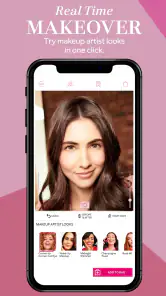
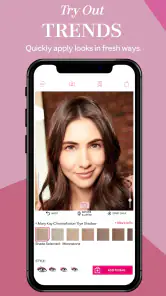
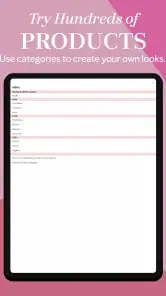
This app leverages augmented reality to let you try on different makeup products in real-time. From lipsticks to eyeshadows, the possibilities are endless. I was particularly impressed with how accurate the colors were. The app’s technology captures your facial features beautifully, allowing the makeup to sit naturally on your face. It’s almost like looking into a real mirror!
More From Our News Desk

Clash of Clans Is Won Between the Battles

Android Auto Makes the Case for Quieter Car Software

MobiOffice: Transforming Mobile Productivity with Seamless Integration

EA SPORTS FC™ Mobile Soccer: Redefining Mobile Sports Gaming

How Microsoft OneDrive Became a Mobile Productivity Giant

How Google Translate Breaks Language Barriers Effortlessly
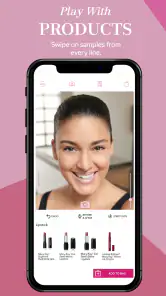
The fun factor here is undeniable. You can switch between products with just a tap, and there’s a handy option to compare before and after looks. Whether you’re a makeup junkie or just someone who likes to dabble in beauty products, this feature is sure to keep you entertained for hours.
Product Recommendations
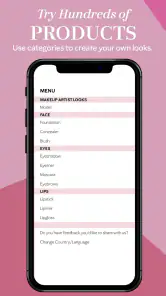
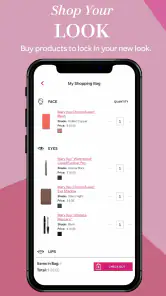
One of the standout features of the app is its product recommendation system. Based on the looks you try on, the app suggests Mary Kay products that match. It’s a clever way to discover new items and even purchase them directly through the app. Talk about convenience!
Plus, the app provides detailed information about each product, including shades, prices, and customer reviews. It’s like having a virtual beauty consultant guiding you through the entire process.
Sharing Your New Look
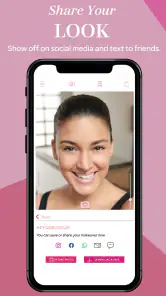
What’s a makeover if you can’t show it off? The app makes it easy to snap a picture of your new look and share it on social media. Whether you want to get opinions from friends or simply flaunt your fabulousness, sharing is just a button away.
Moreover, if you’re unsure about a particular look, you can save it for later and revisit your options before making a purchase. It’s a thoughtful feature for those who like to deliberate before committing to a product.
Who will get the most from it
I’d recommend it to someone who already shops Mary Kay or wants a relaxed way to play with makeup before a consultation or a special occasion. Picture getting ready for a dinner after work: you have a few minutes between changing and heading out, and can test a softer eye with a brighter lip, then save the combination to review later. That is more useful than browsing random inspiration because the choices are tied to products you can investigate.
It is also approachable for makeup beginners. You can compare looks without buying several shades just to find out that one is too dramatic for your taste. Still, anyone who wants a broad, brand-neutral beauty tool—or needs a precise match for undertone, texture, and wear—will be better served by trying products physically or using a wider retailer’s comparison tools.
Small habits that make the preview more useful
For a cleaner test, face a steady light source and keep your head position similar while switching shades. If the lighting changes, it can make the same color appear different and undermine the comparison. I’d also save only the looks I might genuinely wear, rather than collecting every novelty combination; a short shortlist is easier to use when deciding what to test offline.
Sharing can help when you want another opinion, but I’d treat a photo as a conversation starter, not a verdict. Friends may be reacting to the lighting, camera, or overall styling as much as the makeup itself. If I’m close to choosing a product, I’d use the saved look to remember the shade I liked, then check the actual product before buying.
Choosing between a quick preview and an in-person test
A practical question is whether a virtual try-on can replace asking for help at a beauty counter or trying a sample. For me, it solves a different problem. MirrorMe is handy when I want to narrow down the color direction before I spend time shopping; a physical test is still the better way to judge finish, comfort, and how a shade works with my skin. If I already know I dislike a particular color family, the app can help me rule it out quickly. If I’m deciding between two nearly identical shades, a screen is a weaker judge.
I’d also use it differently depending on the occasion. For an everyday routine, I would test a restrained combination and check whether it feels like something I would actually wear to work or on errands, rather than building a dramatic look just because it is fun to preview. For a wedding or evening event, I might explore a stronger lip or eye, then take the shortlist to a real product test. The app is most helpful at the idea stage, before the decision becomes about how makeup feels over several hours.
A useful routine for saving and revisiting looks
Saving options is most valuable when I give each one a purpose. Rather than keeping a long gallery of unrelated experiments, I’d make a small set: one dependable everyday option, one change that feels adventurous, and perhaps a look for a specific event. When I return to them later, I can compare the overall impression instead of trying to remember which shade I tapped first. This turns a playful session into a practical shopping note.
There is a small trade-off in that workflow: a saved digital look preserves an idea, not a guarantee of the exact product result. I’d write down or remember what question the image answered—such as whether a warmer lip seems more appealing—rather than treating it as a precise color reference. That distinction is especially useful if I’m looking at the app in a different room or on another screen later.
When another approach makes more sense
If I want inspiration without narrowing myself to one company’s range, social feeds, editorial makeup guides, or a multi-brand retailer are better starting points. They show a wider mix of brands and styles, though they may not put the look directly on my own face. If I already have a particular Mary Kay item in mind, the app’s focused catalog can be more convenient than searching through unrelated products. The right choice depends on whether I’m exploring broadly or checking a specific family of looks.
I would also skip a virtual try-on session when the main concern is skin sensitivity, product ingredients, or wear through a long day. A digital overlay can help me imagine color, but it cannot answer those practical questions. In that situation, I’d check product details and seek an appropriate real-world test instead of expecting a makeover preview to function as a skin or wear assessment.
What to expect before installing
The app is free, rated for Everyone, and has an average rating of 3.6 from around 989 ratings, with over 100,000 installs. It was released on January 13, 2019; version 3.1.7 requires Android 12 or later. Those details make it worth checking device compatibility before downloading, especially if you use an older Android phone. The rating suggests a mixed reception, so I’d approach it as a focused try-on companion rather than a complete beauty-shopping service.
One limitation is also part of its purpose: recommendations point you toward Mary Kay, so the experience won’t answer whether another brand offers a better shade or formula. And while virtual application is convenient, the result depends on the screen and lighting you are using. If you need confidence about comfort, coverage, or how a product wears through the day, an in-person test remains the more reliable choice.
My verdict
Overall, Mary Kay® MirrorMe™ is a pleasant, focused way to explore makeup looks and keep a few possibilities in mind before shopping. I’d choose it for quick shade experiments, especially if Mary Kay products are already on my list; I’d skip it if I wanted brand-wide comparisons or a substitute for testing makeup on my skin. Used as inspiration rather than a final decision-maker, it can make choosing a look feel more playful and less like guesswork.
Mary Kay® MirrorMe™ Frequently Asked Questions
Does Mary Kay® MirrorMe™ need access to my camera?
Yes. The virtual makeover experience uses your phone’s camera to place makeup looks over your live image, so camera access is central to trying products on your face. This makes it easier to compare colors and styles while seeing them in context. If you prefer not to use the camera, the app’s main try-on experience may not be useful for you.
Is Mary Kay® MirrorMe™ suitable for beginners who are new to makeup?
Mary Kay® MirrorMe™ can be useful for both makeup enthusiasts and people who are just starting to explore cosmetics. Trying different looks virtually lets you see how makeup styles and colors appear on your face before choosing products. The app is focused on creating makeup looks, so beginners can use it as a low-pressure way to explore possibilities and decide what they might like.
What is Mary Kay® MirrorMe™ and how does it work?
Mary Kay® MirrorMe™ is a virtual makeover app that allows users to try on various makeup looks using augmented reality technology. By utilizing your phone’s camera, the app superimposes makeup styles, such as lipsticks and eyeshadows, onto your live image. This helps you visualize how different products and colors will look on your face before purchasing them. It’s a handy tool for both makeup enthusiasts and novices alike.
Is Mary Kay® MirrorMe™ free to use?
Yes, the Mary Kay® MirrorMe™ app is free to download and use. Users can access a wide range of makeup products and looks without any cost. However, there are certain features or exclusive looks that might require in-app purchases. The app offers a comprehensive range of free options to help users get started with their virtual makeovers.
Which devices are compatible with Mary Kay® MirrorMe™?
Mary Kay® MirrorMe™ is compatible with both Android and iOS devices. It requires Android 5.0 and up or iOS 11.0 or later. The app is optimized for smartphones, ensuring that users have a seamless experience while trying out different makeup looks. It’s always advisable to have the latest version of the operating system for optimal performance.
Pros
- Real-time makeup try-on
- Wide range of beauty products
- User-friendly interface
- Accurate skin tone detection
- Free to download and use
Cons
- Limited hairstyle options
- Requires strong internet connection
- May not support all devices
- Occasional lag in AR features
- No offline functionality
- Category
- Beauty
- Version
- 3.1.7