Map Drive - Radar, Speedometer
- 358.00
- 4.2
- Installs
- 5.00M
- Price
- Free
Screenshots
Analysis by Reviewed
Map Drive - Radar, Speedometer is a fascinating app that promises to enhance your driving experience. It combines a variety of features designed to offer assistance and safety on the road. Let's dive into what makes this app a noteworthy companion for your journeys.
Seamless Navigation With Real-Time Updates
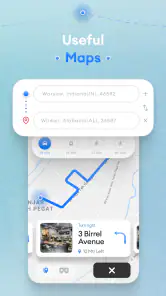
Ever found yourself lost in the middle of nowhere, wishing for a magic tool to guide you back on track? That's where Map Drive - Radar, Speedometer comes in handy. This app offers seamless navigation with real-time updates. Imagine having a personal assistant who not only tells you where to go but keeps you updated on the traffic situation ahead. The app ensures you're always on the best route, potentially saving you time and frustration.
Speedometer and Radar Alerts
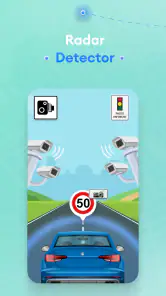
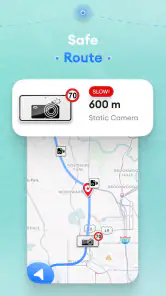
If you're anything like me, keeping track of your speed while driving can sometimes slip your mind. The speedometer feature in this app is a lifesaver. It provides accurate speed readings, ensuring you stay within legal limits. But what really caught my attention is the radar alert feature. It's like having a co-pilot who warns you about upcoming speed cameras and radar traps, allowing you to adjust your speed and avoid hefty fines.
Now, who doesn't love a little heads-up when it comes to speed cameras, right? With Map Drive - Radar, Speedometer, you can drive with confidence, knowing you have a reliable alert system in place.
User-Friendly Interface
The developers of this app seem to have put a lot of thought into making it user-friendly. The interface is intuitive, allowing even the least tech-savvy individuals to navigate it with ease. From setting up routes to configuring alerts, everything is straightforward. It's almost as if the app anticipates what you need and presents it in the most accessible manner.
The app also offers customization options, letting you personalize the dashboard to display the information most relevant to you. Whether it's your current speed, the distance to your destination, or upcoming alerts, you have the power to choose what you see.
Battery Efficiency
One of the concerns I initially had was the impact this app might have on my phone's battery life. Let's face it, navigation apps can be notorious for draining battery. However, I was pleasantly surprised to find that Map Drive - Radar, Speedometer is optimized for battery efficiency. It manages to run smoothly without causing your phone to gasp for power. This means you can enjoy extended periods of navigation without the constant worry of your phone dying on you.
More From Our News Desk

Clash of Clans Is Won Between the Battles

Android Auto Makes the Case for Quieter Car Software

MobiOffice: Transforming Mobile Productivity with Seamless Integration

EA SPORTS FC™ Mobile Soccer: Redefining Mobile Sports Gaming

How Microsoft OneDrive Became a Mobile Productivity Giant

How Google Translate Breaks Language Barriers Effortlessly
In conclusion, Map Drive - Radar, Speedometer is more than just a navigation app. It's a comprehensive driving tool designed to enhance your road experience. With features like real-time navigation updates, radar alerts, and a user-friendly interface, it provides everything you need for a safer, more efficient drive. Whether you're a daily commuter or a weekend road tripper, this app is definitely worth considering for your next journey.
What to expect before your first trip
Map Drive is a free Maps & Navigation app from Tiki Punch Studio, with an Everyone age rating. It has a 4.2 average from around 18,000 ratings and over 5 million installs. The current version is 5.2.0, and it runs on Android 7.0 or later. Those details make it approachable for many Android drivers, but I would treat it as a driving companion rather than assume it replaces every tool you already rely on.
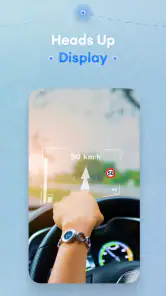
Its appeal is the combination of route guidance, traffic context, a compass, a head-up display, speed information and camera alerts. That breadth is useful when you want several kinds of driving information in one place. The trade-off is that a screen with many possible readouts can become distracting if you try to monitor all of them. I would choose only the information that helps with the trip at hand, then leave the phone mounted and avoid adjusting it while moving.
A calmer path from install to first route
For a first run, start while parked. Open the map, enter a familiar destination and look over the suggested route before setting off. A short, known journey is a better test than a complicated cross-town drive: you can see whether the directions make sense to you without having to learn the interface under pressure. If the dashboard lets you choose what appears, begin with a simple view and add details only when you know you want them.
It also helps to decide what role you want the app to play. If your main concern is speed awareness, make that the item you can glance at easily; if traffic is the priority, focus on the route and road conditions. Radar alerts should be treated as prompts to pay attention and obey posted limits, not as permission to drive faster between alerts. Camera information can be incomplete or change, so safe, lawful driving still depends on the road signs and your own judgement.
Where it fits into an ordinary day
Picture a weekday trip to an unfamiliar appointment across town. Before leaving, I would check the route while stationary, mount the phone where it does not obstruct the view, and keep the display uncluttered. On the way, traffic updates can help me anticipate a slower stretch, while the speed display gives a quick reference without needing to switch between separate tools. Once parked, I can review what worked and adjust the dashboard before the next drive.
This kind of combined setup is most helpful for drivers who regularly travel new routes or prefer a single driving screen for navigation and speed awareness. For a familiar commute, it may be more information than necessary; a basic map app can be simpler if all you need is directions. Likewise, drivers who depend on a particular navigation service’s established place search or route-planning habits may prefer to keep that service as their primary guide and use Map Drive only when its driving-oriented display is useful.
Useful habits and sensible limits
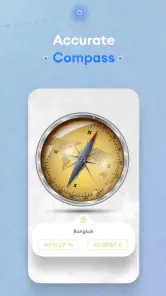
A practical tip is to test the compass and dashboard layout before relying on them in an unfamiliar area. A compass is most valuable when you are stopped and orienting yourself, not when you are trying to interpret several moving indicators at once. If a route changes, follow the spoken or visual guidance only when it is safe to do so, and pull over before changing settings or destination details. This small routine makes the first meaningful success—reaching a nearby destination without fuss—more reassuring than trying every option on one trip.
Navigation and live traffic can put sustained demands on a phone, especially with the screen on, so I would still start longer journeys with a well-charged device and a secure mount. Battery efficiency is welcome, but it cannot remove the practical limits of using GPS and a lit display for a long drive. If battery life is critical, keep the screen view restrained and plan around your phone’s usual charging needs rather than assuming any navigation app will run indefinitely.
My recommendation for new users
Map Drive is free, so it is easy to try on a short drive and decide whether its mix of map guidance, traffic, compass, HUD, speedometer and radar alerts suits your habits. I would recommend it to someone who wants those driving details close together and is willing to set up a clean, low-distraction view. I would skip it as a primary choice if you want the simplest possible directions screen, or if you expect camera alerts to be a complete substitute for attention and road signs.
My best advice is to begin with one familiar route, configure the screen while parked, and judge the app by whether it makes that drive clearer rather than by how many features it offers. Used thoughtfully, it can be a handy extra layer of awareness; used as a reason to look repeatedly at the phone, it defeats its own purpose. For a first-time user, that balance is the key to getting useful help from the app without making the drive more complicated.
Choosing what to rely on during a drive
There is a useful distinction between a navigation app that acts as your main trip planner and one you keep because its driving display brings several road cues together. I would make that choice before a long journey, not at a junction. Use the map and traffic information to orient yourself, but let familiar road signs and safe driving decisions take priority when the screen and the road seem to disagree.
For example, if I were heading to a new appointment, I would enter the destination before leaving and check that the route begins in the direction I expect. That quick check can catch a mistaken destination or an awkward starting point while I am still parked. If the first route looks confusing, I would switch to a navigation service whose directions I already know rather than trying to troubleshoot while moving.
Making the display work for you
A dashboard is only helpful when the information is easy to interpret at a glance. I would resist the temptation to fill every available space just because customization is offered. Pick one main job for the display—following the route, checking speed, or keeping an eye on an alert—and let the rest stay secondary. This is especially important in dense traffic, where looking away for even a moment can matter more than seeing another readout.
The head-up display can be appealing if you want key information presented prominently, but it should not be treated as a reason to place the phone in an awkward position or block your view. Before driving, check that the mount is secure and that the screen is visible without stretching or shifting your posture. If reflections or sunlight make it hard to read, simplify the setup and rely on safe, familiar driving rather than repeatedly adjusting brightness or layout on the road.
When the alternatives are a better fit
Drivers who mainly need reliable place search, saved destinations, or a familiar route-planning routine may be happier with the mapping app they already use every day. Familiarity has real value: it reduces the effort of interpreting directions and helps you spot when a route suggestion does not suit your plans. Map Drive’s advantage is the concentration of driving-oriented information, not a guaranteed replacement for every strength of a general-purpose map service.
On the other hand, someone who regularly crosses unfamiliar areas and wants speed, compass and traffic context alongside route guidance may appreciate having those cues together. I would try it on a short, low-pressure trip and compare the experience with my usual app: Was the route clear? Did the extra display help, or pull my attention away? That comparison is more useful than choosing based on the number of features alone.
Questions worth settling before a longer trip
A natural first question is whether it is suitable for a long journey. I would use it only after a short test drive has shown that the map, alerts and screen layout make sense to me, and I would set off with the phone charged and mounted securely. For a route where I cannot afford uncertainty, keeping a familiar navigation option available as a backup is a sensible choice.
Another question is whether radar alerts mean I can stop watching for signs. They do not. Treat an alert as a reminder to check the road and obey the posted limit; alert coverage and road conditions can vary. Likewise, if a direction or traffic prompt seems inconsistent with what is happening around you, do not make a sudden move to follow it. Continue safely, and pull over before changing the route or settings.
For a first-time user, the most reassuring test is modest: choose a nearby destination you already know, set the screen while parked, and follow the guidance without trying to explore every control. If the display makes the trip clearer, keep the setup and build from there. If it adds confusion, return to a simpler map view or use the navigation tool you already trust. That practical choice is why I see Map Drive as a potentially useful driving companion, rather than a one-size-fits-all replacement.
Map Drive - Radar, Speedometer Frequently Asked Questions
Can I use Map Drive without an internet connection?
Map Drive is built around GPS, maps, routes, and real-time traffic updates, so the experience may depend on having a connection for some information. GPS positioning itself can work independently of mobile data on a compatible phone, but map availability and live updates may vary. If you expect to drive through areas with weak coverage, prepare your journey in advance and keep your attention on the road.
What permissions or phone features might Map Drive need?
Because Map Drive offers GPS, route guidance, a compass, speed monitoring, and a heads-up display, it may need access to location services and relevant display or notification features for those tools to work as intended. You can review permission requests on your device and decide which to allow. Location access is especially relevant to navigation and driving features, so check your settings before relying on the app.
Can I rely on Map Drive’s speed and camera alerts instead of road signs?
No. Map Drive’s alerts and speed information should be treated as driving aids, not as a substitute for posted signs, local rules, or your own safe judgment. Conditions and information can change, and an alert may not reflect every situation on the road. Keep within the legal speed limit, follow signs, and avoid looking at or operating your phone while driving.
Can Map Drive help me plan a route before I start driving?
Map Drive is a Maps & Navigation app with GPS and route features, so it can support navigation as part of a journey. Its store summary also highlights maps and real-time traffic updates, which may help you make more informed decisions on the road. For safer use, set up your route before you begin driving and avoid interacting with your phone while the vehicle is moving.
What is Map Drive - Radar, Speedometer?
Map Drive - Radar, Speedometer is an innovative app designed to enhance your driving experience by providing real-time radar detection, speed monitoring, and navigation tools. It integrates GPS technology to alert drivers about speed limits, radar locations, and traffic updates, ensuring a safer and more informed journey. It is developed by Tiki Punch Studio, and its store summary also highlights a compass and heads-up display (HUD) alongside GPS, maps, routes, speed cameras, and real-time traffic updates.
Pros
- Accurate speed tracking
- User-friendly interface
- Customizable alerts
- Offline map access
- Battery-efficient
Cons
- Limited features in free version
- Occasional GPS issues
- Ads in free version
- No night mode
- Limited map updates
- Category
- Maps & Navigation
- Version
- 5.2.0