

Lucky Tunes - Rewards & Music
- 2.00
- 4.2
- Installs
- 10.00K
- Price
- Free

Screenshots



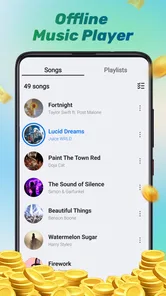

Analysis by Reviewed
I approached Lucky Tunes as a small music and audio app rather than expecting a full replacement for a mature streaming service. Its central appeal is simple: it is free, rated for Everyone, and built around the idea of keeping music close at hand. After spending time with it, I found that the most useful way to judge it is not by the size of a music catalog or the number of advanced controls, but by how easily different people can understand and use the experience in everyday situations.
That distinction matters. A person who wants a straightforward way to explore music may appreciate the low barrier to entry, while someone who depends on detailed playback controls, strong customization, or clearly documented accessibility options may need more from a different app. My impression is that Lucky Tunes is easiest to consider as a lightweight option for casual listening, with its strengths and limitations becoming clearer when looking at readability, navigation, motor comfort, sensory load, and use away from ideal conditions.
How the interface feels to read and navigate
The app comes from JKL Build and sits in the Music & Audio category. Its short store label, “Lucky Tunes,” is deliberately brief, while the longer summary presents it as a way to take music with you. That gives the product an uncomplicated identity, but it also means the first question for a new user is how much the app explains through its actual screens rather than through its name.
In my experience, a music app is comfortable when I can tell what is selectable, what is currently playing, and what will happen after I tap something. That basic clarity is especially important for people with reading difficulties, attention limitations, or low vision. Lucky Tunes benefits from being a focused app instead of a crowded entertainment platform, because fewer competing sections can make the first interaction feel less intimidating.
Still, simplicity should not be confused with complete guidance. A new user should take a moment to move through the main areas slowly rather than tapping rapidly and assuming that every control behaves like the equivalent control in a larger music service. This is one of my practical recommendations: start with a short listening session, identify the playback area, and check how the app responds before relying on it during a commute or another situation where attention is divided.
The current release is version 1.0.1, which places it at an early stage compared with long-established audio platforms. I would therefore judge its navigation by whether it feels understandable for casual use, not by expecting the dense organization found in apps with years of accumulated features. The advantage is a potentially gentler learning curve. The trade-off is that users looking for carefully refined navigation patterns may notice fewer layers of customization.
Text size and contrast are important here, particularly for anyone who enlarges system text or uses display settings designed for easier reading. I would not assume that every visual element automatically adapts perfectly to every device configuration. Before making Lucky Tunes a daily tool, I would test it with the phone’s preferred font size and display contrast, then verify that labels and playback controls remain easy to distinguish without squinting or bringing the screen unusually close.
More From Our News Desk

 Gmail
GmailGmail in a Busy Inbox: Who Benefits Most?
From first account to crowded workday, Gmail earns its place through dependable search and flexible sorting—but its best fit depends on how much inbox maintenance you can tolerate.

 Prime Video
Switching to Prime Video: What Changes in Your Viewing Routine
Prime Video can make a compelling second home for streaming, but switching means learning a different catalog, rental layer, and route from browsing to playback.

 Universal TV Remote Control
Universal TV Remote Control Works Best as a Reliable Backup
A phone remote earns its place through quick setup and reliable habits. Here is how to get more from Universal TV Remote Control—and where its limits show.

 Weather - By Xiaomi
Weather by Xiaomi Review: Clear at a Glance, Less Clear Up Close
Xiaomi’s weather app makes everyday forecasts quick to scan, but its calm surface can leave useful details and recovery paths harder to find than they should be.

 X
XX Under Pressure: Can It Recover When Posting Goes Wrong?
A resilience-focused review of X, examining setup, mistaken posts, interruptions, weak connections, and the gaps that matter when recovery needs to be dependable.

 Clash of Clans
Clash of Clans Is Won Between the Battles
Its raids are quick; its community is a long-term project of coordination, teaching, rivalry, and shared responsibility—with all the friction that entails.
Latest News



That test is more useful than judging accessibility from a store badge alone. A person with dyslexia may care about short labels and predictable placement, while a person with low vision may care more about contrast, scaling, and whether icons have enough surrounding space. These needs overlap, but they are not identical. Lucky Tunes can be approachable for casual navigation, yet the real comfort level will depend on the phone, display settings, and the user’s preferred way of interacting.
What the first-use experience suggests
I like to evaluate a music app by imagining someone handing the phone to a relative who does not want a tutorial. With Lucky Tunes, the best approach is to keep the first session practical: open it, find a track or listening area, start playback, pause it, and return to it. If those actions feel natural, the app has already achieved something valuable for users who do not want a complicated audio dashboard.
For an older listener, a family member assisting with setup could make the experience less stressful by placing the app where it is easy to find and leaving a clear path back to playback. That is not a special feature of the app, but it is a realistic workflow. Small reductions in searching and repeated tapping can matter more than advanced options when the goal is simply to listen without frustration.
I also recommend avoiding a rushed evaluation based only on the first screen. Music apps often reveal their practical strengths when the user pauses, resumes, changes context, or returns after another task. A person with attention difficulties may value a stable route back to listening more than an attractive home screen. Someone with limited reading stamina may prefer short, familiar actions rather than browsing through many descriptive panels.
Motor, sensory, and attention-friendly use
Music is often used with one hand, from a distance, or while the listener is doing something else. That makes motor design just as important as visual design. A user with tremors, reduced dexterity, joint pain, or difficulty making precise taps may find small controls tiring even when the overall app looks simple. I would test Lucky Tunes with deliberate, slower touches and check whether ordinary actions can be completed without repeated corrections.
A useful habit is to begin playback before the situation becomes demanding. For example, if I were preparing music for cooking, I would choose the listening session while the phone was on a stable surface, confirm that audio had started, and only then move away from the screen. This avoids trying to locate a tiny control with wet hands, while wearing gloves, or while carrying something. The app’s value in that scenario comes from reducing the number of interactions needed after setup.
That same workflow can help people with limited reach or reduced fine-motor control. A phone stand, a larger system text setting, or a familiar location on the home screen may make access easier. These are practical adjustments rather than claims about built-in assistive technology, and they are worth considering because the app itself should not be treated as the only part of the accessibility equation.
Sensory comfort is another matter. Music apps can be difficult for people sensitive to sudden sounds, busy motion, bright screens, or unexpected changes in volume. I would begin with the device volume set low and raise it gradually. I would also avoid testing in a quiet room with headphones at a high level, because that can make any audio experience uncomfortable and does not reflect safe everyday listening.
For users who are sensitive to visual movement or crowded layouts, a focused music app may be less demanding than a platform packed with videos, social feeds, recommendations, and animated artwork. That is a meaningful potential advantage of Lucky Tunes’ lightweight positioning. However, a calmer experience cannot be guaranteed simply because the app belongs to Music & Audio. The actual comfort depends on how its screens behave on the user’s device and how much information appears during browsing and playback.
People with hearing loss may use the app differently from people seeking immersive sound. They may rely on captions or lyrics in other services, use hearing-device streaming, or prefer visual confirmation that playback is active. I would not choose Lucky Tunes solely on the assumption that it offers those tools. If understanding words, following lyrics, or adjusting sound precisely is central to your listening, a more established alternative with explicitly documented audio and text controls may be a better fit.
When attention is limited
One of the strongest everyday cases for a simple audio app is background listening during a repetitive task. I can imagine using Lucky Tunes while sorting laundry, organizing a room, or taking a quiet break. In those moments, I do not want to navigate a large catalog every few minutes. I want to start something, put the phone down, and keep my attention on the task.
That use case also reveals an important limitation: “background listening” is not the same as hands-free accessibility. If the user must return to the screen frequently, the app may become inconvenient for someone with limited mobility, visual impairments, or difficulty switching attention. Before depending on it for long periods, I would test whether playback continues reliably when the screen is locked or when another app is opened, rather than assuming that every music app handles those situations identically.
The same caution applies to people who need audio in noisy places. On public transport or outdoors, a user may need clear feedback that a tap registered, but increasing volume is not always the safest solution. I would prepare the session in advance and keep awareness of the surroundings. For anyone who cannot comfortably monitor the screen or hear changes in playback, an app with stronger external-control support may be more appropriate.
Access in real situations, not just at home
Lucky Tunes is free, which makes experimentation easier for people who do not want to commit money before knowing whether the interface suits them. Its age classification is Everyone, so families may find the basic entry point approachable. I still would not treat that rating as a promise that every person, including every child or older adult, will find the controls equally comfortable. Age suitability and accessibility are related only loosely.
With more than ten thousand installs and an average rating of 4.2 from around seventy ratings, the app has attracted a modest early audience. Those figures suggest that people are trying it and responding positively overall, but they do not tell me whether it fits a particular accessibility need. A small review base can also make it harder to predict how the app behaves across different phones, display settings, headphones, and listening habits.
For travel, I would use a simple preparation routine. First, open the app somewhere calm. Next, choose what I want to hear and make sure playback is active. Then I would put the phone somewhere reachable but secure, rather than holding it continuously. This is especially helpful for users who find repeated screen interactions tiring or unsafe while walking. The key trade-off is that a lightweight app is most convenient when the listener plans ahead.
For a shared household device, Lucky Tunes may be useful when one person wants a straightforward music option without creating a complicated setup for everyone else. A caregiver or family member could perform the initial navigation test, adjust the phone’s general display settings, and show the listener the shortest route to start and stop playback. If that route requires too much explanation, the app may not be the right choice for that particular user, even if another family member finds it easy.
In a workplace or study setting, I would be more cautious. Audio can support concentration, but interruptions, notifications, and the need to switch between tasks can expose weaknesses in any simple player. Someone who needs precise control over queues, volume normalization, playlists, or offline organization may be better served by a mature music platform. Lucky Tunes makes more sense when the desired experience is casual and direct rather than carefully managed.
For children, the Everyone classification is reassuring as a starting point, but I would still set expectations around device use. A parent should decide whether the child can browse independently, whether headphones are suitable, and how long listening should continue. The app may be easy to open, yet ease of access also means adults should think about the surrounding phone settings and listening habits.
Where the experience may still create barriers
The biggest barrier is uncertainty about depth. Lucky Tunes presents itself as a compact way to carry music, but users who need a complete listening system may want more than a simple entry point. Detailed organization, robust search, extensive playback preferences, lyrics, equalizer controls, and carefully documented assistive support are the kinds of features that can determine whether an app works for a person with specific needs.
I would also be careful about recommending it to someone who cannot tolerate trial and error. Early-stage apps can feel perfectly adequate for one listener and frustrating for another because small differences in control placement or feedback matter greatly. If a user depends on a screen reader, magnification, switch access, voice control, or a particular hearing setup, the responsible approach is to test the actual workflow on that person’s device before presenting it as a dependable solution.
Another barrier is divided attention. A user with memory difficulties may forget where playback controls are located after a break. Someone with motor limitations may accidentally tap the wrong item when the phone is moving. Someone with sensory sensitivity may need to stop audio quickly. I would keep the device accessible and avoid placing it in a bag or across the room until I knew how easy it was to regain control.
There is also a difference between being free and being low-cost in effort. Free access removes a financial obstacle, but an app can still cost time if the user has to repeat setup, search through unclear screens, or compensate with extra device adjustments. Lucky Tunes is most convincing when it saves effort through a direct listening routine. It is less convincing for users who need a carefully personalized audio environment.
Compared with a large streaming service, Lucky Tunes may feel less overwhelming and easier to try. Compared with a dedicated accessibility-focused player, it may offer less certainty about specialized workflows. Compared with a phone’s built-in audio tools, its value depends on whether its particular listening experience feels more convenient than simply using what is already installed. I would choose it for simplicity first, not for a long list of professional controls.
An inclusive verdict for casual listeners
My final view is that Lucky Tunes is worth trying if you want a free Music & Audio app with a modest, approachable starting point. I can recommend it to casual listeners, people who prefer not to navigate a crowded entertainment platform, and families willing to spend a few minutes checking the experience on the intended device. Its Everyone rating and straightforward positioning make it easy to consider, while its early version means I would keep expectations realistic.
The most inclusive way to use Lucky Tunes is to test the complete routine, not just the opening screen. Check reading comfort, tap accuracy, audio sensitivity, background behavior, and the ease of stopping playback. Try the app with the phone’s normal accessibility settings already enabled, because that reflects how the person will actually use it. If the route from opening the app to starting music feels calm and repeatable, it may be a good personal fit.
I would skip it for now if you require guaranteed compatibility with a particular assistive workflow, advanced audio shaping, extensive library management, or highly predictable hands-free control. In those cases, a larger or more specialized alternative is likely to justify its extra complexity. I would also avoid making it the only option for someone who cannot independently recover from an unexpected screen or playback change.
For everyone else, the app’s appeal is its low commitment. You can try it without paying, use it in a planned listening routine, and decide based on actual comfort rather than assumptions. JKL Build has created an option that is easy to place in the casual-listening category, but the best recommendation is conditional: choose Lucky Tunes when uncomplicated access matters more than a deep collection of controls.
That is why I see Lucky Tunes as a reasonable companion for short, ordinary listening sessions rather than a universal answer for every listener. It can fit a quiet break, a household device, or a prepared background-music routine. Its inclusive potential comes from keeping the task approachable, while its remaining barriers remind me that accessibility is personal. Test it with the person, phone, and listening context that matter, and its strengths become much easier to judge honestly.
Lucky Tunes - Rewards & Music Frequently Asked Questions
Is Lucky Tunes - Rewards & Music compatible with my phone?
Lucky Tunes - Rewards & Music is a music and audio app for Android, with a minimum operating-system requirement of Android 7.0. Check your phone’s software version and the app’s official store page before installing to make sure it is compatible. If you use an iPhone, confirm availability and compatibility in the iOS App Store before proceeding.
Who makes Lucky Tunes - Rewards & Music, and is it widely used?
Lucky Tunes - Rewards & Music is published by JKL Build. It has an average rating of 4.2 from 69 ratings and has been installed over 10,000 times. Those figures offer a little context, but they do not replace reading recent feedback and checking whether the app’s music and rewards features suit what you want from it.
What is Lucky Tunes - Rewards & Music, and how does it work?
Lucky Tunes - Rewards & Music is an entertainment and rewards app that combines music-related content with opportunities to collect points or prizes. After installing it, users can typically listen to available tracks, explore offers, complete selected activities, and check their reward balance. The exact earning options, eligibility rules, and available content may vary by location, account status, and current promotions.
Can I really earn cash or gift cards with Lucky Tunes - Rewards & Music?
The app may allow eligible users to exchange accumulated rewards for cash, gift cards, or other available benefits, but earnings should not be considered guaranteed income. Rewards usually depend on completing qualifying activities and meeting redemption requirements. Before spending significant time in the app, review the current payout options, minimum withdrawal threshold, processing times, and any regional restrictions shown in the official terms.
Is Lucky Tunes - Rewards & Music free to download and use?
Lucky Tunes - Rewards & Music is free to download, although the app may include advertisements, optional in-app purchases, sponsored content, or third-party offers. Some activities may redirect you to external services with their own conditions. Check the store listing and the app’s payment information carefully so you understand whether any feature requires a subscription or additional payment.
Pros
- Earn rewards while listening to music and completing simple activities.
- Easy-to-use interface suitable for casual users.
- Music-based tasks can make reward earning feel more entertaining.
- Offers multiple ways to collect points within the app.
- Free to download and try without an upfront payment.
Cons
- Reward availability may vary by country or region.
- Points can take time to accumulate before reaching redemption limits.
- Some activities may require watching advertisements.
- Background listening may affect battery life and mobile data usage.
- Rewards and redemption terms can change without much notice.











