lPlayer - Offline Video Player
- 681.00
- 3.8
- Installs
- 10.00M
- Price
- Free

Screenshots
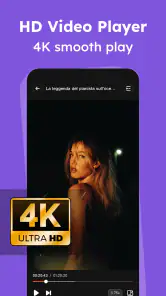
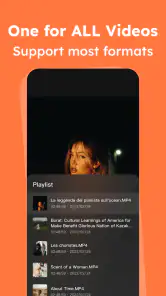
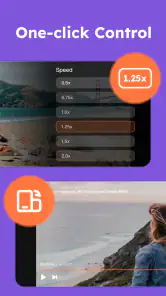
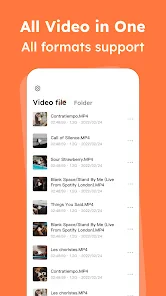
Analysis by Reviewed
When I need to watch a video that is already on my phone, I want to open it quickly and get on with it, rather than move it into another app or spend time adjusting settings. lPlayer - Offline Video Player is a free Android video player from snap game team, and its focus is straightforward: playing local video files. It suits the moments when a downloaded clip, a family recording or a work video needs to play without relying on a streaming service.
Starting with the file you already have
The most useful way to think about this app is as the last step in a small video-watching workflow. First, the file has to be on your phone; then you choose it in the player, check that the picture and sound are right, and watch. That distinction matters if you are used to streaming services, where finding a title and pressing play are usually part of the same experience. Here, the app handles playback, not the whole journey of finding or transferring a video.
For example, I might receive a recording from a relative, save it to my device, and watch it later while waiting for an appointment. Or I might keep a lesson video available before heading somewhere with a poor connection. In either case, the practical check is simple: open the file before you leave and make sure it plays. That small test can save a frustrating search through folders or an unexpected format problem when you have little time.
This local-file approach also makes the app useful for videos that do not belong in a streaming library: personal recordings, clips shared directly with you, or material you have already saved for offline viewing. It is less compelling if nearly everything you watch comes from a subscription service and you rarely handle video files yourself.
From saved file to first playback
My practical starting point would be a video already stored on the device. Open the player, choose the file from your library and start watching; that simple workflow is the reason to consider a dedicated player instead of a streaming app. The interface is described as uncomplicated, and the controls are meant to be easy to find. I would still check that the file is saved locally before setting off: an offline player cannot make a video available if it has not been transferred to the phone.
The app’s format support is presented as broad, including familiar types such as MP4 and AVI. That can be useful when someone sends you a clip in a format your usual gallery player does not handle well. In practice, I would test an unusual or important file before travelling, rather than discovering a compatibility problem when there is no time to troubleshoot. A player can support many formats without guaranteeing that every file, encoding or damaged download will work perfectly.
If a file does not appear where you expect, I would first check whether it has finished downloading and whether it was saved on the device rather than left in an online account. I would also try opening a known, ordinary video before assuming the player itself is at fault. This basic troubleshooting order helps separate a transfer issue from a playback issue without wasting time changing settings at random.
More From Our News Desk

Weather by Xiaomi Review: Clear at a Glance, Less Clear Up Close

X Under Pressure: Can It Recover When Posting Goes Wrong?

Clash of Clans Is Won Between the Battles

Android Auto Makes the Case for Quieter Car Software

MobiOffice: Transforming Mobile Productivity with Seamless Integration

EA SPORTS FC™ Mobile Soccer: Redefining Mobile Sports Gaming
Playing Videos with Ease
The first thing that caught my attention about lPlayer - Offline Video Player is its ability to play almost any video format you throw at it. From MP4 to AVI, it seems like nothing is off-limits. The app opens quickly, and the interface is super intuitive. I didn’t have to fumble around to find settings or options; everything is exactly where you’d expect it to be.
Controls that suit quick viewing
The design of the app is simple yet effective. You won’t find any unnecessary frills or distractions, which I appreciate. The controls are straightforward, making it easy for anyone, even the less tech-savvy, to navigate through their video library. There’s a handy gesture control feature that allows you to adjust volume and brightness by swiping on the screen, making it a breeze to use, especially when you’re in a hurry or multitasking.
Those gestures are especially useful when I’m watching one-handed on a bus or trying not to disturb someone nearby. My tip is to try them at home first: swiping is convenient once familiar, but it can take a moment to learn where and how the controls respond. For a shared screen or a video that needs precise scrubbing, visible on-screen controls may feel more predictable than gestures.
That trade-off is worth considering before handing the phone to someone else. A person who has never used the player may not immediately know that a swipe changes brightness or volume, and an accidental gesture can interrupt a quiet scene. I would show them the controls first or keep the phone in my own hands when the exact playback matters. Gestures make quick adjustments easier, but they are not automatically the best choice for every viewing situation.
Playback details: subtitles, tracks and low light
Performance-wise, this app is a beast! Videos play smoothly without any lag or buffering issues, even when you’re watching in high definition. One of the standout features is the app’s ability to download subtitles directly, saving you the hassle of finding them yourself. Plus, it supports multiple audio tracks, which is a blessing if you’re into multilingual content.
Subtitles and alternate audio tracks make a meaningful difference for downloaded films and language-learning clips, but I would check both before settling in: the subtitle timing or the available track depends on the video itself. This is also where a dedicated player can beat a basic gallery viewer, while remaining less useful than a full media library app if you want to organize a large collection, sync viewing across devices or continue watching on a television.
A useful workflow for a language lesson is to open the clip before class, confirm the intended audio track, and check whether the subtitles are readable on the phone’s screen. If a clip contains several tracks, selecting the right one up front avoids interrupting the lesson later. For a film, I would likewise check subtitle timing near the beginning rather than assume that a subtitle option will suit every file equally well.
Another feature I found useful is the app’s night mode. It tweaks the screen settings to be easier on the eyes when watching in low light conditions. This feature is a game changer for late-night binge-watching sessions.
Night mode is most helpful when the phone is the screen you are actually watching, such as during a quiet evening or on a dimly lit journey. It is not a substitute for controlling the room’s lighting or taking a break when your eyes feel tired, but it gives the player a practical role beyond simply starting a file. If you are watching with other people, I would still check brightness and volume before pressing play so the viewing setup suits everyone nearby.
What happens before and after playback
A realistic use case is saving a few videos over Wi-Fi before a long journey, then opening them from the phone when the connection is unreliable or unavailable. I’d also use it for reviewing a recording after an event, or checking a downloaded lesson during a commute. The handoff is simple: get the file onto the device first, then use the player to watch it. If your videos live in cloud storage, you’ll need to make them available locally before expecting offline playback.
That handoff can involve another app or device. A video may arrive in a message, be copied from a computer, or be saved from a service that permits offline files; whichever route you use, the important point is to verify that the finished file is accessible on the phone. I would avoid building a complicated folder system for a couple of clips, but if I were carrying several lessons or recordings, I would use clear filenames or folders before opening the player. It makes finding the right video less fiddly once I am on the move.
For a family recording, I would also check the full clip rather than only the opening seconds if it is important. A file that begins normally can still be incomplete or have a problem later on. When the goal is simply to watch a short clip, that level of checking is unnecessary; for a presentation rehearsal, a class assignment or a memory I do not want to miss, it is a sensible precaution.
The app is free to install and is rated for Everyone. It has a 3.8 average from around 39,000 ratings, with more than 10 million installs, and its current version is 2.4.0. It includes in-app purchases ranging from $1.99 to $29.99 per item, so I’d look over the purchase details before buying anything. The app is aimed at Android devices running version 6.0 or later.
Those purchase options are a reason to pause at any prompt and ask what the item actually adds to your own routine. If you only need to open occasional local clips, I would not assume that an optional purchase is necessary. If an extra is presented, I would read its details carefully and decide whether it solves a real problem for me rather than treating a purchase screen as part of the basic setup.
How it compares with other ways to watch
Compared with a phone’s built-in gallery player, a dedicated video player is worth trying when the gallery struggles with a file or when you want playback controls such as gestures, subtitle handling or alternate audio. The gallery can still be the easier choice for quickly reviewing a personal clip among photos, because there is no need to switch apps. I would keep both approaches in mind rather than expecting one player to be best for every video.
Streaming apps solve a different problem: they help you browse and watch their own catalogues, but they do not replace a player for arbitrary video files already stored on your phone. On the other hand, a full media-library app can be a better fit if your priority is sorting a large collection, maintaining a broader home setup or moving between devices. lPlayer’s appeal is narrower and more immediate: choose a local video and watch it without building a library around it.
That focus is a strength for someone who wants little setup, but it also sets a limit. I would choose it for a handful of saved clips, a downloaded lesson or a recording that needs a straightforward check. I would look elsewhere if I wanted a polished catalogue, cross-device continuity, or a central system for managing a substantial film collection. The best comparison depends less on which app has the longest feature list and more on where your videos come from and what you need to do with them.
Where the workflow can break
Offline playback is not the same as an all-in-one video service: it does not replace the step of obtaining or transferring the files you want to watch. If you mainly stream from subscription platforms, prefer automatic cloud syncing, or need advanced library management, your existing streaming app or a more organization-focused media player may be a better fit. The broad format claims are appealing, but I would keep another player available for a file that refuses to open.
There is also a difference between the app being free to download and every part of using it being free: optional purchases are available. I would pay attention to any purchase prompt and decide whether a paid extra solves a need I actually have. That is more useful than assuming a free player must include every feature without additional cost.
Another possible point of friction is the expectation that every video will behave identically. File format is only one part of playback; the way a particular video was made or saved can matter too. If a clip has no sound, missing subtitles or an unexpected track, I would test a second file and check the available options before concluding that the player is unsuitable. For an important event or a trip, that quick comparison is easier to do while I still have time to choose another route.
I would also skip this app if my main goal were to watch protected content from a streaming service, send a video straight to a television, or keep a watched position synchronized across several devices. Those needs call for the service or media system designed around them. A local player can be convenient without being a universal replacement, and treating it as one would create avoidable disappointment.
A practical fit, not a complete media system
Overall, lPlayer - Offline Video Player has proven to be a reliable companion for my video-watching needs. It’s not just a player; it’s an experience that makes enjoying your favorite content more convenient and enjoyable. Whether you’re traveling and need to play videos offline or just want a smooth player for your digital library, this app has your back. The app is free with some ads, but they’re not intrusive enough to detract from the overall experience.
If you’re in the market for a solid offline video player, I’d definitely recommend giving this one a shot. It’s lightweight yet packed with features that cater to every video enthusiast’s needs.
My recommendation is strongest for Android users who already keep video files on their phones and want a direct route from saved file to playback. The combination of local viewing, gesture controls, subtitle support, multiple audio tracks and night mode gives it useful options without requiring a streaming-style routine. I would start with a video I know works, learn the gestures, and check the sound and subtitles before relying on it for a longer viewing session.
For people whose video habits are almost entirely online, or who need careful collection management and device-to-device continuity, another kind of app will probably feel more natural. For everyone else, this is a practical player to try when the file is already in hand. Its value comes from making that final step less complicated, while being clear-eyed about the transfer and compatibility checks that still belong to the user.
lPlayer - Offline Video Player Frequently Asked Questions
Can lPlayer play videos without an internet connection?
Yes. lPlayer - Offline Video Player is intended for playing video files stored on your device, so you can watch them without an internet connection once they are available locally. That can be useful when traveling or when you want to avoid relying on a network. It is a video player, rather than a source for streaming or downloading videos.
Can I use lPlayer to watch videos I have downloaded for a trip?
Yes. If the video files are saved on your device, lPlayer can play them offline, making it a practical option for watching during a trip or in places with limited connectivity. Make sure the files are available locally before you leave, since the app is a player for videos on your device rather than a service for finding or downloading them.
What is lPlayer - Offline Video Player?
lPlayer - Offline Video Player is a versatile app designed to play a wide range of video formats on your device without requiring an internet connection. It supports high-definition videos and offers features like subtitle support, video playback speed controls, and an easy-to-use interface, making it ideal for users who travel or have limited internet access.
Is lPlayer compatible with all video formats?
Yes, lPlayer is compatible with most popular video formats, including MP4, AVI, MKV, and more. The app is designed to handle various codecs and resolutions, ensuring smooth playback across different devices. However, for very rare or proprietary formats, users might need to convert the files to a supported format.
Does lPlayer offer subtitle support?
Absolutely, lPlayer allows users to load subtitles in various formats such as SRT, SSA, and ASS. Users can easily adjust subtitle settings, including font size, color, and synchronization, to match their preferences, providing a seamless viewing experience for foreign films or videos with complex audio.
Pros
- Supports various video formats seamlessly.
- User-friendly interface with easy navigation.
- No internet needed for offline viewing.
- Customizable playback settings available.
- Low battery consumption during use.
Cons
- Limited advanced features for professionals.
- Advertisements in free version can be annoying.
- Occasional bugs with subtitle synchronization.
- No cloud storage integration.
- Limited support for 4K videos.
- Category
- Video Players & Editors
- Version
- 2.4.0











