

LongPlus
- 208.00
- 2.9
- Installs
- 50.00K
- Price
- Free

Screenshots
Analysis by Reviewed
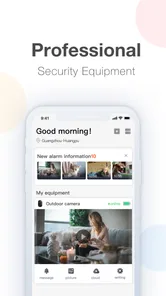
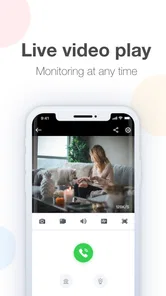
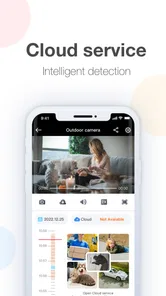
I approached LongPlus as a practical video-monitoring tool rather than as a general video player. It is a free app in the Video Players & Editors category, developed by CREATIVE SECURITY LIMITED, and its purpose is straightforward: connect with a compatible camera system so I can view live video through a peer-to-peer connection. That narrow focus is important. If you want to watch films, edit clips, or organize a personal media library, this is not the right kind of app. If you need to check a camera from a phone, its design makes much more sense.
My overall impression is mixed but useful. The basic idea is easy to understand, and remote live viewing can be valuable in ordinary situations, such as checking an entrance, looking in on a room, or seeing whether a delivery has arrived. At the same time, the experience depends heavily on the camera setup and the quality of the connection. The app cannot make an unsuitable camera system feel modern, and its relatively modest average rating of 2.9 from around 720 ratings suggests that many users have encountered friction. I would treat it as a focused monitoring client, not a polished all-purpose security platform.
How clearly LongPlus works for different users and situations
I look at LongPlus as a tool for a specific kind of user, not as a universal answer to home monitoring. In this section, I’m focusing on how its live-view role fits different routines and abilities, and on the practical choices that can make a camera check less frustrating. That perspective leads naturally to the question of whether the app remains worthwhile once the initial setup is no longer new.
Readability and navigation during everyday checks
The strongest part of a focused monitoring app is that it can avoid the clutter found in broader smart-home platforms. LongPlus is built around viewing real-time video, so the main task is clear from the beginning: reach the camera view and check what is happening. That simplicity is helpful for someone who does not want a dashboard filled with unrelated home-automation controls.
For me, the most useful way to judge the interface is not by how attractive it looks, but by how quickly I can answer a question. Is someone at the door? Is a child’s play area empty? Did the pet come back inside? A monitoring client earns its place when those checks take little thought. LongPlus is best suited to that short, repeatable workflow rather than long sessions spent browsing video.
Users with reduced vision may find a dedicated camera screen easier to understand than a complicated security suite, especially when only one or a small number of live feeds are involved. However, readability is not only about the presence of text. Live video itself can be difficult to interpret when the scene is dark, crowded, distant, or affected by glare. The app can display the camera feed, but it cannot correct every limitation of the camera’s image.
I also recommend setting up a consistent routine. Keep the phone at a comfortable viewing distance, open the app before you need it, and use the same camera order each time. This matters for older users or anyone who finds unfamiliar screens tiring. A predictable sequence—open the client, select the relevant feed, pause long enough to read the scene—reduces the mental effort of remote checking.
More From Our News Desk

 Gmail
GmailGmail in a Busy Inbox: Who Benefits Most?
From first account to crowded workday, Gmail earns its place through dependable search and flexible sorting—but its best fit depends on how much inbox maintenance you can tolerate.

 Prime Video
Switching to Prime Video: What Changes in Your Viewing Routine
Prime Video can make a compelling second home for streaming, but switching means learning a different catalog, rental layer, and route from browsing to playback.

 Universal TV Remote Control
Universal TV Remote Control Works Best as a Reliable Backup
A phone remote earns its place through quick setup and reliable habits. Here is how to get more from Universal TV Remote Control—and where its limits show.

 Weather - By Xiaomi
Weather by Xiaomi Review: Clear at a Glance, Less Clear Up Close
Xiaomi’s weather app makes everyday forecasts quick to scan, but its calm surface can leave useful details and recovery paths harder to find than they should be.

 X
XX Under Pressure: Can It Recover When Posting Goes Wrong?
A resilience-focused review of X, examining setup, mistaken posts, interruptions, weak connections, and the gaps that matter when recovery needs to be dependable.

 Clash of Clans
Clash of Clans Is Won Between the Battles
Its raids are quick; its community is a long-term project of coordination, teaching, rivalry, and shared responsibility—with all the friction that entails.
Latest News



LongPlus is available for devices running Android 5.0 or later, which gives it a broad compatibility range. That can be useful if a household relies on an older phone as a dedicated monitor. Still, compatibility with the operating system does not automatically guarantee that every camera, phone, or display combination will feel equally comfortable. Screen size, brightness, and the camera’s own image quality all affect the result.
Motor and sensory considerations before relying on it
Remote monitoring sounds effortless, but it still involves several physical actions: unlocking the phone, opening the app, choosing a device, and keeping the handset positioned so the feed is visible. For someone with limited dexterity, repeated tapping can become more frustrating than the live video itself. LongPlus is therefore more comfortable when the camera list is kept manageable and the phone is placed somewhere stable.
A useful workaround is to dedicate an older phone or tablet to monitoring when that is practical. Instead of picking up a phone repeatedly, I can leave the device in a known location and check the display directly. This does not add a special LongPlus feature; it is simply a better workflow for users who find small touch targets or repeated handling difficult. It also makes the app more useful for a family member who is not comfortable navigating a smartphone every time.
People who are sensitive to bright screens should be careful with prolonged viewing. A live camera feed can be visually demanding, especially in a dark room where the phone display feels disproportionately bright. Lowering screen brightness and using brief checks rather than leaving the feed open for long periods can make the experience less tiring. The same advice applies to users who experience discomfort from moving images or low-light video.
Hearing-related needs deserve a realistic distinction. LongPlus’s central value is visual monitoring, so it can help a person who prefers to see what is happening rather than depend on an audible alert. But visual access is only useful if the user remembers to look at the screen. I would not treat the app alone as a complete substitute for an alarm, doorbell, or other notification system when immediate attention is essential.
For users with cognitive or memory difficulties, the app is easier to manage when the purpose is limited to one question at a time. “Check the front entrance” is a clearer task than “monitor the whole property.” A written reminder near the phone, a fixed device location, and a small camera list can reduce confusion. These practical habits are more dependable than expecting the app to solve every navigation challenge automatically.
Situational access: when a live view is genuinely useful
The most convincing use case is a quick check while I am away from the camera. Imagine leaving home and wondering whether the front door area is clear. Instead of asking someone else to look, I can open the monitoring client and inspect the live scene. The value is not entertainment; it is the convenience of making a small decision without returning home.
Another realistic scenario is caring for a family member in another room. A live view may let me check whether the person is resting, whether a room is occupied, or whether an unexpected movement needs attention. I would still use it thoughtfully. A camera view should support care and reassurance, not replace direct contact when a person may need help.
LongPlus can also suit a small shop, office, workshop, or storage area where the owner wants occasional remote visibility. The peer-to-peer approach is relevant here because the app is intended to connect directly with a compatible monitoring setup rather than function as a conventional video-sharing service. That makes it more specialized than apps designed for social video, editing, or media playback.
Travel is another situation where the app may help, provided the camera system is already configured. A quick check from a hotel or another location can provide reassurance about an empty property. I would not make decisions based on a single frozen-looking frame, though. If the image appears delayed or the connection behaves inconsistently, the sensible response is to try again and verify the situation through another method when it matters.
Its free download lowers the barrier to trying the client, and the content rating is Everyone, so it is positioned for general household use rather than an adults-only audience. The app also has over 50 thousand installs, which indicates that it is being used beyond a single private setup. That does not guarantee a smooth experience for every camera owner, but it does make the app relevant to people looking for a straightforward mobile viewing client.
Where LongPlus differs from ordinary video apps and broader security platforms
Comparing LongPlus with a normal video player would be unfair because the two tools solve different problems. A standard player is designed for stored films or clips, while LongPlus is meant for a live camera feed. It is not the app I would choose for editing recordings, adding captions, trimming footage, or managing a personal collection of videos.
Compared with a broad smart-home platform, its focused role can be an advantage. A larger platform may combine cameras with locks, lights, thermostats, routines, and notifications. That can be better for someone who wants one central control panel. On the other hand, every extra function adds another layer of menus and settings. If my only requirement is opening a camera view, a dedicated client may feel less overwhelming.
The trade-off is that a focused client can be less forgiving when the camera relationship is not straightforward. A broad ecosystem often guides users through device discovery and account management in a more unified way. With LongPlus, the important question is whether the existing monitoring equipment is compatible and properly configured. I would check that before planning a purchase or changing a household’s camera setup.
There is also a privacy and practicality trade-off in any remote camera app. The convenience of seeing a room from elsewhere must be balanced with careful placement of the camera and agreement from people who may appear in the feed. LongPlus provides a viewing route; it does not remove the need for sensible household rules about when cameras are used and who can access them.
Remaining barriers that can affect confidence
The clearest barrier is dependence on the surrounding setup. LongPlus is not a standalone camera. It needs a compatible monitoring arrangement, and the quality of the result depends on the camera, network path, and phone. If the live view will not connect, loads slowly, or shows an unclear scene, the app may feel unreliable even when the underlying problem is elsewhere.
That is why I would test it before using it for something important. Try the app from the exact places where it will be needed: inside the home, outside on mobile data if relevant, and from a room with weaker signal. Check the feed at different times of day. This simple test exposes a weakness that a brief installation cannot: a camera that looks fine in daylight may be much less useful at night.
Another limitation is the difference between viewing and responding. Seeing a problem does not necessarily provide a way to solve it. If I notice that a door is open or an area needs attention, I still need a person nearby or another system to act. LongPlus should therefore be considered an observation tool, not a complete emergency or access-control solution.
The app’s current version is 24.1.1.20240120, and the developer is CREATIVE SECURITY LIMITED. Users should remember that version information is only one part of long-term usability. Phones change, camera firmware changes, and network conditions change. A client that works well today still deserves occasional testing, particularly if it is being used to watch a vulnerable person, a business area, or an important entrance.
Although the app is free to install, it includes in-app purchases ranging from forty-nine cents to $148.99 per item. That makes it especially important to understand what the connected setup requires before spending anything. I would not assume that installing the client means every monitoring function is included at no cost. Anyone working with a limited budget should review the in-app choices carefully and avoid paying for an option without knowing how it relates to the camera system.
The rating history also deserves a measured interpretation. An average of 2.9 from around 720 ratings is not a reason to dismiss the app automatically, because camera compatibility and network problems can influence reviews. But it is a warning not to expect a universally smooth experience. I would install it when I already have a suitable camera arrangement or a clear reason to test it, rather than choosing it blindly as the first security app I see.
Who should use it, and who should choose something else?
I think LongPlus is most suitable for someone who already has a compatible camera system and wants a mobile way to view live video. It can also work for a family that wants a simple dedicated screen for occasional checks, especially when a full smart-home platform would be unnecessary. People who value a narrow, task-focused app may appreciate not having to navigate unrelated home controls.
I would be more cautious about recommending it to someone buying a complete security system from scratch. In that situation, an integrated camera ecosystem may offer clearer setup guidance, more coordinated alerts, and a single place for device management. A different option is also better for anyone whose main goal is video editing, playback, or media organization; LongPlus is not built around those activities.
Users who need guaranteed immediate warnings should not rely on the live view alone. A person who cannot regularly look at a screen, a business that needs a formal alarm workflow, or a household that requires dependable event notifications may need a more comprehensive solution. LongPlus can complement those arrangements, but I would not make it the only layer of protection.
For accessibility, the best match is someone who can comfortably perform basic touch navigation and interpret a live visual scene, or someone who has help setting up a dedicated device. It may be less suitable for users who need strong hands-free control, highly specialized visual presentation, or a monitoring system with clearly coordinated non-visual alerts. Those are not small details; they determine whether the app is reassuring or simply another source of uncertainty.
My inclusive verdict after using it as a monitoring client
LongPlus has a clear purpose and can be useful when that purpose matches the user’s needs: viewing a compatible camera remotely without turning the phone into a full smart-home control center. I like the idea of a focused client for quick checks, and the broad Android compatibility makes it worth considering for older devices used as dedicated monitors.
Its accessibility story is practical rather than comprehensive. A simple viewing task can be easier than a crowded security dashboard, and a fixed phone can reduce repeated handling. Yet the app remains dependent on touch navigation, visual interpretation, camera quality, and network reliability. Those constraints matter more than the download price when the app is being used for care, safety, or business oversight.
My recommendation is therefore conditional. If you already own compatible equipment, need live video, and are willing to test the connection in the places that matter, LongPlus is a reasonable free client to try. Keep the workflow simple, check the image in both bright and dim conditions, and treat the feed as one part of a wider plan. If you need polished accessibility controls, coordinated alerts, or a complete security ecosystem, I would look at a more integrated alternative instead.
In short, LongPlus is neither a general video app nor a complete security answer. It is a specialized viewing tool whose usefulness depends on the surrounding camera system and the person using it. Its real strength is focused remote visibility; its real weakness is that visibility alone does not guarantee access, action, or reassurance.
LongPlus Frequently Asked Questions
What is LongPlus and what can I use it for?
LongPlus is a mobile application focused on creating and sharing short-form video content. After exploring its main sections, users can browse a personalized feed, watch videos from other creators, interact with posts, and produce their own clips using editing and creative tools. Its exact features may vary by region and app version, so checking the current store description is recommended before downloading.
Is LongPlus free to download and use?
LongPlus can generally be downloaded without an upfront purchase, allowing users to access its core browsing and content-creation features for free. However, free apps may include advertising, optional in-app purchases, or paid promotional tools. Before confirming any transaction, review the price shown in your local currency and check whether subscriptions renew automatically through Google Play or the App Store.
Does LongPlus require an account or personal information?
Some LongPlus features may be available immediately, but creating or signing into an account is usually necessary for publishing videos, following creators, saving preferences, commenting, or synchronizing activity across devices. Registration can involve information such as an email address, phone number, username, or social-login details. Review the app’s privacy policy and permission requests before providing personal data.
Is LongPlus safe for children and teenagers?
Parents should review LongPlus carefully before allowing children or teenagers to use it because short-video platforms can contain user-generated material, advertising, public comments, and interactions with unknown users. Available safety controls may include reporting, blocking, privacy settings, or content filtering, but these tools are not a complete substitute for supervision. Check the official age rating and local availability.
What permissions and device requirements does LongPlus have?
LongPlus may request access to the camera and microphone for recording videos, photos and media files for uploading content, and notifications for alerts or interactions. Depending on the version, location or other permissions may also be requested. You can manage these permissions in your device settings. For smoother editing and playback, use a recent Android or iOS device with sufficient storage and a stable internet connection.
Pros
- Natural-looking retouching keeps edits subtle and realistic.
- One-tap enhancement tools make quick photo improvements easy.
- Offers creative filters and effects for social media content.
- Supports portrait-focused edits for selfies and profile pictures.
- Regularly adds new templates
- effects
- and editing options.
Cons
- Many advanced tools and effects require a paid subscription.
- Some edits can look overly smooth when settings are pushed too far.
- Export options may be limited compared with professional photo editors.
- The app may include frequent ads in the free version.
- Processing complex edits can be slow on older phones.











