LiveWell with Advocate Aurora
- 3.55K
- 4.4
- Installs
- 1.00M
- Price
- Free

Screenshots
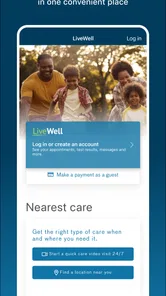
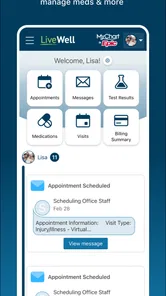

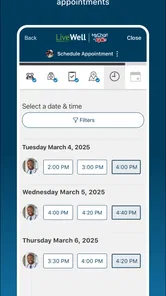

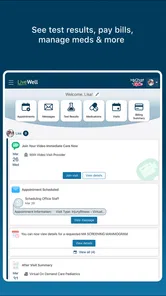

Analysis by Reviewed
I would decide whether to keep LiveWell by asking a practical question: does it make the next step in my care easier, or does it merely give me another screen to check? Its value is clearest when I already have a reason to use it, such as preparing for an appointment, reviewing a result, or contacting my care team. For someone receiving care through Advocate Aurora, that can turn a one-off download into a useful household routine. For everyone else, the connection to that health system matters more than the convenience of having a medical app on a phone.
Why the first week can feel worthwhile
The initial appeal is practical rather than flashy. A medical portal can replace some of the small bits of admin that otherwise live in paper folders, phone calls, and memory. LiveWell brings care-related tasks into a mobile app, so I can see why someone would install it before an appointment or after being told to check a result. It is free, rated for Everyone, and developed by Advocate Aurora Health, which makes it easy to try if that is where you receive care.
I would use the first few days to do more than browse. Check that you can sign in, find the parts of the app that matter to you, and see whether the information you expect is available for your care. That quick orientation is a better test than opening it repeatedly without a purpose. If the app fits your provider relationship, you will know where to go when a task actually comes up.
A realistic example is preparing for a routine visit while waiting for the bus. I could review information already available in the app, then write down a question about a symptom or a change I have noticed. The app can help me arrive organized, but it cannot decide which detail matters or replace a conversation with a clinician. I would keep my own brief notes for anything that needs context, especially if it began recently or has changed over time.
Records are helpful, but they are not the whole story
Having medical information on a phone is convenient, but it can also make a record seem more complete or self-explanatory than it is. A result needs context: what was being checked, what a clinician said, and whether any follow-up is needed. I would use the app to review and locate information, then ask the care team when an entry leaves me unsure what to do. It is a useful distinction between access to a record and interpretation of that record.
One small habit can make visits more productive: before opening the app, jot down the question you want answered and the decision you need help with. Then use the available records to support that conversation rather than trying to reconstruct it from memory in the appointment. This works especially well when you have several unrelated concerns; separating them into short notes reduces the chance that a convenient portal turns into a hurried, unfocused review.
How LiveWell fits into a care routine
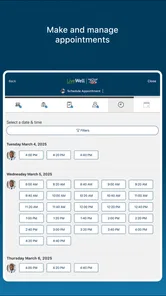
First things first, the LiveWell with Advocate Aurora app is like having your entire health history right in your pocket. You can access your medical records, view test results, and even schedule appointments without having to make a single phone call. It's incredibly convenient, especially for those of us who are always on the go. No more digging through paper records or playing phone tag with the doctor's office. Just a few taps, and you're good to go!
More From Our News Desk

Weather by Xiaomi Review: Clear at a Glance, Less Clear Up Close

X Under Pressure: Can It Recover When Posting Goes Wrong?

Clash of Clans Is Won Between the Battles

Android Auto Makes the Case for Quieter Car Software

MobiOffice: Transforming Mobile Productivity with Seamless Integration

EA SPORTS FC™ Mobile Soccer: Redefining Mobile Sports Gaming
Staying in touch without treating messages as urgent care
One of the standout features of this app is the ability to message your care team directly. Whether you have a quick question or need to discuss something more in-depth, you can do it all through the app. This kind of direct communication really puts your mind at ease and ensures that you're always in the loop when it comes to your health care.
That messaging option has a useful boundary: it suits a non-urgent question better than an immediate problem. I would use it to ask about a follow-up or clarify a care instruction, then keep an eye on the reply rather than assuming a message is being handled like a live conversation. If a concern needs prompt attention, the usual direct route to a clinician or urgent care is the sensible choice.
It is also worth being deliberate about what goes into a message. A concise note with the relevant question is easier to act on than a long account that mixes several topics. I would keep one message focused on one issue, mention the context that changes the question, and avoid using the portal as a running diary. That approach makes messaging a practical part of care rather than another inbox that grows until it feels burdensome.
Wellness tools need a purpose to stay useful
The app doesn't just stop at managing your appointments and records. It also offers tools and tips for maintaining a healthy lifestyle. From tracking your daily steps to providing personalized wellness tips, it's like having a personal health coach right on your phone. Plus, the app syncs with various fitness devices, making it easier than ever to keep track of your progress.
For month-to-month value, I would treat the wellness side as a light prompt, not a complete fitness system. Step tracking and connected-device data can help you notice a pattern, but they are most useful when they support a goal you already care about. If your main priority is detailed training plans or a specialized workout log, a dedicated fitness app is likely a better fit; LiveWell’s appeal is keeping wellness alongside care tasks.
A useful trade-off is that a combined care-and-wellness app can reduce app-hopping, but it may not offer the depth of a tool built around one specific activity. If I want to understand whether I am generally moving more, a simple step view may be enough. If I am trying to follow a structured training plan, compare detailed exercise sessions, or build a specialized routine, I would choose a fitness product designed for that job and leave LiveWell focused on its care role.
Privacy, sign-in, and the small upkeep that matters
Now, I know what you're thinking—what about privacy? In this day and age, it's a valid concern. Rest assured, the LiveWell with Advocate Aurora app takes your privacy seriously. With secure login features and data encryption, you can feel confident that your personal information is safe and sound.
There is still a small maintenance habit involved: keep your login details accessible in a secure way and make sure you can get into the account before you need something time-sensitive. If you use the app only when a test result or appointment comes up, the sign-in process can feel like friction. Checking access during a calm moment is a simple way to avoid turning an already stressful task into a password-recovery detour.
I would also decide in advance how the app fits into a shared household routine. Helping someone remember a question or organize appointment details can be valuable, but access to medical information is personal. Rather than casually sharing a password, keep account boundaries clear and have the account holder handle sign-in and decisions about what to share. That may add a step, but it is a better trade-off than making convenience the only consideration.
Who benefits, and when another option makes more sense
I think it is a stronger match for people who already receive care through Advocate Aurora and want a single place to handle records, appointments, and routine communication. Someone helping a family member organize care may also find a central digital view useful, while still respecting account access and privacy. If you mainly want a general medical encyclopedia, a broad wellness tracker, or a portal for a different health system, this is less likely to replace the tool you already rely on.
The comparison with a clinic’s website or phone line depends on the task. A phone call remains the better choice if the issue is urgent, complicated to explain, or needs a back-and-forth conversation. A web portal may be easier for someone who prefers a larger screen or does not want to manage care on a phone. LiveWell has the advantage of putting mobile access and wellness features near care tasks, but that is only useful if you are comfortable doing this kind of administration on your device.
It also helps to decide what “all in one place” means for your own routine. The app can bring its care-related tools together, but it should not become your only record of important details: keep any instructions you need for an appointment available, and confirm anything that affects a decision with your care team. That modest backup habit is especially useful when you are comparing information from different providers.
For a person managing several appointments, a practical routine is to use the app when there is a specific task, then capture any next steps somewhere they will actually remember to check. That could mean noting a question before a visit or recording a reminder after receiving an instruction. The point is not to duplicate every detail; it is to prevent a convenient portal from becoming a place where information is viewed once and then forgotten.
What its track record tells me—and what it cannot decide
LiveWell has been available since March 9, 2015, and its current version is 11.3.2, with support for Android 9 and newer. It has a 4.5 average from around 16,000 ratings, and more than 500,000 installs. Those figures suggest an established audience, though they cannot tell you whether the app suits your particular care arrangement. For me, the deciding factor is whether its records and communication fit the providers I actually use.
Its 3,300 reviews also point to a sizeable group of people who have taken time to share feedback, but I would not treat an average rating as a guarantee that every workflow will suit me. Medical apps are unusually dependent on the relationship between the patient and the health system. Before building a routine around one, I would check whether the relevant provider and care tasks are part of my actual experience with Advocate Aurora. That is a more useful test than judging it by popularity alone.
If you are deciding whether to install it, the straightforward question is whether you expect to use its connection to Advocate Aurora. If yes, trying it for a real task—such as checking a record or arranging a visit—will reveal more than a long exploratory session. If not, a general health reference app or the portal associated with your own provider is likely to serve you better. The fact that LiveWell is free removes a price barrier, but it does not remove the time cost of maintaining another account.
Does it earn a lasting spot?
To sum it up, if you're someone who's looking for a comprehensive, user-friendly app to manage your health, LiveWell with Advocate Aurora is definitely worth checking out. It's got all the bells and whistles you need to stay on top of your health game without any of the hassle. Give it a try, and you might just wonder how you ever lived without it!
My long-term verdict is more measured than the first-week impression: the app is most valuable when a real care task brings you back, not because you need to check it every day. The risk of fatigue is treating wellness prompts or step counts as another obligation. I would keep notifications and routines purposeful, use the records and messaging when they solve a concrete problem, and let the rest stay optional. With 3,300 reviews and no cost to try it, LiveWell is an easy option to consider for Advocate Aurora patients; its recurring value ultimately depends on whether those services match your ongoing care.
LiveWell with Advocate Aurora Frequently Asked Questions
What operating-system version do I need to install LiveWell with Advocate Aurora?
Before downloading, check that your phone or tablet runs a compatible operating system. LiveWell with Advocate Aurora requires Android 9 or later, so an older Android device may not be able to install it. The app is a medical tool for keeping health information in one convenient place, so compatibility is worth checking before you rely on it for care-related tasks.
Who develops LiveWell with Advocate Aurora, and what is the app’s age rating?
LiveWell with Advocate Aurora is developed by Advocate Aurora Health and is categorized as a medical app. Its content rating is Everyone, making it suitable for a broad audience. The app is intended to bring health information together in one place, which may be useful for people who want a mobile way to stay connected with their care.
Who can use LiveWell with Advocate Aurora, and is it useful before I become a patient?
LiveWell with Advocate Aurora is a medical app developed by Advocate Aurora Health, designed to help users keep health information and care-related tasks together in one place. Its tools are most relevant to people receiving care through Advocate Aurora Health, especially when they want a convenient way to manage appointments or review health information. The app is free to download.
What is LiveWell with Advocate Aurora and what does it offer to users?
LiveWell with Advocate Aurora is a comprehensive health and wellness application designed to connect users with their healthcare providers seamlessly. It offers features like scheduling appointments, viewing test results, and accessing medical records. The app also includes tools for managing prescriptions and communicating directly with healthcare professionals, making it a convenient resource for managing one’s health on-the-go.
Is LiveWell with Advocate Aurora free to use, or are there any hidden costs?
The LiveWell with Advocate Aurora app is free to download and use for patients of Advocate Aurora Health. There are no hidden costs associated with accessing your medical records or communicating with healthcare providers through the app. However, any costs related to healthcare services, such as appointments or treatments, are separate and billed accordingly.
Pros
- User-friendly interface for easy navigation
- Comprehensive health tracking features
- Integrates with wearable devices
- Secure data encryption for privacy
- Regular updates with new features
Cons
- Limited free features available
- Requires stable internet connection
- Occasional sync issues with devices
- Customer support response is slow
- Some features are paywalled











