

LivePhish
- 1.53K
- 4.8
- Installs
- 100.00K
- Price
- Free

Screenshots
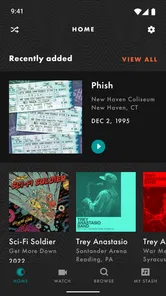
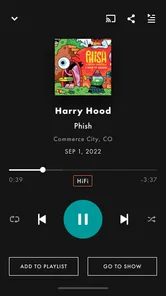
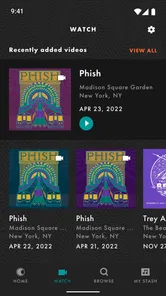
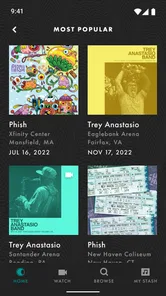
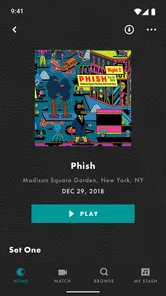
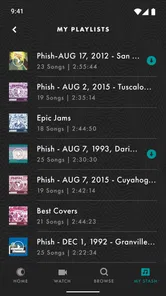
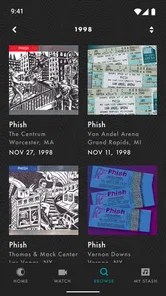
Analysis by Reviewed
I spent time with LivePhish as a dedicated way to follow Phish recordings and live broadcasts, and my impression is quite clear: this is a focused music app for people who want more than a general streaming service usually offers. It is built around the band’s live world, with exclusive livestreams and access to a complete archive, rather than around discovering every kind of artist in one place. That narrow purpose is both its greatest strength and the main reason some listeners will find it unnecessary.
Developed by nugs.net, the app sits in the Music & Audio category and is free to install. Its audience is already substantial, with more than one hundred thousand installs, and the average rating is a strong 4.8 from roughly four thousand ratings. Those figures suggest that the core audience is getting what it came for, but they do not change the most important question: do you regularly want Phish concerts, livestreams, and archived performances on your phone?
I would recommend it to a Phish fan who wants a practical listening hub, especially someone who moves between current broadcasts and older shows. I would not recommend downloading it simply because you enjoy music apps in general. The experience is much more specific than Spotify, Apple Music, YouTube Music, or a typical radio app, and its value depends heavily on how much live Phish matters to you.
How the app feels to read and navigate
I find that a focused layout matters most when I’m choosing a show in a hurry: I can keep the task to finding a performance rather than sorting through unrelated music. In this section, I’m looking at how that concentration affects reading and navigation, including the point where a deep archive asks for more patience than a casual playlist does.
A focused layout helps the main task
The first thing I noticed is that LivePhish has a much clearer purpose than a broad streaming catalog. Instead of asking me to move through unrelated genres, playlists, podcasts, and recommendations, it keeps attention on performances connected to Phish. That focus can make the app easier to understand for someone who does not want a crowded entertainment dashboard.
For a listener who knows what they are looking for, an archive-centered app can also reduce mental effort. You are not starting with an enormous universe of artists. You are trying to reach a show, a broadcast, or a particular period in the band’s live history. That narrower scope makes the service feel less distracting than a general music platform, even though the archive itself can still be a lot to explore.
Readability matters particularly when you are using the app away from a desk. I often judge music apps by whether I can identify the next action quickly while sitting on a train, preparing dinner, or switching from speakers to headphones. LivePhish works best in those moments when the goal is simple: choose a performance and start listening. A screen full of tiny controls or competing recommendations would undermine that advantage, so the app’s focused identity is useful in everyday situations.
More From Our News Desk

 Gmail
GmailGmail in a Busy Inbox: Who Benefits Most?
From first account to crowded workday, Gmail earns its place through dependable search and flexible sorting—but its best fit depends on how much inbox maintenance you can tolerate.

 Prime Video
Switching to Prime Video: What Changes in Your Viewing Routine
Prime Video can make a compelling second home for streaming, but switching means learning a different catalog, rental layer, and route from browsing to playback.

 Universal TV Remote Control
Universal TV Remote Control Works Best as a Reliable Backup
A phone remote earns its place through quick setup and reliable habits. Here is how to get more from Universal TV Remote Control—and where its limits show.

 Weather - By Xiaomi
Weather by Xiaomi Review: Clear at a Glance, Less Clear Up Close
Xiaomi’s weather app makes everyday forecasts quick to scan, but its calm surface can leave useful details and recovery paths harder to find than they should be.

 X
XX Under Pressure: Can It Recover When Posting Goes Wrong?
A resilience-focused review of X, examining setup, mistaken posts, interruptions, weak connections, and the gaps that matter when recovery needs to be dependable.

 Clash of Clans
Clash of Clans Is Won Between the Battles
Its raids are quick; its community is a long-term project of coordination, teaching, rivalry, and shared responsibility—with all the friction that entails.
Latest News



The archive requires a little patience
The complete archive is a major attraction, but a large catalog naturally creates a different kind of challenge. New listeners may not know which performance to choose first, while experienced fans may have a particular date or era in mind. The app is most comfortable for people who already have some reference point, such as a favorite show, a recommendation from a friend, or an upcoming livestream they want to follow.
My practical advice is to decide what kind of listening session you want before opening the archive. If I want background music, I choose a familiar performance rather than browsing endlessly. If I want to explore, I set aside time for searching and comparing. That small habit prevents the archive from becoming a decision-making chore.
Another useful approach is to treat livestreams and archived concerts as separate activities. A livestream is time-sensitive and social in feeling, while an archived show is better for deliberate listening. Keeping those intentions separate makes the service easier to use and helps avoid the disappointment of expecting an archive browser to behave like an automated radio station.
Version and device expectations
The current Android version is 4.2.3, and the app requires Android 10 or later. That requirement is reasonable for people with a recent phone, but it immediately excludes older devices that still handle basic audio apps comfortably. If you keep an older handset as a music player, this is worth checking before relying on LivePhish for a trip or a concert night.
The app is rated for Everyone, which fits its role as a music and audio service. That rating does not mean every listening context will be equally comfortable, though. The experience still depends on the phone’s screen, touch controls, audio output, and the user’s ability to manage a catalog. The content rating is reassuring for households, but it should not be confused with a guarantee that every interaction suits every ability.
Useful habits for different reading needs
If small text is difficult for you, the most helpful strategy is to use the phone’s own display settings before relying on the app. Larger system text, stronger contrast, and a less reflective screen can make show titles and navigation easier to scan. I would also avoid browsing while walking or in a moving vehicle; the archive deserves enough attention that you can confirm what you selected rather than starting the wrong performance.
For someone with limited attention or memory, a simple routine works well: open the app, choose one show, start playback, and avoid exploring the rest of the catalog until later. The service is more approachable when you turn it into a single-purpose player rather than trying to understand everything at once.
Listening with different abilities and in different situations
For me, the best way to judge listening comfort is to separate choosing a performance from settling in to hear it. This section considers how screen interaction, live-audio intensity, and the listening environment can shape that experience, so I can weigh the app’s practical fit before turning to its value over time.
Motor considerations during playback
Music apps are often used with one hand, while cooking, commuting, exercising, or carrying a bag. LivePhish is therefore easiest when playback has already been selected and the phone can remain still. Searching a deep archive with repeated taps is less convenient for someone with tremors, limited reach, or pain in the hands. In that situation, I would prepare a performance before the activity begins and keep interaction to a minimum.
This is an important distinction: the app’s focused catalog can reduce cognitive clutter, but it does not remove the physical demands of tapping, scrolling, and confirming selections. A person who has difficulty with precise touch should test the browsing experience at home, not for the first time during a live broadcast or while traveling.
External controls may improve the experience depending on the phone and listening setup, but I would not assume that every action can be completed away from the screen. The safest workflow is to start the show manually, place the device somewhere stable, and use familiar hardware controls where they work reliably. That approach is less frustrating than repeatedly reaching for a phone during a long performance.
Sensory needs and the nature of live audio
Live recordings have a different sensory character from polished studio tracks. Crowd sound, changing volume, long improvisational passages, and the feeling of being inside a concert can be exactly what fans want. For listeners who are sensitive to sudden changes or dense sound, however, the same qualities may become tiring.
I would begin with a short listening session and a comfortable volume rather than starting a long show at a high level. Headphones with dependable volume controls can help, but speakers may be better for anyone who dislikes the pressure or isolation of in-ear listening. The best setup depends on the individual, and the app’s main strength is the content rather than a promise that every recording will feel equally gentle or predictable.
For people who are hard of hearing, the central question is whether the audio itself provides enough detail through their chosen device. A good speaker position and clear volume control can make a meaningful difference. Someone who relies on visual alternatives should be cautious about treating a music-first app as a complete substitute for captioned or sign-supported concert content. LivePhish is designed around listening, so it is naturally less suitable when audio cannot be the primary way to access the experience.
Using it in ordinary daily life
A realistic example is an afternoon at home when I want a full concert rather than a short playlist. I can choose an archived performance, connect the phone to a speaker, and let the music run while I do low-attention tasks. The archive is especially useful here because I am not limited to whatever a general service happens to recommend that day. I can choose a performance based on mood, memory, or curiosity.
On a commute, the app can serve a different purpose. I would select the show before leaving, make sure the device is charged, and avoid depending on a complicated search while standing on a crowded platform. This preparation is not unique to LivePhish, but it matters more when the appeal is a long-form concert rather than a quick, disposable track.
For a shared household, the Everyone rating makes the app easy to consider as a family music option, but the listening style may not suit everyone. One person may want an extended improvisation while another wants familiar songs or a short playlist. In that case, a general streaming service is more flexible, while LivePhish is the better choice for the household member who specifically wants Phish performances.
Where the usual alternatives are better
Spotify, Apple Music, YouTube Music, and similar services are stronger when I want broad discovery, mixed-artist playlists, algorithmic recommendations, or one subscription covering many listening habits. They are also more natural choices for someone who listens casually to many genres and only occasionally plays Phish.
LivePhish makes more sense when the archive and exclusive livestreams are the reason I am opening the app. Its specialization avoids the noise of a general platform, but that specialization also means it cannot replace a complete everyday music service for most people. I see it as a companion to a broad streaming app, not necessarily a universal replacement.
The pricing model deserves attention before committing to regular use. The app itself is free, while in-app purchases range from $9.99 to $149.99 per item. That wide range means a casual listener should look carefully at what they are selecting before confirming a purchase. Someone who only wants to sample the experience may prefer to begin with the free installation and understand the available listening options first, rather than assuming that every part of the catalog is included at no extra cost.
Remaining barriers for new and returning listeners
The biggest barrier is not basic navigation; it is knowing how to use a specialized archive. A devoted fan may find the depth exciting, while a newcomer can feel as though they have entered a conversation without enough context. The app would be easier for beginners if they already have a starting point, so I recommend asking a fan friend for one or two performances instead of trying to survey the entire catalog immediately.
Another barrier is the difference between wanting music and wanting an event. Exclusive livestreams appeal to people who value the feeling of following a performance as it happens. If I only want background tracks on demand, I may not get enough benefit from that emphasis. The service rewards commitment to the band’s live culture more than occasional curiosity.
There is also a practical financial barrier for listeners who expect a free archive simply because the app costs nothing to download. The purchase range makes it important to separate installation from access. I would treat the free app as an entry point, then decide whether individual listening choices justify the expense. That is a healthier expectation than assuming the entire experience works like an unlimited free radio service.
People using older Android hardware face a separate limitation because Android 10 is the minimum operating system. If your phone cannot meet that requirement, the app is not a realistic option on that device. For those users, a different service that supports their hardware may be more useful, even if it offers a less specialized Phish experience.
My inclusive verdict
After using LivePhish as a focused music app, I see its accessibility in practical rather than absolute terms. The narrow purpose can make navigation less overwhelming, the Everyone rating makes it easy to consider for a wide household audience, and prepared playback works well for listeners who want minimal interaction once a show begins. Those are meaningful advantages for people who prefer a calm, intentional listening routine.
At the same time, archive browsing still asks for visual attention and repeated touch interaction, while the content is fundamentally audio-led. Listeners with motor difficulties, sensory sensitivities, or limited access to audio may need a carefully chosen setup, shorter sessions, or another service with broader alternatives. I would not describe the app as universally convenient, but I would describe it as approachable when the device and listening method match the user.
My honest recommendation is simple: choose LivePhish if Phish’s live catalog is central to the way you listen. The combination of archived performances and exclusive livestreams gives it a purpose that ordinary music platforms do not fully duplicate. Choose a broader service instead if you mainly want mixed-artist discovery, effortless playlists, or one place for every kind of audio.
For the right listener, the app feels less like another streaming shelf and more like a personal doorway into a particular live music history. I would start slowly, test the reading and touch experience on your own phone, check the purchase details before paying, and prepare shows in advance for travel or low-attention listening. With those expectations, LivePhish is a strong specialist app from nugs.net, and its high average rating feels understandable even though its narrow focus will not suit everyone.
LivePhish Frequently Asked Questions
Can I browse LivePhish before creating an account or choosing a plan?
You can explore what LivePhish offers before deciding whether it suits your listening habits. The app focuses on Phish performances, with concerts, albums, playlists, and selected video content to browse. To access playback and the full range of listening options, you may need to sign in and choose an available free or paid option.
What is LivePhish, and what can I listen to in the app?
LivePhish is the official listening platform for Phish live recordings. After exploring the app, users can browse a large catalog of concerts, albums, playlists, and selected video content from the band’s performances. It is designed mainly for fans who want access to professionally recorded shows, rather than for discovering a broad range of unrelated artists or mainstream music.
Does LivePhish require a subscription, or can I listen for free?
LivePhish offers a mixture of free and paid content, but the complete experience generally requires a subscription or individual purchases. Free users may be able to preview selected tracks, explore the catalog, or access occasional promotional material. A paid plan typically unlocks a wider collection of shows and listening features, so it is worth checking the current pricing and included benefits before downloading.
Can I download LivePhish concerts for offline listening?
Offline listening depends on the content and account option you use. In the app, eligible recordings can generally be saved for playback when you do not have a reliable internet connection, which is useful during travel or at concerts. Downloaded material may remain accessible only while your subscription or purchase rights are active, and you should allow enough storage space for full shows.
Is LivePhish available on both Android and iPhone?
LivePhish is intended for mobile listening and is available through supported Android and iOS devices, although exact compatibility can vary according to operating-system version and device model. Before installing, check the app store listing for current requirements. You will also need an internet connection for streaming, account access, updates, and downloading recordings for offline use.
Pros
- Official access to a large archive of live Phish recordings
- High-quality audio options suit dedicated concert listeners
- New releases and shows are added regularly
- Offline downloads make listening possible without a connection
- Playback supports saving favorite shows for quick access
Cons
- Most useful features require a paid subscription
- The catalog can feel overwhelming for first-time listeners
- Audio quality and availability vary between recordings
- Downloads may use considerable storage on your device
- The app is focused on Phish and offers little variety beyond the band












