Live weather alarm-Radar
- 233.00
- 3.4
- Installs
- 100.00K
- Price
- Free
Screenshots

Analysis by Reviewed
I approached Live weather alarm-Radar as a practical tools app rather than another broad weather dashboard. Its idea is easy to understand: help me pay attention to changing weather when a normal forecast check might be too easy to forget. That focus makes it interesting for people who want weather information to prompt a decision, not simply sit on a screen waiting to be opened.
After spending time with it, my view is cautiously positive. The app feels most useful when I treat it as a personal reminder around weather-sensitive routines, such as commuting, walking, outdoor work, school runs, or preparing for a trip. It is less convincing as a complete replacement for a detailed weather service. The distinction matters because an alarm can improve awareness, while a forecast app usually gives me more context for deciding what to do.
Developed by App Musings, this free Android tools app is aimed at a broad audience and carries an Everyone age rating. It runs on Android 8.0 and later, which makes it accessible to many older phones as well as newer devices. The current release is version 1.9.1, and the app has passed the 100K-install mark. Those figures suggest that it has found a real audience, although its average rating of 3.4 from around 1.2K ratings also tells me to keep expectations realistic.
How the weather alarm fits into everyday decisions
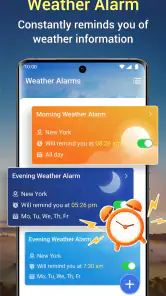
The strongest part of the concept is that it addresses a very ordinary problem: I may look at the weather in the morning and still miss a meaningful change later. A standard forecast requires me to remember to check it. An alarm reverses that relationship by making the weather event the reason to pay attention.
A realistic example is a late afternoon commute. I might leave home under clear conditions, have no reason to open a weather app again, and then discover that the return journey needs different clothing or transport planning. A well-timed alert could make me reconsider carrying a rain jacket, delaying a bike ride, or taking a route with better shelter. The value is not in replacing judgment; it is in reducing the chance that I forget to use it.
I also found the idea useful for routines that happen at roughly the same time each day. Someone who walks a dog, works outdoors, cycles to an office, or collects children from school may benefit from a weather-focused prompt before that activity. In these cases, the app is doing something different from a radar map. It is trying to connect weather awareness with a moment when action is still possible.
That focus creates an important trade-off. A notification can be convenient, but it can also become background noise if I configure it too broadly or if conditions change frequently in my area. The app makes more sense when I use it for a small number of decisions that genuinely matter. I would not want every possible weather change competing for my attention.
What I would do before relying on an alert
My first step would be to use the app alongside my existing weather habit rather than replacing it immediately. I would check the forecast normally, identify the weather condition that could disrupt my day, and then use the alarm as a reminder to reassess. This workflow gives the alert a clear purpose and makes it easier to judge whether it is helping.
I would also spend time reviewing every visible setting before enabling notifications. A weather alarm is only useful if I understand what event it is watching, when it may notify me, and whether I can adjust or disable it. If the controls feel unclear, I would treat that as a meaningful limitation rather than assuming the app will behave exactly as I expect.
Another practical tip is to begin with one routine instead of setting up several at once. For example, I might use it only for an evening walk for a few days. That makes it easier to notice whether the timing is useful, whether alerts arrive too often, and whether the information leads to a better decision. Once that pattern proves worthwhile, I could expand its role.
Trust starts with visible choices
For a weather tool, trust is less about attractive graphics and more about whether I can understand and control its behavior. I pay attention to the choices presented during setup, especially anything related to notifications, location, and account access. I do not want an app to make me guess why it needs a particular permission or how to change my mind later.
My cautious approach is especially important here because weather alarms can touch several sensitive moments in daily phone use. A location-related choice may affect how relevant the weather information is, while notification access determines whether the main purpose of the app can reach me. I would grant only the access that matches the way I intend to use the app, and I would revisit it if I stop using that function.
I also prefer testing the app without creating unnecessary commitments. If an app works without an account, that can reduce friction for a simple utility. If it presents an account step, I would want a clear reason before continuing. Live weather alarm-Radar is easier to evaluate when I can see what it asks for and decide deliberately, rather than treating every setup prompt as something to accept automatically.
This is not a claim that a weather alarm is inherently risky. It is simply the right standard for a tool that may operate in the background and interrupt me. Clear controls matter as much as the forecast itself, because an inaccurate or poorly timed notification can be just as unhelpful as no notification at all.
Data-sensitive moments deserve attention
Weather apps naturally raise questions about location and data handling. I would look closely at the app’s permission prompts and any privacy choices shown inside the installation and settings experience. I would not assume that a weather-related function needs every available form of access, and I would avoid enabling something that does not have an obvious connection to my intended use.
There is also a difference between occasional manual use and continuous convenience. If I open the app only when planning an outdoor activity, my privacy expectations may be different from using an always-ready alert tied to where I am. The second approach can be more convenient, but it deserves a more careful review of the choices available to me.
My advice is to make the app earn broader access gradually. Start with the least intrusive setup that still allows the main function to be useful. If the result is not relevant enough, then consider whether an additional permission genuinely solves the problem. This approach is more sensible than enabling everything at the beginning and trying to reconstruct the consequences later.
I would apply the same care to notifications. If the app allows different alert conditions or schedules, I would choose only those connected to a real activity. If it does not offer enough precision for my routine, I would rather keep it as a manual weather tool than accept repeated interruptions. A free app is not automatically a good bargain if it creates friction every day.
Where it differs from normal weather apps
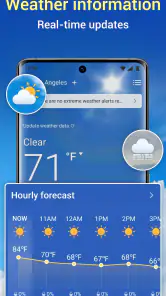
Most familiar weather apps are built around browsing: current conditions, hourly forecasts, daily outlooks, maps, and sometimes radar layers. Their strength is detail. They help me compare times, understand trends, and investigate what may happen over a wider period. I reach for that kind of app when I am planning a trip, deciding whether to schedule an outdoor event, or trying to understand a complicated forecast.
Live weather alarm-Radar appears more focused on attention than exploration. Its appeal is the possibility of receiving a prompt instead of remembering to check. That can make it a useful companion to a conventional forecast app, especially for people who repeatedly forget to look at the sky before leaving home.
The compromise is depth. If I need a detailed map, multiple forecast models, long-range planning, or a careful comparison of conditions, I would choose a fuller weather service. If I need a simple reminder connected to weather awareness, this app’s narrower purpose may be more convenient. Neither approach is universally better; they solve different parts of the same problem.
I would also avoid judging it by the standards of a radar-heavy application. The name may attract people looking for advanced visual weather analysis, but the practical question is whether the alarm behavior fits their routine. Someone who mainly wants to watch storm movement on a map may be happier elsewhere. Someone who wants a prompt before weather disrupts a familiar activity may find the focused approach more useful.
Small workflows that make the concept more useful
One effective workflow is to connect the alarm to a decision deadline rather than a general curiosity. I would set it around the point when I can still change plans: before leaving for work, before starting an outdoor task, or before heading to an evening activity. An alert that arrives after I am already committed has much less value.
A second workflow is to pair the app with a prepared response. If the alert points me toward worsening weather, I should already know what I can change: carry waterproof clothing, move an exercise session indoors, protect equipment, or leave earlier. This turns the notification into an action trigger instead of another piece of information to dismiss.
A third useful habit is to review the setup after an unusual week. Weather patterns and routines change, so an alarm that was helpful during one season may become irrelevant later. I would remove alerts tied to activities I no longer do and check whether the remaining ones still arrive at a useful time. This kind of maintenance is easy to overlook with background tools.
I would also keep the app’s role narrow enough that I can tell whether it is working. If I use it for commuting, I can ask whether it helped me make a better departure decision. If I use it for outdoor work, I can ask whether it gave me enough warning to protect materials or change the schedule. A measurable routine is better than installing it and hoping that a vague sense of preparedness appears.
Who should try it, and who should skip it
I think the app is a reasonable choice for people who regularly forget to check the weather and whose plans are sensitive to changing conditions. It may suit commuters, walkers, cyclists, outdoor workers, parents managing daily transitions, and anyone who wants a weather prompt connected to a routine. Its free price also makes experimentation straightforward.
It is less suitable for users who want a complete meteorological workstation on their phone. If detailed radar interpretation, extensive forecast history, or advanced planning tools are central to your needs, I would choose a more comprehensive weather application and use this only if its alert approach adds something missing.
I would also hesitate to recommend it to someone who dislikes background notifications or is very particular about permission control unless the setup feels transparent and adjustable on their device. An alarm that cannot be tuned to a person’s schedule quickly becomes an annoyance. In that situation, manually checking a trusted forecast may be the better experience.
Families and shared households should think about whose routine the alerts represent. A single phone-based alarm may be useful for one person’s commute but not automatically relevant to everyone else. I would avoid treating it as a household warning system unless the visible controls and notification behavior clearly support that use.
What the rating tells me about expectations
The app’s average rating of 3.4 is neither a strong endorsement nor a reason to dismiss it. Combined with around 1.2K ratings and 233 written reviews, it suggests a mixed experience among users. I read that as a signal to approach the app for its specific idea rather than expecting a universally polished weather platform.
The install count, now above 100K, shows that enough people have been curious to try it. That does not prove that it will suit every phone or routine, but it does make the app feel like a real option rather than an obscure experiment. I would still judge it by the quality of the controls and the usefulness of its alerts on my own device.
The current version, 1.9.1, is the one I would evaluate when installing it. Because weather tools depend heavily on notification behavior and phone settings, I would test the app directly after setup instead of assuming that another person’s experience will match mine. Battery optimization, notification rules, and location choices can all affect how a background utility feels in daily use.
A balanced verdict for careful users
My final opinion is that Live weather alarm-Radar has a worthwhile, focused idea but should be used with discipline. It is not the app I would choose for every weather question. I would keep a detailed forecast service for planning and use this one when I want a prompt that brings weather back into my attention before a routine is affected.
The most important question is not whether it can replace the weather app already on your phone. It is whether you repeatedly miss the moment when a forecast should change your behavior. If the answer is yes, an alarm-centered tool can fill a genuine gap. If you already check forecasts reliably and dislike extra notifications, its narrower benefit may not justify another app.
I recommend starting carefully: inspect the visible permissions and data choices, enable only the notifications connected to a real decision, and test the timing with one everyday routine. If the alerts help you act earlier without creating noise, the app earns a place in your toolkit. If the controls feel vague or the reminders do not match your schedule, I would uninstall it without hesitation and return to a conventional weather service.
For me, that makes this a useful but situational recommendation. App Musings has presented a tool built around awareness rather than endless forecast browsing, and that can be genuinely practical. Just keep the scope clear: it works best as a weather prompt beside informed judgment, not as a substitute for checking the full picture when the conditions really matter.
Pros
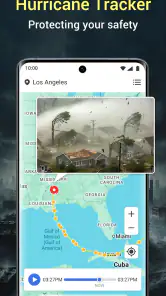
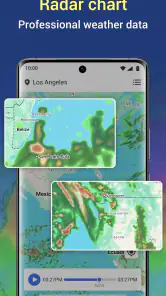
- Real-time radar maps make approaching rain and storms easy to track.
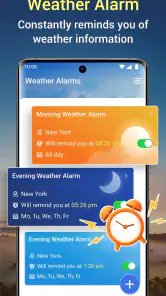
- Customizable alerts help you prepare for severe weather conditions.
- Supports multiple locations for monitoring home
- work
- or travel destinations.
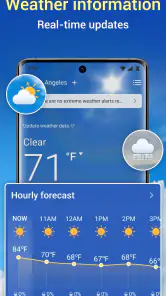
- Clear visual forecasts are useful for quick checks throughout the day.
- Weather information can help plan outdoor activities more safely.
Cons
- Frequent alerts may become distracting during rapidly changing weather.
- Radar accuracy can vary by region and available weather station coverage.
- Some advanced features may require a subscription or in-app purchase.
- The app may use extra battery when location and radar updates stay active.
- Forecast details may be less reliable several days ahead.
- Category
- Tools
- Version
- 1.9.1











