Literal Word Bible App
- 1.07K
- 4.9
- Installs
- 100.00K
- Price
- Free

Screenshots
Analysis by Reviewed
I found Literal Word Bible refreshingly focused from the moment I opened it. This free Bible app belongs to the Books & Reference category, and its purpose is clear: it puts the Bible at the center rather than trying to become a general-purpose social, productivity, or media platform. That narrow focus is its biggest appeal, especially if you want a straightforward place to read Scripture on an Android phone without paying for access.
The app is developed by Literal Word, and it has built a strong reception among readers, with a 4.9 average from around 3.5 thousand ratings. It has also passed over 100 thousand installs, which gives me the impression of a small but committed audience rather than a noisy, overcrowded service. It is rated for Everyone, costs nothing to download, and works on devices running Android 6.0 or later.
Getting from installation to a useful first reading
I start this section with a practical goal: get from opening the app to reading a passage, without turning setup into a project. I’d choose a passage I already know, then check whether I can find it and return to it comfortably; that gives me a useful baseline before I explore anything else. From there, the next section looks at what the opening experience feels like for a new reader.
What to expect when you open it
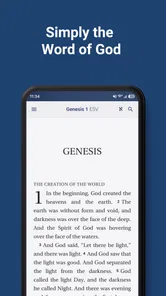
My first impression was that Literal Word Bible is best understood as a reading tool, not a replacement for every Bible study resource. The store summary describes it as a free Bible app built around the word of God, and that emphasis comes through in the experience. You are not pushed toward unrelated content or asked to learn a complicated system before reading. The value is in reducing the distance between opening the app and reaching the passage you came to see.
That simplicity can be reassuring for a first-time user. Many Bible apps greet newcomers with several layers of plans, community material, audio options, notifications, and promotional panels. Those additions can be useful, but they can also make a quick reading session feel like a search exercise. Literal Word takes a quieter route. I found it more suitable for someone who already knows what they want to read, or who wants to browse Scripture without building a complicated personal library first.
The app’s current version is 4.4.9, so it is not an abandoned experiment that has been left untouched after release. It first appeared on April 30, 2019, and that longer presence matters when choosing a reading app: a Bible is something many people return to repeatedly, not an application they install for one afternoon. Still, I would keep expectations realistic. Its focused design means it may feel less expansive than large Bible platforms that combine reading with social features, devotional programs, extensive study tools, and multimedia.
Starting without overthinking the setup
For a first session, I recommend resisting the temptation to explore every available control immediately. Install the app, open it, and look for the most direct route to a passage or book. The first meaningful success should be simple: reach a chapter, read several paragraphs, and confirm that the text is comfortable to use on your screen. That test tells you more than spending several minutes adjusting options before you have read anything.
More From Our News Desk

Weather by Xiaomi Review: Clear at a Glance, Less Clear Up Close

X Under Pressure: Can It Recover When Posting Goes Wrong?

Clash of Clans Is Won Between the Battles

Android Auto Makes the Case for Quieter Car Software

MobiOffice: Transforming Mobile Productivity with Seamless Integration

EA SPORTS FC™ Mobile Soccer: Redefining Mobile Sports Gaming
If you are helping a parent, grandparent, or someone who is not comfortable with mobile apps, this is also the approach I would use. Show them how to open the application, reach the Bible text, and return to it. Do not begin with a lecture about every possible setting. A reading app becomes useful when the person can repeat the basic action alone the next day.
Because the app is free, there is no payment decision standing between installation and reading. That makes it easy to recommend as a low-risk trial, particularly for someone who wants a dedicated Bible on an older Android device. The minimum operating-system requirement is Android 6.0, so compatibility is still worth checking before installation if the phone has been out of service for many years.
The first successful action: read before you customize
My preferred first workflow is to choose a familiar passage rather than beginning with settings. A familiar chapter gives you a practical way to judge the reading experience: can you move through the text comfortably, recognize where you are, and return to the same place without confusion? If the answer is yes, the app has already done its main job.
After that, try a second workflow that matches real life. Search for or navigate to a passage you heard mentioned during a conversation, study group, or service, then read it in context instead of looking at one isolated line. This is where a dedicated Bible app can be more useful than a general web search. You remain inside the text rather than jumping between browser tabs, advertisements, and unrelated results.
I also suggest using a short daily session as your first routine. Open the app at a consistent moment, read a small section, and close it when you are finished. The goal is not to create an ambitious plan on the first day. It is to make the action repeatable. Literal Word Bible works particularly well for this kind of modest habit because its central purpose is easy to remember: open it, find Scripture, read.
The most useful early test is not how many settings you can discover, but whether you can return to a passage without help. If you can do that after one or two sessions, the app is already serving its intended role for you.
Where new users may hesitate
The main possible confusion comes from expecting a large, all-in-one Bible platform and finding a more concentrated reading experience. If you are looking for a full devotional ecosystem, a strong social layer, or a large collection of media around every passage, you may initially wonder whether something is missing. That is not necessarily a defect; it is a difference in scope. Literal Word is easier to approach when you treat it as a Bible reader first.
Another point of friction is knowing how much exploration is worthwhile. New users often tap through every menu because they assume the best experience is hidden behind setup. I found the opposite approach more effective: read first, then adjust only the parts that interfere with reading. If the text is too small, make readability your next concern. If navigation feels unclear, practice moving between a book and chapter. Do not turn the first session into technical maintenance.
It is also important to separate a Bible app from a study method. Literal Word can place Scripture within reach, but the quality of your study still depends on how you read, compare passages, take notes elsewhere if needed, and discuss difficult sections. Someone preparing a detailed lesson may prefer a more specialized study application with broader reference material. Someone wanting a dependable digital Bible for ordinary reading may appreciate the restraint here.
A realistic everyday scenario
Imagine that you are commuting, waiting for an appointment, or sitting quietly before work. You have ten minutes and want to read rather than scroll through unrelated updates. With Literal Word Bible, the useful routine is uncomplicated: open the app, go to the passage you chose, read slowly, and leave when the time is over. You do not need to turn that moment into a large project.
That same routine works for a household sharing one device. A family member can read a passage in the morning, hand over the phone, and let someone else open the app later without needing a separate account structure or a complicated onboarding process. I would still recommend checking that the next reader knows how to return to the main text, especially if they are unfamiliar with Android navigation.
For group use, the app can be a practical companion when everyone agrees on a passage beforehand. One person can announce the book and chapter, while each reader finds it on their own device. The limitation is that a focused reader may not replace the coordination tools or shared study features offered by larger services. It is useful for getting everyone to the text; it may not be the complete solution for managing the group around it.
How it compares with familiar alternatives
The usual alternative is a browser search. A browser is convenient when you need to look up several unrelated things, but it also brings distractions and inconsistent presentation. Literal Word Bible gives the reading task its own space. For me, that makes it the better choice when I already know I want Scripture rather than general information.
Another alternative is a large Bible app with plans, audio, community material, and extensive study resources. Those apps can be better for users who want a guided program or a broad collection of supporting content. They may also suit people who want to move constantly between reading, listening, and structured devotionals. Literal Word is preferable when those extras would make the experience feel crowded or when your priority is simply reaching the biblical text quickly.
A printed Bible remains a strong option for deep, distraction-free reading and for people who enjoy physical page references. The phone-based advantage is portability: the app can be available during a commute or while traveling without carrying a separate book. The trade-off is obvious too. A screen invites interruptions, and a digital reader may feel less natural for someone who prefers marking physical pages. I would choose Literal Word for convenience and access, not because it makes paper reading obsolete.
Small habits that improve the experience
One useful habit is to decide your destination before opening the app. If you know the book and chapter, you can spend your limited time reading instead of wandering through menus. For a new reader who does not know where to begin, choosing a short, familiar section with help from a trusted person is often less frustrating than tapping randomly.
A second tip is to judge the app at the time of day you will actually use it. Text that looks comfortable in bright daylight may feel different late at night, and a phone that works well on a desk may be awkward one-handed. Test the reading position you expect to use. This matters more than a polished first impression because Bible reading is often a repeated, quiet activity.
A third insight is to keep the app’s role clear when studying difficult material. Use it as the stable place where you read the passage, then bring in a separate trusted reference when you need historical, linguistic, or theological background. That division prevents disappointment. Literal Word can be the foundation of a reading routine without having to become your only study resource.
For users with limited storage or older phones, the free and focused nature of the app may be attractive, but the practical question is still whether the device runs Android 6.0 or newer. Compatibility is more important than assuming every Android Bible app behaves the same way. If the phone meets that requirement, this is a sensible application to try before moving to a heavier alternative.
Who should choose it, and who should look elsewhere
I would recommend Literal Word Bible to a first-time digital Bible user who wants a clear starting point, to a regular reader who dislikes overloaded apps, and to anyone seeking a free Bible app for ordinary personal reading. It is also a good candidate for an older Android phone that needs a focused reading tool rather than a large media platform.
I would be more cautious about recommending it as the only app for a serious researcher, a study leader who needs extensive cross-references and supporting material, or a user whose main interest is audio and guided devotional content. Those readers may be happier with a broader service, even if that service takes longer to learn. The right choice depends less on the impressive rating than on whether the app’s narrow purpose matches your routine.
The Everyone age rating also makes it approachable for households, though adults should still guide younger readers through interpretation and context. An accessible interface does not automatically answer theological questions, and no reading app should be treated as a substitute for thoughtful teaching or conversation.
My next-step recommendation
After your first successful reading, give the app a fair trial by using it for several short sessions instead of judging it only from the opening screen. Return to one passage, find another passage from memory, and use it in the setting where you normally read. That will reveal whether navigation feels natural and whether the focused design helps you stay with the text.
If the experience suits you, keep the routine deliberately small. A dependable ten-minute reading session is more valuable than an elaborate plan that becomes difficult to maintain. If you need deeper references, pair the app with a trusted study resource rather than expecting one tool to do everything. That combination is where I see the strongest use of Literal Word: it can provide the direct reading foundation while another resource handles specialist questions.
Overall, I came away viewing Literal Word Bible as a calm, practical choice rather than a feature-heavy showcase. Its free access, approachable age rating, long-running availability, and strong user response make it easy to try. The trade-off is that its focused identity may feel limited beside larger Bible platforms. For me, that limitation is also the reason to recommend it: when the goal is to open a Bible and read without unnecessary detours, Literal Word Bible keeps the first step reassuringly simple.
Literal Word Bible App Frequently Asked Questions
Is Literal Word Bible available for Android and iOS?
Literal Word Bible is a Bible app in the Books & Reference category, designed for reading Scripture. Before downloading, check the app store on your device to make sure the available version is compatible with your operating system. The app is free, and its age rating is Everyone, so it can be considered by readers across a wide range of ages.
What is the Literal Word Bible app?
Literal Word Bible is a Scripture-reading app designed for users who want a more direct and study-oriented English Bible experience. Its main appeal is a relatively literal translation style, with tools that can help readers compare wording, follow passages, and examine the text more carefully. It is better suited to personal study and close reading than to devotional features or entertainment-focused content.
Is Literal Word Bible free to download and use?
Literal Word Bible is a free Bible-reading app built around the word of God. It is available at no cost to download, making it an accessible option for readers looking for a dedicated Scripture resource. As with any app, it is sensible to review the current store page before installing so you can confirm the version and terms available for your device.
What Bible translation does Literal Word Bible use?
Literal Word Bible focuses on a literal English rendering intended to stay close to the structure and wording of the original biblical languages. This approach can be valuable for readers studying sentence construction and precise phrasing, but it may feel less natural than modern thought-for-thought translations. Users who prefer simple devotional reading may need time to adjust to its more formal style.
Does Literal Word Bible work offline?
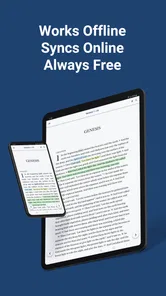
The core Bible text may be available for offline reading after the necessary content has been downloaded, making the app useful during travel or in areas with limited internet access. However, features such as synchronization, online references, updates, or external study materials may require a connection. It is recommended to open the app offline after installation to confirm which functions remain available.
Pros
- Clear
- readable interface makes daily Bible reading easy.
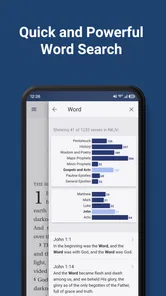
- Powerful search helps locate verses
- topics
- and keywords quickly.
- Audio Bible support is useful for listening while commuting or relaxing.
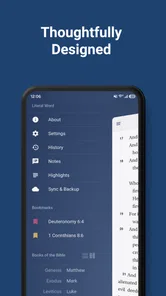
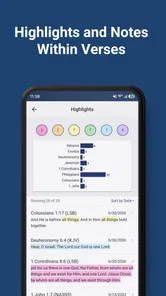
- Bookmarks and highlights make it simple to save meaningful passages.
- Works well for personal study
- reflection
- and regular devotional habits.
Cons
- Some translations or features may require an in-app purchase.
- Audio downloads can use considerable storage and mobile data.
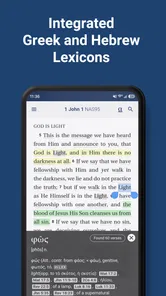
- The number of study tools may feel limited for advanced Bible scholars.
- Account or internet access may be needed for certain synchronization features.
- Ad interruptions may reduce the focus during reading sessions.











