Listen Audiobook Player
- 1.10K
- 4.7
- Installs
- 100.00K
- Price
- $1.99
Screenshots

Analysis by Reviewed
I judge an audiobook player less by how many controls it can show me and more by whether it helps me return to a story without losing my place. That makes Listen Audiobook Player most appealing to people who already have audiobooks they want to listen to and prefer a dedicated player over a general music app. It is a paid Music & Audio app from acme-android.com, with an average rating of 4.7 from around 5,400 ratings and over 100,000 installs. Its $1.99 price makes the decision fairly direct: it is worth considering if you listen often, but less compelling if audiobooks are an occasional experiment.
Choose by listening habits, not by a feature checklist
Before switching, I’d ask how you actually listen. If you move through books in short stretches—during a commute, while doing chores, or before bed—playback speed, a sleep timer, and an easy return to your place matter more than a complicated library dashboard. If you mostly stream spoken audio or want one app for music, podcasts, and books, a general-purpose player may be a better fit. Listen is specifically aimed at audiobook listening, and that focus is its clearest reason to choose it.
It is rated Everyone 10+ and was released on Jul 16, 2012. That long presence gives it a different feel from a newly launched player, though the age of an app alone does not tell me whether its interface will suit you. I’d use the free store details and the way I organize my own files to decide whether the dedicated audiobook workflow is worth paying for.
Getting Started with Listen Audiobook Player
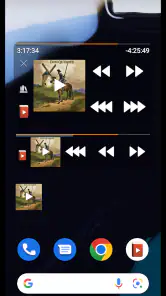
First off, let’s talk about the user interface. It’s all about simplicity here, folks. The Listen Audiobook Player doesn’t bombard you with complicated settings or unnecessary features. Once you fire up the app, you’re greeted with a clean and intuitive interface. It’s like the app knows what you want as a user - to dive straight into your audiobooks without any fuss.
Features that Stand Out
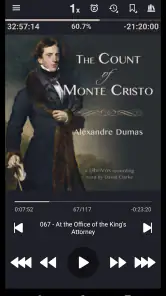
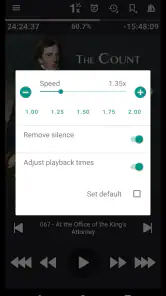
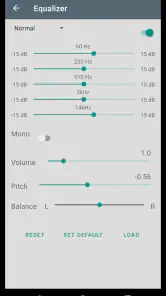
Now, onto the features! One of my favorite things about this app is its customization options. You can tweak the playback speed which is a lifesaver, especially when you’ve got a narrator who likes to take their sweet time. Plus, the sleep timer function is a blessing for those of us who like to doze off to the soothing sounds of a good story.
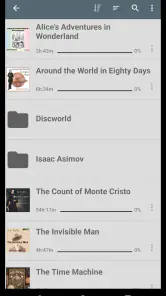
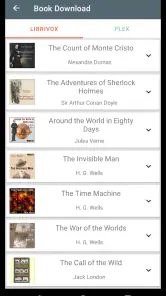
Another standout feature is the ability to manage and organize your audiobook library. The app lets you create playlists, mark your favorites, and even resume from where you left off with ease. It’s like having your personal audiobook assistant. Not to mention, the app supports a wide range of formats, so you don’t have to worry about compatibility issues.
Performance and Experience
In terms of performance, I’ve got to say, the app runs smoothly without any hiccups. There’s nothing worse than an app that crashes right in the middle of a gripping chapter, am I right? But with this app, it’s smooth sailing all the way.
More From Our News Desk

Clash of Clans Is Won Between the Battles

Android Auto Makes the Case for Quieter Car Software

MobiOffice: Transforming Mobile Productivity with Seamless Integration

EA SPORTS FC™ Mobile Soccer: Redefining Mobile Sports Gaming

How Microsoft OneDrive Became a Mobile Productivity Giant

How Google Translate Breaks Language Barriers Effortlessly
For a practical routine, I’d use the sleep timer when listening in bed, then check the saved position before picking up the same book on my next walk. That small habit helps avoid replaying a passage or accidentally skipping ahead. I’d also keep favorites for books I’m actively following rather than treating the library as a catch-all; playlists and favorites are most useful when they make the next choice quicker, not when they become another chore to maintain.
The main trade-off is that a dedicated player is only convenient if your listening material is already accessible to it. Someone who expects a streaming catalog, recommendations, or an all-in-one media service may find a subscription-based audiobook platform more natural. Conversely, if you have a collection of files and want control over playback, a general music app can feel less tailored, even when it can play audio. The choice is less about which app is universally best and more about whether you want a player for your library or a service that supplies the books.
Performance and everyday trade-offs
Playback speed is worth adjusting gradually rather than pushing it high immediately: a small change can make a slow narrator easier to follow, while too much speed can flatten character voices and make names harder to catch. I’d also treat the sleep timer as a listening boundary, not just a bedtime feature; it can prevent a book from running on after you stop paying attention. These are simple controls, but they matter most when they match a routine you already have.
One thing I would check before committing is how well the library organization fits the way you store and name your audiobooks. Playlists and favorites can help separate current listens from books you have saved for later, but they won’t automatically solve a messy collection. If you switch between several titles, a little organization up front can make resuming feel effortless; if you keep only one book in progress, that structure may be unnecessary.
Oh, and did I mention the sound quality? It’s top-notch! Whether you’re using headphones or blasting it on a speaker, the audio comes through crystal clear. It’s like having a narrator right there in the room with you.
Where a dedicated player fits best
I find the strongest case for Listen is a listener who owns or otherwise manages audiobooks separately and wants playback to stay focused on the book. That could be someone who listens during a daily bus ride, pauses frequently to handle errands, and picks up the same title again later at home. The useful part is not simply that audio plays; it is that the player’s speed controls, sleep timer, and saved position support the stop-and-start rhythm of ordinary days.
There is also a quieter benefit to keeping books in a dedicated space: it can make listening feel less like scrolling through an endless stream of media. If I open a music app, I may be choosing among songs, podcasts, and other audio. With a book-focused player, the decision is narrower: continue the current story, or pick another book from my own library. That is a real advantage for readers who want fewer distractions, though it is not a substitute for a service that recommends or supplies new titles.
For a household or personal collection with several books in progress, I would decide on a simple naming and playlist habit before the library grows. For example, keeping a short “currently listening” group distinct from titles waiting for later makes the next session easier to start. Favorites work best as a quick signal, not as a duplicate archive. This is a small organizational choice, but it prevents the app’s library tools from turning into a second project.
Where another kind of audio app may suit you
The usual alternatives fall into two broad groups: catalog-based audiobook services and general audio players. A catalog service is often the more natural choice if your main question is “What should I listen to next?” or if you want books delivered within the same service. A general player makes more sense if audiobooks are just one kind of audio among music and podcasts, and you value keeping everything together. Listen’s narrower purpose is a plus only when you actually want that separation.
That distinction matters before paying, because the player and the source of the books are separate parts of the experience. If you have not settled on where your audiobooks will come from, buying a dedicated player may not solve your main problem. If you already have a collection and simply want a more suitable way to listen, the choice is clearer. I would make that decision first, then judge whether the player’s everyday controls justify adding another app to my routine.
There are also listeners who should skip it even if they like audiobooks. If you only listen a few times a year, prefer to browse a catalog as you go, or need a single place for every kind of audio, the focused workflow may feel like an unnecessary extra step. And if your books are already easy to manage in a general player, switching just for the sake of switching may not improve your day enough to matter.
Making the switch without creating extra work
Before moving a listening routine, I would test the app with one book rather than reorganizing an entire collection at once. Choose a title you know you will continue, check whether it appears in the library as expected, then pause and return to it in a later session. That simple trial answers the practical question that matters most: does the way you keep your books work smoothly with the way you want to listen?
If you listen to several books at once, decide how you want to distinguish them before creating playlists or favorites. One useful approach is to reserve a playlist for books you are actively hearing and leave the rest in the general library. If you tend to finish one book before starting another, skip the extra sorting until you feel a need for it. The app’s organizational options are helpful, but the best setup is the smallest one that saves you time.
I would also make a deliberate choice about playback speed for each narrator. The same setting can feel comfortable for one voice and rushed for another, so a short test passage is more useful than choosing a speed once and applying it everywhere. When a scene contains unfamiliar names or detailed information, slowing down can preserve comprehension; for a familiar or leisurely narration, a modest increase may make a long commute feel more manageable. That flexibility is valuable, but it works best as a listening adjustment rather than a race to finish faster.
For bedtime listening, I’d set the sleep timer with enough room to hear a little of the chapter without letting the book continue far beyond the point where I drift off. If I often fall asleep quickly, I’d keep the timer conservative and check the saved position the next day. If I listen while walking or doing chores instead, the timer may matter less than having a reliable way to resume after interruptions. Matching the controls to the setting is more useful than trying to use every option every time.
One point worth keeping in mind is that a player cannot make a disorganized collection feel organized by itself. A pile of poorly labeled files can still take effort to sort, and playlists only help once you decide what belongs in them. I would treat setup as a one-time bit of housekeeping: make the titles easy to recognize, start with the books you are actually listening to, and avoid creating categories you will not maintain. That keeps the dedicated workflow convenient instead of turning it into library administration.
Performance and everyday trade-offs
Playback speed is worth adjusting gradually rather than pushing it high immediately: a small change can make a slow narrator easier to follow, while too much speed can flatten character voices and make names harder to catch. I’d also treat the sleep timer as a listening boundary, not just a bedtime feature; it can prevent a book from running on after you stop paying attention. These are simple controls, but they matter most when they match a routine you already have.
One thing I would check before committing is how well the library organization fits the way you store and name your audiobooks. Playlists and favorites can help separate current listens from books you have saved for later, but they won’t automatically solve a messy collection. If you switch between several titles, a little organization up front can make resuming feel effortless; if you keep only one book in progress, that structure may be unnecessary.
Oh, and did I mention the sound quality? It’s top-notch! Whether you’re using headphones or blasting it on a speaker, the audio comes through crystal clear. It’s like having a narrator right there in the room with you.
For anyone wondering whether this is a good first audiobook app, I think it can be, provided you already know where your books come from and are happy to manage a personal library. If you want your listening app to discover and deliver titles for you, choose a service built around a catalog instead. If you mainly listen in brief sessions, the combination of speed adjustment, a timer, and saved progress is a more relevant reason to choose Listen than a long list of controls would be.
Final Thoughts
So, should you download the Listen Audiobook Player? Honestly, if you’re looking for a reliable, easy-to-use app to enjoy your audiobooks, this one should definitely be on your radar. It’s packed with features that truly enhance the audiobook listening experience.
In a world where apps come and go, it’s refreshing to find one that delivers exactly what it promises. So go ahead, give it a try and happy listening!
My recommendation is for regular listeners who value a straightforward, book-focused player and will use the playback controls often enough to justify the one-time $1.99 cost. I’d skip it if I rarely listen, want music and podcasts in the same place, or would rather have a catalog than organize my own books. For the right listener, it is a practical way to keep a story moving through everyday gaps in the day; for everyone else, a broader audio app may be the simpler choice.
Listen Audiobook Player Frequently Asked Questions
How much does Listen Audiobook Player cost, and is it a paid app?
Listen Audiobook Player costs $1.99. It is an audiobook-focused app in the Music & Audio category, built for people who want a dedicated way to listen to books they already have. Before downloading, consider whether its playback tools fit your listening habits; the price is a one-time app cost rather than a description of audiobook purchases.
What is Listen Audiobook Player and how does it enhance my audiobook experience?
Listen Audiobook Player is a dedicated app designed for audiobook enthusiasts, offering a seamless listening experience with customizable settings. It supports various audio formats, allows for easy navigation through chapters, and provides playback speed adjustments, bookmarks, and sleep timer functions. Its user-friendly interface and offline playback feature make it an ideal choice for on-the-go listening without interruptions.
Is Listen Audiobook Player compatible with all audiobook formats?
Yes, Listen Audiobook Player supports a wide range of audiobook formats, including MP3, M4A, M4B, and more. This compatibility ensures that users can easily import and enjoy their audiobooks from various sources without worrying about format restrictions. It is especially beneficial for those who have a diverse audiobook library.
Can I customize the playback settings in Listen Audiobook Player?
Absolutely! Listen Audiobook Player offers extensive customization options for playback settings. Users can adjust playback speed, set bookmarks for future reference, and use the sleep timer to automatically stop playback after a certain period. These features allow users to tailor their listening experience according to their personal preferences and schedule.
Does Listen Audiobook Player require an active internet connection to function?
No, Listen Audiobook Player does not require an active internet connection for playback once the audiobooks are downloaded onto your device. This offline functionality is perfect for users who wish to listen to their audiobooks in areas with limited connectivity, ensuring uninterrupted listening sessions no matter where you are.
Pros
- Highly customizable playback options.
- Supports a wide range of audio formats.
- Offline listening capability.
- User-friendly interface.
- Sleep timer is very handy.
Cons
- No free version available.
- Lacks advanced bookmarking.
- Can occasionally crash.
- Limited cloud integration.
- No cross-device sync.
- Category
- Music & Audio
- Version
- Varies with device











