

LINQ Connect
- 543.00
- 4.0
- Installs
- 100.00K
- Price
- Free

Screenshots
Analysis by Reviewed
Paying school-related expenses is rarely difficult because of the payment itself; the real nuisance is remembering which account to use, finding the right deadline, and making sure meal money is available when a child needs it. LINQ Connect is built around that narrow but important routine. I found it most useful as a practical education app for families whose schools use the LINQ system, especially when the alternative is calling an office, searching through old messages, or waiting until a balance becomes a problem.
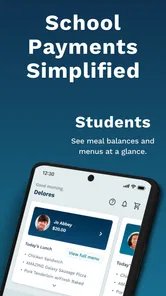
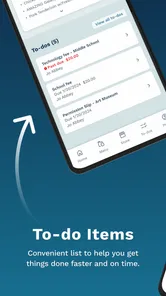
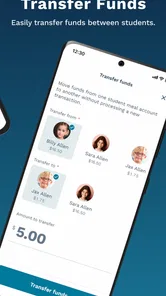
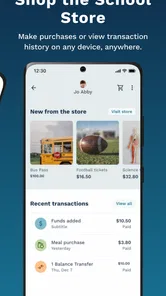
The app is free, developed by EMS LINQ, and aimed at Everyone. Its purpose is straightforward: manage school fees and add money to meal accounts from a phone. That focus is both its strength and its boundary. It is not trying to replace a school portal, homework planner, messaging platform, or general banking app. Instead, it concentrates on a few school-payment tasks and makes them available away from a desktop.
I would describe the experience as functional rather than exciting. When the account is connected to the correct school information, the main benefit is convenience: I can handle a payment during a normal day instead of treating it as a separate administrative project. The app has an average rating of 4.0 from around 2,000 ratings, with over 100,000 installs, so it has a meaningful user base without feeling like a universal household finance tool.
How the everyday LINQ Connect workflow feels
The sensible way to use LINQ Connect is to treat it as a repeatable school-money routine. After installing it, I would begin by signing in or creating the required account, then connect the relevant student or school information. The exact screens can depend on how a school has configured its LINQ services, so the important first step is not rushing through setup. I would check the student name, school association, and available account details before making a payment.
That verification matters because a payment app is only useful when the money reaches the intended place. If more than one child is involved, I would review each profile separately rather than assuming the first visible account represents the whole family. This is one of the less obvious habits that makes the app easier to trust: use the first session to understand how the family’s students and balances are displayed, then repeat the same path each time.
The basic workflow is simple. I open the app, look for the relevant school fee or meal account, enter the amount, and review the destination before completing the transaction. I prefer this deliberate pause over tapping through quickly, particularly when several children share similar names or when I am paying for different purposes. The app saves time by putting the task on a phone, but it does not remove the need for a careful final check.
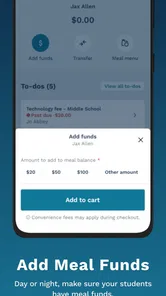
A realistic example is a busy weekday morning. A child mentions that meal funds are running low while I am already preparing to leave. Instead of logging into a computer, I can open LINQ Connect, select the meal account, add money, and return to the morning routine. That is where the app earns its place. It is not a dramatic improvement over every alternative, but it is much more convenient than handling a small school payment through a chain of emails or a paper form.
More From Our News Desk

 Gmail
GmailGmail in a Busy Inbox: Who Benefits Most?
From first account to crowded workday, Gmail earns its place through dependable search and flexible sorting—but its best fit depends on how much inbox maintenance you can tolerate.

 Prime Video
Switching to Prime Video: What Changes in Your Viewing Routine
Prime Video can make a compelling second home for streaming, but switching means learning a different catalog, rental layer, and route from browsing to playback.

 Universal TV Remote Control
Universal TV Remote Control Works Best as a Reliable Backup
A phone remote earns its place through quick setup and reliable habits. Here is how to get more from Universal TV Remote Control—and where its limits show.

 Weather - By Xiaomi
Weather by Xiaomi Review: Clear at a Glance, Less Clear Up Close
Xiaomi’s weather app makes everyday forecasts quick to scan, but its calm surface can leave useful details and recovery paths harder to find than they should be.

 X
XX Under Pressure: Can It Recover When Posting Goes Wrong?
A resilience-focused review of X, examining setup, mistaken posts, interruptions, weak connections, and the gaps that matter when recovery needs to be dependable.

 Clash of Clans
Clash of Clans Is Won Between the Battles
Its raids are quick; its community is a long-term project of coordination, teaching, rivalry, and shared responsibility—with all the friction that entails.
Latest News



I also see value in using it before a predictable busy period rather than waiting for an urgent reminder. A parent might check meal balances at the start of the week, after a school break, or before several days when the child will be eating at school. This turns the app into a small household habit instead of an emergency tool. The useful insight is that the app works best when paired with a calendar or family routine; it is not a substitute for remembering that an account exists.
What to check during setup
The first settings worth checking are the account and student details, not decorative preferences. I would confirm that the school connection is correct, that every intended student is visible, and that the available payment destinations match what the family actually uses. If a child changes schools or a family account includes multiple students, revisiting these details is more reliable than assuming the original setup remains accurate forever.
I would also inspect the app after an update rather than assuming every screen works exactly as before. The current version is 390.6.19, and the application supports Android 7.0 or later. Those details make it accessible on many older Android phones, but an older device can still behave differently from a newer one because of its operating system, screen size, or general performance. Keeping the app and phone in a usable state is part of making payment tasks dependable.
Another worthwhile check is the way the app presents balances and payment choices. Before relying on it for regular use, I would make a small, familiar transaction or review an existing account carefully so I understand which balance belongs to meals and which relates to school fees. This is not about finding a hidden feature; it is about learning the app’s labels well enough that a rushed payment does not become confusing.
Families should also decide who is responsible for the account. If two adults both use separate logins or devices, agreeing on a simple routine can prevent duplicated payments or uncertainty about whether money was added. LINQ Connect is helpful when it becomes the shared place to check school-related funds, but it cannot resolve household coordination by itself. A quick message between parents may still be necessary when both are managing the same child.
Notifications and phone-level permissions are worth reviewing if the app offers them on the device. I would allow only the alerts that genuinely help with school payments and avoid treating every notification as an instruction to pay immediately. A balance reminder can be useful, but the final decision should still come from checking the correct student and account. This is a good example of combining settings with judgment instead of turning automation into blind trust.
Faster patterns that remain safe
Once the account is familiar, speed comes from consistency. I would keep the app in an easy-to-reach location on the phone and use the same sequence every time: open the account, identify the student, choose the payment purpose, enter the amount, and review before confirming. That repeated path reduces mental effort without depending on shortcuts that may not exist on every device.
A useful pattern is to separate “checking” from “adding money.” During a weekly review, I might open the app only to inspect balances and note which child needs attention. Then I can make one planned payment rather than several impulsive ones. This approach is especially practical for families with multiple students because it creates a single moment for comparing accounts and reduces the chance of overlooking one child.
Another practical habit is to prepare the payment information before opening the app. I would know which student needs funds, which account should receive them, and approximately how much I intend to add. That sounds obvious, but it prevents the common phone problem of opening an app while distracted and then abandoning the task halfway through. LINQ Connect is quickest when the decision has already been made.
For school fees, I would treat each payment as a separate record in my household routine. After completing the transaction, I would note the purpose in whatever budgeting method I already use. The app can handle the school-side action, but a family budget may still need its own record. This is an important trade-off: LINQ Connect is more direct than a general banking app for the school account, while a banking or budgeting tool may remain better for seeing the complete household picture.
Meal accounts benefit from a different rhythm. Instead of adding money only when a child reports a problem, I would check before the school week and after unusual schedules such as trips, holidays, or days when meals were not purchased as expected. The app makes the top-up convenient, but the best results come from connecting it to the school calendar and the child’s routine.
I would also avoid using the same amount automatically for every child without checking actual habits. One student may buy meals regularly while another brings food from home. A repeatable process should be consistent in its checks, not careless in its amounts. That distinction is where experienced use differs from simply opening the app and tapping the largest visible button.
Where the app stops being the best tool
LINQ Connect is not a complete school-management solution. If I need grades, attendance, assignments, teacher communication, bus information, or a full family calendar, I would use the school’s broader portal or the appropriate dedicated service instead. Trying to make this payment-focused app serve those purposes would create frustration because its value comes from staying focused.
It is also not a replacement for a normal banking app. A bank app may provide broader transaction history, budgeting categories, transfer tools, and a complete view of household finances. LINQ Connect is preferable when the task is specifically tied to a school fee or meal account. The better choice depends on the job: use the school-connected tool for school money, and use the bank for general financial management.
There can be friction when the school connection, student profile, or account information is not immediately clear. In that situation, repeatedly retrying a payment is not a good strategy. I would stop, check the selected student and destination, and contact the school or relevant support channel if the account still does not look right. The app can simplify access, but it cannot correct an enrollment or account-linking issue that exists outside the phone.
Users who expect a highly polished personal-finance experience may also find the interface utilitarian. That is not necessarily a flaw for its intended purpose, but it affects expectations. The app is valuable because it puts a specific school task within reach, not because it offers deep financial analysis or a broad collection of lifestyle tools.
Privacy and device habits matter as well. Because school and payment information are involved, I would use a phone lock, avoid making transactions on a shared public device, and sign out or secure the phone appropriately when other people can access it. These are sensible precautions for any payment-related application. The presence of a convenient mobile workflow should not encourage casual handling of account details.
Families should skip LINQ Connect if their school does not use the relevant LINQ services or if they only need a general way to send money. In those cases, the app may not solve the actual problem. It is also not ideal for someone who wants one platform to manage every school interaction. For the right school connection, however, its narrow purpose becomes an advantage rather than a limitation.
Who will get the most from it
I think the strongest audience is parents and guardians who regularly manage school meal balances or fees and want a phone-based option. It is particularly useful for people who are away from a computer during the day, share school responsibilities with another adult, or have several children whose accounts need occasional attention.
It can also help a caregiver who is temporarily responsible for school routines. Instead of learning an entire school portal, that person can focus on the payment task, provided the account access and student details are already arranged. The simpler scope makes the app less intimidating than a large education platform, although the caregiver still needs clear instructions from the family.
On the other hand, a parent who makes school payments only once in a long while may not gain much from installing another app. If the school’s website already handles the task comfortably and the user rarely needs mobile access, the extra app may not justify the setup. Convenience is personal here: frequent school-account activity makes LINQ Connect more compelling, while occasional use may favor the existing web route.
The same applies to families who prefer a single financial dashboard. They may appreciate the direct school connection but still use their bank or budgeting app for oversight. I would not choose one tool exclusively just because it can technically perform a payment. The most reliable arrangement is often a combination: LINQ Connect for the school destination, a household budget for the broader record, and the school’s main communication system for everything else.
My final view after building a routine around it
LINQ Connect is at its best when it becomes a small, dependable part of a family’s weekly school routine. I would not recommend it as a universal education app, because it is not designed for that. I would recommend it to families whose schools are connected to the service and who want a direct way to handle fees and meal funds without waiting for access to a computer.
The most effective approach is simple but deliberate: verify the student profiles, learn the account labels, check balances on a repeatable schedule, prepare the payment before opening the app, and review the destination before confirming. Those habits make the experience faster while protecting against the mistakes that can happen when school payments are made in a hurry.
The free price removes the main barrier to trying it, and the Everyone rating makes its intended audience broad. EMS LINQ has kept the concept focused, which I see as a benefit for payment tasks but a reason not to expect a full school-management suite. Its current version, 390.6.19, and Android 7.0 support also make it approachable for people using older phones, provided the device remains comfortable and secure for account use.
My recommendation is therefore conditional but positive: install it if your school relies on LINQ and you regularly manage meal accounts or school fees from a phone. Skip it if you need grades, communication, budgeting, or general money transfers, because another tool will serve those needs better. For the specific job it targets, the app saves small amounts of time repeatedly, and those small savings are exactly what make it worthwhile.
After using it, I see the main benefit less as a single payment button and more as a reliable workflow. When the account is set up correctly and the family agrees on who checks it, school-related payments stop being an occasional scramble. That is a modest achievement, but for busy households, the right focused tool can be more useful than a larger app that tries to do everything.
LINQ Connect Frequently Asked Questions
Which schools or districts can I use LINQ Connect with?
LINQ Connect is useful when your child’s school or district participates in LINQ-managed programs. Support and available services can vary by location, so check with your school or district before downloading if you are unsure whether it uses the platform. Confirming this first can help you avoid creating an account that cannot be connected to your student or the school services you need.
What devices can run LINQ Connect?
LINQ Connect is an education app for mobile devices, and compatibility depends on your device’s operating system. On Android, the app requires version 7.0 or later. Before installing, check your device’s software version and make sure you are downloading the official LINQ Connect app from your app store. Keeping the operating system and app updated can also help with reliable access.
What is LINQ Connect and what can I use it for?
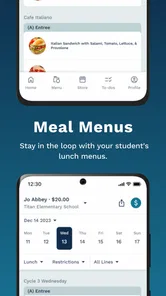
LINQ Connect is a mobile service app designed for families and school communities using LINQ-managed programs. Depending on the district or organization, it can help parents view cafeteria menus, manage meal accounts, add funds, review purchases, submit applications, and receive school-related updates. Available features may differ by location, so it is best to confirm that your school or district supports LINQ Connect before downloading and creating an account.
How do I create an account and connect my child or student?
After installing LINQ Connect, you generally create an account using an email address and password, then select the relevant school district or organization. You may need information such as the student’s name, identification number, school, or other details provided by the district. If the student does not appear, the information may not match school records, or the district may require account linking through its administrative office.
Can I add money to a student’s meal account through LINQ Connect?
In supported districts, LINQ Connect allows parents or guardians to add funds to a student meal account using an available payment method, such as a debit or credit card. Before completing a payment, review the total carefully because service or transaction fees may apply. Processing times, minimum amounts, refund policies, and supported payment options can vary according to the school district.
Pros
- Quickly view account balances
- bills
- and payment history.
- Supports convenient online payments from a mobile device.
- Outage reporting and service updates are easy to access.
- Usage information helps monitor electricity or utility consumption.
- Clean interface makes common account tasks simple to find.
Cons
- Features may vary depending on your local LINQ Connect provider.
- Some payments can take time to appear on your account.
- Requires an active account and internet connection to use.
- Notifications may be limited or delayed during service interruptions.
- The app offers little value for users without LINQ utility service.











