

Lingtutor: AI English
- 2.00
- 4.4
- Installs
- 10.00K
- Price
- Free

Screenshots
Analysis by Reviewed
I look for English-learning apps that make it easier to practise on an ordinary day, not just collect lessons I mean to start later. Lingtutor: AI is built around a practical combination: conversation with AI, short reading, and vocabulary building. That mix gives it a more active feel than a word-list app, though it also means the experience may not suit someone who wants a formal course with a clearly mapped syllabus.
English practice designed for small pockets of time
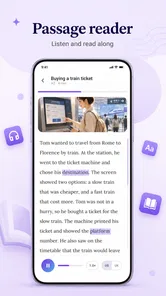
The app’s central appeal is the chance to work with English in more than one way. Reading a brief story can expose you to words in context; speaking with AI gives you a reason to form your own sentences; vocabulary work can help you revisit useful language. I like that these activities can support one another instead of treating English as a stack of isolated translations.
A realistic way to use it is during a commute or a quiet break. I might read a short story, pick one unfamiliar expression, and then try to use that expression in a spoken exchange later. That routine is more valuable than rushing through several activities without remembering anything. It also makes the app easier to fit around work or study than a long lesson that requires an uninterrupted stretch of time.
As an education app, Lingtutor is aimed at learners who want regular contact with English and a low-pressure place to practise. It is free to download, and its Everyone age classification makes it broadly accessible. The developer is MTD TECHNOLOGY COMPANY LIMITED. The app has a 4.4 average from 29 ratings and more than 10,000 installs, which suggests some early user interest, while the small number of written reviews means there is not much public detail to lean on when judging how different learners fare.
Where the three-part approach helps
Conversation is useful because knowing a word on a screen is not the same as retrieving it while speaking. Even a short AI exchange can prompt you to build a sentence, notice where you hesitate, and try a different phrasing. I would treat this as rehearsal rather than a substitute for speaking with people: it can help you get started, but real conversations also involve accents, interruptions, social cues, and unpredictable replies.
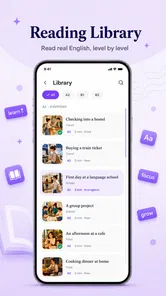
The stories offer a different kind of practice. Short reading is easier to approach when you have only a few minutes, and context can make a new word more memorable than a bare definition. A helpful habit is to pause briefly after each story and explain its main idea in your own words. That turns reading into an active recall exercise without requiring a separate workbook.
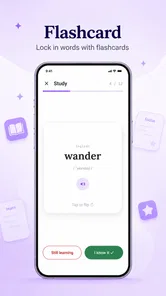
Vocabulary building is strongest when it connects to something you have just read or said. Rather than trying to retain every unfamiliar word, I would focus on a small handful that seems useful for your life, then make your own example sentences. This is a practical trade-off: selective practice may feel slower than collecting a long list, but it gives you a better chance of using the words naturally.
More From Our News Desk

 Gmail
GmailGmail in a Busy Inbox: Who Benefits Most?
From first account to crowded workday, Gmail earns its place through dependable search and flexible sorting—but its best fit depends on how much inbox maintenance you can tolerate.

 Prime Video
Switching to Prime Video: What Changes in Your Viewing Routine
Prime Video can make a compelling second home for streaming, but switching means learning a different catalog, rental layer, and route from browsing to playback.

 Universal TV Remote Control
Universal TV Remote Control Works Best as a Reliable Backup
A phone remote earns its place through quick setup and reliable habits. Here is how to get more from Universal TV Remote Control—and where its limits show.

 Weather - By Xiaomi
Weather by Xiaomi Review: Clear at a Glance, Less Clear Up Close
Xiaomi’s weather app makes everyday forecasts quick to scan, but its calm surface can leave useful details and recovery paths harder to find than they should be.

 X
XX Under Pressure: Can It Recover When Posting Goes Wrong?
A resilience-focused review of X, examining setup, mistaken posts, interruptions, weak connections, and the gaps that matter when recovery needs to be dependable.

 Clash of Clans
Clash of Clans Is Won Between the Battles
Its raids are quick; its community is a long-term project of coordination, teaching, rivalry, and shared responsibility—with all the friction that entails.
Latest News



A workflow that makes practice stick
For a learner who freezes when asked to speak, I would start with a simple sequence: read a short story, choose one idea from it, and use that idea as the subject of an AI conversation. If a word does not come to mind, try describing it in simpler English before reaching for a translation. The exercise builds the habit of working around gaps, which is an important real-world skill rather than just a way to pass an app activity.
Another useful approach is to give each session a purpose. On one day, practise introducing yourself or describing your routine; on another, retell the gist of a story. Keeping a small note outside the app with recurring mistakes or phrases you want to remember can make sessions more deliberate. I would not assume that an app automatically turns every practice moment into lasting progress; the learner still has to revisit and use what they encounter.
There is also a sensible limit to how much I would expect from brief exercises. They are good for consistency, confidence, and vocabulary exposure, but they are not the same as a structured course in grammar, pronunciation, or exam preparation. If you need a certificate, detailed corrections against a syllabus, or a teacher who can explain why a sentence sounds unnatural, you will probably want to pair this with a course, tutor, or reference resource.
Making the short sessions fit real life
One useful everyday setup is to connect practice to a conversation you expect to have. Before a meeting, for example, I could read a story during a break, then use the AI exchange to rehearse explaining a simple idea related to my day. I would keep the goal narrow: practise a few sentences, not prepare a whole presentation. That makes the app a warm-up rather than a substitute for job-specific coaching or careful writing.
If you are unsure whether the app suits your level, try to judge the effort of the activities rather than chasing a label. Can you understand the gist of a short story without translating every line? Can you answer a prompt in simple English, even if your grammar is imperfect? If both feel manageable, the combination may be a productive stretch. If either leaves you lost, a beginner course with more explanation may make the first steps less frustrating.
Current version and what it means for learners
The current version is 0.3.4, so I would approach Lingtutor as a developing product rather than a long-established language platform. That version number is a useful snapshot of the app’s current stage, not proof of a particular feature change or a promise about what comes next. The app was released on Jul 25, 2026, and its current state is best judged by the learning loop it presents now: AI speaking practice alongside short reading and vocabulary work.
For someone already using it, the practical question is whether that loop fits their routine. If you mainly want a quick prompt to speak or read English, the basic concept remains useful without needing to build your entire study plan around the app. If your learning depends on a carefully sequenced course, treat it as a supplementary practice tool and keep your main curriculum elsewhere.
Because the product is still at an early version, I would keep expectations measured about how polished or comprehensive every part feels. That is not a claim that a particular feature is missing; it is simply a reason to judge the app by the experience you can use now rather than assuming its current format represents a finished, full-scale course. The most meaningful sign of progress for a learner is whether they return to practice and can use more English outside the app.
What the version number can—and cannot—tell you
A version number is a marker of the current build, but it does not tell me by itself how much the learning experience has changed over time. I would not infer a particular redesign, new lesson type, or improvement from the number alone. For a new user, the more useful test is whether the present mix of reading, vocabulary, and AI conversation feels coherent and comfortable enough to revisit.
Existing users can make that judgement with a simple personal check: after a week of occasional practice, note whether any expression from a story has surfaced in a conversation or message outside the app. That is not a formal measure of fluency, but it is a better indicator of practical carryover than counting completed activities. If the material is enjoyable but nothing sticks, slow down and use fewer words more deliberately.
Where it compares well—and where another choice may fit better
Compared with flashcard-focused alternatives, Lingtutor’s advantage is the attempt to connect vocabulary with reading and spoken use. A flashcard tool can be better when you need precise review scheduling or want to study a word list you have assembled yourself. Lingtutor’s more rounded approach is appealing when you need a reason to do something with the language, not just recognize it.
Compared with formal language courses, it appears better suited to flexible practice than to a step-by-step curriculum. That can be a strength if a rigid lesson plan makes you stop studying, but a weakness if you need a clear progression from beginner grammar to advanced writing. I would also choose a human tutor or conversation group when the goal is natural back-and-forth with another person, especially for professional or social situations where tone matters.
The app includes in-app purchases priced from $12.99 to $36.99 per item. I would begin with the free app and decide whether the daily practice is genuinely useful before paying for anything. Since those purchases are a meaningful commitment, consider what you want to improve first—speaking confidence, reading habit, or vocabulary—and assess whether your use of the app addresses that need. Do not treat a paid option as necessary simply because it is available.
Choosing a role for it in a study plan
I would use Lingtutor as a practice layer, not automatically as the backbone of a study plan. A learner taking a class could use the stories and speaking prompts to put familiar material into their own words. Someone studying independently could pair it with a grammar reference and a notebook, using the app for active language and the other resources to resolve questions that need a more explicit explanation.
The trade-off is convenience versus control. A broad course or a self-made flashcard deck can give you a clearer sequence and more deliberate review; Lingtutor’s appeal is that it brings several kinds of practice together in a less formal routine. If you notice that you keep repeating the same errors without understanding why, that is a good point to pause and consult a teacher or grammar resource rather than expecting more casual practice to solve the problem by itself.
Who I would recommend it to
I would recommend Lingtutor to learners who already know some English and want a simple nudge to use it more often, especially people who feel comfortable reading but need encouragement to produce their own sentences. It can also suit someone who prefers short, varied activities over a long lesson, provided they are willing to make their own routine and repeat useful language.
I would be more cautious if you are starting from zero and need every instruction explained in your first language, or if you are preparing for a high-stakes exam with specific scoring criteria. The same goes for learners who want detailed human feedback on pronunciation or writing. In those cases, a dedicated beginner course, exam-preparation program, or teacher is a better primary resource; Lingtutor could still serve as a small practice supplement.
For families, the Everyone age rating is reassuring in terms of the store’s general audience classification, but I would still choose learning tools based on a child’s reading level and the kind of guidance they need. The app’s educational purpose makes it a plausible option for independent practice, yet an adult or teacher may need to set goals and help connect its activities to schoolwork.
What I would watch as it develops
The key thing I would watch is whether the app makes it easy to turn short encounters into steady progress. A strong learning routine needs more than engaging prompts: learners benefit from a clear sense of what to practise next and a way to return to difficult language. I would judge future development by whether it strengthens that continuity, while separating any future possibilities from what the current version already offers.
I would also pay attention to how well the three activities work together in everyday use. If stories naturally feed into speaking and vocabulary review, the app’s combined format can be more useful than three disconnected tools. If they feel like separate stops, a learner may get more value by using a specialized reading or speaking app instead. That is the main trade-off to test for yourself after a few sessions.
When deciding whether to keep using it, I would ask whether it is helping you do something you otherwise avoid: read a little, attempt a spoken answer, or retrieve a word without switching straight to translation. If the answer is yes, even a short session can have a place in your week. If you need detailed feedback, a planned sequence, or dependable preparation for a particular exam, choose a resource built around that outcome and use this app only if its lighter practice adds something useful.
Overall, Lingtutor: AI has a clear, approachable purpose: make it easier to read, build vocabulary, and practise speaking without setting aside a large block of time. I like its emphasis on using English rather than only memorizing it, and I would start with brief sessions tied to a real topic from your day. Its early version and the limits of AI practice call for realistic expectations, but for a learner seeking a flexible daily companion rather than a complete course, it is worth trying before deciding whether its paid options belong in your study routine.
Lingtutor: AI English Frequently Asked Questions
What is Lingtutor: AI English, and who is it for?
Lingtutor: AI English is an English-learning app built around AI-supported practice. It may suit learners who want to work on speaking, vocabulary, grammar, or everyday conversation at their own pace, including people who prefer practicing on a phone rather than joining a live class. The available lessons and tools can vary by app version, so check the current listing to confirm that its learning approach matches your level and goals.
Does Lingtutor offer speaking practice and feedback?
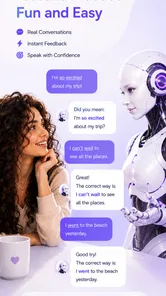
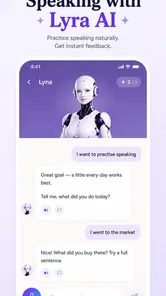
AI English tutors commonly let learners practice conversations by typing or speaking and may provide suggestions about word choice, grammar, or pronunciation. The exact conversation modes and feedback available in Lingtutor can depend on the current version, device, and account plan. Before relying on it for pronunciation coaching, review the app’s feature descriptions and try a short session to see whether its feedback is clear, accurate, and useful for your needs.
Is Lingtutor: AI English free to download and use?
The app may be available to download without an upfront charge, but some lessons or features could require a subscription, in-app purchase, or account upgrade. Pricing and trial terms can change, so check the Google Play or App Store listing and the purchase screen before subscribing. Pay particular attention to billing frequency, renewal conditions, cancellation steps, and whether a free trial automatically converts to a paid plan.
Does Lingtutor: AI English work for beginners and advanced learners?
It may be useful across different proficiency levels if its lessons and conversation prompts can be adjusted to the learner. Beginners generally benefit from clear explanations, basic vocabulary, and slower practice, while more experienced learners may prefer open-ended conversations and detailed corrections. Check whether the app offers a level assessment or adjustable difficulty, and test a few activities to make sure the content is neither too simple nor too challenging.
What should I know about privacy and internet access before using Lingtutor?
AI learning features may send text or voice input to online services for processing, so review Lingtutor’s privacy policy and permissions before sharing personal information or recording speech. Some functions may require an internet connection, and availability can differ by device or region. If you plan to practice on mobile data, check how the app handles voice features and consider using Wi-Fi until you understand its data use and privacy settings.
Pros
- AI conversation practice lets learners rehearse English without scheduling a tutor.
- Instant feedback can help identify mistakes while they are still fresh.
- Short practice sessions are easy to fit into a daily routine.
- Personalized exercises can make practice more relevant to individual goals.
- A low-pressure format may help shy learners build confidence speaking English.
Cons
- AI feedback may miss context or suggest unnatural phrasing.
- Speech recognition can struggle with accents
- background noise
- or fast speech.
- AI conversations cannot fully replicate the nuance of a human tutor.
- Some features or learning content may require a paid subscription.
- Learners who need structured grammar lessons may need another resource.











