Legal Text Collector
- 294.00
- 4.0
- Installs
- 100.00K
- Price
- Free
Screenshots
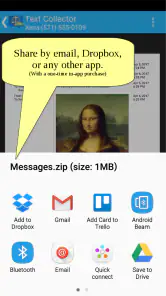
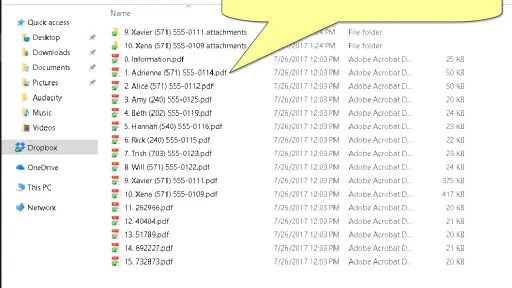
Analysis by Reviewed
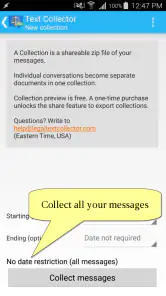
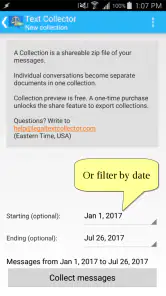
Legal Text Collector is the kind of communication app I would reach for when a message needs to become a proper document instead of remaining buried in a chat thread. Its purpose is focused: it saves messages as PDF files. That sounds simple, but it becomes useful whenever a conversation contains instructions, confirmations, records, or wording that I may need to read and share later.
I reviewed it as a practical utility rather than a full messaging platform. It does not try to replace the app where a conversation began. Instead, it sits beside that conversation and helps turn selected text into something easier to keep, print, attach, or organize. The developer is Legal Text Collector, and the app belongs to the communication category. It is free to install, rated for Everyone, and its current version is 2.24.2.
My overall impression is that this is a narrowly defined tool with a clear reason to exist. It is most appealing to people who regularly need a durable copy of messages, while casual users may find the workflow more specialized than they need. The quality of the experience depends not only on the export itself, but also on where the original conversation lives, how reliably the phone can reach the relevant sharing or storage services, and how carefully I handle the resulting files.
Turning conversations into usable documents
Where the app fits in a normal communication workflow
The usual alternative is to take a screenshot, copy text into a notes app, forward the conversation to myself, or rely on the original chat application's search. Each method has a weakness. Screenshots preserve appearance but can be awkward to search or print. Notes are editable and may lose context. Forwarding depends on the original service and can make an important exchange harder to separate from everyday messages.
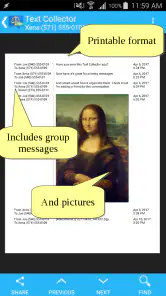
Saving messages as PDF gives the conversation a more settled form. In my view, that is the central benefit here. A PDF is easier to attach to an email, place in a folder, or present as a single document than a long series of screenshots. It also encourages a cleaner archival habit: instead of keeping an entire chat forever just to preserve one exchange, I can create a separate file for the part that matters.
That does not make the PDF automatically better evidence or a perfect record. A document is only useful if I know where it came from, what context it includes, and whether the original conversation might later change. I would therefore treat the export as a convenient record of selected messages, not as a substitute for keeping important source information when the situation calls for it.
Network-dependent moments are easy to overlook
The most important connectivity issue is not the basic idea of producing a PDF; it is everything around the source and destination. If I need to open a conversation, retrieve content from a communication service, share the finished file, or place it in cloud storage, the phone may need a working connection at those points. A weak signal can turn a short task into a frustrating sequence of retries.
You May Like

Clash of Clans Is Won Between the Battles

Android Auto Makes the Case for Quieter Car Software

MobiOffice: Transforming Mobile Productivity with Seamless Integration

EA SPORTS FC™ Mobile Soccer: Redefining Mobile Sports Gaming

How Microsoft OneDrive Became a Mobile Productivity Giant

How Google Translate Breaks Language Barriers Effortlessly
This matters particularly when I am working from a train, a crowded venue, a basement office, or a location with unstable mobile coverage. I might remember that I need a message while away from home, but the practical workflow can depend on whether the conversation is available at that moment and whether the finished document can be sent where I need it. I would avoid starting an urgent export immediately before a meeting unless I had already opened the relevant material and knew the destination was reachable.
The app’s focused purpose is helpful here because there are fewer decisions than in a general document-management suite. Still, “save as PDF” should not be confused with “everything is available anywhere.” Connectivity shapes the surrounding steps, and users should plan around that rather than assume a network-independent archive.
A realistic mobile scenario
Imagine that a service provider sends appointment instructions through a messaging channel. On the way to work, I realize I need to send those instructions to another person and keep a readable copy for later. A screenshot might require several images if the exchange is long, while copying the text into a note could remove the conversational setting. With this app, the useful goal is to create one PDF that can be attached or stored as a document.
The mobile advantage is convenience. I do not have to wait until I reach a desktop to turn the conversation into a file. That can be valuable for parents, freelancers, students, support workers, and anyone who receives practical information through messages rather than email. The trade-off is that phones are also where interruptions happen: a call, a poor connection, limited storage, or an unfamiliar sharing screen can break the flow.
My advice is to decide the file’s next destination before exporting. If I only need to read it later, local storage may be enough. If I need to send it, I should have the correct mail or messaging app ready. If I need a long-term record, I should use a clearly named folder rather than leaving the document among random downloads.
What happens when the process fails
Any message-to-document workflow has several possible failure points. The source conversation may not open correctly, the selection may be incomplete, the export may not finish, or the resulting PDF may be created but not reach its intended destination. These are different problems, and treating them as one can lead to confusion.
When something goes wrong, I would first return to the original conversation and check that the intended messages are visible. Next, I would repeat the export with a smaller, clearly defined selection if that is possible in the current workflow. After the PDF is produced, I would open it before sharing it. That simple check catches missing text, unexpected page breaks, or a file that is not where I thought it was.
A useful recovery habit is to keep the original message thread available until the PDF has been checked and delivered. Deleting or hiding the source too early removes an easy way to compare the document with the conversation. I would also avoid creating many nearly identical files during repeated attempts. A simple naming pattern based on the subject and date can make it obvious which copy is the final one without relying on memory.
Connectivity failures deserve a separate response. If sharing does not work, I would save the document first if the workflow allows it, then try sending it later instead of repeatedly tapping the same destination. If the source itself cannot be reached, I would wait for a stable connection rather than assume that a partial view represents the whole exchange. The app is more useful when I treat export and delivery as two related but separate tasks.
Data-conscious use and document hygiene
Messages can contain names, addresses, account details, private plans, or attachments described in text. A PDF makes that information portable, which is convenient but also increases the number of places where it can be exposed. Before sharing, I would read the document as if I were the recipient and remove anything that is not necessary for the purpose.
This is one area where a screenshot can occasionally be preferable. If I need to show one small visual detail exactly as it appeared, an image may preserve the original presentation more directly. On the other hand, a PDF is usually easier to gather into one file and review page by page. The right choice depends on whether readability and consolidation matter more than visual fidelity.
I would also be careful with automatic cloud backup and broad sharing destinations. A file meant for one person should not be placed in a generally shared folder simply because it is convenient. If I am using mobile data, I would avoid repeatedly exporting large conversations or sending several duplicate copies. The app’s document focus does not remove the need to manage the connection and the destination responsibly.
Another practical tip is to separate temporary exports from records I intend to keep. A short-lived PDF can remain in a downloads area until it has served its purpose. A document that matters later deserves a meaningful filename and a deliberate storage location. That small distinction prevents the common problem of having useful records technically saved but impossible to find.
Who will get the most value
I think this app suits people who communicate important details through messages and need a cleaner way to preserve them. A freelancer might save a client’s instructions before starting work. A student could keep a conversation containing project arrangements. A family member might turn travel or appointment messages into a document that is easier to forward. In each case, the value comes from reducing scattered chat content to a file with a clear purpose.
It can also help users who prefer documents over chat histories. Searching a messaging app is convenient when the conversation remains active, but it is less comfortable when I need to send a selected exchange to someone who does not use the same service. A PDF creates a more familiar handoff.
I would skip it if I rarely need to preserve messages or if my existing communication app already provides a complete, convenient export that meets my needs. I would also look elsewhere if I require advanced document editing, annotation, redaction, optical character recognition, or sophisticated archive management. This is a focused collector, not a replacement for a full PDF editor or records system.
Free access, paid extras, and practical expectations
The app is free, which makes it easy to test with a real conversation before deciding whether it belongs in a regular workflow. In-app purchases are listed at $2.49 per item. I would not pay automatically just because the task sounds useful; I would first check whether the free experience handles the kind of message export I actually need and whether the paid option removes a limitation that affects me repeatedly.
Its audience is broad in age because the content rating is Everyone, but that does not mean every exported conversation is suitable for every recipient. The rating describes the app’s general audience, while the privacy of a particular message depends on the content I choose to save and share.
The app has been available since June 12, 2017, and it has reached over one hundred thousand installs. Its average rating is four out of five from more than five hundred ratings, with over two hundred written reviews. Those figures suggest that the focused concept has found a real audience, although they do not replace testing the exact workflow on my own phone and with my own communication habits.
How it compares with familiar alternatives
Screenshots are faster for a single short exchange and preserve the visual look of the original screen. Their weakness appears when a conversation spans many screens or needs to be shared as one coherent item. Copy-and-paste is flexible, but it can require manual cleanup and may lose details about who said what or when. Forwarding is natural inside many chat services, yet it may not help when the recipient needs a standalone document.
A general notes app is better when I want to rewrite, annotate, or combine message content with my own planning. A dedicated PDF tool is better when I need to edit pages after creation. Legal Text Collector makes more sense when the main job is specifically to move message content into PDF form without turning the process into a larger writing project.
The trade-off is specialization. A narrow tool can be quicker for its intended task, but it offers less value outside that task. I would choose it for message preservation, not for managing every document on my phone. That distinction keeps expectations realistic and makes the app easier to judge fairly.
My connectivity verdict
Connectivity does not define the app’s purpose, but it strongly affects how dependable the overall experience feels. The best results come when I prepare the source conversation, use a stable connection for any network-dependent step, inspect the finished PDF, and only then share or archive it. In a poor-signal situation, the app should be treated as part of a chain rather than an isolated solution.
I like the idea because it addresses a real gap between casual messaging and orderly record keeping. The strongest insight for me is that the PDF is not the end of the workflow: naming, checking, storing, and sharing it are what turn an export into something useful. Users who build those habits will get more from the app than someone who simply taps save and forgets where the file went.
My recommendation is cautious but positive: try Legal Text Collector if you regularly need to preserve selected messages as documents, especially when screenshots and forwarding feel messy. It is less compelling for occasional chat users and not the right choice for advanced PDF work. As a free communication utility with optional purchases, it earns its place when the simple act of converting a conversation into a portable PDF solves a problem you genuinely encounter.
Legal Text Collector Frequently Asked Questions
Will Legal Text Collector work on my phone?
Legal Text Collector is an app in the Communication category, and the Android version requires Android 4.4 or later. Check your device’s operating system before downloading so you can confirm compatibility. The app is rated for Everyone, which describes its content rating; it does not replace checking that your particular device can run the version offered in its app store.
What is Legal Text Collector used for?
Legal Text Collector is designed to help users gather, organize, and review legal text from different sources in one place. It can be useful for students, researchers, legal professionals, and anyone who needs to keep notes or references related to laws, regulations, contracts, or case materials. Its store summary is “Save messages as PDF.” It should be treated as an organizational and research aid, not as a substitute for professional legal advice.
Is Legal Text Collector suitable for professional legal work?
The app may be helpful for collecting and arranging legal information during research, but its suitability for professional work depends on the specific features available in the version you install. Users should verify whether it offers reliable search, export, backup, document management, and privacy controls. Always check the original source of legal information, since the app itself may not guarantee that every text is current or legally authoritative.
Does Legal Text Collector provide legal advice or interpret the law?
No application should be relied upon as a replacement for a qualified lawyer, and Legal Text Collector should be used primarily for collecting and managing legal text. The information stored or displayed through the app may require additional interpretation and verification. Laws can change, differ between jurisdictions, and depend on individual circumstances, so users should consult an attorney or official government source before making an important legal decision.
Can I safely store confidential contracts or sensitive legal documents in the app?
Before adding confidential material, review the app’s privacy policy, permissions, storage method, synchronization options, and any available security features. Avoid uploading highly sensitive documents unless you understand who can access them and whether the data is encrypted. If the app lacks password protection or secure backup controls, it may be better to store private legal files in a dedicated encrypted document-management service.
Pros
- Quickly organizes legal text snippets for later reference.
- Useful search tools help locate saved passages efficiently.
- Supports consistent note-taking across multiple legal projects.
- Clean interface makes frequent text collection straightforward.
- Can reduce time spent copying information into separate documents.
Cons
- May require manual checking to confirm texts remain legally current.
- Limited usefulness without a clear system for tagging and organizing.
- Collected excerpts may lack the context of their original documents.
- Privacy settings should be reviewed before storing sensitive legal material.
- Advanced legal research features may be unavailable or limited.
- Category
- Communication
- Version
- 2.24.2











