Lark Video Player: HD Video
- 81.00
- 4.6
- Installs
- 5.00M
- Price
- Free

Screenshots
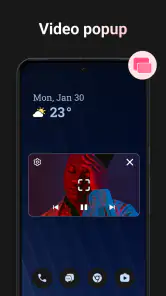
Analysis by Reviewed
I tend to judge a video player by what happens when my connection is poor, not by a long list of features. Lark Video Player: HD Video is an Android app for watching videos, and its appeal is the promise of straightforward playback across common formats. The key distinction is that a player and a streaming service solve different problems: this app is for playing video files, so your experience depends on having a file available on your device rather than expecting a network connection to supply a film or show.
Where connectivity does—and doesn’t—fit
When a video is already on your phone, a weak signal should matter less to the basic act of playing it than it would in a streaming app. That makes a local player useful for a downloaded lesson, a clip sent by a colleague, or a video you saved before leaving home. I would still check that the file opens and plays before relying on it somewhere without dependable reception; a player cannot help if the file itself is missing or unusable.
The distinction also helps set expectations about subtitles and sharing. Those tasks may involve network access depending on where the subtitle comes from or how you share a file, while playback of an available video is a separate matter. I wouldn’t assume every part of the experience works without a connection. If you’re planning a trip, test the exact file and any supporting material beforehand rather than discovering a snag in transit.
A practical fit for everyday phone use
A realistic use case is watching a short work clip on a commute: save or receive the file while you have a connection, open it in the player, and avoid depending on a live stream through patchy coverage. It also suits someone who keeps personal videos on their phone and wants a dedicated way to play them. At 5M+ installs, it has reached a broad audience, though popularity alone doesn’t tell me whether its interface will suit your habits.
Lark Video Player comes from Lark Player Studio - Video, MP4 & Music Player. It is free, rated for Everyone, and sits in the video-player-and-editor category. The current version is 1.32.7, with Android 5.0 as its minimum requirement. Its average rating is 4.6 from around 38,000 ratings, alongside 81 written reviews. Those figures offer a useful snapshot, but I’d treat them as context rather than proof that every file or device will behave the same way.
Smooth Playback and User-Friendly Interface
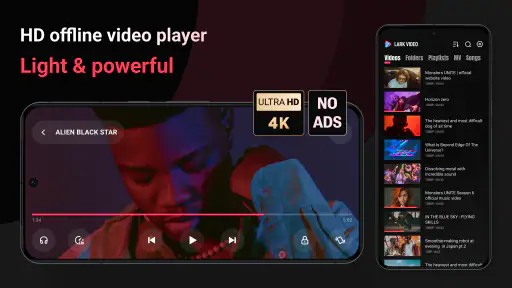
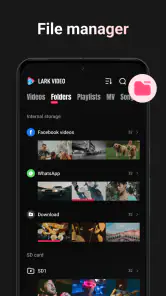
Let's talk about its smooth playback. With Lark Video Player, you won't find yourself pacing around waiting for a video to load. It's like the app has a turbo mode that ensures your videos play without a glitch. The interface? Oh boy, it's as intuitive as having a chat with an old friend. Everything is neatly organized, making navigation a breeze even for the tech-challenged folks like me.
Formats Galore!
One of the standout features of this app is its ability to handle multiple video formats. Whether it's MP4, AVI, or MKV, you name it, and Lark Video Player supports it. It's like having a Swiss Army knife for video formats right in your pocket. No need to fiddle around with converters or worry about compatibility issues.
More From Our News Desk

Weather by Xiaomi Review: Clear at a Glance, Less Clear Up Close

X Under Pressure: Can It Recover When Posting Goes Wrong?

Clash of Clans Is Won Between the Battles

Android Auto Makes the Case for Quieter Car Software

MobiOffice: Transforming Mobile Productivity with Seamless Integration

EA SPORTS FC™ Mobile Soccer: Redefining Mobile Sports Gaming
Customization and Features
Customization is the name of the game here. You can tweak the settings to your heart's content. Whether it's adjusting the playback speed or playing around with the equalizer, the app gives you the freedom to personalize your viewing experience. It's like having your cinema where you're the director calling the shots.
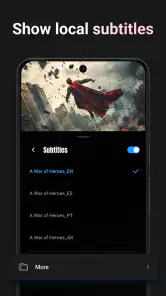
Moreover, the app's built-in subtitle feature is a lifesaver. No more struggling to find the right subtitle file online. Lark Video Player allows you to easily download and sync subtitles, making it perfect for those foreign flicks or binge-watching sessions.
Offline Mode and Sharing
Here's another cool feature - offline mode. You can download videos directly onto your device and watch them without an internet connection. Perfect for those long flights or when you're heading to a remote cabin in the woods. Plus, the sharing feature is super handy. You can easily share your favorite videos with friends, making it a social experience.
The app also pays attention to the little details, such as remembering where you left off in a video. So when you return, it picks up right where you paused. It's like having a bookmark for your videos!
What I’d check before settling on it
The main trade-off is that a dedicated file player is only as convenient as the files you can access. If your viewing mostly happens through subscription services, browser video, or live streams, your usual streaming apps are likely the better fit; Lark is not a replacement for their catalogs. It makes more sense for people who already keep videos on their phone and want one place to play them.
For larger files, I’d think about storage before transferring a whole collection. Keeping a few likely-to-watch clips available is more practical than filling a phone with videos just in case. A useful habit is to test one file from each source you rely on—such as a camera recording and a received clip—then note whether playback and any subtitle syncing work as expected. That small check can reveal compatibility friction before you’re away from Wi-Fi.
Choosing it over a default player
Compared with the basic player that comes with a phone, Lark’s stated emphasis on multiple formats and playback adjustments may suit someone who wants more control without converting files first. A default player can still be the simpler choice for occasional clips, especially if it already opens everything you watch. I’d also choose a streaming service when I want discovery, cloud libraries, or playback that follows me between devices; a local player is strongest when I already know which file I want.
If a file won’t play, I’d first check that it is fully present on the device and try another known-good clip. That helps separate a file or transfer problem from a player issue. Likewise, if subtitles are important, check them with a short sample before settling in for a full film; syncing and availability can be more fiddly than pressing play. These are ordinary checks, but they matter more when you are preparing for travel or relying on a video for work.
Who will get the most from it
I’d recommend trying it if you regularly watch saved videos, receive clips in different formats, or want playback adjustments and subtitle tools in one app. It is less compelling if your phone use is almost entirely online streaming, or if your built-in player already handles your library without trouble. The app is free and was released on Jan 17, 2025, but I’d still decide based on how it handles your own files rather than assuming that a broad feature set guarantees a perfect match.
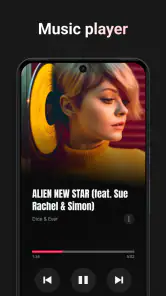
In conclusion, Lark Video Player: HD Video is more than just a video player; it's a complete package for anyone who loves watching videos on their mobile devices. With its wide range of features and user-friendly interface, it’s like having a mini home theater in your pocket. So, if you're on the hunt for a reliable video player, give this one a shot. You won't be disappointed!
When a file is present but playback still falters
A useful way to troubleshoot is to change one thing at a time. First, reopen the file after confirming it has finished transferring; then try a different clip you know plays correctly. If one file fails and another works, the issue may be tied to that particular video rather than your connection or the whole app. This is especially helpful with clips received through messaging apps, where a preview may appear before the full file is ready.
I’d also avoid treating a subtitle problem as a video problem. Try the video by itself, then add or sync the subtitle and check a short section where someone speaks. If the picture and sound are fine but the text is late or early, you have narrowed down the source of the frustration. For a lesson or work recording, that quick check can save you from replaying a long file only to discover the captions were out of sync.
Small habits that make mobile viewing easier
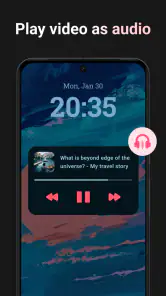
On a phone, screen size and surroundings often matter as much as raw playback. I’d use playback-speed adjustment for a lecture or a long explanation when I need to review material quickly, then return to normal speed for dialogue where timing matters. Equalizer controls may be useful when voices sound thin through a phone speaker, but I would compare the result with headphones before changing settings for every video; a tweak that helps speech can make music or sound effects less natural.
For a commute, I’d prepare a short queue of files rather than rely on finding and opening the right one while moving. Confirm that the videos are actually stored on the device, check that the first one resumes where expected, and keep enough free space for the files you still need. That workflow is more dependable than assuming a recent item in a list is necessarily available when reception drops.
What to expect from formats and controls
Broad format support is valuable because videos arrive from different places, but it should not be read as a guarantee that every file will play perfectly. A video container can include different kinds of audio, video, or subtitle tracks, and a troublesome file may need a different copy or another player. I’d test the exact formats I receive most often instead of converting an entire collection—or assuming that a familiar extension settles the question.
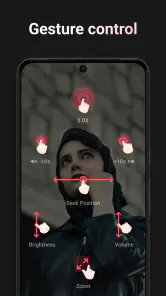
The same practical approach applies to controls. If you use playback speed or the equalizer regularly, spend a minute trying them with a sample clip and note which setting feels right. These adjustments are most useful when they solve a specific viewing problem; they are less compelling if you only watch occasional camera videos and prefer not to manage extra options.
Choosing the right setup for travel and limited data
For a journey, I’d separate preparation into two checks: make sure the video is available locally, then make sure any supporting material you need is ready too. Subtitles or sharing may involve network access, so I would not leave those steps until the connection becomes unreliable. A test at home also gives you a chance to spot a corrupted transfer, an unexpected file issue, or a subtitle mismatch while there is still time to choose another copy.
This kind of player can help avoid streaming data use when you already have a video file on your phone, but it does not make obtaining that file data-free. Downloading or receiving a large video can use a connection and take up device storage. If you are keeping an eye on mobile data, transfer files over a connection you are comfortable using and check the file is complete before relying on it away from home.
Who should choose a different kind of app
I would skip a dedicated local player if what I really want is a library of shows, recommendations, live channels, or automatic syncing between devices. Those are strengths of streaming platforms, not the reason to choose a file player. Someone who only watches a few short clips may also be perfectly happy with the built-in player, especially if it already opens their videos and remembers their place.
On the other hand, a student revisiting recorded lessons, a traveler carrying a few films, or a person who receives video files for work may appreciate having playback controls and subtitle handling in one place. The deciding question is not whether a player has many options, but whether those options remove a recurring hassle in your own routine. If you rarely encounter format or subtitle issues, a simpler setup can be the better one.
My connectivity verdict
I see Lark Video Player as a useful companion for videos already within reach, not as a way around every network problem. Its best mobile scenario is deliberate: prepare the file, confirm it plays, and use the player when a live connection would be inconvenient or unreliable. That makes it a sensible option for saved clips and personal libraries, while people who depend on streaming catalogs should keep their usual services at the center of their setup.
The most reassuring part of that approach is control over the viewing plan: you know which video you want, can check it ahead of time, and are less dependent on a signal during playback. The trade-off is that you manage the files yourself, including their storage and any supporting subtitles. If that balance sounds right for how you watch, this app is worth trying; if you want video to arrive on demand from an online catalog, another kind of app will suit you better.
Lark Video Player: HD Video Frequently Asked Questions
Is Lark Video Player: HD Video available for iPhone or iPad?
Lark Video Player: HD Video is presented as an Android app, so iPhone and iPad users should check the Apple App Store for an iOS version before expecting to install it. The Android release is intended for devices running Android 5.0 or later. If you use more than one type of device, make sure you select the version made for your operating system.
Can I use Lark Video Player to play files stored on my device?
Yes. Lark Video Player is described as an offline video player, and it can be used to play local media files without streaming them from the internet. That makes it a practical option for watching videos you already have on your device, including when you are away from a connection. Your files still need to be accessible to the app on the device.
Is Lark Video Player: HD Video compatible with my Android device?
Lark Video Player: HD Video is an Android app that requires Android 5.0 or later. If your device meets that requirement, you can consider it for playing your local video and audio files. It is listed for everyone, so its age classification is suitable for a general audience. Check your device’s Android version before downloading to make sure it can install the app.
Can I use Lark Player to watch high-resolution videos and play different file types?
The app is described as an offline player for HD video, 4K, and major formats, so it may suit users with a mixed collection of video files and higher-resolution content. Playback quality can also depend on the file and the device. If you plan to watch large or high-resolution videos, make sure your device has enough storage and handles those files comfortably.
What video formats does Lark Player support?
Lark Video Player: HD Video supports a wide range of video formats, including MP4, AVI, MKV, and more. This ensures seamless playback of almost any video file you might have, making it a versatile choice for users who have diverse video collections. It also supports high-definition videos, ensuring quality viewing experience.
Pros
- Supports multiple video formats
- User-friendly interface
- High-definition video playback
- Subtitle support available
- Regular app updates
Cons
- Contains ads in free version
- Limited features without premium
- Occasional playback issues
- Subtitle sync can be off
- Requires internet for some features
- Category
- Video Players & Editors
- Version
- 1.32.7











