

Language Learning: Pingo AI
- 972.00
- 4.7
- Installs
- 5.00M
- Price
- Free

Screenshots

Analysis by Reviewed
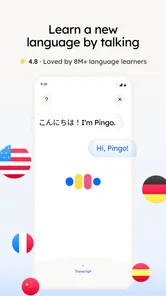
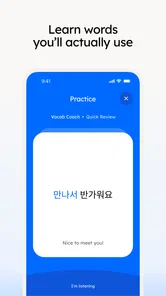
I find that language practice on a phone is most useful when it fits into the gaps of an ordinary day, but those quick sessions can depend heavily on a reliable connection. Language Learning: Pingo AI is an education app from Pingo AI, Inc. that uses AI as part of its language-learning approach. It is aimed at people who want to practise languages such as Spanish, English, Korean, German, or French without having to build every study session around a classroom or textbook. My overall impression is that it is most compelling as a flexible practice companion, provided you are comfortable learning through an app and can usually get online when you want to use it.
Where a connection changes the lesson
The most important practical point is that an AI-based learning experience is not the same as a downloaded phrasebook. When the app needs to respond to what you enter or say, a connection can shape how smoothly the interaction proceeds. That matters most during active practice: a pause while a response loads can interrupt the rhythm of a conversation more than it would interrupt a simple flashcard review.
I would plan to use Pingo AI when I have a steady connection, especially for sessions that involve back-and-forth practice. At home, on dependable Wi-Fi, it is easier to settle into a longer study block and focus on forming answers rather than wondering whether the app is waiting on the network. On mobile data, it can still suit a short practice break, but I would avoid starting an important lesson in a place where the signal is already unreliable.
That distinction helps set expectations. The app is not best judged only by how many minutes you can spend in it; it is also about whether you can give its interactive approach enough attention to be useful. A five-minute session with a stable connection may be more productive than a longer attempt interrupted by loading delays. If you mainly want a resource you can consult in airplane mode, a downloaded dictionary or an offline course may fit that need better.
Use short sessions for practical goals
A realistic use case is preparing for a small interaction that is coming up soon. If I were travelling, for example, I might practise how to introduce myself, ask for help, or handle a basic question before leaving the hotel. I would keep the goal narrow, work through a few responses while connected, and then mentally revisit the phrases later. That is a more manageable routine than expecting one session to make me fluent.
For a commuter, the same idea works in a different way: use a reliable part of the journey for a focused practice window rather than assuming every stretch of the route will support uninterrupted interaction. A connection that drops in a tunnel or a crowded station can make a conversation-style exercise frustrating. If the route is unpredictable, I would save the most demanding practice for home and use travel time for brief review only when the app is responding consistently.
What makes the AI approach useful—and where it can fall short
The appeal of an AI-oriented language app is the possibility of practising actively instead of only reading examples. That can help learners who freeze when they have to produce a sentence, even if they recognize the same words on a page. The trade-off is that interactive practice asks for more attention than passively scrolling through vocabulary. I would use it to build confidence and get comfortable attempting answers, not as proof that every nuance of pronunciation, grammar, or cultural context has been fully covered.
More From Our News Desk

 Gmail
GmailGmail in a Busy Inbox: Who Benefits Most?
From first account to crowded workday, Gmail earns its place through dependable search and flexible sorting—but its best fit depends on how much inbox maintenance you can tolerate.

 Prime Video
Switching to Prime Video: What Changes in Your Viewing Routine
Prime Video can make a compelling second home for streaming, but switching means learning a different catalog, rental layer, and route from browsing to playback.

 Universal TV Remote Control
Universal TV Remote Control Works Best as a Reliable Backup
A phone remote earns its place through quick setup and reliable habits. Here is how to get more from Universal TV Remote Control—and where its limits show.

 Weather - By Xiaomi
Weather by Xiaomi Review: Clear at a Glance, Less Clear Up Close
Xiaomi’s weather app makes everyday forecasts quick to scan, but its calm surface can leave useful details and recovery paths harder to find than they should be.

 X
XX Under Pressure: Can It Recover When Posting Goes Wrong?
A resilience-focused review of X, examining setup, mistaken posts, interruptions, weak connections, and the gaps that matter when recovery needs to be dependable.

 Clash of Clans
Clash of Clans Is Won Between the Battles
Its raids are quick; its community is a long-term project of coordination, teaching, rivalry, and shared responsibility—with all the friction that entails.
Latest News



That is also why I would pair it with a second kind of resource if my goal were serious study. A structured textbook or a course with a clear syllabus can be better for explaining grammar step by step. A human tutor can notice habits and give context that an automated exchange may not capture. Pingo AI makes more sense as a convenient practice partner between those options than as a complete replacement for every other way of learning.
Fitting practice into real mobile routines
The app’s broad language selection makes it useful for people juggling more than one learning goal, but I would resist switching between languages in every session. A simple routine is easier to sustain: choose one language for a particular week or set aside distinct moments for each one. That reduces the mental effort of deciding what to practise and makes it easier to notice whether the app is helping with a specific goal.
For a beginner, I would start with familiar situations rather than trying to cover everything at once. Practise a greeting, a basic request, or a sentence about your day; then repeat the same kind of task later and see whether answering feels less effortful. More experienced learners can use the app to keep their speaking or writing active, especially when they do not have a conversation partner readily available. In either case, the value comes from returning regularly, not from treating a single session as a shortcut.
One practical tip is to choose a quiet moment for any exercise that requires speaking or close attention. Trying to practise while crossing a busy street, managing a queue, or keeping half an eye on work notifications is a poor test of the app and a poor learning setup. I would reserve interactive sessions for moments when I can concentrate, then use lower-attention moments for another study method if one is available.
Another useful trade-off is between convenience and continuity. A phone makes it easy to begin a session almost anywhere, but a mobile routine can be broken by calls, notifications, low battery, or unstable reception. I would keep a small personal note of the phrases or topics I want to revisit, rather than relying on a perfect uninterrupted session every day. That habit also gives me a concrete starting point when I return after a gap.
Recovering when a session is interrupted
If a response stalls or the connection becomes unreliable, I would first pause rather than repeatedly tapping through the same action. Check whether other apps can connect, move to a steadier network if one is available, and then reopen the learning session. If the interruption happens during a longer exercise, resume with a smaller goal—one question or one useful phrase—rather than trying to reconstruct the whole session at once.
This kind of recovery matters because interruptions can make language practice feel like a technical problem instead of a learning activity. I would not schedule an important study milestone around a single session on a weak connection. For a planned trip or a class discussion, practise the material beforehand somewhere dependable and keep a separate written reminder of key phrases. That gives you something useful to fall back on if your phone cannot support an interactive exercise at the moment you need it.
It is also worth distinguishing a temporary network problem from a mismatch in learning style. If you repeatedly find that waiting for interactive responses breaks your concentration, the issue may not be your connection alone. A paper workbook, a downloaded audio lesson, or a traditional vocabulary tool can provide a more predictable pace. I would keep Pingo AI in the routine only if its conversational approach makes me more willing to practise than those alternatives do.
Using mobile data thoughtfully
I would avoid making assumptions about how much data a particular session uses, since that can vary with how the app is being used and the connection available. If your plan is limited, try a short session while checking your phone’s normal data-usage controls, then decide whether longer practice is comfortable on mobile data. Using Wi-Fi for extended study is a sensible choice if you want to keep cellular use predictable.
Battery and attention are part of the same calculation. A long interactive session can be inconvenient when your phone is nearly out of charge or when you need to stay reachable. I would choose a shorter practice goal in those circumstances and save a longer session for a time when I can focus and keep the phone powered. The best routine is one that does not make you resent opening the app.
The app is free to download, with in-app purchases ranging from $14.99 to $119.99 per item. I would begin with the free experience and decide whether the format suits my habits before spending anything. The range of purchase prices is a reason to check what an individual option includes and whether it matches the way you study, rather than assuming that paying automatically solves problems such as a weak connection or a lack of time.
Who is likely to enjoy it, and who may prefer another tool
I would recommend giving it a try if you want an approachable way to practise languages on a phone and are willing to engage with an AI-based learning format. It may be especially useful for people who understand some of a language but need regular prompting to produce their own sentences. Its audience is broad: the app is rated for Everyone, and its current version is 5.4.4 for devices running Android 8.0 or later.
It may be a weaker fit if your top priority is offline study, detailed human correction, or a tightly sequenced course that takes you from one grammar point to the next. In those cases, a conventional course, tutor, or offline reference may be more dependable. I would also think twice if you dislike interactive exercises or tend to practise in places with poor reception; convenience is less valuable when the experience repeatedly stops at the wrong moment.
There is a sizeable audience for the app: it has over 5 million installs and a 4.7 average from around 201 thousand ratings, alongside 972 written reviews. Those figures suggest many learners have chosen to try it, but they cannot tell me whether its teaching style matches an individual’s needs. I would treat them as context, then judge the app by whether I actually return to practise and can use what I work on.
My connectivity verdict
Language Learning: Pingo AI works best when I treat it as an online practice companion, not as a guaranteed solution for every study setting. A reliable connection supports the flow of interactive work; an unreliable one makes it harder to stay focused and can turn a quick lesson into a frustrating wait. Short, purposeful sessions, a dependable network for more involved practice, and a backup plan for key phrases make the experience easier to fit into daily life.
I would try it if conversational practice feels more motivating than studying from lists alone, especially if I can use it regularly at home or in other connected places. I would choose a different or additional tool if offline access, detailed instruction, or human feedback is essential to my plan. Used with those limits in mind, it can be a practical way to keep a language present in everyday routines without pretending that an app can replace every part of learning.
Language Learning: Pingo AI Frequently Asked Questions
What is Language Learning: Pingo AI, and how does it help you learn?
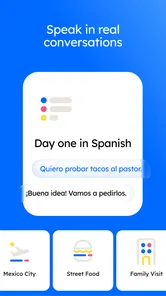
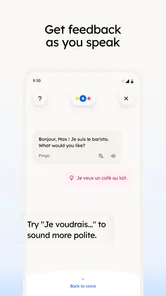
Language Learning: Pingo AI is a language-learning app built around practicing conversations with an AI tutor. Instead of focusing only on vocabulary lists or grammar exercises, it lets you work on speaking and writing through simulated dialogues. It may be useful for rehearsing everyday situations, building confidence, and getting more practice between lessons. The learning experience and available tools can vary by language, subscription, and app version.
Which languages can I learn with Pingo AI?
The languages available in Pingo AI may depend on the current app version and your device’s region, so check the app listing or language-selection screen before downloading. The app is designed to support practice in multiple languages, but availability of conversation topics, feedback, and learning features may not be identical for every language. If you are studying a less commonly offered language, confirm that it is supported before starting a subscription.
Is Pingo AI free to use, or does it require a subscription?
The app may offer free access to some features, while additional practice, usage limits, or premium tools can require a paid plan. Pricing, trial availability, and subscription terms can change, so review the current details shown in the App Store or Google Play before confirming a purchase. Also check whether a trial renews automatically, how billing works, and where to cancel if you decide not to continue.
Can Pingo AI replace a teacher or a full language course?
Pingo AI can provide convenient conversation practice, but it is best treated as a supplement rather than a complete replacement for a teacher or structured course. AI responses and corrections may not always capture every nuance, and the app may not cover all grammar, pronunciation, or cultural context you need. For stronger progress, combine its practice with listening, reading, systematic study, and feedback from reliable learning resources or a qualified instructor.
Does Pingo AI need an internet connection, and what should I know about privacy?
AI conversation features generally rely on an internet connection, so some or all practice may not be available offline; confirm current offline support in the app. Before using voice or chat tools, read the privacy policy and review the permissions requested, especially microphone access. Check how conversation data and recordings are handled, whether you can delete stored information, and what account or data controls are available in your region.
Pros
- Offers low-pressure speaking practice without needing a conversation partner.
- AI feedback can help identify pronunciation issues as you practise.
- Role-play scenarios make it easier to rehearse everyday conversations.
- Lets learners practise at their own pace and repeat difficult exchanges.
- Useful for building confidence before speaking with people in real situations.
Cons
- AI responses may sound less natural than a conversation with a fluent speaker.
- Feedback may not always explain how to correct a specific mistake.
- Free access may be limited
- with some features requiring a subscription.
- Speech recognition can struggle with accents
- background noise
- or unclear audio.
- It is not a full substitute for structured lessons
- grammar study
- or human feedback.











