

Kura Sushi Rewards
- 389.00
- 4.7
- Installs
- 100.00K
- Price
- Free

Screenshots
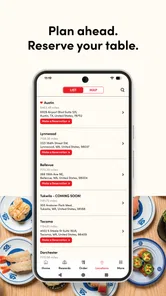
Analysis by Reviewed
I like loyalty apps most when they remove a small annoyance instead of creating another chore. Kura Sushi Rewards aims at that sweet spot for guests of Kura Revolving Sushi Bar by bringing rewards, coupons, and waitlist tools into one place. I tested it with that practical question in mind: can it make an ordinary visit easier, or is it just another restaurant app that I would forget after downloading it?
My answer is positive, with an important qualification. This is a focused Food & Drink app for people who visit Kura Sushi often enough to care about loyalty benefits and the arrival process. It is not a general restaurant discovery tool, a full meal-planning service, or a replacement for every way of ordering food. When I use it for the job it was designed to handle, it feels useful. When I expect it to do more than that, its narrow focus becomes noticeable.
How the everyday Kura visit works with the app
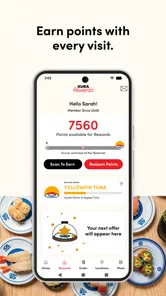
The most sensible way to use Kura Sushi Rewards is to treat it as a companion to a restaurant visit rather than something to browse constantly. I would open it before deciding whether to join the waitlist, check whether a coupon is available, and then use the loyalty area after the visit. That simple order keeps the app from becoming a distraction.
The waitlist function is the part that can change the rhythm of a busy meal. Instead of arriving first and discovering that the dining room is already crowded, I can use the app to begin the waiting process before I leave or while I am nearby. That is especially helpful when I am coordinating with friends or family, because the waiting time can be used for travel rather than spent standing at the restaurant.
I would still treat a digital waitlist as a planning aid, not a guarantee that the table will be ready at an exact minute. Travel time, restaurant traffic, and the pace of seating can all affect the experience. The best habit is to check the status before setting off, leave enough time to arrive comfortably, and avoid assuming that joining remotely means I can wander far away.
Once I am at Kura, the app has a different role. The useful routine is to make sure the account is ready, keep any relevant coupon easy to find, and remember to check the rewards area after the meal. I prefer this approach to trying to reconstruct the visit later from memory. Loyalty programs are only valuable when the steps become automatic.
For a realistic example, imagine that I want to meet two friends after work. I can open the app while leaving the office, look at the waitlist option, and use the travel time to get closer to the restaurant instead of arriving blindly. Before paying, I can review whether a coupon or reward is relevant. Afterward, I check the account while the visit is still fresh. That is a small workflow, but it combines the app’s main functions without making the evening revolve around a phone.
More From Our News Desk

 Instagram
Instagram’s Power Comes From Its Place in Your Phone
A close look at how Instagram turns Meta’s reach, recommendation systems and everyday camera habits into durable platform power—and what that costs users.

 Gmail
GmailGmail in a Busy Inbox: Who Benefits Most?
From first account to crowded workday, Gmail earns its place through dependable search and flexible sorting—but its best fit depends on how much inbox maintenance you can tolerate.

 Prime Video
Switching to Prime Video: What Changes in Your Viewing Routine
Prime Video can make a compelling second home for streaming, but switching means learning a different catalog, rental layer, and route from browsing to playback.

 Universal TV Remote Control
Universal TV Remote Control Works Best as a Reliable Backup
A phone remote earns its place through quick setup and reliable habits. Here is how to get more from Universal TV Remote Control—and where its limits show.

 Weather - By Xiaomi
Weather by Xiaomi Review: Clear at a Glance, Less Clear Up Close
Xiaomi’s weather app makes everyday forecasts quick to scan, but its calm surface can leave useful details and recovery paths harder to find than they should be.

 X
XX Under Pressure: Can It Recover When Posting Goes Wrong?
A resilience-focused review of X, examining setup, mistaken posts, interruptions, weak connections, and the gaps that matter when recovery needs to be dependable.
Latest News



The developer, Kura Sushi USA, keeps the product closely tied to its own restaurant experience. That is both its strength and its boundary. I do not have to sort through unrelated restaurants, delivery services, or generic dining offers, but I also should not install it expecting a broad restaurant rewards wallet.
The first setup matters more than it seems
My advice is to complete the account setup before I am hungry and standing in a crowded restaurant. Entering details, checking the rewards area, and becoming familiar with the main screens is much easier at home. A few minutes of preparation prevents the common mistake of trying to learn the app while friends are waiting to sit down.
I would also make sure the account information I use at home is the same information I expect to use during the restaurant visit. Loyalty tools depend on continuity. If I switch between accounts or forget which sign-in method I used, the experience becomes confusing even if the app itself is working correctly.
Another practical habit is to open the app shortly before leaving rather than relying on an old screen left open from a previous visit. Waitlist information and available offers are the kinds of things I want to review when they are relevant. A fresh check is more useful than assuming that yesterday’s view still reflects today’s situation.
Settings and permissions worth checking
I would begin with notification settings. If the app uses alerts to keep me informed about a waitlist or account activity, notifications can be helpful; if they become noisy, I would reduce them at the phone level. The right balance depends on how often I visit and how closely I can watch the app myself.
I also prefer to review location access rather than approving every permission automatically. A restaurant waitlist may be more convenient when the app can understand where I am, but convenience should match my comfort level. If I do not want location access enabled continuously, I can consider whether using the app manually still gives me enough value. This is a personal trade-off, not a reason to dismiss the whole service.
Account and notification settings deserve a quick look after installation because they shape how much attention the app demands. I want useful reminders without turning a restaurant loyalty tool into a constant source of alerts. I also check whether the app is signed into the account I actually intend to use before relying on a coupon or expecting a visit to appear in my rewards history.
There is a subtle difference between preparing the app and over-configuring it. I would not spend time searching for complicated automation or hidden personalization systems. The value here comes from repeatable basics: a ready account, sensible notifications, and a quick pre-visit check. That is more realistic than expecting advanced controls that the app is not designed to provide.
Coupons are most useful when checked at the right moment
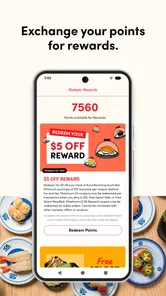
Coupons can be easy to overlook when they are mixed into a broader loyalty screen. My preferred routine is to check them before ordering, not after the meal. That gives me time to understand what is available and whether it fits the visit instead of discovering a missed opportunity when the bill is already settled.
I would also avoid assuming that every coupon is automatically applied. A digital offer may require me to select or present it in the appropriate part of the restaurant process. The safe habit is to read the offer inside the app and follow its displayed instructions before I commit to the purchase. That takes less time than arguing with myself afterward about whether I should have activated something earlier.
Coupons can also change how I think about value. If an offer encourages me to buy more than I originally wanted, the discount may not actually save money. I use the app best when the coupon supports a meal I was already planning, rather than when it becomes a reason to spend extra. That is one of the differences between a useful loyalty tool and an app that quietly pushes unnecessary purchases.
Faster patterns for regular visitors
After a few visits, I would build a short routine around three checkpoints: before leaving, while approaching the restaurant, and after the meal. Before leaving, I check the waitlist and any relevant offer. While approaching, I review the current status and make sure I know what I need to do on arrival. After eating, I open the rewards area so the visit does not disappear from my attention.
This pattern is faster than exploring every screen on every visit. It also reduces the chance of using the wrong feature at the wrong time. The waitlist belongs before arrival, coupons belong before or during the purchase, and rewards belong in the post-visit habit. Separating those jobs makes the app feel calmer.
For families, the biggest benefit may be coordination. One person can manage the waitlist while another handles travel or parking. I would agree in advance about who is responsible for watching the app, because having several people check different phones can create unnecessary confusion. A single person managing the digital queue is usually simpler.
For couples or small groups, I would use the app as a shared planning tool rather than handing the phone around at the table. Check the waitlist before leaving, decide whether the available coupon matters, and then put the phone away. The app is most successful when it reduces waiting friction without becoming the center of the meal.
Frequent visitors can also use a calendar habit without needing a special in-app feature. If Kura Sushi is part of a regular monthly outing, I can add a personal reminder to check the app before that outing. This is not an automation provided by the app; it is a simple phone habit that helps me remember the rewards and waitlist tools when they are actually useful.
Where it beats the usual alternatives
The usual alternative is to arrive without checking anything, ask about the wait at the restaurant, and handle loyalty details manually. Kura Sushi Rewards is better for people who dislike that uncertainty. It puts the restaurant-specific steps together, so I do not have to depend entirely on memory or on a separate paper offer.
It is also more focused than a general dining rewards application. A broad rewards app may cover many restaurants, but it can require more searching and may not offer the same direct connection to Kura’s waitlist experience. If Kura Sushi is one of my regular destinations, that focus is an advantage.
On the other hand, a general restaurant app may be better if I rarely visit Kura or want to compare many restaurants in one place. Installing a dedicated loyalty app for an occasional visit may not be worth the extra account and notification management. The right choice depends less on the app’s quality than on how often Kura fits into my routine.
Small habits that prevent avoidable problems
I would keep the phone charged before using the waitlist on a busy outing. That sounds obvious, but a queue tool is much less helpful if the phone dies while I am traveling. I would also avoid closing myself off from ordinary communication with the restaurant; if something about the visit is unclear, asking staff remains more reliable than trying to infer everything from a screen.
I would not wait until the last possible moment to join a waitlist. The app can make the process more convenient, but it cannot remove the real demand for tables. Checking earlier gives me more room to adjust plans if the wait is longer than expected.
Finally, I would review the rewards screen after each visit only once. Repeatedly refreshing or reopening the same area rarely improves the outcome. A deliberate check, followed by returning to the evening, is a better use of time than treating loyalty tracking like a live dashboard.
Limits that experienced users should understand
The app’s narrow purpose is its clearest limitation. It is not where I would go for a broad restaurant search, detailed food education, or an all-purpose payment experience. Its usefulness depends on being connected to a Kura Sushi visit. If that connection is missing, much of the app’s appeal disappears.
The waitlist feature can reduce uncertainty, but it does not eliminate the need for judgment. I still need to consider how long it takes to reach the restaurant and whether my whole group is ready to leave. Joining too early can be inconvenient; joining too late may not change the wait much. The app gives me a better starting point, not perfect control over the dining room.
Coupons also require attention. A reward can be valuable only if I understand when to use it and whether it matches what I am already ordering. I would not assume that an offer applies to every visit or every purchase without reading its details in the app. That extra check is a small burden, but it is part of using digital promotions responsibly.
There is also a behavioral limit: loyalty apps can encourage people to visit more often simply because a reward is visible. I like the convenience, but I would keep my normal food budget and plans in charge. The app should reward visits I want to make, not persuade me that every available offer is a reason to go out.
Compatibility is straightforward but still worth noting. The app requires a device running at least iOS or Android version 10, depending on the platform. That makes it accessible to many users, while anyone with an older phone should check the operating system before planning around it. The current release is version 2.0, so I would keep automatic updates enabled when possible to avoid using an outdated build.
The age classification is Everyone, which fits the app’s restaurant and loyalty purpose. That does not mean every feature will suit every family’s preferences, especially when notifications or spending decisions are involved, but there is no mature entertainment angle driving the experience.
The app is free to download, which lowers the cost of trying it. Free does not mean completely frictionless, though: I still spend time creating an account, checking offers, and managing notifications. For a frequent Kura guest, that time can pay off. For someone who visits only once in a long while, the benefit may be too small to justify maintaining another app.
Who should use it and who should skip it
I would recommend it to regular Kura Sushi guests, families who want to manage a wait before arriving, and diners who genuinely use loyalty coupons. It is especially practical for people who already know they will return, because the setup effort is spread across multiple visits.
I would skip it if I am only curious about the restaurant, rarely eat there, or mainly want a single app for every dining brand. I would also skip it if I dislike managing accounts and notifications more than I dislike waiting at the restaurant. No loyalty feature can compensate for a workflow that feels annoying every time I open it.
Its public adoption suggests that it has found a real audience: the app has more than one hundred thousand installs and an average rating of 4.7 from roughly five thousand ratings. Those figures make it easier for me to take the product seriously, but they do not replace my own judgment about whether Kura Sushi is part of my regular routine.
My verdict after building a repeatable routine
Kura Sushi Rewards works best when I use it with restraint. I check the waitlist before leaving, review coupons before ordering, and confirm rewards after the visit. That sequence turns the app from a collection of restaurant features into a practical routine.
I appreciate that the product stays focused. The developer, Kura Sushi USA, has not tried to make this a universal dining platform in my experience. The trade-off is that its value is highly specific: if I do not plan to eat at Kura Sushi, there is little reason to open it.
My strongest recommendation is to install it before a planned visit, configure notifications and account access calmly, and test the basic flow when I am not under time pressure. I would then decide after a couple of visits whether the waitlist and rewards tools genuinely save effort. If they do, the app earns a permanent place on my phone; if not, its narrow purpose makes it easy to leave behind.
The best reason to use Kura Sushi Rewards is not the promise of constant engagement, but the small amount of planning it removes from a busy restaurant visit. For frequent guests, that can be enough to make the free app worthwhile. For occasional diners, the ordinary alternatives may be simpler. In my view, it is a focused, useful companion rather than an essential app for everyone, and that honest limitation is part of what makes the recommendation credible.
Kura Sushi Rewards Frequently Asked Questions
Can I use the app to join a waitlist or manage a visit?
Yes. Kura Sushi Rewards is described as offering waitlist features alongside loyalty rewards and coupons, so it can be useful for more than tracking promotions. The app is intended to support a Kura Revolving Sushi Bar visit, but the options you see may depend on the restaurant and your location. Check the app for the available visit features before heading out.
Which devices can run Kura Sushi Rewards?
Kura Sushi Rewards is an app in the Food & Drink category, and its current version is 2.0. It requires Android 10 or later, so check your device’s operating system before downloading. The app is free and rated for Everyone. Keeping your device and app updated can help you access the latest available features and offers.
Is Kura Sushi Rewards well reviewed by users?
The app has a 4.7 average rating, with around 5,000 ratings and 389 written reviews. Those figures can offer a useful sense of user feedback, but individual experiences may differ depending on device, location, and how someone uses the rewards features. Reading recent reviews can help you judge whether the app’s loyalty, coupon, and waitlist tools suit your needs.
What is Kura Sushi Rewards?
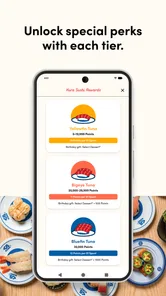
Kura Sushi Rewards is the loyalty program connected with Kura Sushi restaurants, designed to give participating customers benefits for qualifying visits and purchases. Depending on the current program rules, members may be able to collect points, receive promotional offers, unlock birthday rewards, or access other restaurant-related perks. Availability and benefits can vary by location, so it is worth checking the official terms before relying on a specific reward.
How do I join and use Kura Sushi Rewards?
You generally join by downloading the official Kura Sushi app or accessing the restaurant’s rewards platform, then creating an account with your email address and other requested information. After signing in, you can review available offers, rewards, and account activity. At the restaurant, follow the instructions shown in the app, such as scanning a code or identifying your account, so eligible purchases or visits are properly credited.
Pros
- Earn points and rewards from eligible Kura Sushi visits and purchases.
- Digital rewards are convenient to access without carrying a physical card.
- Restaurant information helps locate nearby Kura Sushi branches quickly.
- Promotions and special offers can make repeat visits more rewarding.
- Simple account access keeps your rewards details organized in one place.
Cons
- Rewards may be limited to participating Kura Sushi locations.
- Points or coupons can have expiration dates and usage restrictions.
- The app’s usefulness is limited if you rarely dine at Kura Sushi.
- Some offers may require minimum purchases or specific qualifying items.
- Account
- location
- or notification permissions may be requested during setup.











