

Krystal
- 730.00
- 4.6
- Installs
- 100.00K
- Price
- Free

Screenshots
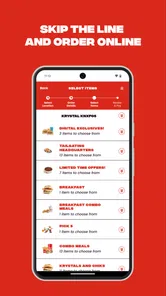
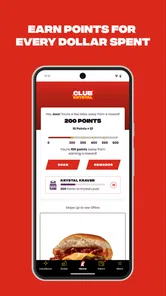
Analysis by Reviewed
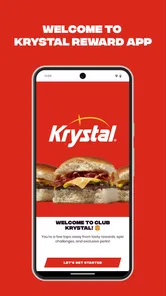
I found Krystal most useful when I wanted to turn a familiar fast-food order into a quicker, more organized visit. It is a free Food & Drink app from The Krystal Company, built around ordering, rewards, and member perks rather than trying to replace every food-ordering service on a phone. After spending time with it, my view is fairly simple: it makes sense for regular Krystal customers who want a direct way to plan an order and keep track of benefits, while occasional visitors may not find enough reason to keep another restaurant app installed.
The app has a 4.6 average from around 6,100 ratings, with more than 100,000 installs. Those figures suggest that it is serving a real group of returning customers, but they do not change the main question I would ask before downloading it: do I visit Krystal often enough for rewards and exclusive perks to matter? If the answer is yes, the app is easier to justify. If I only stop by once in a while, the regular ordering alternatives may be more convenient.
How Krystal feels to use in everyday situations
I focus here on how Krystal’s single-brand ordering and rewards setup fits into ordinary routines, rather than treating the app as a replacement for every way of buying a meal. I’ll look at what changes when I plan through the app, then consider the situations where that preparation is genuinely helpful and where a simpler option may suit better.
Readable navigation for a quick food decision
The strongest part of the experience is its focused purpose. Instead of presenting a broad marketplace filled with unrelated restaurants, Krystal keeps attention on the brand’s own ordering and rewards journey. That narrower scope can be helpful when I already know where I want to eat. I am not comparing dozens of menus; I am trying to decide what to order, whether I can earn something from the visit, and which perk might be useful.
That simplicity matters for readability. A person who is hungry, in a hurry, or using a phone in a bright outdoor setting benefits from an app that does not make the basic task feel like account management. I found it easier to approach the app with a specific goal—place an order or check the value of returning—than to browse without a plan. The product summary, “Order, Earn Rewards, Unlock Exclusive Perks,” accurately describes the three ideas users need to understand.
For someone with limited attention or difficulty processing crowded screens, a single-brand app can have an advantage over a delivery marketplace. There are fewer competing restaurants, promotions, and delivery choices demanding attention. On the other hand, this focus also means the app has less value when I want to compare prices, menus, or availability across several nearby options. A marketplace is usually better for that broader decision.
I would recommend opening the app before reaching the restaurant rather than waiting until I am standing at the counter. That gives me time to read the menu, review the order, and deal with sign-in or account prompts without people waiting behind me. It is a small change, but it makes the experience feel much less stressful, particularly for anyone who needs extra time to read or make selections.
More From Our News Desk

 Instagram
Instagram’s Power Comes From Its Place in Your Phone
A close look at how Instagram turns Meta’s reach, recommendation systems and everyday camera habits into durable platform power—and what that costs users.

 Gmail
GmailGmail in a Busy Inbox: Who Benefits Most?
From first account to crowded workday, Gmail earns its place through dependable search and flexible sorting—but its best fit depends on how much inbox maintenance you can tolerate.

 Prime Video
Switching to Prime Video: What Changes in Your Viewing Routine
Prime Video can make a compelling second home for streaming, but switching means learning a different catalog, rental layer, and route from browsing to playback.

 Universal TV Remote Control
Universal TV Remote Control Works Best as a Reliable Backup
A phone remote earns its place through quick setup and reliable habits. Here is how to get more from Universal TV Remote Control—and where its limits show.

 Weather - By Xiaomi
Weather by Xiaomi Review: Clear at a Glance, Less Clear Up Close
Xiaomi’s weather app makes everyday forecasts quick to scan, but its calm surface can leave useful details and recovery paths harder to find than they should be.

 X
XX Under Pressure: Can It Recover When Posting Goes Wrong?
A resilience-focused review of X, examining setup, mistaken posts, interruptions, weak connections, and the gaps that matter when recovery needs to be dependable.
Latest News



Rewards are most useful when they fit a routine
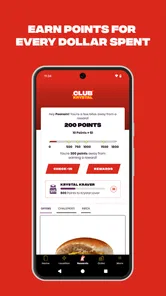
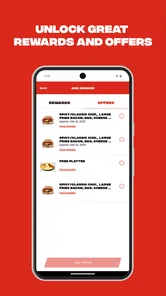
The rewards element is not just a decorative extra. It changes how I think about repeat visits. If I already buy breakfast or a quick meal from Krystal, checking the app before ordering can help me decide whether to use an available benefit now or save the visit toward a later reward. That is a more practical workflow than treating every promotion as an impulse purchase.
My advice is to look at the rewards area before building the order, not after. This lets me understand what I am working toward and prevents a rushed checkout from becoming the only moment when I notice an offer. It also helps separate a genuinely useful perk from something that does not suit my meal or schedule. Exclusive benefits are valuable only when they match what I would have ordered anyway.
There is a trade-off here. A loyalty program can make a familiar restaurant feel more rewarding, but it can also encourage unnecessary visits if I focus too much on completing a reward. I would use the app as a record of value, not as a reason to spend money I would not otherwise spend. That distinction is especially important for people trying to keep food spending predictable.
Motor and sensory considerations during ordering
Ordering on a phone is not equally easy for everyone. Small touch targets, fast-moving screens, unclear selection states, or a checkout flow that requires repeated corrections can be tiring for people with limited dexterity, tremors, one-handed use, or visual fatigue. Krystal’s focused structure helps reduce the number of choices I need to manage, but the practical experience still depends on how comfortably I can interact with the phone and read its interface.
I would approach the app with the phone’s own accessibility settings already configured. Larger system text, display magnification, screen-reading tools, contrast adjustments, or voice control may make the process more manageable, depending on the device and the individual’s needs. I would not assume that every screen will respond perfectly to every setting; instead, I would test the menu and checkout flow before relying on it for a time-sensitive order.
For users who are sensitive to visual clutter, the app’s single-purpose design may be calmer than a delivery platform filled with banners and restaurant cards. For users who need strong audio guidance or highly predictable focus movement, the experience deserves a personal trial. I cannot treat a clean-looking interface as proof that every interaction is accessible. The important question is whether the person can independently identify the current item, change it, review the order, and complete the final step.
A useful technique is to build a familiar order slowly once, while at home, and note where extra attention is needed. After that, the same person may be able to repeat the workflow more confidently in a restaurant parking area or during a busy morning. Saving mental effort for the final visit is one of the app’s less obvious benefits: preparation can matter as much as speed.
Situational access: when the app helps and when it does not
Imagine I am leaving work with only a short break. I can open the app before walking to the restaurant, decide what I want without speaking over background noise, and use the rewards section before submitting the order. In that situation, the app supports privacy and planning. I do not have to explain my order aloud while people are waiting, and I can review the choices at my own pace.
That same situation can expose a limitation. If my connection is unreliable, the phone battery is nearly empty, or I have not completed the account setup, a digital order may take longer than simply ordering in person. A person who does not want to create or maintain another account may reasonably prefer the counter. The app is a convenience layer, not a guarantee that every visit will be faster.
It can also help people who need to avoid last-minute decision pressure. Someone with anxiety in busy public spaces may prefer to prepare the order away from the restaurant. Someone who communicates more comfortably through text and touch may find an app easier than a spoken interaction. A caregiver might also use it to organize a meal before arriving, although the benefit depends on whether the final pickup or in-store process is comfortable for everyone involved.
For groups with different dietary needs or strong ingredient concerns, I would still review each item carefully and confirm anything important through the restaurant’s available channels. The app’s main promise is ordering and rewards; I would not treat its convenience as a substitute for asking a direct question when an allergy or serious restriction is involved. That is a sensible boundary for any restaurant-ordering tool.
Where the experience can create friction
The first barrier is commitment. A dedicated restaurant app is worthwhile when I return often enough to remember it exists and use what it offers. For a one-time visitor, installing an app, adjusting permissions or settings, and learning a rewards system may feel like more work than the meal itself. A general delivery app or an in-person order can be the better choice in that case, even if it offers fewer brand-specific benefits.
The second barrier is comparison. Krystal is designed around one restaurant, so it cannot give me the same broad overview as a multi-restaurant service. If I am choosing based on distance, delivery options, dietary variety, or the lowest total cost among several places, I would start elsewhere. The dedicated app is strongest after I have already decided that Krystal is the destination.
The third barrier is the gap between digital preparation and the physical visit. A well-organized order on the phone does not remove the need to navigate the restaurant, hear announcements, handle a pickup interaction, or cope with a crowded environment. People with mobility, hearing, vision, or sensory needs may still need a backup plan. I would keep the order details available on the phone and allow extra time rather than assuming the digital step solves every access problem.
There is also a learning cost in rewards. Benefits can be easy to overlook if I do not check them before ordering, and a reward is not automatically useful just because it is available. I prefer to treat the rewards screen as something to review deliberately: decide whether the benefit fits today, check the order before submitting it, and avoid changing a sensible meal merely to chase a perk.
What the version and platform requirements mean in practice
The current version is 2.2, and the app requires operating system version 10 or later. That requirement is reasonable for people using a relatively recent Android or iOS device, but it can exclude anyone relying on an older phone. This is not only a technical inconvenience: older devices are often kept by people who cannot replace them easily, use them as backup phones, or need a familiar setup for accessibility reasons.
I would check the phone’s operating system before planning to depend on the app during a busy meal break. If the device cannot run it, the practical alternatives are ordering directly at the restaurant or using another service already supported by the phone. I would not upgrade a device solely for this app unless the person already visits Krystal frequently and has other reasons to replace the phone.
The app is rated for Everyone, which makes its intended audience broad. That does not mean every person will find every screen equally comfortable. Age suitability and accessibility are different questions. A child, older adult, or person with a disability may still need help with account details, payment steps, or reading the order. The useful test is independence: can the intended user complete the important tasks without confusion or unwanted assistance?
Who should install it?
I think Krystal is a good fit for regular customers who want a direct ordering route and are willing to use a loyalty program. It is also suitable for people who prefer making a food decision privately, need to prepare before entering a busy restaurant, or want to review perks before committing to an order. The free price lowers the risk of trying it, especially when the restaurant is already part of the person’s routine.
I would be more cautious about recommending it to someone who visits only rarely, uses an older phone, dislikes creating accounts, or mainly wants to compare multiple restaurants. Delivery marketplaces and ordinary in-person ordering may be less specialized but more practical for those situations. The best option depends on whether the user values Krystal-specific rewards more than broad choice and minimal setup.
For families or caregivers, I would test the complete workflow at a quiet time. Confirm that the person who will place the order can read the menu, adjust selections, recognize the final total, and understand what happens next. If another person must take over at checkout, the app may still be useful for preparation, but it should not be described as fully independent for that user.
My inclusive verdict after using it
Krystal succeeds because it keeps its purpose narrow: it gives returning customers a digital way to order and connect those visits with rewards and perks. I appreciate that focus. It can reduce decision pressure, support private planning, and make a familiar restaurant routine more manageable for people who find spoken or rushed ordering difficult.
Its limits are just as clear. It is not the right tool for comparing many restaurants, avoiding every physical access challenge, or guaranteeing a smoother experience on an older device. Accessibility depends on the phone, the user’s settings, the ordering context, and the person’s ability to complete the final steps. I would test it calmly before relying on it during a crowded or time-sensitive visit.
Overall, I would recommend trying it if Krystal is already one of your regular choices. Use the rewards section before ordering, prepare a familiar order in advance, and keep an in-person alternative available when the phone, connection, or restaurant environment becomes a barrier. For that audience, this free app offers a practical improvement rather than unnecessary decoration. For everyone else, the ordinary ordering route may remain the simpler and more inclusive choice.
Krystal Frequently Asked Questions
What does Krystal offer for ordering and rewards?
Krystal is a Food & Drink app from The Krystal Company. Its store summary highlights ordering, earning rewards, and unlocking exclusive perks, making it a place to access those features from a mobile device. If you are interested in ordering from Krystal or collecting rewards, the app’s core purpose is reflected in that description.
What is Krystal and what can I use it for?
Krystal is an app designed to provide users with a focused digital experience, although its exact tools and purpose may vary depending on the version available for Android or iOS. Before downloading, check the store description and screenshots to confirm that its features match your needs. Reviewing the required permissions and recent update notes is also recommended, especially if privacy and device compatibility are important to you.
Is Krystal free to download and use?
Krystal is free to download. Its listed price is free, so you can install it without paying upfront. If you plan to use ordering, rewards, or exclusive perks, review the available terms in the app before proceeding with any transaction. This helps you understand what you are choosing when placing an order or engaging with the app’s reward features.
Is Krystal safe and trustworthy to install?
You should download Krystal only from an official app store or a verified source, rather than from unknown APK websites or third-party links. Before installation, examine the developer name, ratings, user reviews, privacy information, and requested permissions. If the app asks for access that seems unrelated to its main purpose, consider denying that permission or avoiding installation until you can verify why it is needed. Krystal is published by The Krystal Company, and its content rating is Everyone.
Which devices are compatible with Krystal?
Compatibility depends on the specific Krystal release and the operating system used on your device. Check the app listing for the minimum Android or iOS version, supported device models, storage requirements, and whether an internet connection is necessary. Older phones or tablets may install the app but provide a slower experience, limited functionality, or reduced support for newer features. The current version is 2.2, and the minimum OS requirement is 10.
Pros
- Clean
- modern interface that is easy to navigate
- Offers useful tools for tracking and organizing information
- Responsive performance on most supported devices
- Helpful customization options for different user preferences
- Regular updates can improve features and overall stability
Cons
- Some advanced features may require a paid subscription
- The app may use noticeable storage over time
- Occasional bugs can affect certain functions or screens
- Not all features may be available in every region
- New users may need time to understand the full feature set











