

Kodi
- 23.78K
- 3.7
- Installs
- 50.00M
- Price
- Free

Screenshots
Analysis by Reviewed
I judge a media app by how clearly it lets me understand what I’m opening and how much control I have over the experience. Kodi is a flexible media player and organizer from the Kodi Foundation, but it is not quite like opening a simple streaming service and immediately choosing a show. It works best when you bring your own media or take time to shape the app around the sources you use. That distinction matters: its freedom is appealing, while its setup asks more of you than many familiar video players.
Who benefits from a flexible media hub
For someone deciding whether to install it, the important question is not simply whether they watch a lot of video. It is whether they want a player that can become a tailored home for media they already use. I think Kodi is most rewarding for people with a personal collection, several trusted sources, or a screen where browsing a library feels more comfortable than opening files one by one. Its appeal is the ability to organize playback around your habits, not the promise of an instant, ready-made catalog.
That distinction also helps set expectations around trust. The app itself is developed by the Kodi Foundation, but a customizable media environment can include choices made by the user and by third-party add-on providers. I treat those as separate things. Installing the player does not make every possible source equally familiar or suitable, so I would make decisions about add-ons deliberately rather than assuming that everything visible in a configurable setup has the same origin.
A different kind of media hub
In everyday use, I would choose Kodi when I want one place to browse a personal collection rather than a player tied to a single service. For example, after a busy day, I might open a movie stored on a device or on a home network and use the library view to find it, instead of jumping between folders. The payoff depends on organizing the library and choosing settings that suit the screen; if I only need to tap a video file once, a lightweight player may be quicker.
A practical way to decide is to begin with one small, familiar collection rather than trying to rebuild an entire entertainment setup on the first evening. Add a source you already know, browse a few items, and see whether the library view saves you effort. If that first step feels like more work than opening files directly, that is useful information: Kodi’s organizational strengths matter most when you will return to the collection repeatedly.
That makes Kodi a better fit for curious users who enjoy arranging their entertainment setup than for someone who expects every source to appear automatically. It is free, rated for Everyone, and has been available since 2015; version 21.2 is the current release. Its 3.6 average from around 338,000 ratings suggests a mixed experience, which makes sense for an app with a wide range of possible setups. More than 50 million installs show its reach, but popularity alone does not remove the learning curve.
First Impressions and Usability
Upon firing up Kodi for the first time, I was impressed by its sleek and intuitive interface. The app is designed to be user-friendly, but let me tell you, there's more to it than meets the eye. Although the initial setup can seem a bit daunting, especially if you're not a tech wizard, the app guides you through the process with ease. The menus are logically arranged, and once you get the hang of it, navigating through your media library is a breeze.
More From Our News Desk

 Gmail
GmailGmail in a Busy Inbox: Who Benefits Most?
From first account to crowded workday, Gmail earns its place through dependable search and flexible sorting—but its best fit depends on how much inbox maintenance you can tolerate.

 Prime Video
Switching to Prime Video: What Changes in Your Viewing Routine
Prime Video can make a compelling second home for streaming, but switching means learning a different catalog, rental layer, and route from browsing to playback.

 Universal TV Remote Control
Universal TV Remote Control Works Best as a Reliable Backup
A phone remote earns its place through quick setup and reliable habits. Here is how to get more from Universal TV Remote Control—and where its limits show.

 Weather - By Xiaomi
Weather by Xiaomi Review: Clear at a Glance, Less Clear Up Close
Xiaomi’s weather app makes everyday forecasts quick to scan, but its calm surface can leave useful details and recovery paths harder to find than they should be.

 X
XX Under Pressure: Can It Recover When Posting Goes Wrong?
A resilience-focused review of X, examining setup, mistaken posts, interruptions, weak connections, and the gaps that matter when recovery needs to be dependable.

 Clash of Clans
Clash of Clans Is Won Between the Battles
Its raids are quick; its community is a long-term project of coordination, teaching, rivalry, and shared responsibility—with all the friction that entails.
Latest News



Making setup manageable
I would approach the first setup as a small experiment, not a commitment to configure every option. Start with the library or source that matters most, confirm that it appears in a way you can understand, and only then decide what to adjust. This makes it easier to tell whether a setting actually improves your routine. It also gives you a clean baseline if playback or navigation becomes confusing later.
One useful trade-off is that Kodi’s flexibility can help a device serve different roles, but those choices can make the interface feel less obvious to a guest or another person in the household. If other people will use it, I would keep the most-used sections easy to reach and avoid adding paths that nobody needs. A setup that makes sense to its owner is not automatically a setup that makes sense to everyone else.
Customization Galore
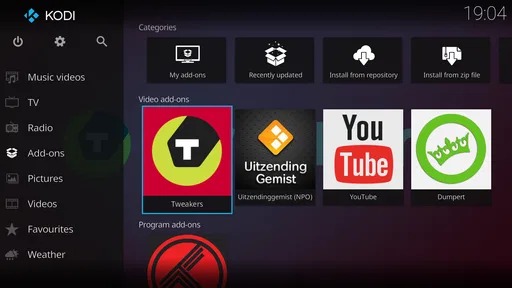
One of the standout features of Kodi is its extensive customization options. Seriously, this app is like a chameleon. Whether you want to change the look and feel of the interface or add new functionalities, Kodi's got you covered. The app supports a wide range of add-ons, allowing you to tailor it to suit your specific needs. From skins to plugins, the possibilities are virtually endless.
I recommend changing one thing at a time rather than installing several add-ons at once. That makes it easier to tell which change improved your setup and which one caused confusion or stopped behaving as expected. A useful trade-off is that a customized home screen can make everyday browsing faster, but too many menus and options can make Kodi harder for other people in the household to use. I would keep the main screen focused on the libraries and sources everyone actually needs.
There is a broader reason to be selective: an add-on is not just decoration if it changes where content comes from or how the app behaves. I would read its description, consider whether I recognize its source, and avoid adding it simply because it promises more choices. If an add-on is no longer useful, removing it can keep the interface easier to understand. A smaller setup is often easier to maintain and troubleshoot than one assembled all at once.
Playback, sources, and sensible checks
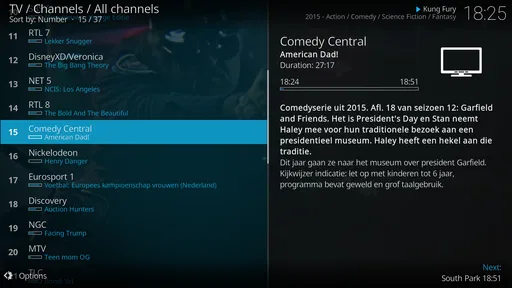
Now, onto the main event: streaming and playback. Kodi excels in this department. It supports a wide array of formats, so you can kiss compatibility issues goodbye. Whether you're streaming from your local library or tapping into online content, the playback is smooth and seamless. Buffering? Not an issue here. I found that Kodi efficiently handles high-definition content, offering a quality viewing experience every time.
Compared with a typical video player, Kodi is more about building a browsable media space than opening a file and pressing play. That extra structure is useful when a collection spans different folders or sources, but it is unnecessary overhead for occasional viewing. Before settling in, I would test a representative file and check that the audio and subtitles behave as expected on the device I plan to use. A quick test is more practical than discovering a mismatch halfway through a film.
That small test can be especially helpful when the viewing setup changes. A clip that plays acceptably on one screen may not be the best way to judge how a full film will feel on another. I would check a file similar to what I plan to watch, confirm the sound is at a comfortable level, and make sure any subtitle choices are readable. This is not a complicated ritual; it is simply a way to catch an avoidable problem before committing to a long viewing session.
Online sources deserve a little extra care. Add-ons can change what appears in the interface, so I would install only ones I recognize and understand, and review what each asks me to do before relying on it. Kodi’s flexibility should not be confused with every add-on having the same origin or behavior. If a source is unfamiliar, I would leave it out rather than treating its presence in a customizable setup as an endorsement.
Trust, choices, and sensitive moments
My cautious approach is to separate what I can see and choose inside the app from assumptions about what happens beyond it. I would review the permissions presented during installation or use on my own device, and make decisions based on the prompts and controls actually shown there. I would not infer a data practice from the app’s open-source character, nor assume that every add-on follows the same approach. When a source asks for access or information I do not understand, I would pause and decide whether that source is necessary.
This matters most when adding an unfamiliar source or connecting to a collection that other people in a household also use. Before changing a shared setup, I would make sure I understand which library or source I am adjusting and who may be affected. If I cannot explain why an add-on is needed, I would leave it out. Kodi gives users room to shape the experience, but that room is most helpful when each choice has a clear purpose.
Useful routines beyond the first evening
A realistic everyday use is settling in after work, choosing a film from a personal collection, and returning to the same library later without searching through separate folders. In that situation, the effort spent organizing the source can pay off because the app becomes a familiar route to media you already have. For a quick clip someone sends you, though, opening it in the device’s ordinary player is likely more direct. Kodi is strongest when the repeated routine justifies its setup.
Another good fit is a household that wants a shared browsing point for a known collection, provided someone is willing to keep the layout understandable. I would ask whether the people using it can find the sections they need without learning every customization choice. If not, simplifying the home screen is more useful than adding another feature. The best setup is not the one with the most options; it is the one that reduces friction for the actual viewers.
For someone comparing alternatives, I would think of the choice in terms of the job to be done. A basic device player is usually the sensible pick for occasional local playback with almost no setup. A subscription streaming app is a better fit when the priority is a managed catalog and familiar, service-specific browsing. Kodi occupies a different space: it is for organizing and playing personal media across chosen sources, with more control and more responsibility for configuring the experience.
Community and Support
No app is perfect, and every now and then, you might run into a hiccup. Fortunately, Kodi boasts an active community of users and developers who are always ready to lend a hand. The forums are a treasure trove of information, offering solutions to common issues and tips for getting the most out of your media experience. Plus, regular updates mean the app just keeps getting better.
When something goes wrong, I find it helps to change only one setting or add-on at a time and then check playback again. That simple habit makes troubleshooting less frustrating: if a problem appears immediately after one change, there is a clear place to start. Kodi is available at no cost, but it still asks for some of your time. If you prefer a polished, managed catalog with minimal setup, a mainstream subscription app or the basic player already on your device may suit you better.
That same one-change-at-a-time habit is useful when deciding whether to keep a customization. If the app becomes harder to navigate, undo the most recent change before layering on more. It is also a good reason to avoid turning setup into a weekend project unless you genuinely enjoy that process. The point is to make watching easier, not to spend more time maintaining the interface than using it.
In conclusion, if you're in the market for a robust media streaming solution, Kodi is definitely worth checking out. Its customization options, extensive format support, and strong community make it a standout choice for anyone looking to take control of their media experience. Whether you're a seasoned tech enthusiast or a casual user, Kodi has something to offer. Why not give it a try and see how it transforms your media world?
My cautious recommendation
I would recommend Kodi to someone who wants to manage personal media and is willing to learn a more configurable interface. I would skip it if I mainly want a simple, ready-made catalog or do not want to make choices about sources and add-ons. Start with the media you already trust, keep the setup lean, and expand only when you have a clear reason. That way, its flexibility feels useful rather than like extra work.
My practical recommendation is to judge it after trying one familiar source and one ordinary viewing session, rather than by how many options the menus contain. If browsing that collection feels clearer and the controls make sense to you, the app is doing the job that makes it distinctive. If you find yourself repeatedly wishing for a ready-to-watch catalog or a one-tap file player, choosing a simpler alternative is not a failure; it is just a better match for how you watch.
Kodi Frequently Asked Questions
What should I know about Kodi’s privacy before installing it?
Kodi is a media center, so the privacy considerations depend partly on how you use it and which sources or add-ons you choose. Be thoughtful about permissions, account details, and any information requested by third-party services. Reviewing an add-on’s source and privacy terms before installing it is a sensible way to decide whether it fits your comfort level.
Can Kodi organize media files I already have?
Kodi is designed to play and organize digital media, including files stored locally or on network storage. You can use it as a central place to browse and play media you already have access to, rather than relying only on content streamed from the internet. The experience depends on how your files and storage are arranged, so try the basic library features first and customize them as needed.
Is Kodi free, and what devices can I install it on?
Kodi is a free, open-source media center from the Kodi Foundation, designed to bring different kinds of entertainment into one place. It is available across platforms, including Android and iOS, as well as computers and other compatible devices. On Android, the minimum operating system requirement is version 5.0. Before installing, check that your device and operating system are supported.
Does Kodi include movies, shows, or music to watch and listen to?
Kodi is a media center rather than a catalog of entertainment included with the app. It can play media files from local or network storage and the internet, but what you can watch or listen to depends on the sources you choose to use. Make sure you have the rights to access any content you stream, and be cautious when considering third-party services or add-ons.
What is Kodi and what can it be used for?
Kodi is a free and open-source media player application that allows users to play and view most videos, music, podcasts, and other digital media files from local and network storage media and the internet. It can be installed on a variety of devices including Android and iOS smartphones, tablets, and computers. Kodi supports a wide range of file formats and offers a customizable interface with a variety of add-ons to enhance its functionality.
Pros
- Highly customizable interface
- Supports numerous add-ons
- Cross-platform availability
- Regular updates and improvements
- Free and open-source
Cons
- Complex initial setup
- Limited customer support
- May require additional plugins
- Not all content is legal
- Occasional performance issues











