Kobo | eBooks & Audiobooks
- 21.14K
- 4.5
- Installs
- 10.00M
- Price
- Free

Screenshots


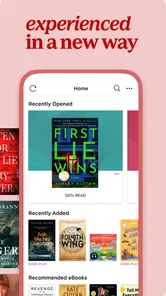
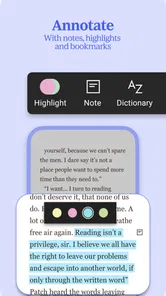
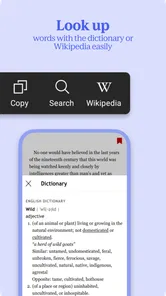
Analysis by Reviewed
If you're anything like me, you probably love getting lost in a good book. Whether it's during your commute, before bed, or while sipping a coffee at your favorite café, reading offers a delightful escape from reality. Enter the Kobo | eBooks & Audiobooks app, a digital haven for book lovers looking to explore a vast library of titles right at their fingertips.
Where a reading routine can snag
The first hurdle with a reading app is often deciding what to open, not finding a place to read. A large catalog can make browsing feel like work, especially when you have only a few minutes. I find it helps to arrive with a simple intention: continue a current book, search for a particular title, or sample something new. That keeps discovery enjoyable rather than turning every spare moment into a long scroll.
It is also worth separating browsing from reading. If you are choosing a book on a crowded commute, previews can help you judge the writing before you commit, while saving the actual reading for when you have a quieter moment. For audiobooks, a short sample can tell you whether the narrator’s voice suits you; that matters more than a polished cover when you plan to listen for hours.
A World of Books in Your Pocket
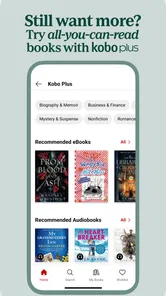
First things first, let's talk about the sheer volume of content available on Kobo | eBooks & Audiobooks. With over five million ebooks and audiobooks to choose from, it feels like having an entire bookstore in your pocket. They've got everything from bestsellers and new releases to hidden gems waiting to be discovered. It's like being in a candy store, but for books!
Setup checks that save time
Kobo Books is a free Books & Reference app from Kobo Books, and its long history in digital reading shows in the straightforward idea behind it: bring reading and listening together in one place. The app has been around since June 15, 2010, and it carries a Teen age rating. Its average rating is 3.9 from around 294,000 ratings, with roughly 21,000 written reviews and more than 10 million installs. Those figures suggest a widely used app, though they do not guarantee that every reader will like its interface or catalog.
Before settling into a book, I would check that I am signed into the account I intend to use and that the title I want is available in my library. If you use more than one device, make sure both are connected to the same account; otherwise, a missing book or a reading position that has not caught up can look like a sync failure. When a title does not appear immediately, checking the library again after refreshing the app is a sensible first step.
User-Friendly Experience
One of the standout features of this app is its user-friendly interface. Navigating through the app is a breeze, and I found it incredibly intuitive. The search function is robust, allowing you to find exactly what you're looking for without any hassle. Plus, the app's ability to sync across devices means you can start reading on your tablet and pick up right where you left off on your phone. Talk about convenience!
More From Our News Desk

Weather by Xiaomi Review: Clear at a Glance, Less Clear Up Close

X Under Pressure: Can It Recover When Posting Goes Wrong?

Clash of Clans Is Won Between the Battles

Android Auto Makes the Case for Quieter Car Software

MobiOffice: Transforming Mobile Productivity with Seamless Integration

EA SPORTS FC™ Mobile Soccer: Redefining Mobile Sports Gaming
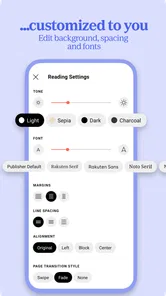
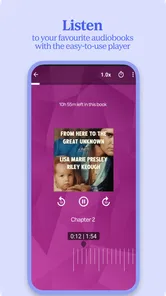
Reading on the app is a pleasant experience too. You can adjust the font size, background color, and even the brightness to suit your reading environment. And for those who love to listen, the audiobook player is top-notch, featuring adjustable playback speeds and a sleep timer for nighttime listening.
Recovering a disrupted reading session
A practical routine makes the app more useful than simply opening it whenever you remember. On a typical workday, I might read a few pages on my phone during a break, then continue on a tablet at home. If the position looks out of date, I would leave the book open long enough for the device to reconnect, then check the other device again. I would avoid jumping back and forth rapidly, since that makes it harder to tell which position is current.
For nighttime listening, the sleep timer is a small but meaningful convenience: I can set a stopping point instead of worrying that an audiobook will keep playing after I fall asleep. Adjustable speed is useful too, but faster is not automatically better. I would start close to my natural listening pace and change it only if the narration remains easy to follow. For reading, adjusting text size and brightness before beginning can prevent constant fiddling once I am absorbed in a chapter.
Personalized Recommendations
Another feature I adore is the personalized recommendation system. Based on your reading habits, Kobo suggests books tailored to your tastes. It's like having a personal librarian who knows exactly what you might enjoy next. I've discovered some fantastic reads this way that I might have otherwise missed.
Plus, the app offers a nifty feature where you can preview books before committing. It's a great way to sample a few pages or listen to a snippet of an audiobook to see if it grabs your attention.
When a problem may be elsewhere
If a book will not load or progress fails to appear on another device, I would not assume straight away that the app itself is at fault. A weak connection can interrupt tasks that rely on syncing, while a title may simply need another moment to become available. Closing and reopening the app, checking the connection, and confirming the account are sensible basic checks before trying more disruptive fixes.
There is a trade-off in having both ebooks and audiobooks under one roof: it is convenient if you alternate between reading and listening, but it may not replace a specialist audiobook service for someone whose main concern is comparing narration, or a dedicated ebook reader for someone who wants a narrower, device-specific setup. Kobo includes in-app purchases, with listed item prices ranging from five cents to $999.99, so it is wise to check the price shown for an individual title before deciding to buy. The app itself is free to install, but that should not be confused with every book being free.
Community and Sharing
For those who love to discuss books with others, the app also has a community feature where you can share reviews and comment on your favorite reads. It's a fantastic way to connect with fellow bookworms and get recommendations from people with similar tastes. You can also share your reading lists and achievements on social media, making it easy to spread the word about your latest literary discoveries.
Choosing what to read without overspending
I would treat the catalog as a place to compare, not a reason to buy impulsively. A useful habit is to search for a title, read its description, and use the preview before committing. For audio, listening to a sample is especially valuable: narration is personal, and a voice that works for a short excerpt may still not suit a long book. If I am undecided, I would save the title for later rather than filling my library with books I may not start.
The app’s free download makes it easy to explore the reading experience, but individual purchases are a separate decision. I would check the displayed price for each book and audiobook, then consider whether I want that format before buying. This matters if you move between print, ebooks, and audio, since the most convenient format can depend on where and how you expect to use a particular title.
When a different reading setup fits better
Compared with a single-purpose ebook reader, Kobo’s main appeal is having reading and listening together in an app, with a shared digital-library approach rather than a paper shelf. Compared with a service centered on audiobooks, it is more appealing to someone who also reads ebooks than to a listener who mainly wants to browse narration and organize listening. These are different priorities, not a simple ranking: I would choose the format and library I expect to use most often.
There is also a practical question of commitment. If your existing collection lives in another ecosystem, trying Kobo does not automatically make that collection convenient to move. I would first look for a specific book I want to read, then see whether the app’s reading and listening workflow suits me. That small test is more useful than switching everything at once, especially if you already have a comfortable routine elsewhere.
Who will get the most from it?
I would recommend Kobo to readers who switch between text and audio, like browsing for their next book, or want one familiar library across more than one device. It is especially handy for a reader with a mixed routine: a few pages while waiting for an appointment, then an audiobook while doing chores. The ability to change reading appearance and listening speed gives you practical ways to fit a book around the moment rather than forcing one fixed reading style.
On the other hand, if you already rely on another ebook ecosystem and have built a library there, moving everything just to try a new reading app may not be worth the hassle. It is also not the best choice for someone who wants only free reading material without checking individual titles, or who prefers paper books and does not want a digital catalog to manage. Readers who primarily want audiobooks may prefer to compare dedicated listening apps on narration discovery and listening-focused organization before settling on Kobo.
A sensible way to try it
For a first session, I would pick one book I already know I want rather than trying to judge the whole catalog at once. I would check the sample, choose the format that suits my day, and make a small adjustment to text appearance or playback speed before getting started. That gives a clearer sense of whether the app feels comfortable without turning setup into another project.
If I planned to move between devices, I would test that with a short reading session before relying on it during travel or a busy day. Read a little on one device, give it a chance to reconnect, and then check the other. This is a low-effort way to learn how the library and position behave in your own routine; it also makes troubleshooting less confusing if something seems out of sync later.
My practical verdict
To sum it up, Kobo | eBooks & Audiobooks is a treasure trove for anyone who loves to read or listen to books. With its vast library, user-friendly design, and personalized features, it elevates the reading experience to a whole new level. Whether you're a casual reader or a hardcore book enthusiast, this app is sure to become your new best friend. So why not give it a try and dive into the world of books waiting for you?
My recommendation is more measured: it is a strong fit when you want a flexible reading companion and will use both formats or appreciate having them together. Its value depends on finding titles you actually want and liking the way the app handles your sessions. If your current library already works well elsewhere, or audiobook discovery is your only priority, compare those options first. If you are curious, start with one title, check its sample and price, and see whether Kobo earns a place in your everyday routine.
Kobo | eBooks & Audiobooks Frequently Asked Questions
Can I adjust the reading display to suit my preferences?
Kobo is intended for reading eBooks on a phone or tablet, so the app may appeal if you want to read digitally rather than carry a printed book. Before downloading, consider whether reading on your device suits your habits, especially for longer sessions. You can also use Kobo for audiobooks, giving you another way to enjoy books when reading on screen is less convenient.
Can I listen to audiobooks through the app?
Yes. Kobo includes audiobooks alongside eBooks, so you can choose listening when that suits your day better than reading on screen. Audiobooks are part of the same digital library experience, and individual titles may be purchased. If you expect to listen without an internet connection, download a title in advance so it is available offline.
Does Kobo offer books in different genres?
Kobo is presented as a broad eBook and audiobook library, with titles across various genres. That variety can make the app useful if you enjoy browsing for a new read as well as searching for a particular book. Since each title is selected individually, check the book’s details and price before purchasing to make sure it is the right choice for you.
Can I use Kobo on Android and iOS?
Kobo is available for Android and iOS, making it an option for readers who use either mobile platform. The app is developed by Kobo Books and is listed in the Books & Reference category. If you use more than one device, sign in with your Kobo account to access the books associated with it, while keeping in mind that device compatibility can depend on the platform.
Is Kobo a popular app, and what should I know about its rating?
Kobo has an average rating of 3.9 from around 294,000 ratings, with about 21,000 reviews and over 10 million installs. These figures offer a broad sense of its reach, but they cannot tell you whether its reading and listening experience will match your own preferences. Consider whether its mix of eBooks, audiobooks, and individual purchases fits the way you want to use a book app.
Pros
- Extensive library of eBooks and audiobooks.
- User-friendly interface for easy navigation.
- Syncs across all devices seamlessly.
- Supports multiple languages for diverse readers.
- Offline reading and listening available.
Cons
- Limited free books compared to competitors.
- Occasional app crashes reported by users.
- Requires stable internet for syncing.
- No option to lend or borrow books.
- Some titles are region-restricted.











