

Koala Sampler
- 523.00
- 4.8
- Installs
- 100.00K
- Price
- $4.99

Screenshots
Analysis by Reviewed
I like phone music tools most when they turn a spare moment into a useful musical idea, rather than demanding that I sit down for a full studio session. Koala Sampler is a paid music-making app from elf audio, and its appeal is easy to understand: record a sound, work with it as a sample, and build from there. I’d recommend it to curious beat-makers, but it is worth knowing what kind of workflow—and what kind of purchase—you are signing up for.
What the purchase gets you
The app costs $4.99, so it is a paid download rather than a free sampler with an optional upgrade. In-app purchases range from $2.99 to $4.99 per item. I would treat those as possible additional spending, not assume the starting price includes every extra you might want. If you are keeping to a strict budget, check the in-app purchase choices before deciding; the useful question is whether the core sampling approach already matches what you want to do.
That distinction matters because a sampler is only good value when you actually enjoy making music this way. If you expect a ready-made library of songs, or want a conventional recorder for capturing long performances, this purchase is unlikely to solve the problem. If you like turning small sounds into rhythmic material, though, a focused tool can be more inviting than opening a large production app and facing a full studio-style workflow.
Making beats from sounds around you
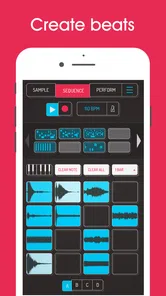
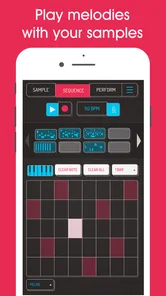
Jumping right into the Koala Sampler, the first thing you’ll notice is how intuitive and straightforward it is to use. The developers have done a stellar job in ensuring that the user interface is as friendly as possible, so you can focus more on creating and less on figuring out how things work. Whether you’re a newbie or a pro, you’ll find yourself navigating through the app with ease. Trust me, it’s like the app reads your mind!
From a quick recording to a musical idea
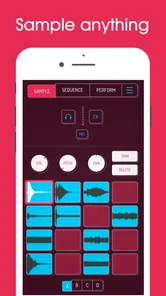
One of the coolest features has to be the live recording. You can record anything and everything around you and instantly transform it into a sample. The magic happens when you start layering these samples to create something truly unique. It’s like painting with sounds, and the possibilities are literally endless.
That makes the app especially handy when inspiration arrives away from a desk. I might capture a short rhythm from objects nearby, then treat it as raw material instead of worrying whether it sounds polished on its own. A practical tip is to record with the next step in mind: a crisp, short sound is easier to place rhythmically than a long recording with an unclear start or finish. Sampling invites experimentation, but a little care at capture time can save frustration later.
For example, on a quiet afternoon I could tap a mug, a desk, and a set of keys, capture a few distinct sounds, and try arranging them into a rough rhythmic sketch. The point is not to mistake that sketch for a finished track. It gives me a place to test timing and texture, and it can keep an idea alive until I have time for a longer session. Recording several contrasting sounds is often more useful than collecting many similar ones: a low thump, a bright click, and a short rattle each give a beat a clearer role.
More From Our News Desk

 Gmail
GmailGmail in a Busy Inbox: Who Benefits Most?
From first account to crowded workday, Gmail earns its place through dependable search and flexible sorting—but its best fit depends on how much inbox maintenance you can tolerate.

 Prime Video
Switching to Prime Video: What Changes in Your Viewing Routine
Prime Video can make a compelling second home for streaming, but switching means learning a different catalog, rental layer, and route from browsing to playback.

 Universal TV Remote Control
Universal TV Remote Control Works Best as a Reliable Backup
A phone remote earns its place through quick setup and reliable habits. Here is how to get more from Universal TV Remote Control—and where its limits show.

 Weather - By Xiaomi
Weather by Xiaomi Review: Clear at a Glance, Less Clear Up Close
Xiaomi’s weather app makes everyday forecasts quick to scan, but its calm surface can leave useful details and recovery paths harder to find than they should be.

 X
XX Under Pressure: Can It Recover When Posting Goes Wrong?
A resilience-focused review of X, examining setup, mistaken posts, interruptions, weak connections, and the gaps that matter when recovery needs to be dependable.

 Clash of Clans
Clash of Clans Is Won Between the Battles
Its raids are quick; its community is a long-term project of coordination, teaching, rivalry, and shared responsibility—with all the friction that entails.
Latest News



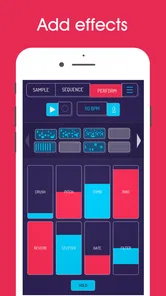
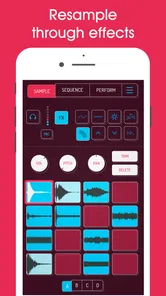
Another highlight is the app’s ability to support MIDI controllers. This means you can hook up your favorite gear and start jamming right away. Plus, the wide range of effects available will make your tracks sound polished and professional. Distortion, reverb, delay – you name it, Koala Sampler has got it all covered.
A useful way to approach effects is to make the sample work before adding them. If a sound already has a clear rhythmic place, effects can add character; if its timing or source is confusing, extra processing may only make it harder to use. I’d keep an untreated version of an interesting recording in mind while experimenting, so the original remains a reference point. That small habit helps me distinguish a genuinely stronger sound from one that is merely louder or more dramatic.
Where it fits among music apps
Compared with a conventional audio player or a music library app, this is for making material, not simply listening to finished tracks. And compared with a broad, traditional recording setup, its sample-first approach feels more immediate: you can begin with a found sound and shape a beat around it. That focus is a strength when you want quick ideas or playful rhythm-building, but it is not automatically the best choice for someone who wants a complete, all-purpose recording environment. I’d choose a larger production setup for a project that depends on a more expansive arrangement workflow; Koala is appealing when sampling is the point.
There is also a practical difference from choosing a general-purpose music production app. A broader workstation may be a better fit if your usual starting point is recording long parts, arranging them across a song, or managing a larger project in one place. A dedicated sampler makes more sense when the source material itself is central and you want to experiment with short captured sounds. Neither approach is universally better; I would choose based on what I tend to create, not on which app sounds more powerful in the abstract.
In everyday use, I can imagine opening it during a quiet break, recording a few sounds from the room, and making a rough beat before returning to the day. The result need not be a finished song to be useful: a small sketch can preserve an idea that would otherwise disappear. If you use a MIDI controller, it may also suit a more deliberate session, while the phone-based workflow remains convenient for experimenting without setting up a full rig.
For a beginner, one question is whether the app teaches the basics or expects you to learn by doing. I would approach it as a hands-on instrument rather than a step-by-step music course: make a short recording, try it in a beat, listen back, and adjust. That cycle is a good way to discover what makes a sound useful. Someone who needs formal lessons or a guided path through music theory may prefer to pair a sampler with learning material, or start with an app that is explicitly designed to teach.
Cost, expectations, and practical tradeoffs
Koala Sampler costs $4.99, so this is not a free sampler that you can try indefinitely before deciding whether to pay. In-app purchases are listed at $2.99 to $4.99 per item, which means the initial price should not be mistaken for a promise that every possible addition is included. I’d check the purchase options in the app before budgeting for extras. Its 4.8 average from around 2,700 ratings and more than 100,000 installs suggest that many people have found a reason to keep using it, though popularity alone cannot tell you whether its particular workflow suits you.
Those figures offer context, but they are not a substitute for matching the app to your habits. The cost is easier to justify if sampling is something you expect to return to, rather than a one-evening experiment. In my view, the main tradeoff is focus: an app centred on samples can make that kind of play feel approachable, but it cannot be the right fit for every music task. Before spending more on optional purchases, I’d first use the core workflow enough to know which limitations, if any, are genuinely getting in the way.
The app is rated for Everyone and requires OS 8.1 or later. Version 1.4142 is the current version, and it was released on March 26, 2020. Those details make compatibility and age suitability straightforward to assess, but the more important question is whether you enjoy building music from individual sounds. Recording and layering can be absorbing; it can also feel fiddly if you prefer selecting a ready-made backing track or arranging long passages in one continuous timeline.
There is a difference between a quick idea-making session and a setup you would rely on for every stage of a production. If you mainly want to preserve a long spoken recording or capture a performance as it happens, a straightforward audio recorder is the more direct tool. If you want a complete arrangement environment, a larger production app is the more sensible comparison. I see the sampler as strongest in the middle ground: more creative than a basic recorder, but more specific and compact in purpose than an all-in-one studio.
A good fit for curious makers
What’s really special about using the Koala Sampler is the vibrant community that comes with it. Once you’re in, you’re part of a global network of music creators who love sharing tips, tricks, and even their latest beats. You’ll never feel alone on your musical journey, and there’s always something new to learn from fellow users.
Moreover, the developers are super responsive and continually update the app based on community feedback. It’s clear they’re passionate about making this app the best it can be, and it shows in the frequent updates and improvements.
I’d point beginners toward it if they are happy to learn by trying sounds and listening back, rather than expecting a guided course in music theory. Experienced producers may value it as a compact way to sketch sample-based ideas, especially if using a controller is part of their routine. I’d steer away anyone who mainly wants a conventional music player, or who would rather record and edit a complete song in a single, broader workstation. Before buying, ask yourself whether you want to create with samples often enough to make a dedicated sampler worthwhile; the price makes most sense when that activity is the reason you are opening the app.
It can also suit someone who does not think of themselves as a producer yet. If you enjoy noticing the different sounds in an ordinary room, you already have a simple starting point: capture a few, compare their qualities, and see whether they suggest a pattern. That curiosity matters more here than arriving with polished musical plans. On the other hand, if you dislike trial and error or want a finished arrangement as soon as you open an app, this style of making music may feel like work rather than play.
One sensible way to judge the purchase is to give yourself a small goal before you start. I might aim to make one short rhythm from three recorded sounds, rather than trying to produce a complete song in a single sitting. A limited task makes it easier to learn what the sampler is good at and whether I enjoy its process. If I keep returning to those small sketches, that is a stronger sign of value than simply being impressed by the idea of sampling.
My verdict on the purchase
In a word, absolutely! The Koala Sampler is a fantastic tool for anyone looking to dive into music production or just have some fun experimenting with sounds. It’s versatile, user-friendly, and incredibly powerful for an app of its size. Whether you’re on your morning commute or chilling at home, you’ll find yourself reaching for your phone to create something magical.
I would make that recommendation with one qualification: buy it for its sample-based way of working, not because you expect it to replace every other music app. The paid entry price is clear, while the additional in-app purchases are a separate consideration. A casual listener who only wants playback should skip it; a musician who wants an expansive recording environment may be happier elsewhere. But if the thought of turning everyday sounds into a beat genuinely appeals, this is a focused, approachable place to begin.
So, if you haven’t already, give the Koala Sampler a whirl. Who knows? You might just produce the next big hit right from your smartphone. Happy sampling!
Koala Sampler Frequently Asked Questions
What kind of app is Koala Sampler, and who makes it?
Koala Sampler is a music and audio app from elf audio, described as “The ultimate pocket sampler.” It is designed for making music with samples, so it may appeal to people who want a compact creative tool on a mobile device. The app is rated for Everyone, making it suitable for a broad audience.
What platforms is Koala Sampler available on?
Koala Sampler is available on both Android and iOS platforms, making it accessible to a wide range of users. Whether you're using a smartphone or a tablet, you can download and enjoy the app seamlessly. Ensure your device meets the necessary system requirements for optimal performance. On Android, the minimum operating system requirement is version 8.1.
What features does Koala Sampler offer for music creation?
Koala Sampler is packed with a variety of features that make it a powerful tool for music creation. Users can record their own samples, edit and manipulate them, and utilize the built-in effects to enhance their sound. The app also supports MIDI functionality and offers a user-friendly interface for both beginners and experienced musicians.
Is there a cost associated with downloading Koala Sampler?
Koala Sampler is a paid app, which means users need to purchase it from the App Store or Google Play Store. The listed price is $4.99, with in-app purchases ranging from $2.99 to $4.99 per item. Considering the extensive features and capabilities it offers, many users may find it a worthwhile investment for music production. Prices can vary by region and store.
Can I share my creations from Koala Sampler with others?
Yes, Koala Sampler allows users to easily share their musical creations with others. The app supports exporting tracks in various formats, enabling users to share their work on social media, music platforms, or with friends and collaborators. This makes it a great tool for both personal projects and collaborative work.
Pros
- Intuitive interface for quick sampling
- High-quality audio output
- Supports multiple audio formats
- Easy integration with other music apps
- Low latency performance
Cons
- Limited free version features
- Requires in-app purchases for full access
- Occasional crashes on older devices
- No built-in tutorial for beginners
- Limited effects compared to competitors











