Knoxville News from WBIR
- 1.06K
- 4.6
- Installs
- 100.00K
- Price
- Free

Screenshots



Analysis by Reviewed
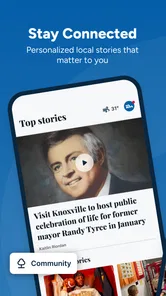
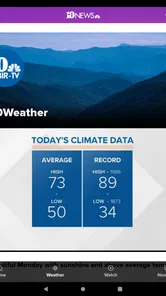
When I want local information rather than a stream of national headlines, I find Knoxville News from WBIR much more useful than a general news app. It is a free news and magazines app from TEGNA focused on Knoxville and East Tennessee, with local reporting, video, and weather in one place. I tested it with the habits I would use at home: checking what happened overnight, looking at the forecast before leaving, and sharing a useful update with someone else in the household.
My main impression is that this is a practical local-news companion, not a replacement for every news source. Its value comes from geographic focus. If you live in the Knoxville area, work there, commute through East Tennessee, or still have family nearby, the app can reduce the effort of finding relevant information. If you are looking for broad national coverage or an international news digest, its narrow focus becomes a limitation rather than a strength.
How it fits into a shared household routine
A realistic use case is a household where different people need the same local information for different reasons. One person may open the app in the morning to check weather video before driving. Another may look for a local breaking-news update during the day. Someone else may watch a report in the evening instead of reading a long article. The app works well in that kind of shared-device rhythm because its subject matter is immediately recognizable: Knoxville and East Tennessee are the center of attention.
I would not treat it as a family dashboard, calendar, or shared planning tool. It does not replace a group chat for deciding who is picking up groceries, and I would not assume that reading the same report means every household member has seen it. Its role is simpler: it gives everyone a common local information source, while each person decides what to read or watch.
The combination of written updates, video, and weather is especially useful when time is limited. A person who does not want to read several paragraphs can look for a video report, while another household member may prefer scanning headlines. That flexibility makes it easier to fit local news into different routines without forcing everyone to consume it in the same way.
There is also a useful distinction between checking information and acting on it. I might use the weather section to decide whether to leave earlier, but I would still use another method to coordinate that decision with the rest of the household. In practice, the app informs the conversation; it does not manage the conversation. That boundary is worth understanding before installing it on a device used by several people.
What I noticed during everyday use
The strongest workflow is a short visit with a clear purpose. I open the app to answer one local question, such as what is happening in the area or what the weather may mean for the day. Then I leave once I have the relevant information. This makes the app feel more efficient than endlessly scrolling through a large national feed where local stories are mixed with topics that have no connection to my day.
More From Our News Desk

Weather by Xiaomi Review: Clear at a Glance, Less Clear Up Close

X Under Pressure: Can It Recover When Posting Goes Wrong?

Clash of Clans Is Won Between the Battles

Android Auto Makes the Case for Quieter Car Software

MobiOffice: Transforming Mobile Productivity with Seamless Integration

EA SPORTS FC™ Mobile Soccer: Redefining Mobile Sports Gaming
Video is helpful when the situation benefits from seeing or hearing context. A weather explanation, an on-location report, or a visual account of a local event can communicate more quickly than text alone. The trade-off is that video is less convenient when I am somewhere quiet, using limited attention, or trying not to disturb other people. In those moments, a written update is the better choice.
My practical tip is to use the app as a local checkpoint rather than keeping it open constantly. Checking it at natural moments—before a commute, during a break, or in the evening—helps separate useful updates from habitual scrolling. That approach also makes the app easier to share in a household, because I can pass along a specific story or weather point instead of telling someone to search through the entire feed.
Setting it up without blurring personal boundaries
Because this is an app for Everyone, it can suit a mixed-age household at a basic content-rating level. That does not mean every story will be equally interesting or equally easy for every reader. News can involve serious events, difficult images, or complicated civic issues, so an adult should still use ordinary judgment when a younger person wants to browse independently.
I would install it separately on each person’s phone when possible, rather than assuming one shared device is the best arrangement. Separate devices make it clearer who is reading, watching, or deciding to share something. They also avoid the small but real friction of interrupting another person’s news check just because the app is installed on a common tablet.
For a shared tablet, I would establish a simple household rule: use the app for information, and discuss anything urgent before treating a report as an instruction. A weather update may influence travel plans, while a developing local story may change how someone feels about going somewhere. The app can provide useful context, but it should not silently become the household’s decision-maker.
The age rating also helps answer a practical question: can a younger family member open it? Yes, the rating is Everyone, but I would still introduce it with guidance rather than handing over unlimited responsibility. A child may understand the weather section but need help interpreting a developing news report. The app’s accessible format should not be confused with a guarantee that every subject is simple.
At the technical level, the current version is 50.23.2 and the minimum operating-system requirement is 7.1. That makes it approachable for devices that are not running the newest software. I would still check the device before planning a shared installation, especially if the household relies on an older phone or tablet that is used for several other tasks.
Coordinating around local information
The app becomes more valuable when a household agrees on how to use it. For example, one person can check the weather before everyone leaves, while another can look at local coverage during the day. This avoids four people repeating the same search and gives the household a common reference point when plans change.
However, I would avoid presenting one person’s interpretation of a report as the final word. Local news can develop quickly, and an early report may not answer every practical question a family has. If the issue affects travel, school, work, or personal safety, I would read the available context and then confirm the decision through the appropriate official or direct source. That is not a criticism unique to this app; it is simply a responsible way to use any news service.
A less obvious advantage of the local focus is that it can improve conversations. National apps often make it difficult to explain why a story matters to a household in Knoxville. Here, the location is already part of the product’s purpose. A person can bring a local report into a discussion about commuting, neighborhood concerns, weather preparation, or community events without first filtering away unrelated coverage.
Another useful habit is to share the topic, not just the headline. If I tell someone, “Look at the weather report,” that may be enough for a quick decision. If I mention why it matters—such as an evening drive or an outdoor plan—the other person can judge whether to open the article or video. This keeps the app from becoming a source of constant notifications in the household, even though the actual sharing happens outside the app.
For people who need a record of information, I would be cautious about relying on memory after watching a video. Video is convenient, but a spoken detail can be harder to revisit than a written passage. My approach would be to note the important point or return to the relevant report before making a decision. That small habit is particularly useful when several family members are working from different schedules.
Age, trust, and the limits of a local news feed
The Everyone rating makes Knoxville News from WBIR a reasonable option for a broad household audience, but trust still requires attention. A local app feels personal because its stories concern nearby places, yet that familiarity can make people react quickly. I prefer to slow down when a report is emotionally charged and distinguish between what the app reports and what I assume it means for my family.
For teenagers, the app can be a useful way to understand what is happening around them, especially when local events affect transportation or community life. I would encourage them to compare important information with other reliable sources rather than treating one app as the complete picture. For younger children, I would use it together and explain unfamiliar terms, especially in serious stories.
Adults may appreciate the app’s directness, but they should also recognize who will not benefit most from it. Someone who has recently moved away from East Tennessee but wants broad coverage may find the regional focus too narrow. A reader who follows several states, national politics, business, sports, and international events will probably prefer a larger news platform, using this app only when Knoxville-specific information matters.
The rating of 4.6 from around 3.9 thousand ratings suggests that many users find the app worthwhile, and its install count is over 100 thousand. I see those figures as signs of an established audience, not as proof that every person will enjoy the experience. A high average cannot remove the basic trade-off between local depth and wider coverage. The right choice depends on whether Knoxville and East Tennessee are central to your daily life.
The app has been available since April 25, 2012, which gives it a long presence in the mobile-news space. For me, that matters less than how well it fits current habits, but it does make the app feel like a continuing local-news option rather than a temporary experiment. It is free, so trying it carries little financial risk; the more important cost is attention, especially if a household already has several news apps competing for it.
Where it stands beside usual alternatives
Compared with a national news aggregator, this app is more focused and less useful for discovering unrelated subjects. That narrowness is exactly why I would choose it when local relevance matters. A general aggregator may give me more variety, but I may have to search or scroll to find Knoxville coverage. Here, the regional purpose is clear from the start.
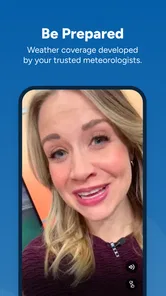
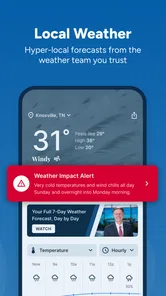
Compared with a weather-only app, Knoxville News from WBIR offers broader context. Weather is one part of the experience rather than the entire reason to open it, so I can move from a forecast-related check to local reporting without changing apps. The compromise is that someone who wants detailed weather tools above all else may prefer a dedicated weather service.
Compared with social media, the app feels more purposeful for local updates. Social feeds can surface eyewitness discussion and personal reactions, but they can also mix rumor, opinion, and unrelated posts. I would use social platforms to see what people are talking about, then use a local news source for a clearer report. This app fits better when I want information without the social noise.
Compared with television news, the mobile format is more convenient for checking information at a time I choose. Video preserves some of the immediacy of a broadcast, while the app avoids requiring me to be in front of a television at a particular hour. Still, someone who prefers a scheduled program, a larger screen, or a complete broadcast-style experience may not find a phone app as satisfying.
One trade-off that is easy to miss is attention switching. A focused local app can save time when the question is local, but it can also encourage a person to open another source whenever the story extends beyond the region. I would keep it alongside a broader source only if I genuinely need both. Otherwise, the two apps may duplicate headlines without improving understanding.
Who should use it, and who should skip it
I would recommend it to Knoxville residents, East Tennessee households, local commuters, and people who want regional news with video and weather close at hand. It is particularly suitable for someone who checks local conditions before leaving home or who wants a quick way to stay connected with events in the area. The free price makes it easy to test without committing to a subscription.
I would also recommend it for families who want a shared local reference point, provided they keep account and decision boundaries clear. Each person can use the information for their own plans, while the household discusses anything important separately. That balance works better than treating the app as a formal family-control system or assuming that one installation automatically coordinates everyone.
I would skip it if my main goal were international reporting, deep national analysis, or coverage from several regions. I would also look elsewhere if I wanted highly specialized weather tools, a personal news-reading system built around many publications, or a social space for discussion. The app is strongest when its local identity is an advantage, not when I ask it to become something broader.
People who dislike video in news apps may still find value in the written coverage and weather information, but they should expect the experience to include multiple formats. Likewise, someone using a very old device should confirm that the operating-system requirement fits before making it part of a shared setup. These are manageable considerations, yet they affect whether the app feels smooth in daily use.
My household verdict
After using Knoxville News from WBIR as a local information source, I see it as a sensible, focused app rather than an all-purpose news replacement. Its best quality is the way it brings Knoxville and East Tennessee coverage, video, and weather into one free mobile destination. That focus can make everyday checks faster and can give a household a common starting point for local conversations.
I would install it for a household that regularly needs Knoxville-area information, then agree on a few simple habits: check it for context, share the reason a story matters, and confirm urgent decisions through the right direct source. I would not use it to blur personal boundaries or to assume that every age group will interpret news in the same way.
My final recommendation is positive, with a clear condition: choose it because you want local relevance. The strong rating, established audience, Everyone age classification, and free access make it easy to try, while the long-running availability and current version support its role as a practical option. If your daily life connects to Knoxville or East Tennessee, it can earn a regular place on your phone. If your interests are wider than the region, pair it with a broader service—or skip it and choose a source that matches your actual news habits.
Knoxville News from WBIR Frequently Asked Questions
Who publishes the Knoxville News from WBIR app, and what is it for?
The Knoxville News from WBIR app is published by TEGNA and is made for people who want local news from Knoxville and East Tennessee in one place. It brings together news, video, and weather coverage, giving readers a mobile way to follow regional developments. It is listed in the News & Magazines category and is intended for a general audience.
What is the Knoxville News from WBIR app?
Knoxville News from WBIR is a local news app focused on Knoxville, East Tennessee, and surrounding communities. It provides access to breaking news, weather updates, traffic information, sports coverage, investigative reports, and videos from WBIR 10News. The app is designed for readers who want a convenient way to follow regional stories without relying only on a mobile browser or television broadcasts.
What type of news and information can I find in the app?
The app covers a broad range of local and regional topics, including breaking news, crime and public safety, politics, education, health, entertainment, business, community events, and Tennessee sports. Its weather section is especially useful for local forecasts and severe-weather information. Available stories and features can change throughout the day as the WBIR newsroom publishes new reports and updates developing events.
Does the Knoxville News from WBIR app provide live weather alerts?
Yes, the app is intended to help users follow changing weather conditions in the Knoxville area and across East Tennessee. Depending on your device settings, it may offer forecasts, radar information, severe-weather coverage, and notifications about important conditions. For the best experience, allow notifications and location access when requested, while remembering that alerts may vary according to your selected preferences and current regional coverage.
Is the WBIR Knoxville News app free to download and use?
The app is generally available as a free download, allowing users to read news stories, view videos, check weather information, and browse other WBIR content without paying an upfront installation fee. However, internet or mobile-data charges may apply, and certain features can change over time. Advertising may also appear because free news applications are commonly supported by commercial content.
Pros
- Fast access to breaking news and local updates in the Knoxville area.
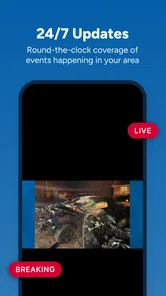
- Live video coverage helps users follow major events as they happen.
- Weather forecasts and alerts are useful for planning around changing conditions.
- News categories make it easy to browse sports
- traffic
- and community stories.
- Push notifications can keep users informed about important local developments.
Cons
- Some notifications may feel frequent
- especially during major news cycles.
- Video content can use significant mobile data when viewed over cellular networks.
- Advertising may interrupt browsing and reduce the app’s visual simplicity.
- Coverage is focused on Knoxville
- so it may offer limited value elsewhere.
- Certain articles may require extra taps before the full story is displayed.













