Kikistory-Good Novel & Stories
- 358.00
- 3.2
- Installs
- 500.00K
- Price
- Free

Screenshots
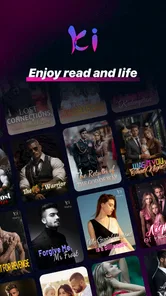
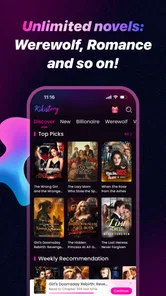
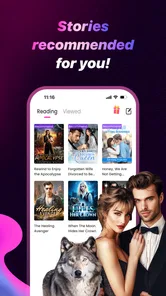

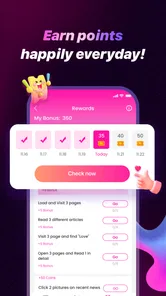
Analysis by Reviewed
I spent time with Kikistory-Good Novel & Stories as a mobile reading app, and my first impression was that it is built for people who want fiction available in small, convenient pieces. It sits in the Books & Reference category, but it feels less like a traditional digital bookshelf and more like a stream of novels, short stories, and serialized reading choices that you can dip into whenever you have a spare moment.
That distinction matters. If you normally buy complete ebooks and expect a quiet, library-style reading experience, Kikistory may feel more commercial and less predictable. If you enjoy discovering ongoing stories, browsing trending titles, and switching between longer fiction and quick shorts, its format is easier to appreciate. I found the app most useful when I treated it as a source of regular reading rather than as a replacement for every ebook service I already use.
The app is free to install, although its in-app purchases range from $0.99 to $199.99 per item. That broad range is worth keeping in mind before settling into a story. Kikistory is also marked Mature 17+, so I would not recommend handing it to a younger reader simply because it is listed under books. Its audience is clearly adult, and the reading choices should be approached with that age guidance in mind.
How Kikistory feels in everyday use
I find Kikistory most useful when a household treats it as one adult’s reading space rather than a shared family bookshelf. That distinction makes everyday use simpler: choose a story for your own spare moments, then keep the phone available for other people without assuming they will pick up where you left off. From there, a little thought about device and account boundaries can prevent confusion.
A reading feed designed for discovery
The central appeal is the mixture of novels, trending stories, shorts, and ebooks. Instead of opening the app with one fixed reading path, I found myself moving between browsing and reading. One minute I could look for a longer story to follow; the next, I could choose something shorter for a bus ride or a break between tasks. That flexibility gives Kikistory a more active, discovery-focused feel than a conventional ebook reader.
My advice is to decide what kind of session you want before browsing too deeply. When I was looking for a substantial story, jumping through too many recommendations made it easy to postpone actually reading. For a short break, that same browsing style worked well. The app is at its best when you use its variety deliberately instead of allowing the catalog to choose your entire evening.
A realistic use case would be a reader commuting without enough time for a full chapter of a printed book. A short story can fit that moment, while a serialized novel can be saved for a longer ride home. Someone waiting at a clinic, taking a lunch break, or winding down before sleep can use the same app differently. I like that it does not force every reading session into the same length.
More From Our News Desk

Weather by Xiaomi Review: Clear at a Glance, Less Clear Up Close

X Under Pressure: Can It Recover When Posting Goes Wrong?

Clash of Clans Is Won Between the Battles

Android Auto Makes the Case for Quieter Car Software

MobiOffice: Transforming Mobile Productivity with Seamless Integration

EA SPORTS FC™ Mobile Soccer: Redefining Mobile Sports Gaming
Who will get the most from it
I would recommend Kikistory to readers who enjoy romance, drama, suspense, and other story-led formats that are easy to sample. It is especially suitable for people who like finding a new title through a recommendation rather than arriving with a specific book already in mind. The combination of trending material and shorter works makes experimentation less demanding than buying a complete ebook every time curiosity strikes.
It is also a reasonable fit for readers who prefer a phone-first habit. You can open it when you have only a few minutes, then return to a longer story when you have more time. That kind of continuity is more useful to me than a large collection that I rarely open. The app encourages a habit of reading in fragments, which can be a strength for busy users.
On the other hand, I would skip it if my priority were a carefully organized personal library, ownership of standard ebook files, or a distraction-free reading environment with no temptation to keep browsing. Readers who only want established authors or complete books should compare it with a traditional ebook store or library app first. Kikistory’s attraction is variety and immediacy, not the feeling of visiting a quiet digital bookshelf.
What the current release tells me
The current version is 2.13.0, and that suggests the app has already gone through multiple rounds of refinement since its release on October 4, 2022. I do not read that number as proof that every rough edge has disappeared, but it does place Kikistory beyond the earliest stage of a new reading product. The experience feels like an established service that is still being adjusted rather than a finished archive that will never change.
That matters for existing users because a later version can improve everyday stability and navigation without changing the basic reason people install the app. If you already enjoy its story selection, the current build is the one to judge rather than relying on impressions from an earlier release. For a new user, the practical takeaway is simple: expect an active product, not a static ebook reader.
The app comes from Spoton Limited and has passed the half-million-install mark, with an average rating of 3.2 from roughly five thousand ratings. I see those figures as a mixed signal. They show that Kikistory has attracted a substantial audience, but the middling rating also tells me that the experience will not satisfy everyone equally. I would install it with realistic expectations and spend time testing the reading flow before paying for a large amount of content.
How the free entry point changes the decision
Because the app is free, the sensible approach is to explore before committing money. I would read enough of several types of story to learn whether the writing style, pacing, and presentation suit me. A title that looks appealing in a thumbnail may not be the right match once the chapters begin, so the free starting point is valuable as a screening tool.
The purchase range requires more discipline than the word “free” might suggest. A small purchase may feel harmless, but repeated chapter or content payments can become difficult to track when several stories are being read at once. I recommend choosing one story to test first, noting what you spend, and only then deciding whether the broader catalog deserves a larger commitment.
This is one area where Kikistory differs from a library app. A library usually asks me to manage availability and return dates, while a conventional ebook store often centers on individual book purchases. Kikistory’s free access and in-app purchase model make browsing easier, but they also make budgeting part of the reading experience. That trade-off should be visible before a reader becomes attached to several ongoing stories.
Small workflows that make the app easier to manage
My first useful workflow is to separate discovery sessions from reading sessions. I browse when I am willing to compare several titles, and I open a chosen story directly when I only have a few minutes. This prevents the recommendation-heavy side of the app from taking over every visit. It sounds minor, but it makes a noticeable difference when the goal is finishing a chapter rather than collecting possibilities.
My second tip is to use short works as a test of the reading experience. Before investing in a longer novel, I would try a short story and pay attention to how comfortable the text feels on the phone, how easy it is to move through the material, and whether the app’s pacing suits me. This gives a better sense of fit than judging the service from its promotional artwork alone.
A third trade-off is worth considering: variety can improve consistency while weakening concentration. Having novels and shorts together means I can always find something that matches my available time, but it also makes abandoning a story very easy. I get better results when I choose a small personal queue and resist opening every attractive title immediately. Kikistory rewards selection, not endless tapping.
Where it still falls short
The biggest limitation for me is that the app’s broad range of content can make the experience feel less curated than a traditional reading service. A busy catalog is useful when I want options, but it can also create decision fatigue. Readers who prefer a clear recommendation from a trusted editor may find the constant choice tiring.
The purchase structure is another point of friction. Even though the app costs nothing to start, the upper end of its individual purchase range is substantial. I would not begin using it casually without checking how a favorite story is paid for and deciding on a personal spending limit. This is particularly important for anyone who tends to read several serialized stories simultaneously.
The 3.2 average rating also keeps me from describing the app as universally polished. Ratings do not explain every individual complaint, so I would not treat them as a verdict on a specific phone or reading preference. Still, they support a cautious recommendation: try the free experience, observe how smoothly it fits your routine, and do not assume that popularity guarantees a perfect match.
Its Mature 17+ classification may also rule it out for families looking for children’s reading material. Parents should choose an age-appropriate platform instead of relying on the fact that the app belongs to a book category. For adult readers, the label is a reminder to make content choices thoughtfully rather than assuming every title has the same tone.
How it compares with familiar alternatives
Compared with a standard ebook reader, Kikistory feels more like an active content service. A conventional reader is usually best when I already have a book and want calm, reliable access to it. Kikistory is better when I want to browse, sample, and move between different lengths of fiction. The choice depends on whether discovery or ownership is the main purpose.
Compared with a library app, Kikistory offers a more immediate path into stories, but the financial model is different. Library borrowing is attractive for readers who want to explore without repeated purchases, while Kikistory may appeal to someone who values access to a continuing selection from one mobile app. I would choose the library route when cost control is the priority and Kikistory when convenience and serialized discovery matter more.
Compared with a short-form entertainment feed, Kikistory demands more attention but gives reading a clearer place in the routine. It is not ideal if I only want content that can be consumed in a few seconds. Its shorts can fill small gaps, yet the real benefit appears when I allow enough time for a story to develop. That makes it a better alternative to passive scrolling for readers who want a narrative rather than isolated snippets.
What existing users should expect from ongoing changes
Users who have been with Kikistory through earlier releases may notice that the current version represents continued maintenance rather than a completely different product. I would expect the core identity to remain centered on mobile fiction, short reading, and discovery. The important question is not whether the app suddenly becomes a traditional ebook library, but whether each update makes returning to an existing story easier and more dependable.
For that reason, I would keep expectations measured. Version 2.13.0 is a useful marker of the app’s current state, but a version number alone does not promise a particular feature or solve every individual complaint. Existing readers should judge updates by practical matters such as whether their normal reading routine feels smoother, while new users should focus on the current experience rather than assumptions about future additions.
If I were watching the app’s development, I would pay attention to how it balances discovery with control. Better organization would help readers keep track of chosen novels without losing the lively browsing experience. Clearer purchase awareness would also improve confidence, especially for readers who move between free samples and paid material. Those are the areas most likely to affect whether casual users become regular readers.
My recommendation after using it
I see Kikistory as a worthwhile experiment for adult readers who enjoy discovering novels and stories directly on a phone. Its free starting point lowers the risk, its mix of formats suits changing schedules, and its mobile-first approach can turn small spare moments into genuine reading time. I would recommend trying it when you want variety and do not mind that the app may ask you to make more choices than a quiet ebook shelf.
I would not make it my only reading app. For complete books, predictable pricing, a private collection, or family-friendly material, another option is likely to serve me better. The in-app purchase range and moderate average rating mean that I would test carefully rather than spend impulsively. Kikistory works best when I set boundaries around browsing and spending.
My final advice is to begin with one short work, then try one longer story, and compare how each fits your available time. If the reading flow feels natural and the catalog keeps you interested, the service can become a convenient part of your routine. If you find yourself browsing more than reading or worrying about the cost of continuing, that is a clear sign to return to a library or conventional ebook alternative.
Overall, Kikistory has a recognizable place among reading apps: it is not simply a digital bookshelf, and it is not merely a stream of disposable snippets. It is a flexible fiction platform for adults who like variety, gradual discovery, and reading in uneven bursts. I would recommend it with that description in mind, because understanding what it is—and what it is not—is the best way to enjoy its strengths without being surprised by its limitations.
Kikistory-Good Novel & Stories Frequently Asked Questions
Is Kikistory suitable for younger readers?
Kikistory is intended for mature audiences and carries a Mature 17+ content rating. Parents and younger readers should take that rating into account before installing it, since the stories are not presented as content for children. If you are choosing the app for a shared device, review its age rating and consider whether its reading material is appropriate for everyone who may use it.
What devices can run Kikistory-Good Novel & Stories?
Kikistory is a mobile reading app for Android and iOS devices. On Android, its listed minimum operating system requirement is version 7.0, so check your device’s software version before downloading. The app is developed by Spoton Limited, and keeping your device’s operating system and the app up to date can help provide a smoother reading experience.
What is Kikistory-Good Novel & Stories?
Kikistory-Good Novel & Stories is a mobile reading app focused on serialized novels, short stories, and other fiction content. After browsing its catalog, readers can explore different genres, open a story, and continue reading chapter by chapter. The experience is designed for people who enjoy discovering new writers and following ongoing stories directly from an Android or iOS device.
Is Kikistory-Good Novel & Stories free to download and use?
The app can generally be downloaded without an upfront purchase, but free access may not include every chapter or feature. Some stories can use coins, credits, advertisements, subscriptions, or in-app purchases to unlock additional content. Before spending money, readers should review the specific title’s unlocking rules, the available payment options, and any subscription terms shown in the app store or inside the application. In-app purchases range from $0.99 to $199.99 per item, so check the amount carefully before confirming a transaction.
What kind of novels and stories are available in Kikistory?
Kikistory typically appeals to readers who enjoy popular mobile-fiction categories such as romance, fantasy, drama, mystery, adventure, and stories with recurring chapter releases. The exact selection can change over time as new titles are added or updated. Because quality, editing, length, and completion status may differ between works, it is worth checking the description, ratings, reviews, and chapter information before starting a long story.
Pros
- Large library of romance
- fantasy
- and serialized fiction
- Personalized recommendations help discover stories quickly
- Regular chapter updates keep ongoing novels engaging
- Simple reading interface with adjustable text settings
- Offline reading may be available for selected chapters
Cons
- Many stories require coins or paid chapters to continue
- Quality and editing can vary between authors
- Frequent updates may depend on individual writers
- Some content may include mature themes or suggestive scenes
- Ads and promotional prompts can interrupt the reading experience











